Item's Home Institution: Reporting on Lost Items
This workflow explains how to:
- Search for items in Alma that are currently marked as <Lost>
- Review the Found Lost Items Report to identify items that have been returned and had their associated fees automatically adjusted
Use this workflow when:
- Monitoring lost materials in your local collection
- Supporting billing, reconciliation, or audit processes
- Identifying items that have been returned after being declared lost
- Coordinating with bursar or financial systems to ensure accurate fee removal
Required Roles
-
Fulfillment Operator
-
Circulation Desk Manager
-
Access Services Manager
PART A: Searching for Items Marked as <Lost>
1: Open Advanced Search Select the <Advanced Search> link in Alma

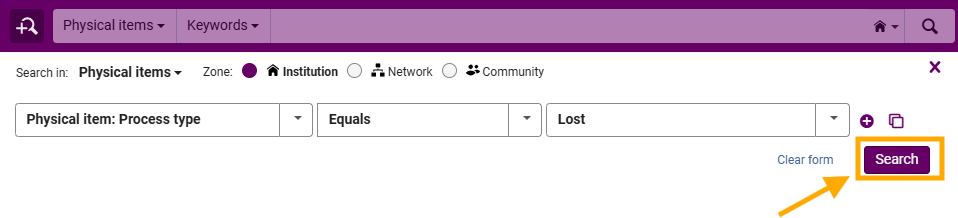
3: Apply Process Type Filter
- In the search criteria:
- Select <Process Type>
- Set the operator to <Equals>
- Select <Lost>
4: Run the Search Click <Search>