
Item's Home Institution: Library Staff Manually Applying Lost Item Status
This workflow explains how library staff manually mark an item as Lost from a patron’s active loan record in Alma.
When to Reference This Document:
Use this procedure when:
- A patron reports an item as Lost
- An item is significantly overdue and meets local lost-item policy
- Staff determine that recovery is unlikely and financial resolution must begin
- Reconciliation or billing processes require formal lost status
When an item is marked Lost:
- The loan status changes to Lost
- Replacement fees (if configured) are applied
- The patron’s Active Balance updates
- Alma automatically sends the Ful Lost Loan letter
This workflow aligns with standard Alma fulfillment configuration and common consortium policy practice.
Required Roles
- Fulfillment Operator
- Circulation Desk Manager
Applying Lost Status from the Patron Record
1: Locate the Patron Record Navigate to Fulfillment > Checkout/Checkin > Manage Patron Services> Search for and open the patron record
Note: The Lost status must be applied to the active loan itself. This step ensures fees and notifications are correctly tied to the borrowing patron.
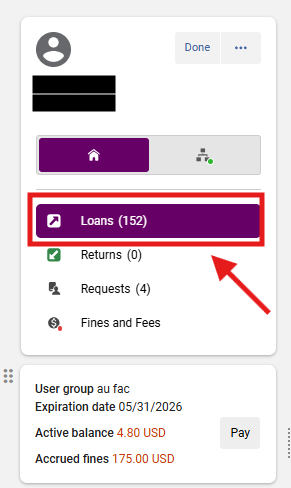
2: Open the Loans Tab Select the <Loans> tab
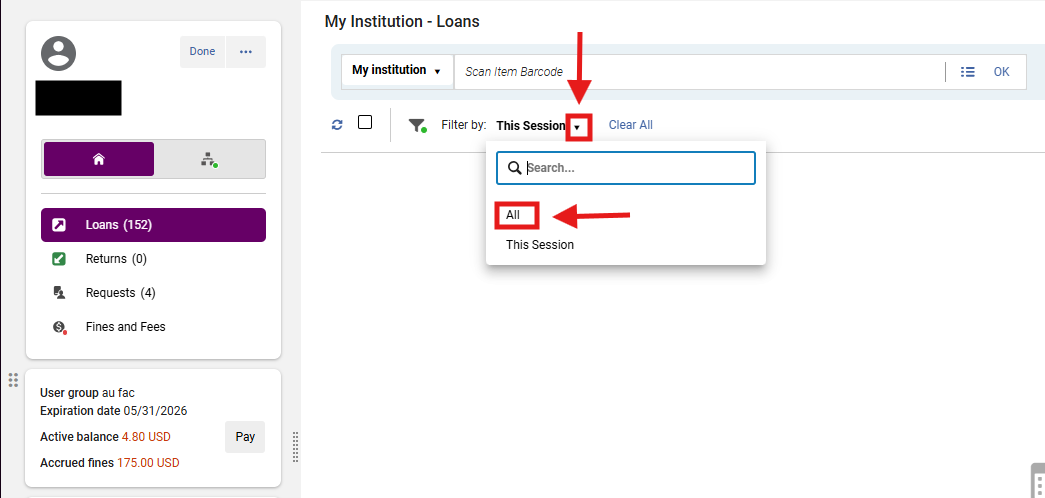
3: Display All Loans In the Loan Display dropdown, select <All Loans>; Locate the item that should be marked Lost
Note: Some items may not appear under “This Session.” Always switch to All Loans to avoid marking the wrong item.
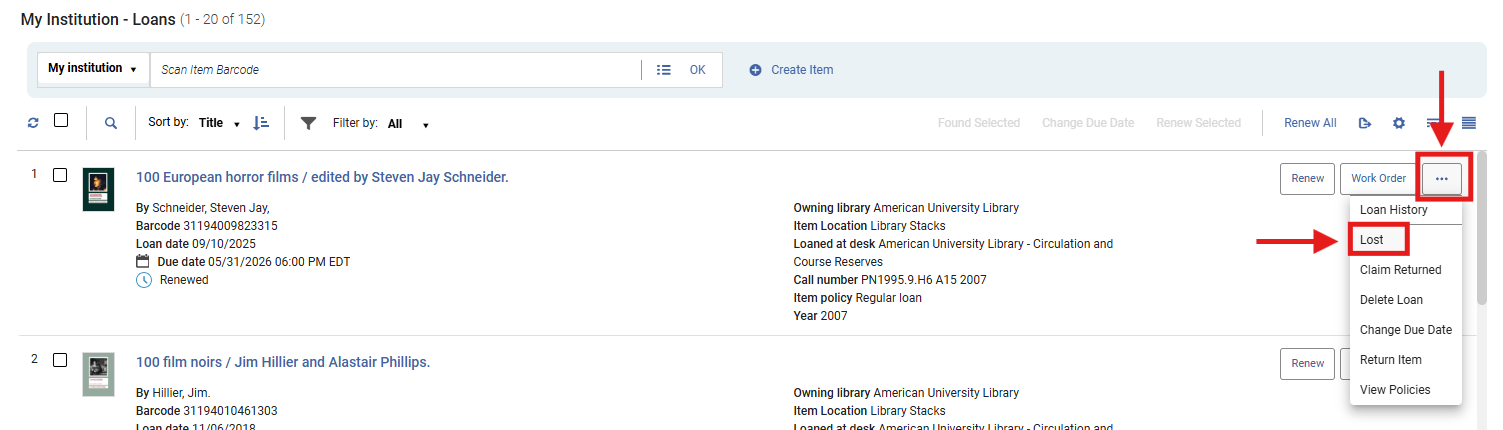
4: Apply Lost Status In the loan row, open the row action menu (⋯); Select <Lost>
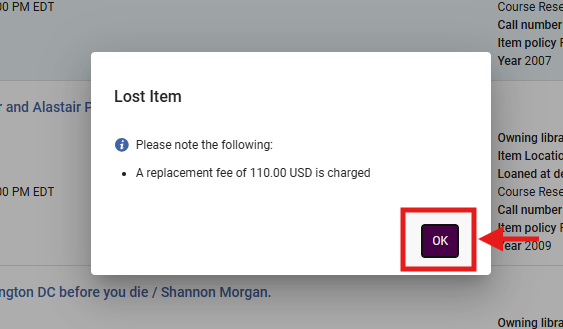
5: Confirm the Lost Status The Lost Item dialog box will open and indicate the item's new Lost status and the Lost Item Replacement fee (if configured); Review the fee information and Select <OK>
- A green dialog box will also appear from the right hand side of the screen indicating that the item's status has been updated to Lost.
- The Loan record will then update to reflect the associated fines and Lost status:

- The system will:
- Change the loan status to Lost
- Update the patron’s Active Balance
- Trigger the Ful Lost Loan letter
What Happens Automatically
When Lost status is applied:
- The item remains attached to the patron
- Replacement charges are applied (based on local configuration)
- The patron receives notification
- The item is no longer renewable
- The item is removed from standard circulation until resolved
Frequently Asked Questions
- Does marking an item Lost block the patron?
- Not automatically. Blocks depend on your Terms of Use configuration and balance thresholds.
- Can staff override the replacement fee?
- Yes. Fees can be adjusted or waived under the Fines/Fees tab if local policy permits.
- Does Alma always send a notice?
- Yes, if the Ful Lost Loan letter is enabled in configuration.
- What if the wrong item is marked Lost?
- Select <Return> to Discharge the item if returned, or select <Found> to restore the loan manually; Adjust fees as needed.

- Should I use Lost or Claims Returned?
- Use Lost when the patron acknowledges the item is lost or recovery is unlikely.
- Use Claims Returned when the patron states they already returned the item.