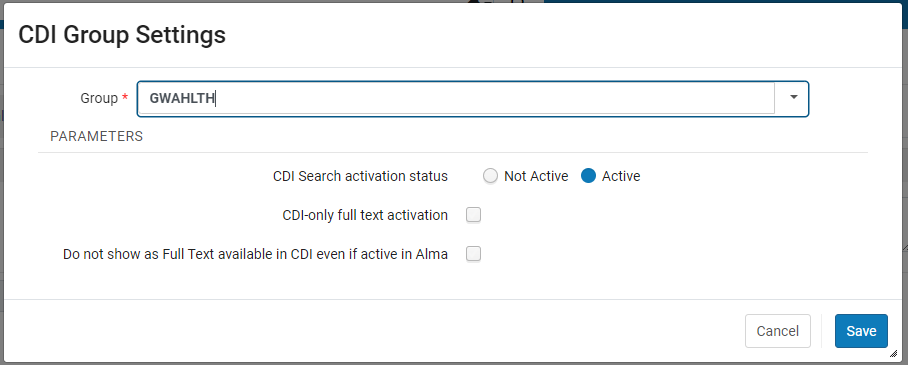
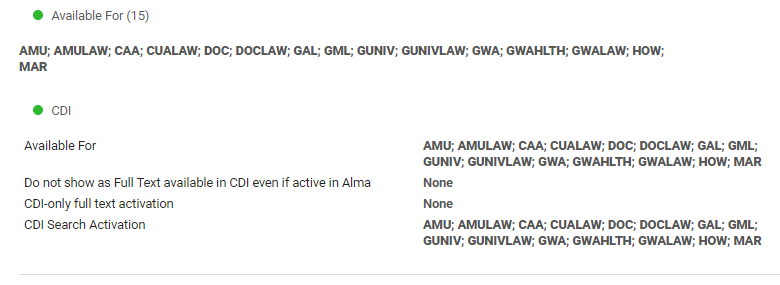
Configuration of CDI Settings for Shared Electronic Collections
CDI settings for electronic collections in the Network Zone are individually configured for each Institution Zone that has access to a specific collection.
CDI Inheritance Parameter
In order for each IZ to inherit the configured CDI settings for NZ shared e-collections, the cdi_consortia_inheritance parameter must be set to Y (for Yes) in the Configuration > Resources > General > Other Settings page.

Notes on CDI
- Full-text activation in Alma consists of two parts : link resolver/link in record for full-text access, and search in CDI (flagged as full-text available)
- All full text collections that are active in Alma will be searchable by default, regardless of what their search activation status is
- You can have search in CDI without full-text links, but you cannot have full-text links without search in CDI unless you suppress it from being flagged as available in CDI
- If a collection is activated for a specific group of IZs, then CDI search is automatically active as well, even if the settings for CDI search activation status are set to No or None
- Full-text suppress means the full-text links (either linkresolver or link-in-record) are activated, but search in CDI is not active, because the resource is suppressed from being flagged as available in CDI.
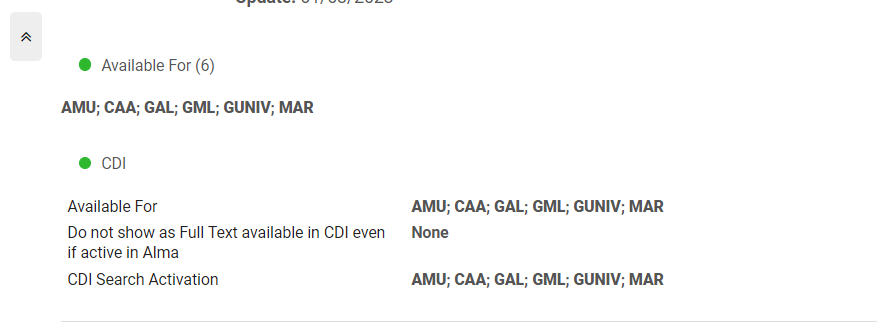
- Do not show as full-text available in CDI even if active in Alma is the full-text suppress setting
- Can be used only if set on the same level (i.e. for the same groups) as the full-text activation
- This setting is recommended for e-books in order to cut down on duplicate e-book records
- It is recommended to set the We subscribe to only some titles in this collection to Yes for collections with Linkresolver full-text linking; this reduces errors in CDI linking
- CDI-only full text activation appears when Available for CDI search is set to Yes and the full-text linking is Link in Record. For use when your collection is inactive in Alma, you have the option to mark it as "Available Online" only in CDI. (https://knowledge.exlibrisgroup.com/Alma/Product_Documentation/010Alma_Online_Help_(English)/Electronic_Resource_Management/060_Alma_Single_Activation_Source_for_CDI/020Single_Activation_with_the_Fully_Flexible_Setting#The_.E2.80.9CCDI-only_full_text_activation.E2.80.9D_Option)
Resources
- Single Activation with the Fully Flexible Setting
- Single Activation with the Fully Flexible Setting - Consortia
- CDI - Setting CDI Attributes (ODIN)
Current WRLC NZ settings
Collections with Book or Journal linking level and Linkresolver
CDI Tab : for each IZ listed in the Group Settings tab for this particular collection, the settings should be as follows
- CDI Search Activation Status = Active (this setting actually doesn't matter because all full text collections that are active in Alma will be searchable by default, regardless of what their search activation status is)
- We subscribe to only some titles in this collection = Yes
- Do not show as full-text available in CDI even if active in Alma = Check for Yes


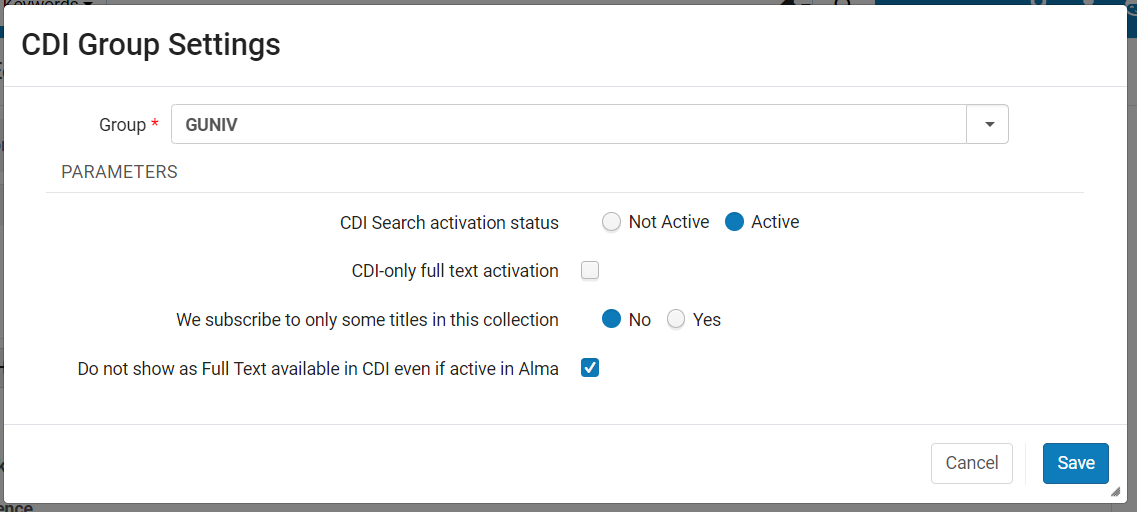
Collections with Book or Journal and Link in record
CDI Tab : for each IZ listed in the Group Settings tab for this particular collection, the settings should be as follows
- CDI Search Activation Status = Active (this setting actually doesn't matter because all full text collections that are active in Alma will be searchable by default, regardless of what their search activation status is)
- CDI-only full text activation = Do not check
- We subscribe to only some titles in this collection = No
- Do not show as full-text available in CDI even if active in Alma = Check for Yes

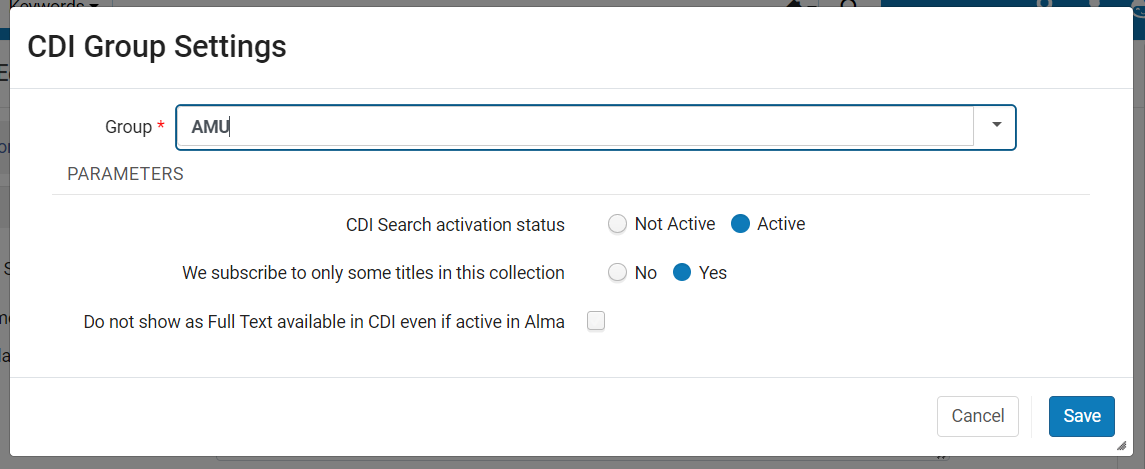
Collections with Article or Issue linking level and Linkresolver
CDI Tab : for each IZ listed in the Group Settings tab for this particular collection, the settings should be as follows
- CDI Search Activation Status = Active (this setting actually doesn't matter because all full text collections that are active in Alma will be searchable by default, regardless of what their search activation status is)
- We subscribe to only some titles in this collection = Yes
- Do not show as full-text available in CDI even if active in Alma = Do not check
Collections with Article or Issue linking level and Link in record
CDI Tab : for each IZ listed in the Group Settings tab for this particular collection, the settings should be as follows
- CDI Search Activation Status = Active (this setting actually doesn't matter because all full text collections that are active in Alma will be searchable by default, regardless of what their search activation status is)
- CDI-only full text activation = Do not check
- We subscribe to only some titles in this collection = No
- Do not show as full-text available in CDI even if active in Alma = Do not check


Database Collections with Link in Record
CDI Tab : for each IZ listed in the Group Settings tab for this particular collection, the settings should be as follows
- CDI Search Activation Status = Active (this setting actually doesn't matter because all full text collections that are active in Alma will be searchable by default, regardless of what their search activation status is)
- CDI-only full text activation = Do not check
- Do not show as full-text available in CDI even if active in Alma = Do not check