
How to use the Community Use Case Submission Form
What is this form?
The Community Use Case Submission Form is the primary way WRLC community members can suggest workflow improvements, automation ideas, or Alma-adjacent process changes that could benefit one institution—or many.
These submissions help WRLC:
- Identify repetitive, time-consuming, or error-prone processes
- Understand real-world pain points across institutions
- Prioritize Library Open Workflow (LibOW) automations that deliver the most impact
You do not need to be technical to submit a use case. If something feels clunky, manual, or harder than it should be, that’s exactly what we want to hear.
Why submit a use case?
When you submit a use case, you’re helping:
- Improve workflows not just for yourself, but for the broader WRLC community
- Surface shared challenges that may not be visible at the central office
- Shape where WRLC focuses its LibOW development time
Even ideas that don’t turn into an immediate workflow still help inform future priorities and improvements.
Where to find it
The form is available directly within Alma as a Cloud App, making it easy to submit ideas while you’re already working in the system. No separate login or external tools are required.
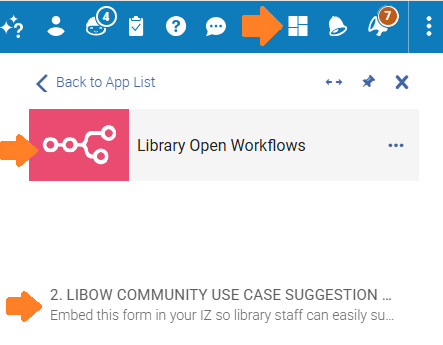

Who can access the form?
The Cloud App is available to staff with standard Alma administrative and operator roles, including (but not limited to):
- Acquisitions Administrator
If you have access to Cloud Apps in Alma, you should be able to access the form.
How to Submit a Use Case
The form asks a series of questions designed to provide WRLC HQ staff with enough context to evaluate, design, and (when possible) build a workflow. Below is what each question is asking—and why it matters.matters:
1. Your name
So we can follow up with you if something is unclear, missing, or worth exploring further.
2. Your Institution (IZ)
Helps us understand whether an issue is local to one institution or shared across multiple IZs, which is a key prioritization factor.
So we can follow up if something is unclear, missing, or worth exploring further. We won’t spam you.
This is the high-level “what’s broken?” description. Think of it as the elevator pitch for the problem.
This tells us what “better” looks like to you. Sometimes the same problem can be solved in multiple ways—knowing the goal helps us design the right approach.
Example:
“Automatically notify the team when a report contains a specific value.”
Understanding the current steps helps us see:
-
-
- Where time is being spent
-
If stepsyou directlywould inprefer the form, or
How often a process happens (daily vs. annually) directly affects howthe muchlikely impact of an automation could have.automation.
Knowing who else benefits helps us assess broader community value—especially for workflows that could support multiple teams or roles.roles or institutions.
Urgency helps us distinguish between:
-
-
- Nice-to-have improvements
-
Even rough estimates help us understand potential time savings and return on effort.
This is your space to add context that didn’t fit elsewhere—constraints, edge cases, or “things that always go wrong.”
Supporting Documentation (Optional but Very Helpful)
You may upload one file (up to 5004 MB) to support your submission.
Helpful examples include:
-
-
- Screenshots of Alma workflows or settings
-
Attachments are optional, but they significantly speed up understanding and design, especially for complex workflows.
What to Expect After You Submit
Once submitted:
- Your use case is logged and reviewed by the WRLC LibOW team
- Urgency
Need More InfoHelp or Want to Add Details?
If you:
- Need help submitting a use case
Please contact the WRLC Help Desk using the instructions here:
