
Configurations
Initial setup pieces like cataloging template, local thumbnail configuration, and custom resource type setup.
Alma Setup
Booking-related parameters
Configuration > Fulfillment > General > Other Settings
- allow_same_day_booking : false (not the default)
- enable_booking_workflow : true (this is the default)
Cataloging
New location
steq - Stacks Equipment (assigned to the Short Loan Fulfillment Unit)
Bib record template
The LDR and 008 values were from the existing Books template, so it's not properly correct from a cataloger point of view. These records are saved to our IZ only and not shared with the NZ.
245 10 $$a [name of the equipment]
500 __ $$a [any notes/descriptive information about brand/model/etc. that you want in the record to help patrons find it and know they have the right thing]
956 42 $$u [URL of a thumbnail image; if you don't have one, delete this field]
996 __ $$a equipment
Fulfillment
New Overdue and Lost Loan Profiles
Specifically for the Stacks Equipment location and Equipment item policy
- Overdue notices at 1 day & 6 days overdue
- 1 Day overdue also applies "Overdue Item" block to the patron's account
- Lost at 7 days overdue
- When the item becomes lost the Overdue block is removed but the patron is now blocked due to owing the replacement cost
Request Pickup Configuration
Name: Booking requests
Input Parameters: Request Type = Booking
Output Parameters:
- Consider as missing when expired = Never
- Show in 'Pick From Shelf' list = True
- Expiry time for 'Pick From Shelf' (in days) = 3
- Calculate expiry time in open days = Yes
On Hold Shelf notice booking-specific text
required WRLC ticket, as the On Hold Shelf Letter is controlled centrally
<xsl:when test="contains(notification_data/request/delivery_address, 'Lauinger')">

<xsl:choose>

<xsl:when test="contains(notification_data/request/request_type, 'BOOKING')">

Your booked item will be held until the circulation desk closes on your requested pick up day.

</xsl:when>

<xsl:otherwise>

     @@note_item_held_until@@ <xsl:value-of select="notification_data/request/work_flow_entity/expiration_date"/>.

</xsl:otherwise>

</xsl:choose>
Loan and Booking Terms of Use
(see Terms of Use page for details)
Process Type Exception rule
Added at the top of the list of Booking rules to prevent requests on lost/missing items
Name: process type exception
Description: prevent bookings on lost/missing items
Input Parameters:
- Process Type InList Lost, Lost and paid, Missing
- Location = Lauinger Library - Stacks Equipment
Output Parameters: Default terms of use (not bookable)
Request Reminder Notice
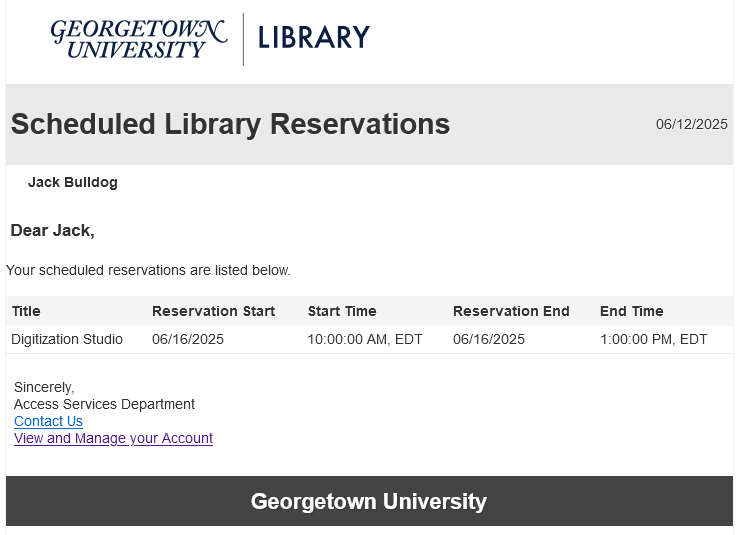
We've adapted the Ful Requests Report Letter to send a daily reminder to patrons of their upcoming reservations for equipment and our digital media studios.
Configuration > Fulfillment > General > Fulfillment Jobs Configuration > Requests - Send report job, select all request types:
- Non active requests
- Requests in process
- Requests on hold shelf
The letter XSL includes a terminate clause for non-booking requests, so the job always reports "Completed with Errors"
Letter XSL was heavily customized to remove the distinctions between types of requests and list the requests by start date/time.
Ful Requests Report Letter full XSL
<?xml version="1.0" encoding="utf-8"?>
<xsl:stylesheet version="1.0"
xmlns:xsl="http://www.w3.org/1999/XSL/Transform">
<xsl:include href="header.xsl" />
<xsl:include href="senderReceiver.xsl" />
<xsl:include href="mailReason.xsl" />
<xsl:include href="footer.xsl" />
<xsl:include href="style.xsl" />
<xsl:template match="/">
<html>
<xsl:if test="notification_data/languages/string">
<xsl:attribute name="lang">
<xsl:value-of select="notification_data/languages/string"/>
</xsl:attribute>
</xsl:if>
<head>
<title>
<xsl:value-of select="notification_data/general_data/subject"/>
</title>
<xsl:call-template name="generalStyle" />
</head>
<body>
<xsl:attribute name="style">
<xsl:call-template name="bodyStyleCss" /> <!-- style.xsl -->
</xsl:attribute>
<xsl:call-template name="head" /> <!-- header.xsl -->
<xsl:call-template name="senderReceiver" /> <!-- SenderReceiver.xsl -->
<xsl:call-template name="toWhomIsConcerned" />
<div class="messageArea">
<div class="messageBody">
<!-- Don't send notice for non-booking requests -->
<xsl:choose>
<xsl:when test="(notification_data/non_active_requests/ful_request_interpated/request_type = 'BOOKING') or (notification_data/process_requests/ful_request_interpated/request_type ='BOOKING') or (notification_data/hold_shelf_requests/ful_request_interpated/request_type ='BOOKING')">
<h>@@please_find_below@@</h>
</xsl:when>
<xsl:otherwise>
<xsl:message terminate="yes">this is not a booking request!</xsl:message>
</xsl:otherwise>
</xsl:choose>
<br />
<br />
<table role='presentation' cellspacing="0" cellpadding="5" border="0" class="listing">
<xsl:attribute name="style">
<xsl:call-template name="mainTableStyleCss" />
</xsl:attribute>
<tr>
<xsl:attribute name="style">
<xsl:call-template name="headerTableStyleCss" /> <!-- style.xsl -->
</xsl:attribute>
<th>@@title@@</th>
<th>Reservation Start</th>
<th>Start Time</th>
<th>Reservation End</th>
<th>End Time</th>
</tr>
<xsl:for-each select="notification_data/hold_shelf_requests/ful_request_interpated|notification_data/process_requests/ful_request_interpated|notification_data/non_active_requests/ful_request_interpated">
<xsl:sort select="start_time" />
<xsl:if test="request_type='BOOKING'">
<tr>
<td><xsl:value-of select="title_display"/></td>
<td><xsl:value-of select="start_time"/></td>
<td><xsl:value-of select="booking_start_time"/></td>
<td><xsl:value-of select="end_time"/></td>
<td><xsl:value-of select="booking_end_time"/></td>
</tr>
</xsl:if>
</xsl:for-each>
</table><br />
<table>
<tr><td><xsl:call-template name="signature" /></td></tr>
</table>
</div>
</div>
<xsl:call-template name="lastFooter" /> <!-- footer.xsl -->
</body>
</html>
</xsl:template>
</xsl:stylesheet>
Primo Configurations
Equipment local resource type (996)
Configuration > Discovery > Display Configuration > Resource Types Configuration > Add/Edit Resource Type Configuration > Custom Local Resource Types tab
Code : equipment
Display Singular Label : Equipment
Display Plural Label : Equipment
MARC mapping : 996 $a equipment (Use Regular Expression : false)
Thumbnail template configuration (956)
Configuration > Discovery > Display Configuration > Thumbnail configuration > Add New Template
Template Name : local thumbnail
Template : $$LinkingParameter1
LinkingParameter Configuration
Field : 956 | Ind1 : 4 | Ind2 : 2 | Subfield : u
Use Field : Always
Normalization : No normalization
This setup is the most basic possible configuration and also allows us to selectively override book cover images that are incorrect.
Labels
Configuration > Discovery > Display Configuration > Labels > Request labels
- almaRequest.startDate : Reservation Start
- almaRequest.endDate : Reservation End
- almaRequest.checkAvailiability : Check Availability Calendar<p></p> [adds space between the link and the rest of the request form]
- 400307 : Same day requests cannot be accepted. Please choose a date in the future.
Considering adding a form description specifically to the booking form (almaBookingRequest.formDescription), but haven't so far.
Additional Considerations
Library Hours
The time our service desk opens varies depending on the day of the week, which caused some unexpected issues with the booking duration initially selected (3 days). This is why the booking duration currently in use for equipment is 76 hours instead of 72.
We also set our service desk hours in Alma to begin 30 minutes after staff are scheduled to arrive so that patrons aren't expecting to pick up their equipment (or check out the Digital Media Studio keys) the instant the library opens.
Title-level vs. Item-level requests
One of the goals of setting up our equipment in Alma was to allow patrons to place requests without needing to select a particular item. This also allows requests to be filled by whichever item is currently on the shelf automatically. Having it work this way REQUIRES that nothing be put into the Item Description field. As soon as you put anything in the Description, even if multiple items have the same Description, that changes the request process to be item-specific.