
Linked Patron Accounts
How to update a Linked Patron Account
Patron linked accounts can be updated in several ways.
- If a patron renews an item on loan from partner institution, the patron's expiry date will automatically be updated to match the expiry date at the home institution.
- If a patron requests a new item from a partner institution, the patron's expiry date will automatically be updated to match the expiry date at the home institution.
- A staff member can manually force an update to a linked patron's expiry date by using "Manage Patron Services".
Fulfillment --> Checkout/Checkin --> Manage Patron Services --> Patron Services page
-
-
- Select "Find user in other institution", select the appropriate institution.
- Scan patron's ID or search for patron and select appropriate one.
- "Find User" (This will force an update to the patron's linked account.
-
How Linked Patron Accounts are configured
Linked Account Rules (Institution Zone)
Each institution in the WRLC network has configured a WRLC Fulfillment Network Patron linked account rule in their Institution Zone (minus Catholic University Law school, which does not borrow nor lend using the WRLC AFN).
Below are the recommended configurations for the WRLC Fulfillment Network Patron linked account rule, found in
Configuration > User Management > Collaborative Networks > Linked Account Rules
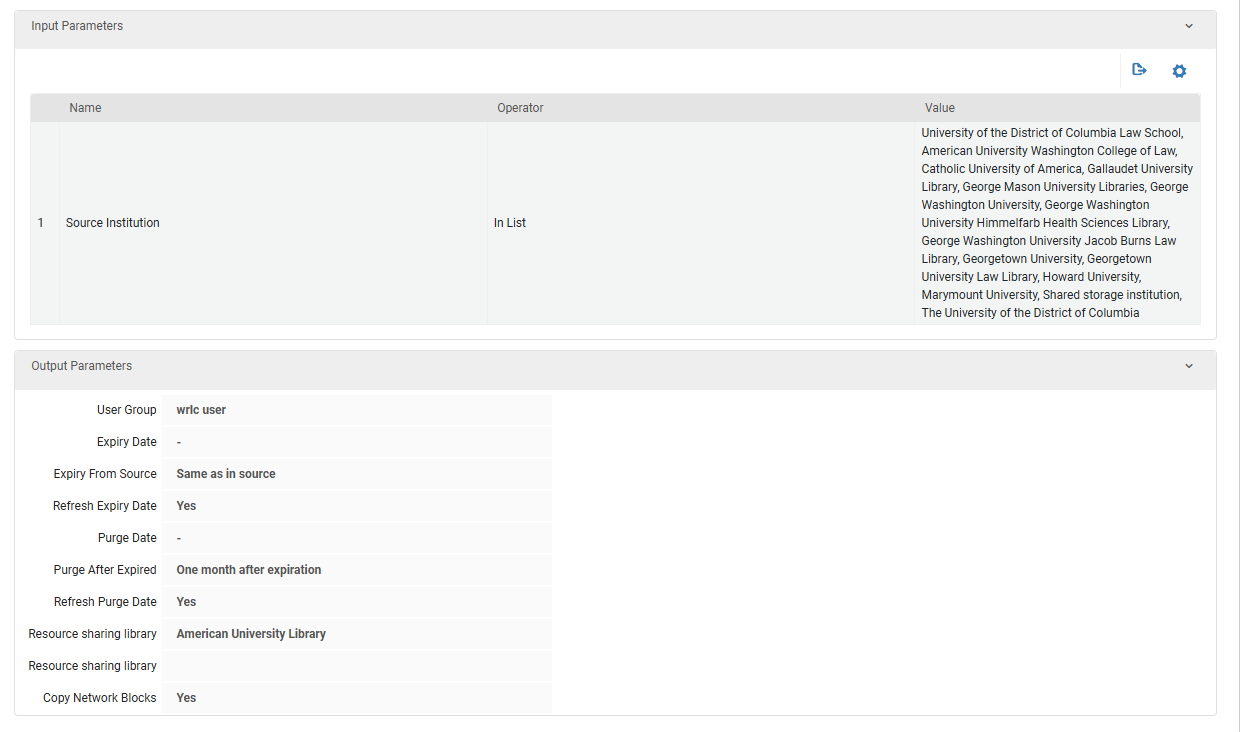
- Input Parameters
- Name = Source Institution
- Operator = In List
- Value = all institutions in the WRLC Network except for Catholic Law
- Output Parameters
- User Group = wrlc user
- Expiry Date = NULL
- Expiry from Source = Same as in source
Copies Expiry Date from the patron account in the patron's Home Institution
-
- Refresh Expiry Date = Yes
When set to 'Yes', the corresponding date is recalculated each time the linked record is refreshed from the source institution
-
- Purge Date = NULL
- Purge After Expired = One month after expiration
The above sets the Purge Date; the account will only be purged if the 'Purge User Records' job is run
-
- Refresh Purge Date = Yes
When set to 'Yes', the corresponding date is recalculated each time the linked record is refreshed from the source institution
-
- Resource Sharing Library = [your institution's resource sharing library]
- Copy Network Blocks = Yes
When set to 'Yes', Alma will delete all the current network blocks that exist on the linked account and re-create them each time the linked record is refreshed. Blocks can only be placed on linked accounts if they are configured in the User Block Definitions and User Block Descriptions section.
For more information, please see the Configuring Linked Account Rules page on the Alma Knowledgebase.
Linked Account Shared Fields (Network Zone)
The configuration that determines which fields in the user account are shared in linked accounts is managed in the WRLC Network Zone. Below is the current configuration.
| Field Name | Shared |
| First Name | True |
| Middle Name | True |
| Last Name | True |
| Pin Number | False |
| Job Title | True |
| Job Description | True |
| Preferred Language | True |
| Birth Date | True |
| Expiry Date | True |
| Purge Date | True |
| Email List | True |
| Address List | False |
| Phone List | False |
| Preferred First Name | True |
| Preferred Middle Name | True |
| Preferred Last Name | True |
For more information, please see the Configuring Linked Account Shared Fields page on the Alma Knowledgebase.