
Fulfillment Units and the AFN
In a consortial (shared) environment using an Alma Network Zone (NZ), a Network Fulfillment Unit is used to manage circulation policies that apply across multiple institutions, such as consortial loan (CLS/AFN) transactions.
-
Function: It is possible for an Institution-only Fulfillment Unit to incorporate rules from a Network Fulfillment Unit (like the 'WRLC Fulfillment Network'). This allows for centralized management of shared policies.
-
Example: In your consortium, the 'WRLC Fulfillment Network' is the single NZ fulfillment unit containing all rules specific to CLS/AFN transactions.
For more information on the rules and TOUs used in the WRLC Fulfillment Network fulfillment unit, please see the Fulfillment Unit section of the AFN Network Zone Configurations page of the WRLC Alma Wiki.
How to Allow AFN Requests for an IZ Fulfillment Unit
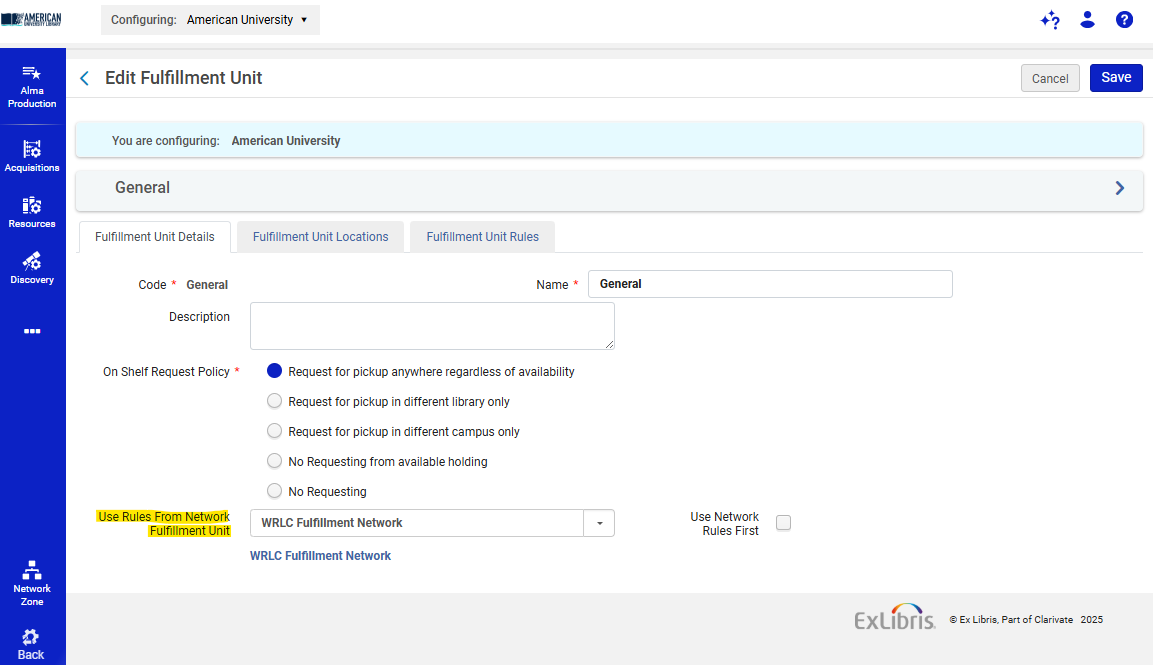
To configure the use of Network Zone rules in a specific Fulfillment Unit,
- Go to Configuration > Fulfillment > Physical Fulfillment > Fulfillment Units
- Edit the specific Fulfillment Unit you wish to make available for AFN requests
- On the Fulfillment Unit Details tab, choose the WRLC Fulfillment Network from the drop-down menu in the Fulfillment Unit configuration page, under the option Use Rules From Network Fulfillment Unit.
- Do not checkmark 'Use Network Rules First.'
Rules configured for your IZ Fulfillment Unit will be applied first, THEN rules configured in the 'WRLC Fulfillment Network' Fulfillment Unit will be applied
How to Prevent AFN Requests for an IZ Fulfillment Unit
To configure the prevention of AFN requests to a specific Fulfillment Unit,
- Go to Configuration > Fulfillment > Physical Fulfillment > Fulfillment Units
- Edit the specific Fulfillment Unit you wish to NOT make available for AFN requests
- On the Fulfillment Unit Details tab, make sure the Use Rules From Network Fulfillment Unit option is left blank.
- Go to the Fulfillment Unit Rules tab, then choose Request from the Type drop-down menu.
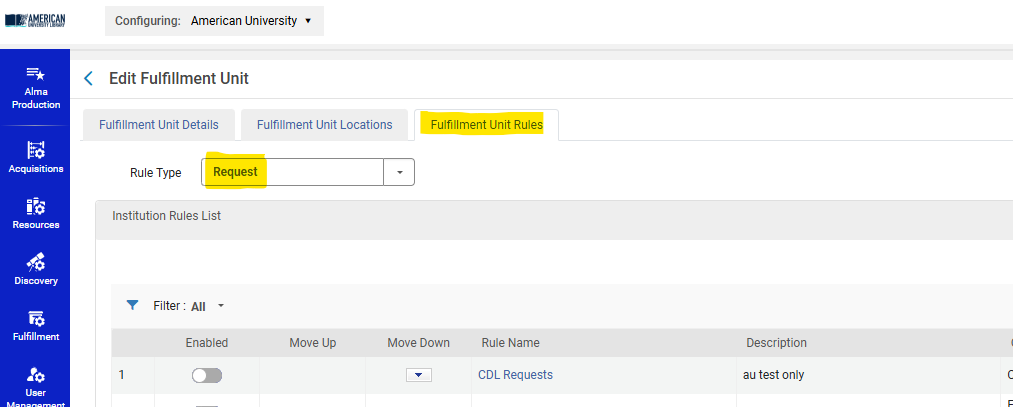
5. Add a Rule like the following:
Input Parameters :
-
-
- User Group = wrlc user
-
Output Parameters :
-
-
- TOU = No FN Requesting
-
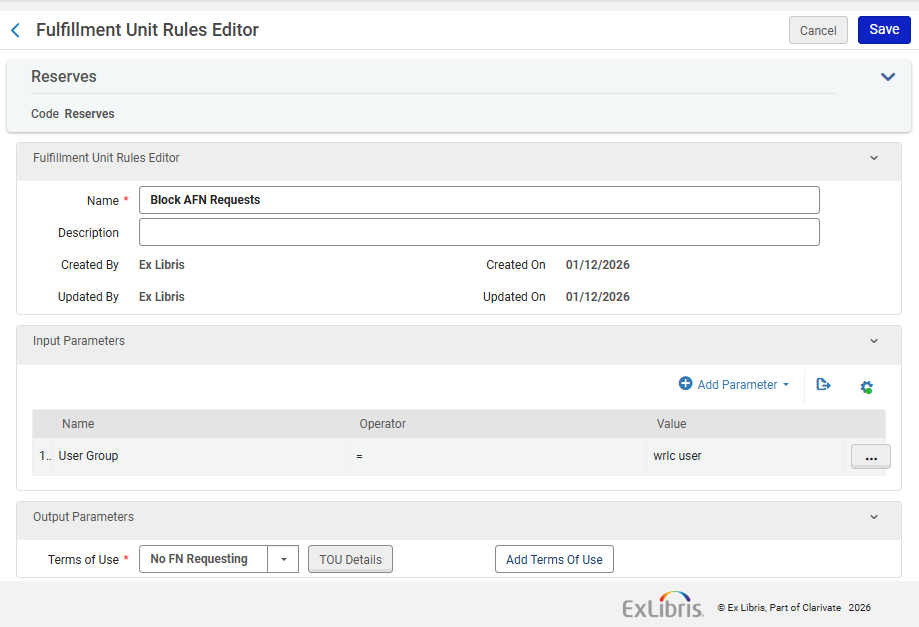
Note that the TOU 'No FN Requesting' is managed in the Network Zone.
For 'Borrowing Only' Institution Zones
If your entire Institution Zone is a Borrowing Only institution (you do not lend your items via CLS/AFN loans), you do not need additional configurations in your IZ. The Network-managed configurations found in the WRLC's Rota Templates and Partner Profiles already prevent other WRLC patrons from requesting your institution's items.
For a full list for all WRLC partners that only borrow in the AFN, see the Consortial Partners in CLS/AFN page.