Troubleshooting E-Resource Tickets / Issues
Below is a series of questions to answer when resolving electronic resources issues / tickets.
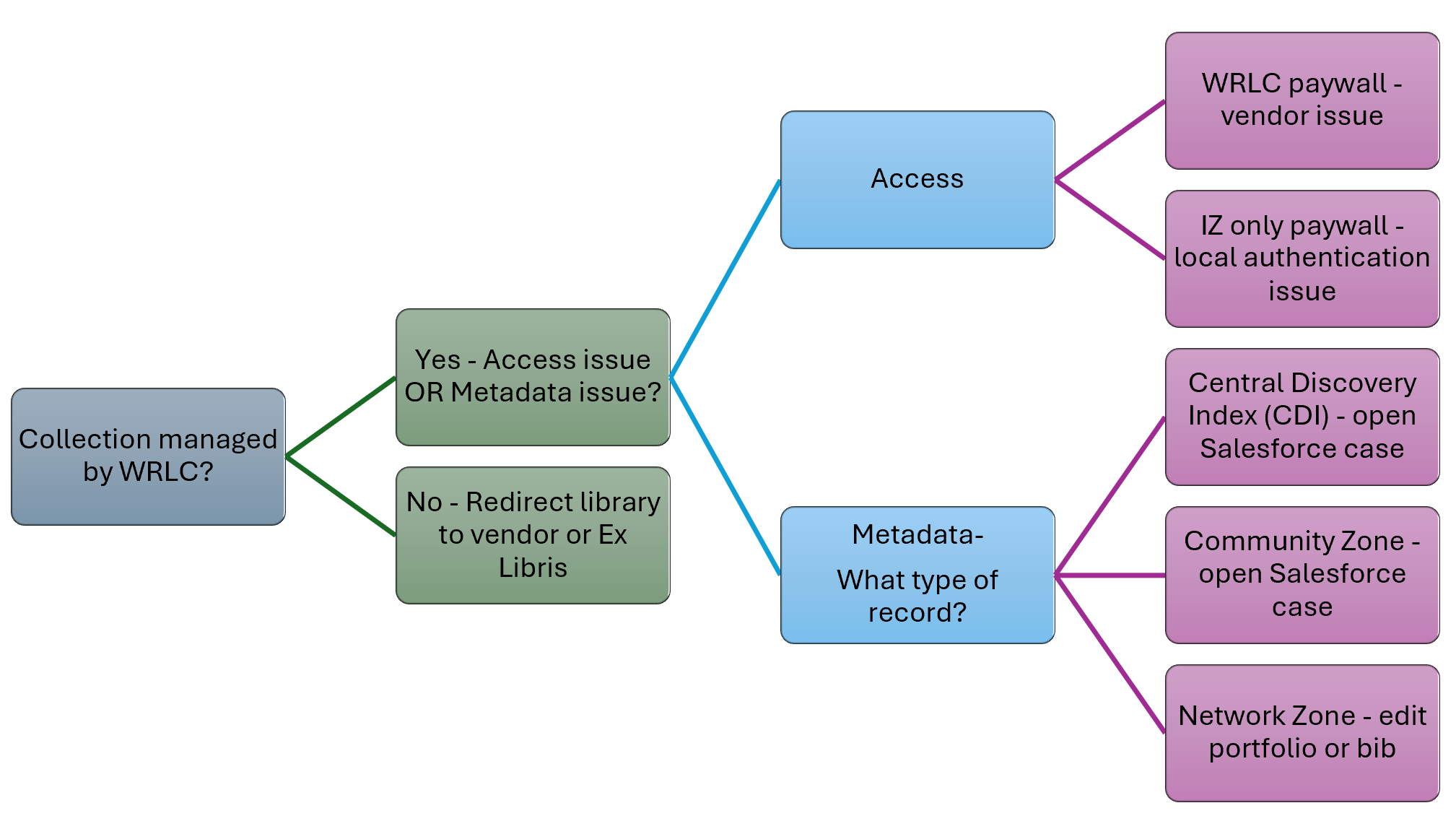
Collection managed by WRLC?
Is This a WRLC-Managed Collection? WRLC can only troubleshoot collections it manages.
-
How to tell
-
In Primo, check the electronic collection name.
-
The title that’s displayed is the name of the electronic collection. All of the electronic collections managed by the WRLC have at the end of the name WRLC written out in parentheses
-
If unsure, verify against the WRLC wiki list of electronic collections: https://alma-documentation-bookstack.azurewebsites.net/books/resources-electronic/page/shared-electronic-collections

If NO
-
-
Redirect the library to their local institution or Ex Libris. WRLC does not intervene beyond advisory guidance.
-
If YES, go to the next question...
Access issue, or Metadata issue?
Is This an Access Issue or a Metadata Issue?
-
Paywalls may indicate an Access issue. In that case, ask for the following:
-
Screenshots
-
Exact error messages
-
Permalinks from Primo (preferred)
-
Use the Primo permalink
-
Bib record ID number? Located at the end of the string, begins with a 9 and ends with 4101
-
Extract the Network Zone MMS ID (starts with “9” and ends in “4101”).
-
-

-
-
Search that ID in Alma Network Zone to locate the exact record:
-
Note: Some vendors (e.g., ProQuest) do not allow <Test Access>
-
Regular Home IZ search, not scoped to the CZ
-
Collection title includes (WRLC)
-
Pulls up exact record found in Primo page
-
From the record’s row action menu select <Test Access> from the drop-down menu
-
-


Portfolio ID> Electronic Portfolio Editor> Linking> Static URL


-
Vendor-specific validation
-
Log into vendor platforms directly using WRLC credentials (when available).
-
Not all portals will provide testing per the consortium vs. individual libraries; ProQuest is one example
-
Check title lists for inclusion/removal.
-
Decision point
-
Contact vendor or open a Salesforce case (especially for ProQuest/Clarivate).
-
If access should not exist, deactivate the portfolio.
-
-
If WRLC also sees a paywall → likely a global vendor issue
-
If WRLC has access but a library does not → likely local authentication issue
If Metadata issue - what type of record is involved?
If this issue is a metadata concern, is this a CDI (Central Discovery Interface) record, a CZ (Community Zone) Record, or a standalone NZ (Network Zone) record?
CDI Record?
-
-
In the NZ, the catalog records are predominantly ebooks
-
CDIs are generally provided for journal articles, not ebooks, but they are used for Open Access journal titles
-
For CDI titles, the Primo record does not display a MARC source record.
-
Permalink IDs look non-standard (alphanumeric strings, not like Network Zone IDs).
-
-
Example: CDI Record in Primo
-
Provide: Permalink; Description of incorrect metadata (dates, volumes, links)
-
-
Includes (WRLC)
-
Open Access Collection
-
In the NZ catalog there is a record for this journal vs. the specific article and it provides the available date range
-
However, what the patron sees here is a CDI record for this specific article; Note there is no Network ID located within the permalink
-
A Network ID number will appear but it will not follow the same pattern as those found within the NZ
-
In the Primo catalog record, scroll down to <Display Source Record>; once you click on the link a MARC record will appear- another indicator that this is a not CDI record
-
Therefore, if updates need to be made, because the metadata is incorrect and the link may not operating, you will need to open an ExLibris Salesforce ticket


-
Example: CDI Record in Alma
-
Select appropriate <Interface> from the Facets panel
-
Select <Portfolio List (175)>

-
One bibliographic record is available; it describes the journal, when it was published, who published it, how long the journal has been available.
-
For the International Journal of Law and Information Technology, the WRLC has access from 1993- 1995 and again in 1996 for Volume 4 Issue 1
-
However, when a patron goes to Primo to search for an article that is available within this journal and they see a full record that describes that article, they are viewing a CDI record that is provided by ExLibris but is does not exist within the NZ catalog
-
ExLibris uses information provided by vendors. If there is a discrepancy between what is provided in the CDI record’s metadata then we cannot address the issue and must submit a Sales Force ticket.

CZ record?
Is the issue from a Community Zone (CZ) record/portfolio? The CZ is a shared online repository of e-records; catalog records are activated within the CZ and vendors send all changes and updates to their e-book URLs
-
To search for an item included within the CZ
-
Update the search bar from Home IZ to Community IZ
-
“Two-people” icon in Alma indicates Community Zone linkage.


-
In general, the recommended preference is to not edit CZ records directly; Open a Salesforce case so fixes propagate globally
-
For CZ portfolios, items that are within the home catalog with records managed by Alma, you can use “Report to Ex Libris” directly from Alma to pre-populate case data.

-
Records corrected here will benefit Alma users at-large
NZ record?
Is the issue from an NZ record/portfolio? This is the only case where direct editing is appropriate. In these instances you are editing the bibliographic record, the information that describes the e-book. For example, if there is a problem with the URL, you edit the portfolio because that’s where the URL lives.
-
Incorrect DOI (Digital Object Identifier)
-
Specific to an ebook or journal; 1:1
-
General Issues
-
Broken static URL
-
Missing characters in links


-
With the MMS ID you can go to the Alma NZ and locate the record to confirm that it is a WRLC- owned item
-
Edit the portfolio (not the bib record)

-
When you arrive at the <Electronic Portfolio Editor> you will see several tabs; for the purposes of this troubleshooting task, you will select <Linking>
-
Update the URL under the Linking tab
-
Use Static URL
-
Do not enable proxy at the Network Zone level.
-
Proxy box is disengaged; select NO; all Proxy information is added by each IZ so nothing needs to be added in the NZ
-
<Save>

-
Test access

-
URL should now match what is found in the NZ record

Notes:
-
US Gov’t documents is currently the only agreement that is not included within the CZ.