SCF IZ Maintenance
Information on the configuration and maintenance of the Shared Collections Facility Institution Zone, specifically in relation to user groups, ongoing scheduled jobs, etc.
For information specifically on how to add a new pickup location for SCF material pickup, please see the Adding a new pickup location for SCF material pickup page in the SCF Remote Storage App chapter.
- Affiliate Library Configuration in the SCF
- User Accounts in the SCF IZ
- Scheduled Jobs in the SCF IZ
- Loan and Renewal Configuration for the SCF IZ
Affiliate Library Configuration in the SCF
1. Create user group
- Configuration > User Management > User Details > User Groups
- + Add Row
- Choose a code and a description (preferably [Affiliate Library] Patron)
- Choose Add Row, and then Save the table
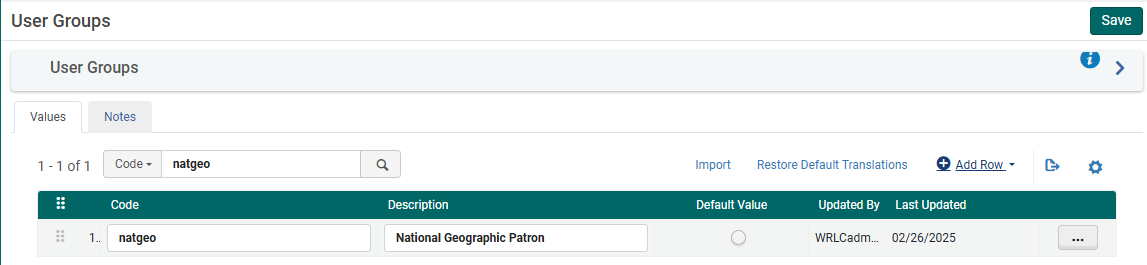
2. Apply user record group to a specific type
- Configuration > User Management > User Details > User Record Type/User Group
- + Add Row
- Choose the user group created in step #1, then choose a record type of Staff, Public, and Organization
- Choose Add Row, and then Save the table

3. Associate library location with Fulfillment Unit
- Configuration > Fulfillment > Physical Fulfillment > Fulfillment Units
- Edit the Fulfillment Unit Affiliate Library
- Choose the Fulfillment Unit Locations tab
- Attach to the list the location(s) associated with the affiliate library
- Save the Fulfillment Unit
The Request TOU ("Library Delivery Request') used is what sets the terms for Home Delivery; because of this TOU, all requests made for these items are automatically home delivery requests.
4. Prevent affiliate user group from requesting other SCF materials
Depending on the rules in place for the affiliate library patrons, they may not be allowed to request WRLC items at the SCF; in that case, you will need to include the affiliate library patron user group to the appropriate Fulfillment Unit rules.
The specific rules that need to be edited can be found listed below :
- Fulfillment Unit : Library Delivery Only
- Rule Type : Request
- Rule Name : Affiliate Library Patrons No Requesting
- Add affiliate library patron user group to the rule
- Fulfillment Unit : Regular
- Rule Type : Request
- Rule Name : Affiliate Library Patrons No Requesting
- Add affiliate library patron user group to the rule
5. Create Provenance Code for affiliate library items
- Configuration > Resources > General > Provenance Code
- + Add Row
- Choose a code and a description
- Save the Provenance Code table
6. Create a restricted search group for Primo VE
This restricted search group will not allow non-affiliate library users (ex. Trinity users) to view the affiliate library's items in the SCF's instance of Primo.
- Configuration > Discovery > Search Configuration > Restricted Search Groups
- + Add Restricted Search Group
- Choose a code, a name (preferably [Affiliate Library Name] Affiliate Library), and a description

- Add the Restricted Search Condition of:
- Search Index = Location
- Operator = Equals
- Value = all library locations associated with affiliate library

- Add the following Allowed Users:
- Patron Group Rule
- Name = [Affiliate Library] Patron Group
- Input Parameter
- Name = User Group
- Operator = "="
- Value = all user groups created in step #1
- Patron Group Rule
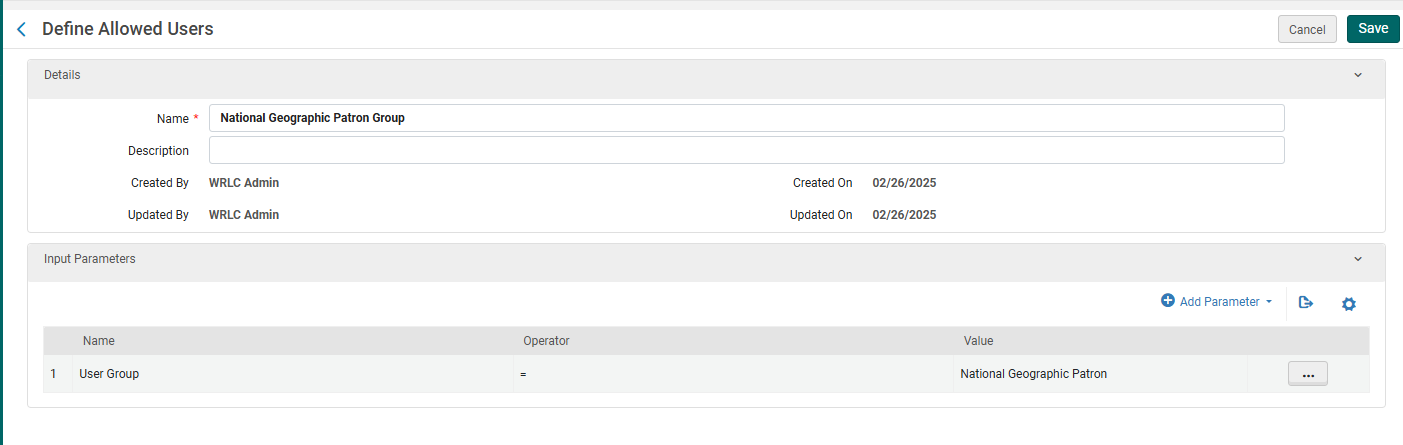
-
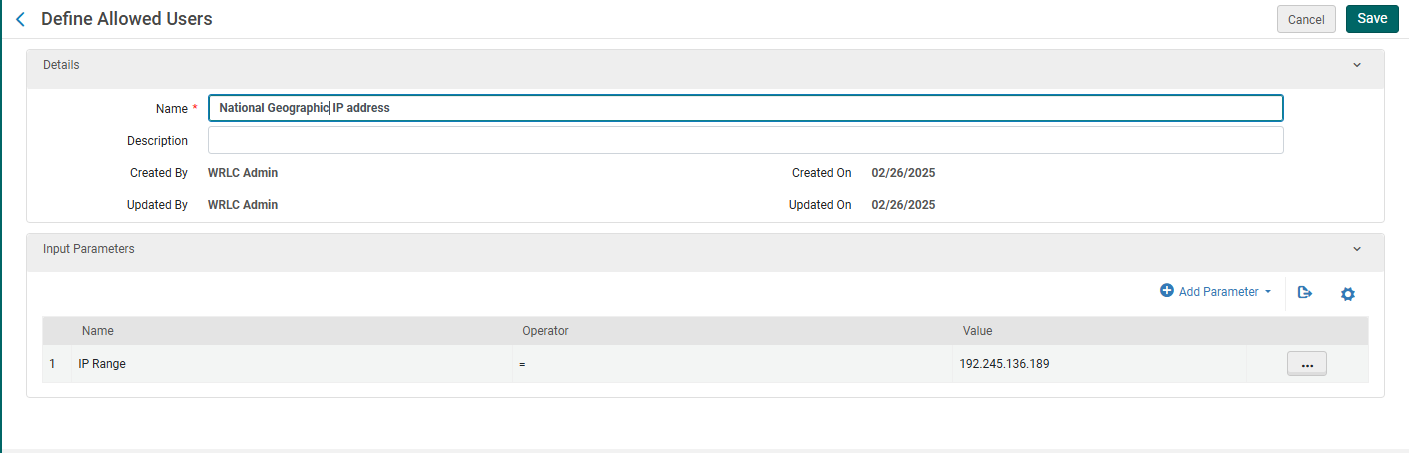
- IP Address Rule
- Name = [Affiliate Library] IP Address
- Input Parameter
- Name = IP Range
- Operator = "="
- Value = [IP range of affiliate library]
- IP Address Rule
- Save the Restricted Search Group Definition
7. Create a Hide rom Network definition
This definition will prevent the affiliate library's bibliographic and item records from appearing in the other Primo instances in our Network.
- Configuration > Discovery > Search Configuration > Hide from Network definitions
- + Add Hide from Network Definition
- Choose a code and a name
- Then add the following Condition:
- Search Index = Inventory > Location
- Operator = Equals
- Value = Location(s) associated with affiliate library
- Add Condition, then Save the Custom Scope
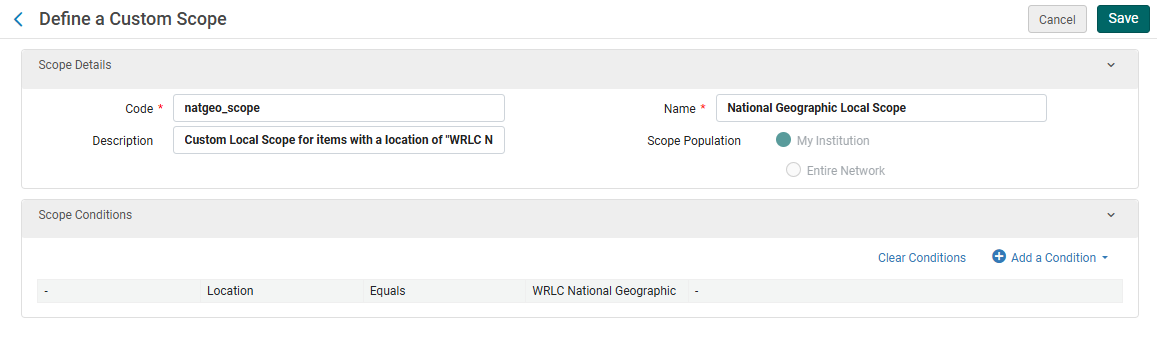
8. Create a custom local data search scope
- Configuration > Discovery > Search Configuration > Search Profiles
- Choose the Custom Local Data Scopes tab
- + Add a Custom Scope
- Choose a code and a name
- Then add the following Scope Condition:
- Search Index = Inventory > Location
- Operator = Equals
- Value = Location(s) associated with affiliate library
- Add Condition, then Save the Custom Scope
9. Create a search profile
- Configuration > Discovery > Search Configuration > Search Profiles
- Choose the Search Profiles tab
- + Add a Search Profile
- Choose a code and a display name
- Then add the following scope:
- Select Scope Type = Custom (Local Data)
- Select Custom Scope = the custom scope created in step #6
- Click Add and close, then Save the Custom Search Profile
10. Create a Primo VE view for affiliate library users
- Configuration > Discovery > Display Configuration > Configure Views
- + Add View
- Choose a code and a name
- Choose the following settings as you work through the configuration pages
- General tab > Discovery Network Settings section
- Display locations from member institutions = No
- Include member institution physical inventory in facets = Never
- General tab > Discovery Network Settings section

11. Create user profile(s)
- When creating user profiles for affiliate libraries, make sure the following fields have the correct values:
- General Information tab
- Primary ID = work email address
- User Group = user group created in step #1
- Password = create a temporary password for the user, checkmark Force password change on next login
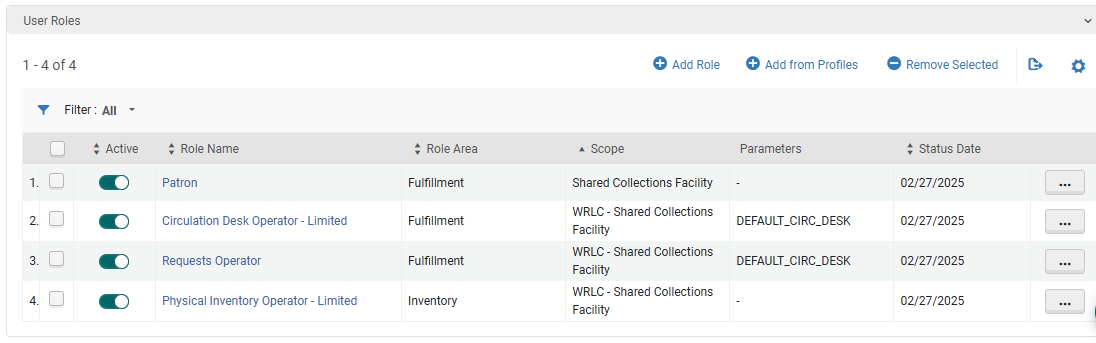
- User Roles (the following are necessary to allow for users to log into the SCF IZ and create requests through Alma)
- Patron
- Circulation Desk Operator - Limited
- Requests Operator
- Physical Inventory Operator - Limited
- General Information tab
-
- Contact Information tab
- Add address of affiliate library as the work address
- Contact Information tab
12. Update letter configuration for pull slip
- Configuration > General > Letters > Letters Configuration
- Search for the letter titled Ful Resource Request Slip Letter, choose Edit
- Edit the XSL around line 100 to include the following example
- Click Save Draft
- Click Save
<!--   Internal Alma request from affiliate institution [Insert affiliate library here}   -->
<xsl:when test="(notification_data/user_for_printing/user_group='[User Group Code]')">
<font size ="40px;">[Affiliate Library Name]</font>
</xsl:when>
User Accounts in the SCF IZ
User Groups
Below are the active user groups in the Shared Collections Facility (SCF) Institution Zone (IZ). These are configured in Configuration > User Management > User Details > User Groups.
| User Group | User Group Code | Type | Notes |
| Library pickup locations | wrlclib |
Internal |
Patron accounts that represent each library pickup location. When SCF items owned by one of our partner institutions are requested, they are checked out to these patron accounts in the SCF IZ.
For more information about these accounts, please see the Patron Accounts for Libraries page on the Alma Wiki.
For more information on the workflow of SCF requests, please see the Requests in the Remote Storage App page on the Alma Wiki. |
| WRLC HQ Staff | db wrlc | Internal | Accounts for staff who work at WRLC headquarters. |
| Trinity Faculty | tr fac | External |
Accounts for Trinity University faculty. Imported via SIS.
For more information on circulation workflows for Trinity, see the How to Bring up a Patron and Check Items Out page on the Alma Wiki. |
| Trinity Student | tr stud | External |
Accounts for Trinity University students. Imported via SIS.
For more information on circulation workflows for Trinity, see the How to Bring up a Patron and Check Items Out page on the Alma Wiki. |
| Trinity Staff | tr staf | Internal |
Accounts for Trinity University staff. Manually created by staff at WRLC headquarters.
For more information on circulation workflows for Trinity, see the How to Bring up a Patron and Check Items Out page on the Alma Wiki. |
| National Geographic Patron | natgeo | Internal |
Accounts for staff at our affiliate library, National Geographic.
For more information on configuring affiliate libraries, see the Affiliate Library Configuration page on the Alma Wiki.
For more information on Affiliate Libraries at the WRLC, see the Affiliate Libraries page on the Alma Wiki. |
| wrlc user | wrlcuser | External (Linked) | Accounts for patrons from our partner libraries who have requested items owned by WRLC (primarily WRLC Shared Monographs) from the SCF IZ. |
| AU Staff | au staf | Internal | User group used by Ex Libris account (unable to delete or edit the account) |
User Categories and Statistics
Below are the current user categories configured in the Shared Collections Facility (SCF) Institution Zone (IZ). These settings can be found in the Configuration > User Management > User Details menu in the Category Types and Statistical Categories/Types pages.
|
User Category Type Description |
User Category Type Code |
Statistical Category Description |
Statistical Category Code |
| INSTITUTION | Patron's Home Institution | American University | AMU |
| INSTITUTION | Patron's Home Institution | American University Washington College of Law | AMULAW |
| INSTITUTION | Patron's Home Institution | Catholic University of America | CUA |
| INSTITUTION | Patron's Home Institution | GW - Himmelfarb Health Sciences Library | HIMM |
| INSTITUTION | Patron's Home Institution | GW - Jacob Burns Law Library | GWLAW |
| INSTITUTION | Patron's Home Institution | Gallaudet University | GAL |
| INSTITUTION | Patron's Home Institution | George Mason University | GMU |
| INSTITUTION | Patron's Home Institution | George Washington University | GWU |
| INSTITUTION | Patron's Home Institution | Georgetown Law School | GULAW |
| INSTITUTION | Patron's Home Institution | Georgetown University | GU |
| INSTITUTION | Patron's Home Institution | Howard University | HU |
| TYPE | Account type | Interlibrary Loan Account | ILL |
| TYPE | Account type | Library Account | LIBRARY |
| INSTITUTION | Patron's Home Institution | Marymount University | MU |
| TYPE | Account type | Patron Account | PATRON |
| TYPE | Account type | Patron Linked Account | LINK |
| INSTITUTION | Patron's Home Institution | UDC - Law School | UDCLAW |
| INSTITUTION | Patron's Home Institution | University of the District of Columbia | UDC |
| INSTITUTION | Patron's Home Institution | WRLC SCF | WRLC |
Scheduled Jobs in the SCF IZ
| System | Set | Updates | Description | Frequency |
| Alma Scheduled Jobs |
Patron accounts where user group = empty AND job category = empty |
User Group changed from empty to 'tri stud' |
Students accounts are not given a user group when they are first imported to the SCF IZ; a job is scheduled to run every week (Mondays at 2am) that adds the 'tr stud' user group to a logical set containing new users where user group = empty, and job category = empty. |
Weekly Monday at 2am |
| Alma Scheduled Jobs |
Bib records where Linked to NZ = No AND Current Location of attached item is NOT wrlc shrm wrlc natg AND Provenance Code is NOT WRLC AND Suppressed = No AND Has Inventory = Yes |
Suppress bib records in set |
Bibliographic records for 'copied' items (item records that are copies from the Owning Institution's IZ) should always be suppressed. If an item is linked to an NZ Bib, the holdings records are automatically suppressed in the SCF IZ, however, bib records not linked to the NZ should be imported as suppressed. This scheduled job makes sure that any unsuppressed, unlinked bib records of 'copied' items are suppressed. |
Every 3 months on day 1 at 4am |
| Alma Scheduled Jobs |
Holdings records where Has Items = No |
Delete the holdings record |
Delete any holdings records that do not have items attached. |
Monthly on 2nd Monday at 2am |
| Alma Scheduled Jobs |
Bib records where Has Inventory = No |
Delete the bib record |
Delete any bib records that do not have items/holdings attached. |
Monthly on 3rd Monday at 2am |
Loan and Renewal Configuration for the SCF IZ
Auto Renewal Rules
The following automatic loan renewal rules are configured in the SCF IZ. These rules can be found under
Configuration > Fulfillment > Physical Fulfillment > Auto Loan Renewal Rules
Items checked out by Library User Accounts
This rule automatically renews all items checked out by accounts with a User Group of 'Library pickup locations'. These specific loans represent the pickup location of the item, and are not the primary loan (the primary loan being the loan of the book by the patron). For this reason, they are automatically renewed.
Input Parameters
- Name : User Group
- Operator : In List
- Value : Library pickup locations
Output Parameters
- Autorenewal : TRUE
Items checked out by ILL Accounts
This rule automatically renews all items if they are checked out by user accounts with a user statistical category Account Type = Interlibrary Loan Account. Patron accounts that represent ILL departments are automatically given a 'wrlc user' group code by the Remote Storage app, but they should be treated like user accounts representing Libraries (accounts with a user group of 'Library pickup location'), rather than user accounts representing individual patrons. These specific loans represent the pickup location of the item (in this case, the ILL department), and are not the primary loan (the primary loan being the loan of the book by the patron). For this reason, they are automatically renewed.
Input Parameters
- Name : User Statistical Category
- Operator : =
- Value : Account Type - Interlibrary Loan Account
Output Parameters
- Autorenewal : TRUE
Overdue and Lost Loan Profiles
The following overdue and lost loan profiles are configured in the SCF IZ. These rules can be found under
Configuration > Fulfillment > Physical Fulfillment > Overdue and Lost Loan Profiles
The following automatic loan renewal rules are configured in the SCF IZ. These rules can be found under
WRLC Lost Loan Profile for 'wrlc shrm' items
This profile marks all wrlc shrm loaned items (items checked out by Trinity patrons or with user group of 'wrlc user') as Lost when overdue by 39 days, according to RSC policy. Because items in this location are owned by WRLC, these are the only items in the SCF IZ that are loaned directly to patrons (and not to patron accounts representing Libraries or ILL departments). Therefore, these items need to follow Consortium Loan Service rules.
- Profile Type : Change to Lost
- Days after Due Date : 39 Days
- User Group :
- Trinity Staff
- Trinity Student
- Trinity Faculty
- WRLC HQ Staff
- wrlc user
- Locations : WRLC Shared Monograph (wrlc shrm)
- Letter send format : Mail*
* The Ful Overdue And Lost Loan Letter is sent by this profile when the Loans - Overdue and Lost Loan Job is run. The Ful Lost Loan Letter is sent when an item is manually changed to Lost.
WRLC Overdue Notice Profile for 'wrlc shrm' items
This profile emails overdue notices for wrlc shrm loaned items (items checked out by Trinity patrons or with user group of 'wrlc user') when overdue by 7 days. Because items in this location are owned by WRLC, these are the only items in the SCF IZ that are loaned directly to patrons (and not to patron accounts representing Libraries or ILL departments). Therefore, these items need to follow Consortium Loan Service rules.
- Profile Type : Overdue notification type 1
- Send notification : checkmarked
- Days after Due Date : 7 Days
- Loan Status :
- Auto renewal
- Loan
- Renew request handled by library staff
- Normal
- Overdue Notification
- Recalled
- Renewed
- Renew rejected by partner
- Renew requested
- Workbench change forward
- User Group :
- Trinity Staff
- Trinity Student
- Trinity Faculty
- WRLC HQ Staff
- wrlc user
- Locations : WRLC Shared Monograph (wrlc shrm)
- Letter send format : Mail*
- The Ful Overdue and Lost Loan Notification Letter is sent by this profile when the Loans - Overdue and Lost Loan Job is run.
Fulfillment > Other Settings
The following configurations set in the Other Settings code table for Fulfillment. These can be found under
Configuration > Fulfillment > General > Other Settings
| Parameter Key | Parameter Value | Notes |
| auto_renew_loan_days_after_due_date | 0 | The days period to auto renew item_loans after loan ends |
| auto_renew_loan_days_before_due_date | 7 | The days period to auto renew item_loans before loan ends |
| close_paid_lost_loan | true | Activate the Lost and Paid status for a lost or replacement fee closed. |
| enable_request_during_loan_for_different_policy | true | When user has an active loan, enable him to request the resource with a different loan period policy |
| force_empty_temp_location_when_disabled | true | When set to true, clearing the temporary location status will also clear the temporary location and library data |
| generate_resource_sharing_temp_barcode | false | |
| ill_item_creation_lib_code | ILL | |
| send_courtesy_notices_behavior | DD_ON_EXACT_DEFINED_DAY | Controls the behavior of the 'Notifications - Send Courtesy Notices and Handle Loan Renewals' job. Options are: DD_ON_EXACT_DEFINED_DAY, DD_WITHIN_RANGE_ONCE, DD_WITHIN_RANGE_DAILY. |
| should_report_active_requests | false | Should active requests be reported in notification |
| should_report_in_process_requests | true | Should in-process requests be reported in notification |
| should_report_on_hold_shelf_requests | false | Should on-hold-shelf requests be reported in notification |