Do not edit this profile without communicating with WRLC Central staff. If you save edits, it will change the Job ID, which is what the Remote Storage App looks for in the [Job Finish Webhook](#bkmrk-integration-profiles). Editing this profile requires finding the new Job ID, and then updating the configuration JSON file with the new information.
---
#### SFTP for SCF App
The Primary ID for the dummy accounts cannot be edited, they are integral to the remote storage app code.
When an item is scanned in at the SCF IZ for initial processing, the remote storage app sees the Remove Loan webhook sent from the SCF IZ by the [SCF Loans Webhooks Integration Profile](#bkmrk-integration-profiles), and the app removes any in transit status’s on the item in the owning IZ.
---
#### Metadata changes in the SCF IZ
##### Bib records
The bibliographic records not linked to the NZ will be given an 035 field with the prefix of the IZ code (ex. 01WRLC\_AMU) followed by the owning IZ’s MMS ID
##### Holdings records
A new holdings record will be created for the item in the SCF IZ if there isn't a pre existing holdings record attached to the bib with the same location code.
##### Item records
- A provenance Code is added that corresponds to the owning IZ
- An X is added to the end of the barcode
- The PO Line is cleared
# Requests in the Remote Storage App
#### Requests Workflow
[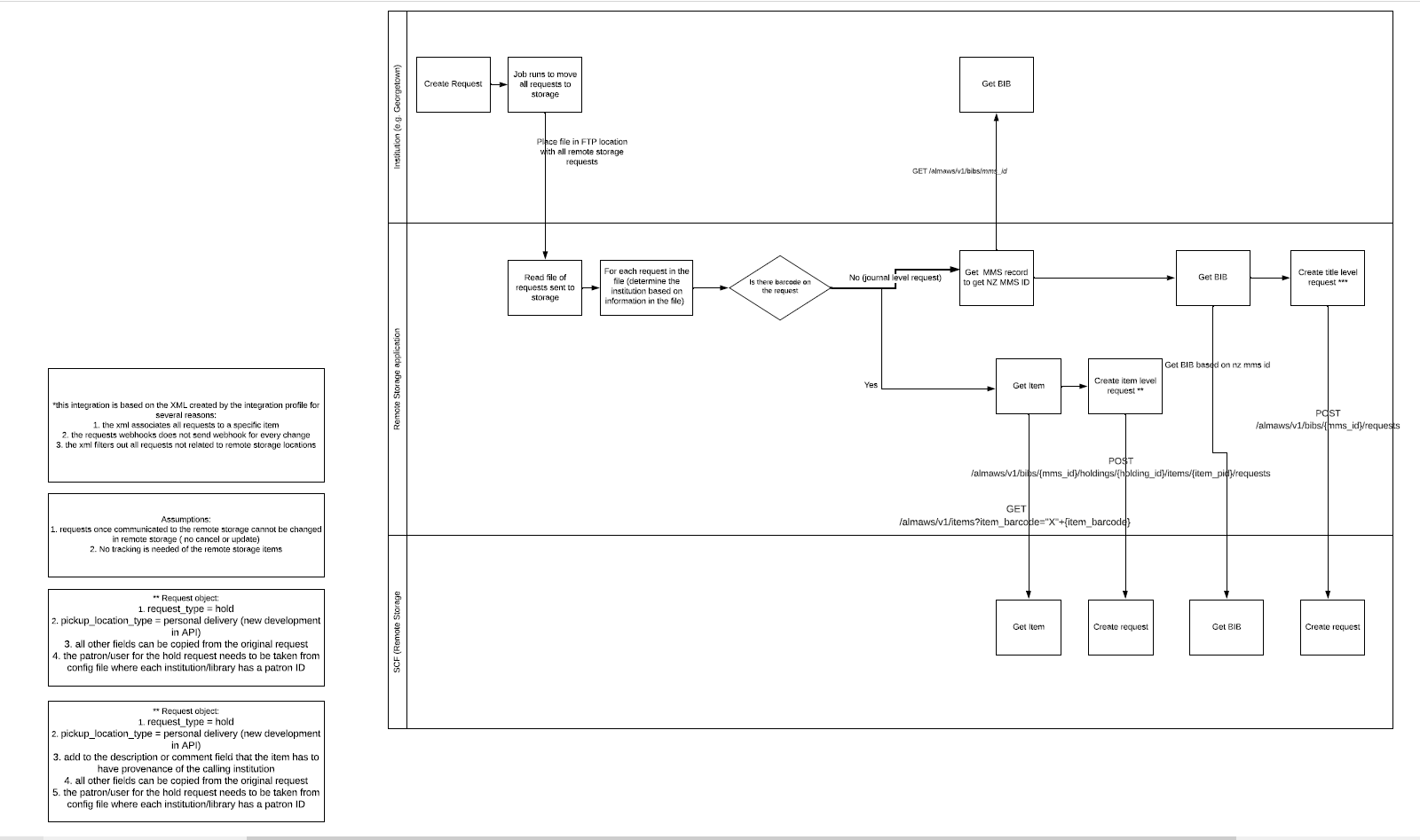](https://alma-documentation-bookstack.azurewebsites.net/uploads/images/gallery/2025-06/scf-app-request-workflow.PNG)
1. [Shared Collections Facility Integration Profile](#bkmrk-integration-profile) runs and places file of requests in the [SCF SFTP folder](#bkmrk-sftp-for-scf-app).
2. Remote Storage app searches for the item in the SCF IZ using the barcode; if found, an item-level request is created
3. If a barcode is not a part of the request metadata (because the request is for an article), then the app searches for the title using the NZ MMS Id; if found, a title-level request is created
##### Assumptions made in the Requests Workflow
1. XML associates all requests to a specific item
2. Requests webhook does not send webhook for every change
3. XML file filters out all requests not related to remote storage locations
4. Requests once communicated to the SCF IZ cannot be changed
5. No tracking is needed of the remote storgae items
6. The request type is a Hold
7. The pickup locaiton type is a personal delivery
8. All other fields can be copied from the original request
9. The patron/user for the hold request needs to be taken from the config file where each institution/library has a Patron ID
10. Item n the SCF IZ must have provenance of the calling institution
---
#### Integration Profile
The Integration Profile used for Requests is configured in every participating Institution Zone in the WRLC Network
1. **Shared Collections Facility Integration Profile** :
1. This is a Remote Storage type integration profile. It runs twice daily (at noon and at midnight) and sends a file of all requests made to items with a Remote Storage location to an SFTP server for the remote storage app to process. The app searches for the job id (publishing\_job\_id) in the [conf.json file](https://alma.wrlc.org/books/shared-collections-facility-scf-institution-zone/page/remote-storage-app-configuration#bkmrk-configuration-files).
Do not edit this profile without communicating with WRLC Central staff. If you save edits, it will change the Job ID, which is what the Remote Storage App looks for in the Job Finish Webhook. Editing this profile requires finding the new Job ID, and then updating the configuration JSON file with the new information.
---
#### SFTP for SCF App
The S/FTP Definition configured in Alma is named **"SFTP for SCF App"**. This is the destination where the publishing profile exports the daily item information file and where the Requests file is also sent.
In this Integration Profile, the specified subdirectory is **"Alma"** (or **"AlmaRSA-PSB"** for sandbox environments).
Each Integration Profile for requests uses a subdirectory in the format:
\[Institution Code\]/requests
`ex.01WRLC_AMU/requests`
> After each sandbox refresh, the sandbox environment must be updated with the correct subdirectory.
Additionally, the SFTP server information in the [app configuration file](https://alma.wrlc.org/books/shared-collections-facility-scf-institution-zone/page/remote-storage-app-configuration#bkmrk-configuration-files) must exactly match the details specified in the S/FTP Definition.
---
#### Requests Process for Physical Items
1. When a patron makes a request for an item at the SCF, the item is given a status of *Waiting for Remote Storage* in the owning Institution’s IZ. The item in the owning IZ also has a process type of *Requested*.
2. If the requester is from a different Institution than the Institution that owns the item, the request will appear under both the *Monitor Requests & Item Processes* page (without a workflow assigned) and the *Borrowing Requests* page in the IZ of the requester, with a status of *Request sent to Partner*; the partner that is listed is the owning IZ, not the SCF IZ.
3. The [Shared Collections Facility Integration Profile](#bkmrk-integration-profile) in each owning Institution Zone runs twice daily (once at noon, and again at midnight), and transfers requests to the SCF IZ. In the SCF IZ, the item is given a status of *Pick from shelf*; it is “requested” by the patron account associated with the pickup location.
4. Once the request has successfully transferred to the SCF IZ, the status of the item in the owning IZ is changed to *Request Communicated to Storage*, until the item is scanned at the requester’s IZ; then the item is placed on their Hold Shelf. The item record will have a process type of *Hold Shelf*, even if the Hold Shelf is at another Institution other than the owning Institution.
5. When the item is scanned in the SCF IZ (after being picked up from the shelf by the SCF specialists), it is automatically loaned to the patron account associated with the requesting library (Deliver To : \[Pickup IZ\]). This is because all of the Library pickup patron accounts in the SCF IZ are governed by the Library Delivery fulfillment rule that is configured under the Limited Request fulfillment unit for Library pickup patron accounts. The SCF copy of the item remains on loan until the item is returned to the SCF.
6. When item is scanned in at the non-SCF Institution Zone, the item is given a status of *Transit for Reshelving*.
7. When the returned item is scanned in at the SCF, not only is the Loan in the SCF IZ removed, but the *In Transit* status in the owning IZ is also removed due to the webhook sent via the SCF Loans Webhooks Profile Integration Profile, and processing done by the SCF app. For more information on Loans and the remote storage app, see the [Loans page](https://alma.wrlc.org/books/shared-collections-facility-scf-institution-zone/page/loans-in-the-remote-storage-app "Loans in the Remote Storage App").
---
#### Requests Process for Digitization
1. When a patron makes a request for an item at the SCF, the item is given a status of *Waiting for Remote Storage* in the owning Institution’s IZ. The item in the owning IZ also has a process type of *Requested*.
2. The [Shared Collections Facility Integration Profile](#bkmrk-integration-profile) in each owning Institution Zone runs twice daily (once at noon, and again at midnight), and transfers requests to the SCF IZ. In the SCF IZ, the item is given a status of *Pick from shelf*
3. IF the digitization request is a Rapido request, it is “requested” by the patron account associated with the pickup location. Once the request has successfully transferred to the SCF IZ, the status of the item in the owning IZ is changed to *Request Communicated to Storage.*
4. IF the digitization request is an ILLiad request transferred to Alma via the ILLiad Add-On, it is requested by a linked account associated with the original requester; because these are requests created by the ILLiad Add-On, these "patron" accounts are accounts for each institution's ILL department. Once the request has successfully transferred to the SCF IZ, the request in the owning IZ is **cancelled**.
5. The SCF specialists then fill the request by scanning the requested pages, and uploading the PDF to the request in the SCF IZ Alma. Alma then sends an email to the preferred email address associated with the requesting patron in the SCF IZ; this will be either the patron account associated with the pickup location, or the accounts for each institution's ILL department. The ILL staff from each school then fill the request via their own workflows for digitization.
# Remote Storage App Configuration
#### Configuration Files
There are two configuration files found on the :
- Live production environment (***home/SCFApp/Alma/conf.json***)
- Sandbox (***home/SCFApp/AlmaRSA-PSB/conf.json***)
This JSON file gives the remote storage app important information regarding institution, library, and location codes, as well as API keys, publishing profile IDs, etc.
What exactly is found in the configuration file?
- SCF SFTP server information
- Default location code for items in the SCF IZ (*wrlc stor*)
- API keys for all WRLC Institution Zones
- Publishing Profile IDs and Job IDs for each IZ (information on how to find these can be found on the [How to find Job IDs for the Remote Storage App](https://alma.wrlc.org/books/shared-collections-facility-scf-institution-zone/page/how-to-find-job-ids-for-the-remote-storage-app) page)
- Institution and Library codes for each IZ
- Remote Storage Location codes for each IZ
If any changes are made to anything listed above, the configuration file must be updated. Changes made to this file requires a reloading of the Remote Storage App
---
#### Logs
Logs for both the production and sandbox environment are found on WRLC's Azure site
- Live production environment | [https://scf-remote-storage-app-dpaaf5gccdgra9fn.scm.eastus2-01.azurewebsites.net/newui/logs](https://scf-remote-storage-app-dpaaf5gccdgra9fn.scm.eastus2-01.azurewebsites.net/newui/logs) (***Application > logstream***)
- Past Logs for Production Environment : https://wrshields.wrlc2k.wrlc.org/api/kudo/login.php?next=%2Fapi%2Fkudo%2Findex.php
- Sandbox | [https://aladin-sp.wrlc.org/login?service=webappvfs](https://aladin-sp.wrlc.org/login?service=webappvfs) (***alma-remote-storage-app-psb/AlmaRSA-PSB/logs***) **URL for sandbox logs no longer working**
The log will have thread numbers - each request/action is given a specific thread number. if there are many requests at once, the thread numbers are an easy way to keep track of one request
Error logs are found in Path: home/LogFiles/ YYYY\_MM\_DD\_XXXXXXXXX\_default\_docker.log files. If there are many errors within the timeframe, the file can reach its size limit and be written over, resulting in the loss of log data. If this occurs, WRLC can locate the missing logs in Azure's admin portal.
---
#### SCFTP for SCF App S/FTP Definition
The S/FTP Definition configured in Alma is named **"SFTP for SCF App"**. This is the destination where the publishing profile exports the daily item information file and where the Requests file is also sent.
The specified subdirectory is **"Alma"** (or **"AlmaRSA-PSB"** for sandbox environments).
[The SCF Data Preparation Publishing Profile](https://alma.wrlc.org/books/shared-collections-facility-scf-institution-zone/page/accessions-in-the-remote-storage-app#bkmrk-scf-publishing-profi) for accessions uses a subdirectory in the format:
\[Institution Code\]/items
`ex.01WRLC_AMU/items`
[The Shared Collections Facility Integration Profile](https://alma.wrlc.org/books/shared-collections-facility-scf-institution-zone/page/requests-in-the-remote-storage-app#bkmrk-integration-profile) for requests uses a subdirectory in the format:
\[Institution Code\]/requests
`ex.01WRLC_AMU/requests`
After each sandbox refresh, the sandbox environment must be updated with the correct subdirectory.
---
#### Integration Profiles
There are three Integration Profiles used for the Remote Storage App.
The two listed below are in each participating Institution's IZ
- **Shared Collections Facility Integration Profile**
- Profile Type : Remote Storage
- It runs twice daily (at noon and at midnight) and sends a file of all requests made to items with a Remote Storage location to an SFTP server for the remote storage app to process. The app searches for the job id (publishing\_job\_id) in the config.json file
- Relevant Workflows
- [Requests](https://alma.wrlc.org/books/shared-collections-facility-scf-institution-zone/page/requests-in-the-remote-storage-app "Requests in the Remote Storage App")
Do not edit this profile without communicating with WRLC Central staff. If you save edits, it will change the Job ID, which is what the Remote Storage App looks for in the [Job Finish Webhook](#bkmrk-integration-profiles). Editing this profile requires finding the new Job ID, and then updating the configuration JSON file with the new information.
- **SCF Job Finish Webhook Integration Profile**
- Profile Type: Webhook
- Sends out a webhook for every job that finishes running in the Institution Zone. The remote storage app searches for the job id (publishing\_job\_id) in the conf.json file and the institution is selected according to it.
- Relevant Workflows:
- [Accessions](https://alma.wrlc.org/books/shared-collections-facility-scf-institution-zone/page/accessions-in-the-remote-storage-app "Accessions in the Remote Storage App")
The profile listed below is in the SCF IZ
- **SCF Loans Webhooks Integration Profile**
- Profile Type: Webhook
- Sends out a webhook for loans in the SCF IZ. The SCFapp changes the status of the owning institution’s item record based on the changes made in the SCF IZ.
- Relevant Workflows
- [Accessions](https://alma.wrlc.org/books/shared-collections-facility-scf-institution-zone/page/accessions-in-the-remote-storage-app "Accessions in the Remote Storage App")
- [Loans](https://alma.wrlc.org/books/shared-collections-facility-scf-institution-zone/page/loans-in-the-remote-storage-app "Loans in the Remote Storage App")
---
#### Set for SCF Item records
Every participating WRLC Institution Zone has a Physical Items set that searches for all item records with either a temporary or permanent location at the Shared Collections Facility. Each set has an Internal Note stating DO NOT DELETE.
This set is used for the [SCF Data Preparation Profile](#bkmrk-publishing-profile).
---
#### Publishing Profile
A publishing profile (called the "SCF Data Preparation Profile") in the owning IZ exports a MARC XML file containing new, deleted, and updated items found in a specific Alma set ("[Set for SCF Data Prep](#bkmrk-set-for-scf-item-rec)").
The XML file names are :
Institution abbreviation **+** iz2scf + yyyymmdd **+** two-digit number **+** Alma Process ID **+** *new* or *delete*
ex. au\_iz2scf\_2025060308\_18906688690004102\_new
The job is run daily, usually at night or early in the morning
A webhook is sent by the [SCF Job Finish Webhook Integration Profile](#bkmrk-integration-profiles) when the publishing job finishes. The job ID is listed in the [config file for the app](https://alma.wrlc.org/books/shared-collections-facility-scf-institution-zone/page/remote-storage-app-configuration#bkmrk-configuration-files), letting the app know that this is a job that it should look out for. When the app recognizes the job id for the publishing profile, the app examines the file of items published and goes to work creating or updating the items in the SCF IZ.
Do not edit this profile without communicating with WRLC Central staff. If you save edits, it will change the Job ID, which is what the Remote Storage App looks for in the [Job Finish Webhook](#bkmrk-integration-profiles). Editing this profile requires finding the new Job ID, and then updating the configuration JSON file with the new information.
# Loans in the Remote Storage App
#### Loans Workflow
Changes in Loan status made in the SCF IZ are directly communicated to the owning IZ through a [Webhook Integration Profile](#bkmrk-webhook-integration-) configured in the SCF IZ.
Changes in Loan status made in the owning IZ are NOT communicated to the SCF IZ. The process only runs one way : from SCF IZ to owning IZ.
[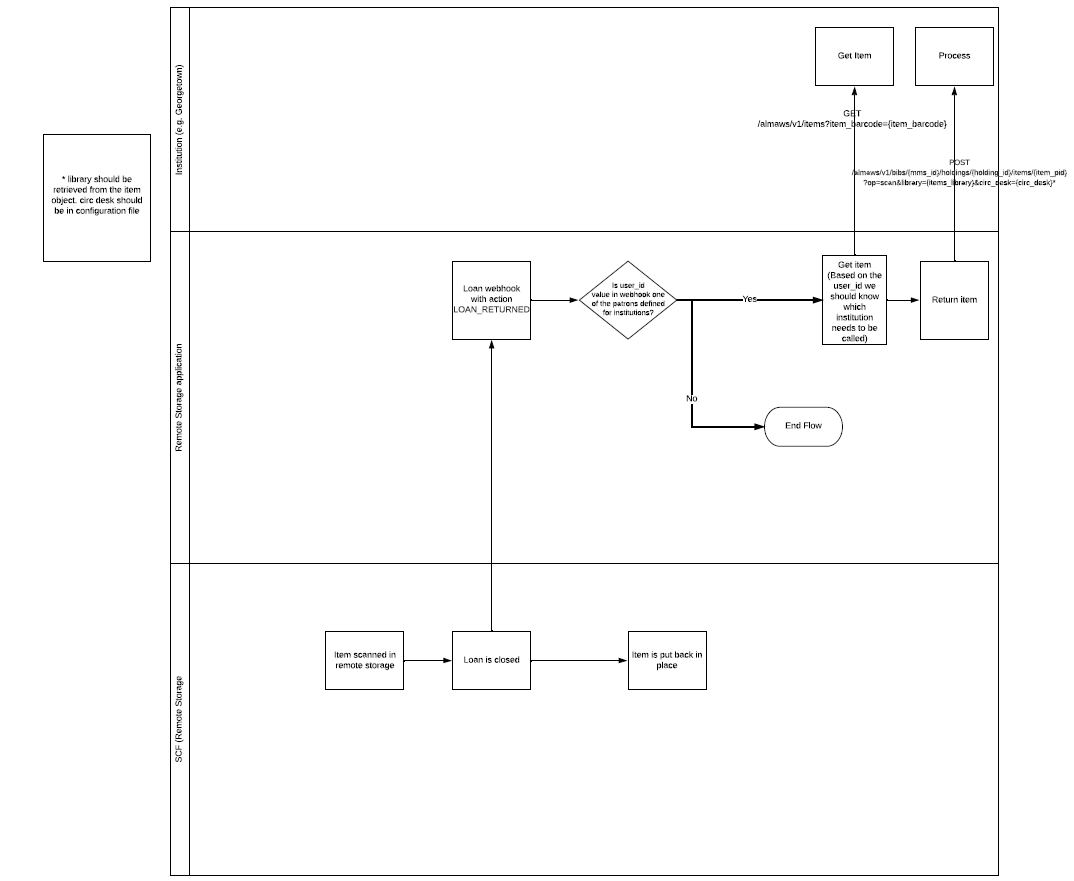](https://alma-documentation-bookstack.azurewebsites.net/uploads/images/gallery/2025-06/scf-app-loan-workflow.PNG)
1. Item scanned in SCF IZ, loan is closed
2. Webhook for the Loan Returned action is sent out
3. If the *user\_id* value in the webhook equals the Primary ID of the dummy library account in the SCF IZ. If the institution code and library code in the Primary ID exist in the [configuration file](https://alma.wrlc.org/books/shared-collections-facility-scf-institution-zone/page/remote-storage-app-configuration#bkmrk-configuration-files), the remote storage app will process the return
4. The remote storage app finds the item in the owning IZ (based on the information in the Primary ID of the patron account, the app knows which institution needs to be called), and returns the item
---
#### Webhook Integration Profile
The webhook profile used for Loans is configured in the SCF IZ.
1. **SCF Loans Webhooks Integration Profile** in the SCF IZ
1. Sends out a webhook for requests and loans originating in the SCF IZ. The remote storage app changes the status of the owning institution’s item record based on the changes made in the SCF IZ.
For the Webhook profiles, you can see list of Webhook logs in Alma (Ellipsis, View Log), and can also see the publishing job id in the Webhooks log for the publishing profile. Webhook secret in integration profile the same as that listed in the config file.
---
#### Loans for recently accessioned items
When an item is published to the SCF IZ, a loan is automatically created for the item. It is loaned to a dummy patron account with a patron type of *Library pickup locations*.
The name of the account will often be *Deliver to : \[IZ abbreviation\]*, for example *Deliver to: CU*.
The Primary ID of these user profiles is the IZ code, followed by a dash (no spaces), and then the code for the library, for example *01WRLC\_GWA-SCRC*.
The Primary ID for the dummy accounts cannot be edited, they are integral to the remote storage app code.
When an item is scanned in at the SCF IZ for initial processing, the remote storage app sees the Remove Loan webhook sent from the SCF IZ by the [SCF Loans Webhooks Integration Profile](#bkmrk-webhook-integration-), and the app removes any in transit status’s on the item in the owning IZ.
---
#### Loans for requested SCF items
Requests made for SCF items are transferred to the SCF IZ by the remote storage app (for a full description of this workflow, please see the [Requests page](https://alma.wrlc.org/books/shared-collections-facility-scf-institution-zone/page/requests-in-the-remote-storage-app "Requests in the Remote Storage App")).
In the transfer process, the SCF copy of the item is requested in the SCF IZ by the dummy patron account associated with each library in the WRLC. The account used takes into consideration both the Primo/ Alma instance where the request originated, and the pickup location of the requested item.
For example, if an item was requested from GW's IZ for pickup at Gelman, the item in the SCF IZ would be requested by the dummy library account with the code *01WRLC\_GWA-gelman*
When the requested item is scanned at the SCF IZ, the item is automatically loaned to the dummy library account, and the loan webhooks are sent to the remote storage app via the [SCF Loans Webhooks Profile](#bkmrk-webhook-integration-) in the SCF IZ.
# How to find Job IDs for the Remote Storage App
**The SCF Job Finish Webhook Integration Profile** sends out a webhook every time a job finishes running in the Institution Zone. The Remote Storage App receives all of the webhooks and specifically looks for the webhooks with a Job ID that is listed in the configuration JSON file.
The specific Job IDs the app is looking for are for the **Shared Collections Facility Integration Profile** (exports a file of requests to an SCF SFTP folder) and for the **SCF Data Preparation Publishing Profile** (exports a file of new SCF items).
It is important to keep these Job IDs accurate and up-to-date; Request and Accession workflows are reliant on them.
If either the Integration Profile or the Publishing Profile are edited in Alma, the Job ID changes. It is essential to communicate with WRLC Staff before editing any of these two profiles.
Follow the workflows detailed below to find the correct Job ID used in the Remote Storage App's configuration file.
---
#### Publishing Profile Job ID
- Go to Alma > Resources > Publishing > Publishing Profiles
- Find the **SCF Data Preparation Profile**, then choose Edit
- Copy the Profile ID (found on the top line next to the Profile Name)
- Copy the API key for this Institution Zone listed in the configuration JSON file
- Create a URL following this formula:
https://api-na.hosted.exlibrisgroup.com/almaws/v1/conf/jobs?
\+ apikey=\[insert API key here\]
\+ &profile\_id=\[insert Profile ID here\]
EXAMPLE:
```xml
https://api-na.hosted.exlibrisgroup.com/almaws/v1/conf/jobs?apikey=x123x&profile_id=12345
```
- In the resulting XML code, find the value for the **id element** (it is usually the letter S followed by a 17 digit number). That is the Job ID for the publishing profile
For more information, see the Google spreadsheet [Publishing Profile info](https://docs.google.com/spreadsheets/d/1NOChbOAACNZG18KDim0gHmhj_dHlzmmUBd5xUtdVqvs/edit?usp=sharing)
---
#### Request Integration Profile Job ID
- Copy the API key for this Institution Zone listed in the configuration JSON file
- Create a URL following this formula:
https://api-na.hosted.exlibrisgroup.com/almaws/v1/conf/integration-profiles?
\+ apikey=\[insert API key here\]
\+ &type=REMOTE\_STORAGE
EXAMPLE:
```xml
https://api-na.hosted.exlibrisgroup.com/almaws/v1/conf/integration-profiles?apikey=x123x&type=REMOTE_STORAGE
```
- In the resulting XML code, find and copy the value for the **id element** (it is usually a 16 digit number)
- Using the id number, create a URL following this formula:
https://api-na.hosted.exlibrisgroup.com/almaws/v1/conf/jobs?
\+ apikey=\[insert API key here\]
\+ &profile\_id=\[insert Profile ID here\]
EXAMPLE:
```xml
https://api-na.hosted.exlibrisgroup.com/almaws/v1/conf/jobs?apikey=l8xxdd61599bea484b8d8b7d84a722da788e&profile_id=10385500680004107
```
- In the resulting XML code, find the value for the **id element** (it is usually the letter S followed by a 17 digit number). That is the Job ID for the publishing profile
# Metadata Infrastructure in the SCF IZ
Every item that resides in the WRLC's Shared Collections Facility (SCF) has two records in our Network Zone; a copy that resides in the owning Institution's IZ, and a second copy that resides in the SCF IZ. The second SCF copy is primarily used for shelf and workflow control at the SCF. Because of this, the SCF copy is suppressed from discovery in the patron-facing catalog (Primo). The record that patrons view in Primo is the record in the owning Institution's IZ.
When a patron requests an item located at the SCF, the request is attached to the owning institution's copy of the item record (the unsuppressed record). Then the SCF publishing app automatically transfers that request to the SCF copy of the item record (the suppressed record).
#### Bibliographic Records
If the owning Institution's item record is attached to a Network Zone bibliographic record, the SCF copy of the item record will also be attached to the same NZ bib record. The SCF holding and item records are suppressed from discovery in Primo.
[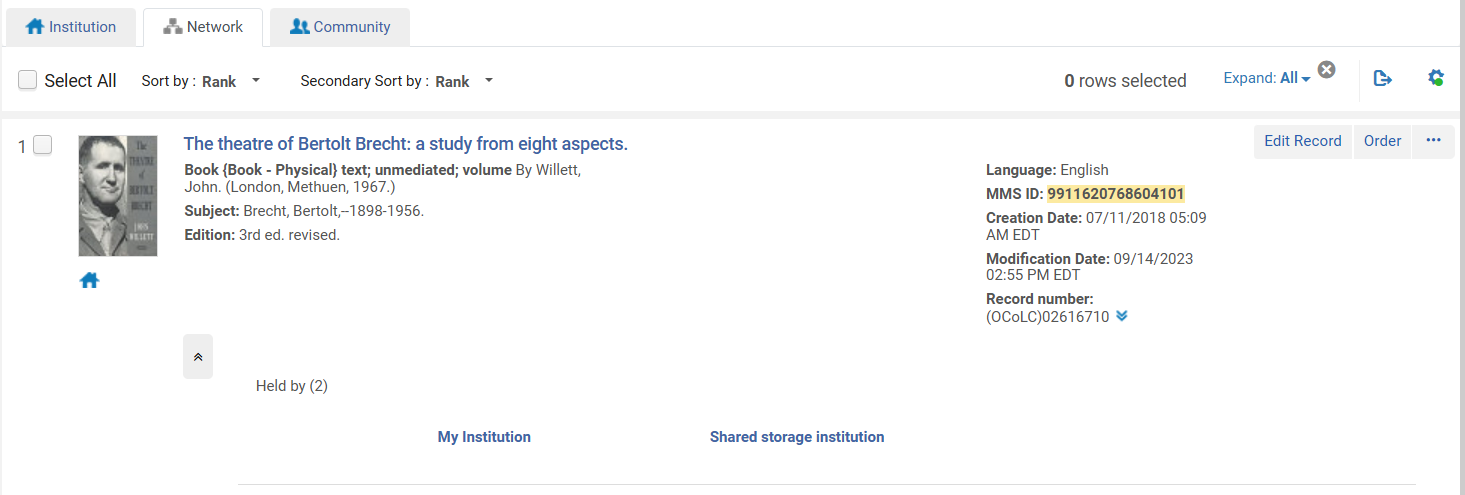](https://alma-documentation-bookstack.azurewebsites.net/uploads/images/gallery/2024-11/infra-1.PNG)
If the owning Institution's item record is NOT attached to a Network Zone bibliographic record (if it is attached to an IZ-only record), then the SCF copy of the item record will be attached to a suppressed copy of the IZ-only bibliographic record.
[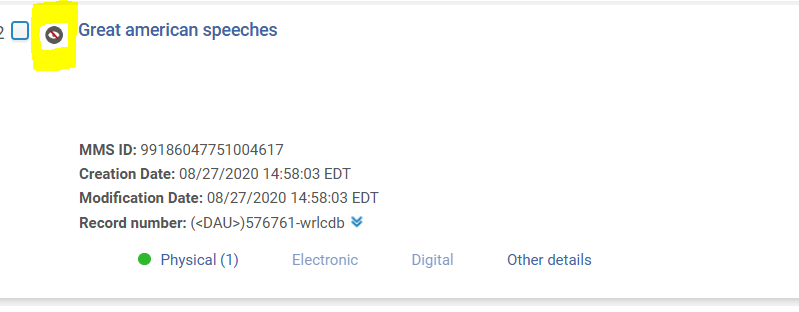](https://alma-documentation-bookstack.azurewebsites.net/uploads/images/gallery/2024-11/infra-3.PNG)
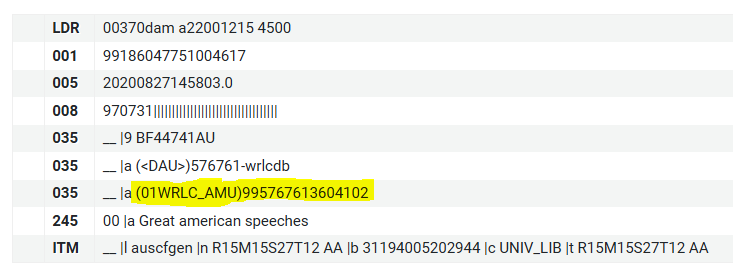
The SCF copy of the bib record will have the MMS Id of the owning Institution's record in the 035 field; the inclusion of the MMS Id allows for requests of non-NZ linked items to occur.
[](https://alma-documentation-bookstack.azurewebsites.net/uploads/images/gallery/2024-11/infra-2.PNG)
Any updates made to the owning Institution's bib record will NOT be transferred to the SCF copy of the bib record.
If an SCF item is moved to a different bib record, please open a WRLC Service Desk ticket () so that the SCF copy can be updated. Without this necessary step, requests for this item may fail. For more policies like this, see the [Updating SCF items (barcodes, bibliographic records, etc.)](https://alma.wrlc.org/books/shared-collections-facility-scf-institution-zone/page/updating-scf-items-barcodes-bibliographic-records-etc "Updating SCF items (barcodes, bibliographic records, etc.)") page.
#### Holding Records
All SCF holding record copies are suppressed from Discovery.
Any updates made to the owning Institution's holding record will NOT be transferred to the SCF copy of the holding record.
#### Item Records
The SCF copy of the item record has a few key differences from the original owning Institution item record.
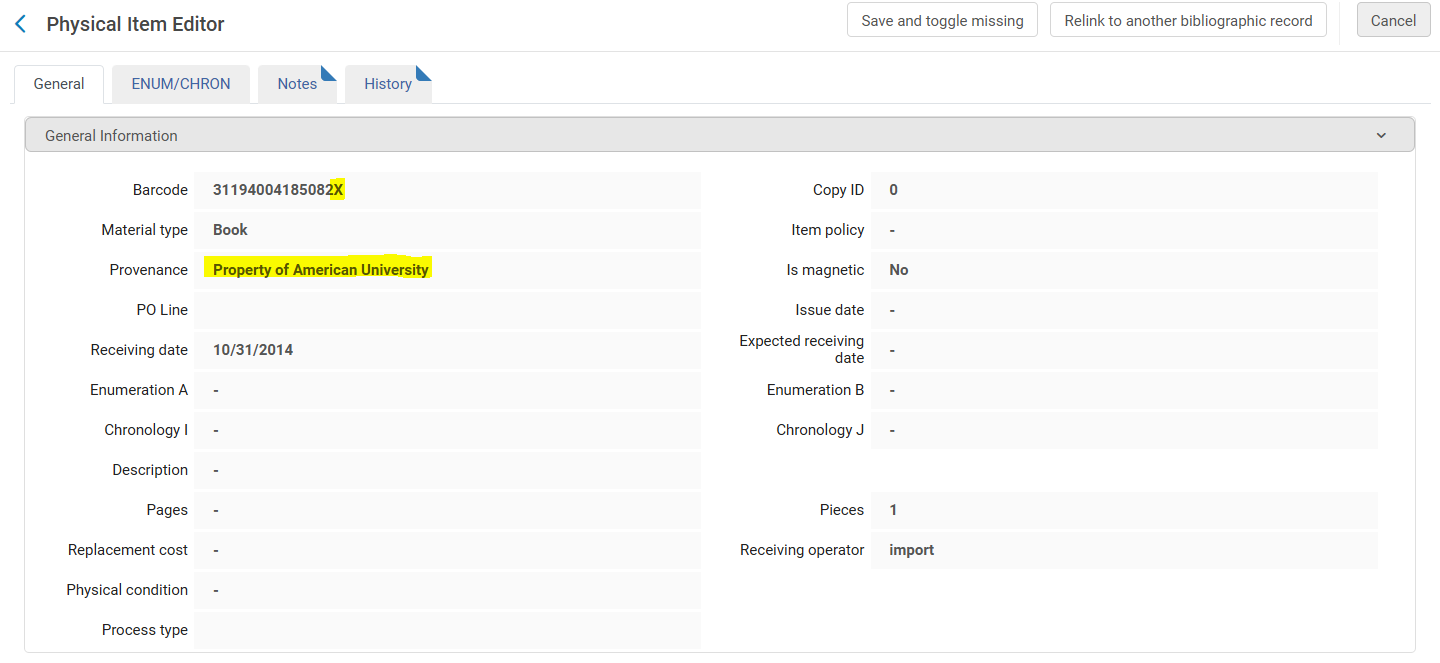
The barcode will have an 'X' appended to the end. In addition, a provenance code is added to keep track of which Institution owns the item.
[](https://alma-documentation-bookstack.azurewebsites.net/uploads/images/gallery/2024-11/infra-4.PNG)
Unlike the bib and holding records, updates made in the following fields to the owning Institution's copy of the item record will be transferred to the SCF copy:
- Material type
- Description
- Enumeration A
- Enumeration B
- Enumeration C
- Enumeration D
- Chronology I
- Chronology J
- Chronology K
If the barcode of an SCF item is changed, please open a WRLC Service Desk ticket () so that the SCF copy can be updated. For more policies like this, see the [Updating SCF items (barcodes, bibliographic records, etc.)](https://alma.wrlc.org/books/shared-collections-facility-scf-institution-zone/page/updating-scf-items-barcodes-bibliographic-records-etc "Updating SCF items (barcodes, bibliographic records, etc.)") page.
#### Item Locations
The permanent or temporary WRLC location in the owning Institution IZ is transferred to the SCF IZ as a permanent location.
If the item location in the owning IZ has one of the following location codes, the item in the SCF IZ will have the exact same location.
| gal arch |
| mu arch |
| ocsk |
| ocskp |
| ocsmr |
| ocssc |
| ocst |
| SCF\_Hold |
| udc jazz |
| wral |
| wrlc |
| wrlc cgrc |
| wrlc dis |
| wrlc hida |
| wrlc natg |
| wrlc sgrc |
| wrlc shrm |
| wrlc shrp |
| wrlc snsa |
| wrlc stnc |
| wrlc stor |
| wrlc stru |
| wrlc\_stru |
Any SCF location in the owning IZ that is NOT listed above will be given the default location of *wrlc stor* in the SCF IZ.
#### Primo VE
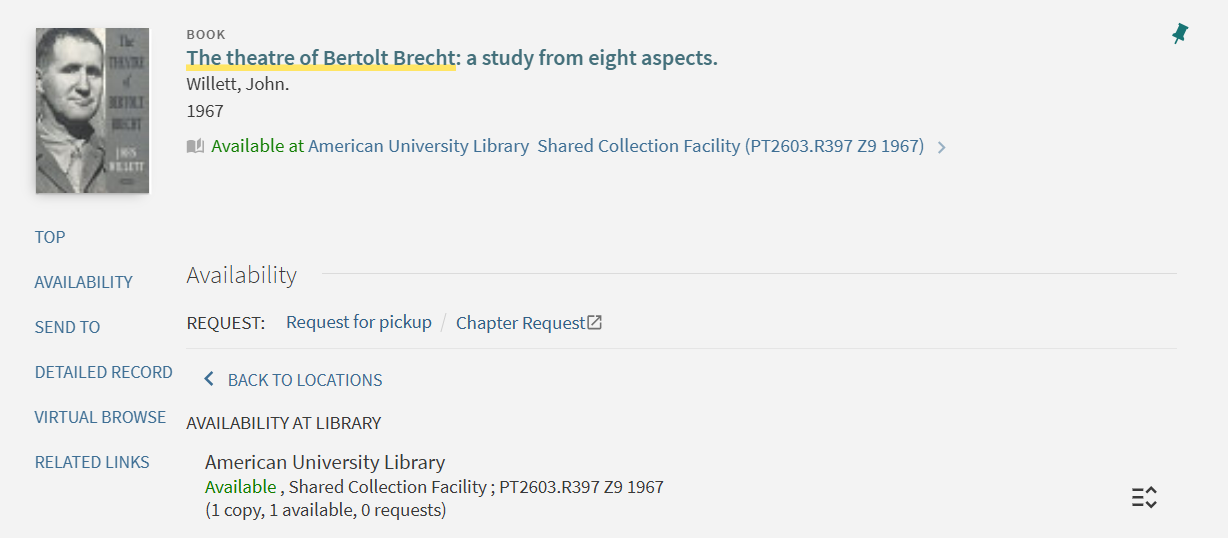
Although there are two record copies for each item, the patron only sees one item in Primo because all SCF records are suppressed.
For example, this bib record has both American University and SCF holdings attached.
[](https://alma-documentation-bookstack.azurewebsites.net/uploads/images/gallery/2024-11/infra-1.PNG)
In Primo, only the American University holdings are visible to the patron.
[](https://alma-documentation-bookstack.azurewebsites.net/uploads/images/gallery/2024-11/infra-5.PNG)
# Patron Accounts for Libraries
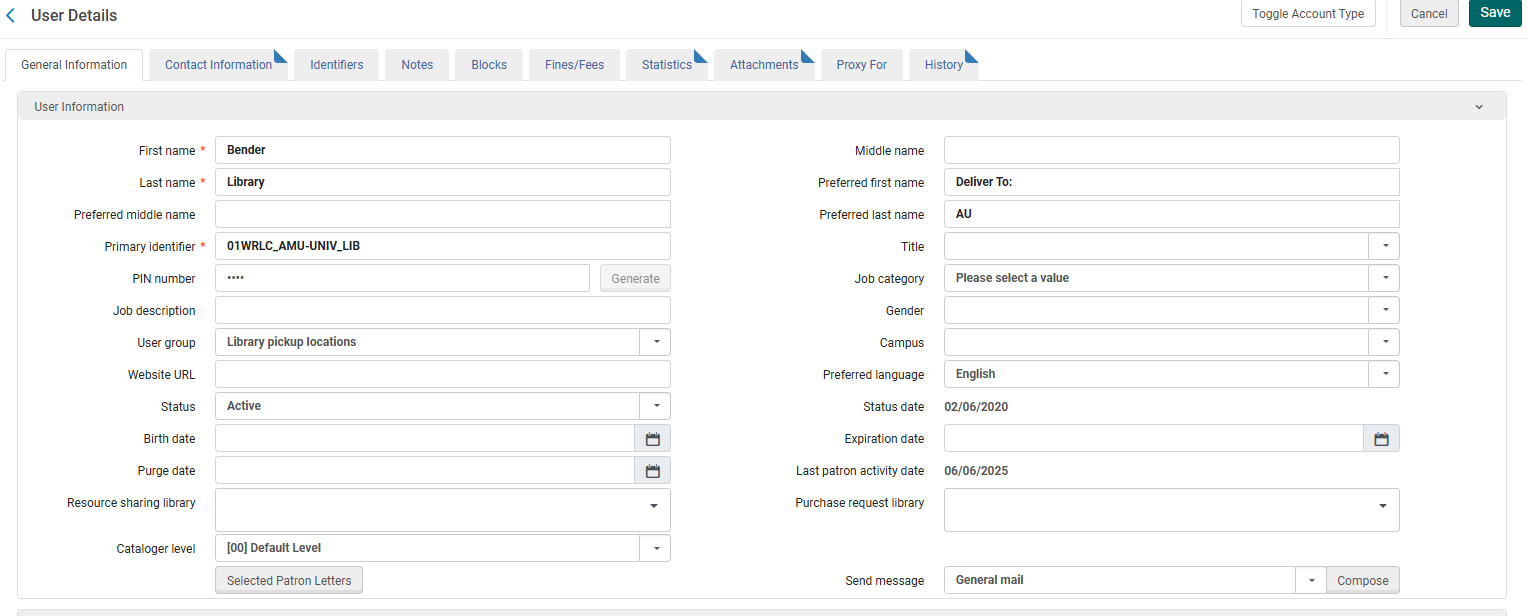
When SCF items owned by one of our partner institutions are requested, they are checked out to patron accounts in the SCF IZ that represent each library pickup location.
These user accounts have the following characteristics
- **First & Last Name** : the name of the library
- **Preferred First & Last Name**: Deliver To: \[Library abbreviation\]
- This is the name that is printed on the SCF Pull slips
- **Primary identifier**: \[Institution code\]-\[Library code\]
- The Primary identifier is used by the Remote Storage App to create requests and loans. This should never be edited!
- **User Group** : Library Pickup Locations
- The Library Pickup Locations user group is configured for all requests to be personal home delivery.
[](https://alma-documentation-bookstack.azurewebsites.net/uploads/images/gallery/2025-06/scf-app-user-profiles.PNG)
# SCF Physical Locations
Below are all of the Remote Storage locations configured in each individual Institution Zone in the WRLC Network.
####
#### American University
| **Location Code in AU Institution Zone** | **Location Description in AU Institution Zone** | **Temporary or Permanent Location in AU Institution Zone** | **Library Name in AU Institution Zone** | **Equivalent Location in SCF IZ\*** |
| auscfgen | Shared Collections Facility - General | Most are Permanent (a handful are Temporary) | American University Library | wrlc stor |
| auscfmus | Shared Collections Facility - Music | Permanent | Music Library (American University) | wrlc stor |
| auscfspec | Shared Collections Facility - Special | Permanent | University Archives and Special Collections (American University) | wrlc stor |
| wrlc stnc | WRLC Storage Non-Circulating | Temporary | American University Library | wrlc stnc |
| wrlc stor | WRLC Storage Circulating | Temporary | American University Library | wrlc stor |
| wrlc stru | WRLC Storage Restricted | Temporary | American University Library | wrlc stru |
| wrlcscfrs | WRLC SCF Remote Storage | Temporary | American University Library | wrlc stor |
---
#### American University College of Law
| **Location Code in AU Law Institution Zone** | **Location Description in AU Law Institution Zone** | **Temporary or Permanent Location in AU Law Institution Zone** | **Library Name in AU Law Institution Zone** | **Equivalent Location in SCF IZ\*** |
| WRLC | WRLC Offsite Storage | Permanent | Pence Law Library | wrlc stor |
---
#### Catholic University of America
| **Location Code in CU Institution Zone** | **Location Description in CU Institution Zone** | **Temporary or Permanent Location in CU Institution Zone** | **Library Name in CU Institution Zone** | **Equivalent Location in SCF IZ\*** |
| wrlc stor | WRLC Shared Collections Facility (wrlc stor) | Temporary AND Permanent | Mullen Library | wrlc stor |
| wrlc stnc | WRLC Shared Collections Facility (wrlc stnc) | Temporary | Mullen Library | wrlc stnc |
| wrlc shrp | WRLC Shared Collections Facility (wrlc shrp) | Temporary | Mullen Library | wrlc shrp |
| wrlc stru | WRLC Shared Collections Facility (wrlc stru) | Most are Temporary, a handful are Permanent | Mullen Library | wrlc stru |
| wrlc disp | WRLC Shared Collections Facility (wrlc disp) | Temporary | Mullen Library | wrlc dis |
| wrlc shrm | WRLC Shared Collections Facility (wrlc shrm) | Temporary | Mullen Library | wrlc shrm |
| wrlc dism | WRLC Shared Collections Facility (wrlc dism) | Temporary | Mullen Library | wrlc dis |
| wr aumc | WRLC Shared Collections Facility | Temporary | Mullen Library | wrlc stru |
---
#### Gallaudet University
| **Location Code in GA Institution Zone** | **Location Description in GA Institution Zone** | **Temporary or Permanent Location in GA Institution Zone** | **Library Name in GA Institution Zone** | **Equivalent Location in SCF IZ\*** |
| wrlc stor | WRLC Shared Collections Facility (wrlc stor) | Permanent AND Temporary | Gallaudet University Library | wrlc stor |
| wrlc stru | WRLC Shared Collections Facility (wrlc stru) | Permanent AND Temporary | Gallaudet University Library | wrlc stru |
| wrlc dflm | WRLC Shared Collections Facility (wrlc stor) Film | Most are Temporary, some are Permanent | Gallaudet University Library | wrlc stor |
| wrlc dfbk | WRLC Shared Collections Facility (wrlc stor) Deaf Books | Most are Temporary, some are Permanent | Gallaudet University Library | wrlc stor |
| WRLCDIG | WRLC Digital Collections | Permanent | Gallaudet University Library | wrlc stor |
| wrlcstoret | WRLC Shared Collections Facility (wrlcstoret) | Temporary | Gallaudet University Library | wrlcstor |
| wrlc stnc | WRLC Shared Collections Facility (wrlc stnc) | Temporary | Gallaudet University Library | wrlc stnc |
| wrlc shrp | WRLC Shared Collections Facility (wrlc shrp) | Temporary | Gallaudet University Library | wrlc shrp |
| wrlc shrm | WRLC Shared Collections Facility (wrlc shrm) | Temporary | Gallaudet University Library | wrlc shrm |
| wrlc resv | WRLC Shared Collections Facility (wrlc stor) Reserves | Temporary | Gallaudet University Library | wrlc stor |
| wrlc dism | WRLC Shared Collections Facility (wrlc dism) | Temporary | Gallaudet University Library | wrlc dis |
| wrlc dfmd | WRLC Shared Collections Facility (wrlc stor) Deaf Media | Temporary | Gallaudet University Library | wrlc stor |
| wrlc cstk | WRLC Shared Collections Facility (wrlc stor) Closed Stacks | Temporary | Gallaudet University Library | wrlc stor |
---
#### George Mason University
| **Location Code in GM Institution Zone** | **Location Description in GM Institution Zone** | **Temporary or Permanent Location in GM Institution Zone** | **Library Name in GM Institution Zone** | **Equivalent Location in SCF IZ\*** |
| wrlc\_shrd | WRLC Shared Collections Facility | Most are Permanent, some are Temporary | Fenwick Library | wrlc stor |
| wrlc\_rstcd | WRLC Center - Restricted Use | Most are Permanent, some are Temporary | Fenwick Library | wrlc stor |
| wrlc\_cntr | WRLC Center | Permanent | Fenwick Library | wrlc stor |
---
#### George Washington University
| **Location Code in GW Institution Zone** | **Location Description in GW Institution Zone** | **Temporary or Permanent Location in GW Institution Zone** | **Library Name in GW Institution Zone** | **Equivalent Location in SCF IZ\*** |
| wrlc stor | WRLC Storage Circulating | Most are Permanent, handful are Temporary | Gelman Library | wrlc stor |
| wrlc stnc | WRLC Storage Non-Circulating | Permanent | Gelman Library | wrlc stnc |
| wrlc sgrc | WRLC Storage Restricted - GRC | Most are Permanent, handful are Temporary | Gelman Library | wrlc sgrc |
| wrlc cgrc | WRLC Storage Circulating - GRC | Permanent | Gelman Library | wrlc cgrc |
| wrlc stru | WRLC Storage Restricted | Permanent | Gelman Library | wrlc stru |
| wrlc shrp | WRLC Shared periodical | Permanent | Gelman Library | wrlc shrp |
| wrlc disp | WRLC Shared Per. Discard | Permanent | Gelman Library | wrlc dis |
| wrlc dism | WRLC Shared Mono. Discard | Permanent | Gelman Library | wrlc dis |
| wrlc snsa | WRLC Restricted National Security Archive | Permanent | Gelman Library | wrlc snsa |
| wrlc\_stru | WRLC Storage Restricted | Permanent | Special Collections Research Center | wrlc\_stru |
---
#### George Washington Himmelfarb University
| **Location Code in GW HS Institution Zone** | **Location Description in GW HS Institution Zone** | **Temporary or Permanent Location in GW HS Institution Zone** | **Library Name in GW HS Institution Zone** | **Equivalent Location in SCF IZ\*** |
| offs | Off-Site Storage | Permanent | Himmelfarb Health Sciences Library | wrlc stor |
---
#### Georgetown University
| **Location Code in GT Institution Zone** | **Location Description in GT Institution Zone** | **Temporary or Permanent Location in GT Institution Zone** | **Library Name in GT Institution Zone** | **Equivalent Location in SCF IZ\*** |
| ocs | Off-Campus Shelving | Most are Permanent, handful are Temporary | Lauinger Library | wrlc stor |
| ocsp | Off-Campus Shelving - Periodicals | Permanent | Lauinger Library | wrlc stor |
| ocspw | Off-Campus Shelving - Woodstock Periodicals | Permanent | Lauinger Library | wrlc stor |
| ocst | Off-Campus Shelving - Theses | Permanent | Lauinger Library | ocst |
| ocsv | Off-Campus Shelving - Media | Permanent | Lauinger Library | wrlc stnc |
| ocsvc | Off-Campus Shelving - Circulating | Permanent | Lauinger Library | wrlc stor |
| ocsmf | Off-Campus Shelving (Microform) | Permanent | Lauinger Library | wrlc stor |
| wrlc shrp | Off-Campus Shared Periodicals | Temporary | Lauinger Library | wrlc shrp |
| ocsmr | Off-Campus Shelving - Request in Special Collections | Permanent | Booth Family Center for Special Collections | ocsmr |
| ocssc | Off-Campus Shelving - Archive/Manuscript Collections | Permanent | Booth Family Center for Special Collections | ocssc |
| ocskp | Off-Campus Shelving - Request in Bioethics Library | Permanent | Bioethics Research Library | ocskp |
| ocsk | Off-Campus Shelving - BRL | Permanent | Bioethics Research Library | ocsk |
| ocswd | Off-Campus Shelving - Request in Woodstock A | Currently no items with this location (configured as a Remote Storage location) | Woodstock Theological Library | wrlc stor |
| ocwdc | Off-Campus Shelving - Request in Woodstock B | Currently no items with this location (configured as a Remote Storage location) | Woodstock Theological Library | wrlc stor |
---
#### Georgetown University School of Law
| **Location Code in GT Law Institution Zone** | **Location Description in GT Law Institution Zone** | **Temporary or Permanent Location in GT Law Institution Zone** | **Library Name in GT Law Institution Zone** | **Equivalent Location in SCF IZ\*** |
| ofstr | Off-Site Storage | Permanent | Georgetown Law Library | wrlc stor |
####
#### Howard University
| **Location Code in HU Institution Zone** | **Location Description in HU Institution Zone** | **Temporary or Permanent Location in HU Institution Zone** | **Library Name in HU Institution Zone** | **Equivalent Location in SCF IZ\*** |
| wrlc stor | WRLC Storage Circulating | Most are Temporary, some are Permanent | Founders Library | wrlc stor |
| wrlcstoret | WRLC Storage Circulating Retention | Temporary | Founders Library | wrlcstor |
| wrlc stnc | WRLC Storage Non-Circulating | Permanent and Temporary | Founders Library | wrlc stnc |
| wrlc shrp | WRLC Shared periodical | Permanent and Temporary | Founders Library | wrlc shrp |
| wrlc stru | WRLC Storage Restricted | Temporary | Founders Library | wrlc stru |
| wrlc disp | WRLC Shared Per. Discard | Permanent and Temporary | Founders Library | wrlc dis |
| wrlc dism | WRLC Shared Mono. Discard | Temporary | Founders Library | wrlc dis |
| wrlc micro | WRLC Shared Microforms | Permanent and Temporary | Founders Library | wrlc stor |
| wrlcscfrs | WRLC SCF Remote Storage | Most are Permanent, handful are Temporary | Founders Library | wrlc stor |
| wrlcstnret | WRLC Storage Non-Circulating Retention | Temporary | Founders Library | wrlc stnc |
| huwrlc | Stored at WRLC Shared Collections Facility (book) | Most are Permanent, handful are Temporary | Founders Library | wrlc stor |
| huwrlcdup | Stored at WRLC Shared Collections Facility (duplicate book) | Most are Permanent, handful are Temporary | Founders Library | wrlc stor |
| huwrlcret | Stored at WRLC Shared Collections Facility (retention book) | Most are Permanent, handful are Temporary | Founders Library | wrlc stor |
| huwrlcperm | Stored at WRLC Shared Collections Facility (permanent book) | Most are Permanent, handful are Temporary | Founders Library | wrlc stor |
| huwrlcper | Stored at WRLC Shared Collections Facility (print periodical) | Most are Permanent, handful are Temporary | Founders Library | wrlc stor |
| huwrlcmicr | Stored at WRLC Shared Collections Facility (microform/film/fiche) | Permanent | Founders Library | wrlc stor |
---
#### Marymount University
| **Location Code in MU Institution Zone** | **Location Description in MU Institution Zone** | **Temporary or Permanent Location in MU Institution Zone** | **Library Name in MU Institution Zone** | **Equivalent Location in SCF IZ\*** |
| wrlc stor | WRLC Storage Circulating | Most are Temporary (a handful are Permanent) | Reinsch Library | wrlc stor |
| wrlc stnc | WRLC Storage Non-Circulating | Temporary | Reinsch Library | wrlc stnc |
| wrlc shrp | WRLC Shared Periodical | Temporary | Reinsch Library | wrlc shrp |
| wrlc stru | WRLC Storage Restricted | Temporary | Reinsch Library | wrlc stru |
---
#### University of the District of Columbia
| **Location Code in DC Institution Zone** | **Location Description in DC Institution Zone** | **Temporary or Permanent Location in DC Institution Zone** | **Library Name in DC Institution Zone** | **Equivalent Location in SCF IZ\*** |
| wrlc stor | WRLC Shared Collections Facility | Temporary | Main Library | wrlc stor |
| wrlc stnc | WRLC Shared Collections Facility (non-circulating) | Temporary | Main Library | wrlc stnc |
---
**\*Items imported to the SCF IZ before October of 2025 were given the location code listed in this column. Any items imported after Oct. 2025 that do not have a [matching location in the SCF Institution Zone](https://alma-documentation-bookstack.azurewebsites.net/books/shared-collections-facility-scf-institution-zone/page/metadata-infrastructure-in-the-scf-iz#bkmrk-item-locations) are given the default location of *wrlc stor***
***The following location information was collected July 2025***