# Merge Rules
It is WRLC policy to use one of three specific merge rules when merging records; these rules were written so as to preserve local WRLC notes in the bib record. The decision to use specific WRLC merge rules was made by the WRLC Metadata Committee in [July of 2018](https://www-libraries-wrlc-org.proxywcl.wrlc.org/content/metadata-committee-minutes-july-27-2018).
#### What are the three WRLC merge rules?
All of the rules can be found in the Metadata Editor under the **Rules > Merge > Shared** folder
##### ***1. CONSORTIUM NZ / IZ Overlay all fields but local***
***DESCRIPTION : CONSORTIUM NZ / IZ Overlay all fields but local for Integration Profile, Import Profile, Combine and Merge Inventory***
[](https://alma-documentation-bookstack.azurewebsites.net/uploads/images/gallery/2023-10/merge-rules-11.PNG)
[](https://alma-documentation-bookstack.azurewebsites.net/uploads/images/gallery/2023-10/merge-rules-12.PNG)
There are two identical copies of this rule; one that is saved in the Network Zone (and is used on NZ records), and the other that is saved in the Institution Zone (and is used for IZ only records).
This rule is to be used for most merge cases, specifically for
- integration profiles
- import profiles
- combine and merge inventory function.
For both integration and import profiles, the primary record is the existing record in Alma; for the combine and merge function, the primary record is the record in the left pane of the Metadata Editor (the one that is opened first). For more information about primary and secondary records as they pertain to merging, please see the Knowledge Center page on [Primary Records](https://knowledge.exlibrisgroup.com/Alma/Product_Documentation/010Alma_Online_Help_(English)/Metadata_Management/016Working_with_Rules/030Working_with_Merge_Rules#Primary_Records).
##### ***2.* *CONSORTIUM NZ / IZ Search external overlay all fields but local***
***DESCRIPTION : CONSORTIUM NZ / IZ Overlay all fields but local for Search External Resources***
[](https://alma-documentation-bookstack.azurewebsites.net/uploads/images/gallery/2023-10/merge-rules-13.PNG)
[](https://alma-documentation-bookstack.azurewebsites.net/uploads/images/gallery/2023-10/merge-rules-14.PNG)
There are two identical copies of this rule; one that is saved in the Network Zone (and is used on NZ records), and the other that is saved in the Institution Zone (and is used for IZ only records).
This rule is ONLY meant for merging a record using the “Copy & Merge” function in the “Search External Resources” page of the Metadata Editor.
When copy cataloging using Search External Resources, the primary record is the record found via the external resource (NOT the existing record in Alma). For more information about primary and secondary records as they pertain to merging, please see the Knowledge Center page on [Primary Records](https://knowledge.exlibrisgroup.com/Alma/Product_Documentation/010Alma_Online_Help_(English)/Metadata_Management/016Working_with_Rules/030Working_with_Merge_Rules#Primary_Records).
##### ***3. CONSORTIUM NZ Add local fields***
[](https://alma-documentation-bookstack.azurewebsites.net/uploads/images/gallery/2023-10/merge-rules-10.PNG)
There is only one copy of this rule, and it is saved in the Network Zone (because this rule is only used on NZ records).
This rule is to be used when one wishes to import records directly to the Network Zone using an import profile. More information on the official WRLC Network Zone policy for this merge rule can be found [here](https://alma.wrlc.org/books/resources-metadata/page/wrlc-network-zone-bibliographic-record-policies#bkmrk-record-load-profile).
#### What do the WRLC merge rules do?
##### ***CONSORTIUM NZ / IZ Overlay all fields but local for Integration Profile, Import Profile, Combine and Merge Inventory*** rule
Completely replaces the primary record with the secondary record except for the following:
- Leave the 001 unchanged
- Retains the following fields in the primary record
- 246 only if they include $5
- 541, 561, 562, 563, 583, 584, 585
- 500, 501, 506, 526, and 540 only if they are institution- or copy-specific and include $5
- 655 fields only if they include $5
- 700, 710, 711, 730, and 740 only if they include $5
- Retain the following fields in the primary record AND add them from the secondary record:
- 009
- 035 (other than OCoLC)
- 09X
- 59X
- 69X
- 9XX (other than 995)
- Replace the following fields in the primary record unless they don’t exist in the secondary record: 500, 505, 520
- Replace the following field in the primary record with the value from the secondary record: 035 (OCoLC only), 995
##### ***CONSORTIUM NZ / IZ Overlay all fields but local for Search External Resources***
Keeps the primary record unchanged except for:
- Retain the following fields in the primary record and add them from the secondary record:
- 009
- 049
- 09X
- 246 only if they include $5 that contains a D, E, G, H, V, L, or A
- 541, 561, 562, 563, 583, 584, 585
- 500, 501, 506, 526, and 540 only if they include a $5 that contains a C, D, E, G, L, or V
- 59X
- 655 fields only if they include $5 that contains a D, E, G, H, V, L, or A
- 69X
- 700, 710, 711, 730, and 740 only if they include $5 that contains a D, E, G, H, V, L, or A
- 9XX
- Leave the 035 as is if it contains “OCoLC”, otherwise replace the 035s in the primary record with the 035s from the secondary (Alma) record (this would retain for example *(ViFGM)4673997-gmudb*)
- If the following fields don’t exist in the primary record, add them from the secondary record:
- 500
- 505
- 520
The intention is to create a simple merge rule that will preserve all local field numbers (009, 09X, 59X, 69X, 9XX), regardless of whether or not they are actually coded as a [local extension](https://knowledge.exlibrisgroup.com/Alma/Product_Documentation/010Alma_Online_Help_(English)/100Managing_Multiple_Institutions_Using_a_Network_Zone/03_Managing_Records_in_Consortia/010Network-Managed_Records_in_a_Network_Zone#Adding_Local_Extensions_Using_the_MD_Editor).
##### ***CONSORTIUM NZ Add Local Fields***
Adds only local fields from the imported record to the Network Zone record via an import profile. Please see the relevant [Network Zone Policy](https://alma.wrlc.org/books/resources-metadata/page/wrlc-network-zone-bibliographic-record-policies#bkmrk-record-load-profile) for more information.
- Add the following fields from the secondary record (the record that is bein imported) to the primary record (the Network Zone record)
- 09X with $9 LOCAL
- 246 only if they contain a $5 with a C, D, E, G, L, or V
- 500, 501, 506, 524, 561, 562, 563, 583, 584, 585, 588 that contains a $5 with a C, D, E, G, L, or V
- 59X with $9 LOCAL
- 600, 610, 611, 630, 647, 648, 650, 651, 655 that contains a $5 with a C, D, E, G, L, or V
- 69X with $9 LOCAL
- 700, 710, 711, 720, 730, 740, 758 that contains a $5 with a C, D, E, G, L, or V
- 77X with $9 LOCAL
- 78X with $9 LOCAL
- 9XX with $9 LOCAL
#### When are merge rules used in Alma?
##### 1. When copy cataloging using an [external resource](https://knowledge.exlibrisgroup.com/Alma/Product_Documentation/010Alma_Online_Help_(English)/Metadata_Management/035Browse_and_Search/030Searching_Resources) in the Alma Metadata Editor.
In this scenario, you will want to configure the *CONSORTIUM NZ / IZ Search external overlay all fields but local* merge rule for your external resource.
[](https://alma-documentation-bookstack.azurewebsites.net/uploads/images/gallery/2023-10/merge-rules-1.png)
The merge rule used in this scenario is configured for that specific resource under the [**Configuration Menu > Resources > Search Configuration > External Search Resources**](https://knowledge.exlibrisgroup.com/Alma/Product_Documentation/010Alma_Online_Help_(English)/040Resource_Management/080Configuring_Resource_Management/020Configuring_Search#Configuring_External_Search_Resources) page.
[](https://alma-documentation-bookstack.azurewebsites.net/uploads/images/gallery/2023-10/merge-rules-2.PNG)
##### 2. When importing records using an import profile
Under the Match Actions section of an import profile, you can choose which merge rules to use.
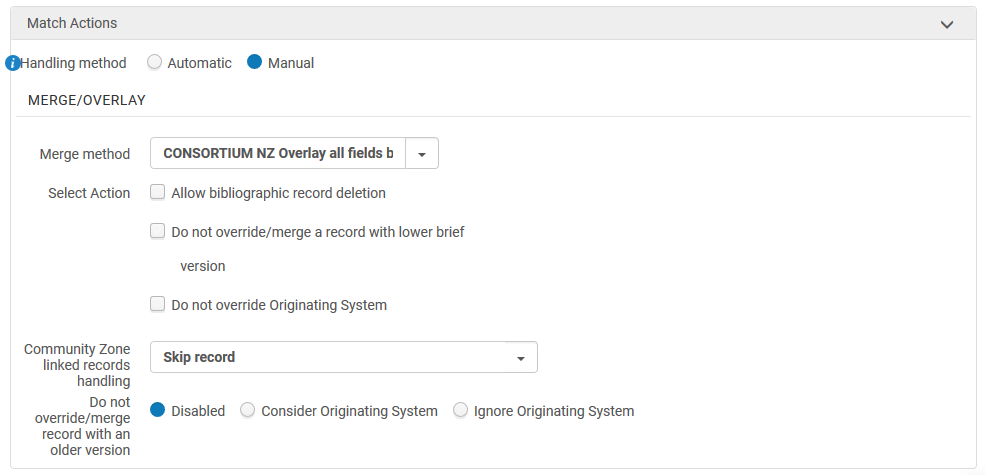
In this scenario, you will want to use the *CONSORTIUM NZ / IZ Overlay all fields but local* merge rule when importing records into the Institution Zone.
When importing records directly into the Network Zone, you must use the ***CONSORTIUM NZ Add local fields*** rule. This is according to WRLC Network Zone policy (see below).
> **Record load profile**
>
> **Policy Statement:** Record load profiles should generally only import to the Institution Zone; the Use Network Zone setting for each institution’s import profile should be set to No.
>
> Import profiles can match to the Network Zone, but if a matching record is found the NZ record must be used (only local fields may be added), and if a matching record is not found the incoming record must be imported to the IZ only. To use this method, the following settings should be used: Use Network Zone: “Yes”, Upon Match: “Merge”, Merge method: “CONSORTIUM NZ AddLocalFields”, Upon No Match: “Import to IZ.”
##### 3. When importing records from OCLC Connexion to the Institution Zone
In this scenario, you will want to configure the *CONSORTIUM NZ / IZ Overlay all fields but local* merge rule for your IZ's OCLC Connexion Integration Profile.
Alma uses an Integration Profile (to be found under the **Configuration Menu > General > External Systems > Integration Profiles**) to import records from OCLC to Alma. If the Integration profile is configured to not use the Network Zone (see image below)...
[](https://alma-documentation-bookstack.azurewebsites.net/uploads/images/gallery/2023-10/merge-rules-5.PNG)
...then Alma will use the merge method configured under the Actions tab of the Integration Profile for merging.
When Alma finds a match with an imported OCLC record and a pre-existing Institution Zone record (the system will use the criteria stipulated under the Serial match method and Non serial match method configured in the Integration Profile; for more information on match methods, see the WRLC NZ policy on [Bibliographic Utilities](https://alma.wrlc.org/books/resources-metadata/page/wrlc-network-zone-bibliographic-record-policies#bkmrk-bibliographic-utilit)), the two records will be merged using the merge method chosen in the Integration Profile.
[](https://alma-documentation-bookstack.azurewebsites.net/uploads/images/gallery/2023-10/merge-rules-6.PNG)
##### 4. When merging two already existing records in the Metadata Editor
Each time you use the Merge Records & Combine Inventory function in the Metadata Editor, you choose which merge rule to use in the pup-up window.
[](https://alma-documentation-bookstack.azurewebsites.net/uploads/images/gallery/2023-10/merge-rules-4.png)
In this scenario, you will want to use the *CONSORTIUM NZ / IZ Overlay all fields but local* merge rule when the primary record is on the left-hand side of the Metadata Editor split screen (the one that is opened first). For more information about primary and secondary records as they pertain to merging, please see the Knowledge Center page on [Primary Records](https://knowledge.exlibrisgroup.com/Alma/Product_Documentation/010Alma_Online_Help_(English)/Metadata_Management/016Working_with_Rules/030Working_with_Merge_Rules#Primary_Records).
Full instructions on how to merge two records can be found in the [How to merge bibliographic records](https://alma.wrlc.org/books/resources-metadata/page/how-to-merge-bibliographic-records) page of the WRLC Wiki.
Keep in mind that you can merge two bibliographic records only when both records are Institution Zone records, or both are Network Zone records. You CANNOT merge an Institution Zone bib record with a Network Zone bib record
#### When are merge rules NOT used in Alma?
##### 1. When importing records from OCLC Connexion to the Network Zone
Alma uses an Integration Profile (to be found under **Configuration Menu > General > External Systems > Integration Profiles**) to import records from OCLC to Alma. If the Integration profile is configured to use the Network Zone (see image below)...
[](https://alma-documentation-bookstack.azurewebsites.net/uploads/images/gallery/2023-10/merge-rules-7.PNG)
...then the Integration Profile IGNORES the merge method chosen under the Actions tab of the Integration Profile.
If a match with a Network Zone record is found, that Network Zone record is used, and the record will NOT merge with the OCLC record.
##### 2. When linking an IZ record to a matching NZ record
You can share an Institution-Zone record with the Network Zone in the Metadata Editor by choosing **File > Share with Network**. If Alma finds a match between the IZ record and an NZ record, you can preview the match or select from among multiple matches. Select Link beneath the matching record to link the Institution Zone record with the Network Zone record.
[](https://alma-documentation-bookstack.azurewebsites.net/uploads/images/gallery/2023-10/merge-rules-8.png)
When an IZ record is linked with an NZ record, the NZ record metadata overlays the IZ record metadata; no merging occurs. The only metadata in the IZ record that merge into the NZ record are [local extensions](https://knowledge.exlibrisgroup.com/Alma/Product_Documentation/010Alma_Online_Help_(English)/100Managing_Multiple_Institutions_Using_a_Network_Zone/03_Managing_Records_in_Consortia/010Network-Managed_Records_in_a_Network_Zone#Adding_Local_Extensions_Using_the_MD_Editor).
#### Extra Resources
[Ex Libris Alma Knowledge Center - Working with Merge Rules](https://knowledge.exlibrisgroup.com/Alma/Product_Documentation/010Alma_Online_Help_(English)/Metadata_Management/016Working_with_Rules/030Working_with_Merge_Rules)