# Georgetown University

Policies, Configurations, and Workflows specific to this university and its IZ. Note: this content may also be applicable to other IZs or may be similar enough to serve as templates for other IZs.

# Resource Sharing

# Requesting Booth Special Collections Material From SCF via Alma

<span style="font-size: 26pt; font-family: Roboto,sans-serif; color: #000000; background-color: transparent; font-weight: 400; font-style: normal; font-variant: normal; text-decoration: none; vertical-align: baseline; white-space: pre-wrap;">Requesting Booth items from SCF via Alma</span>

# <span style="font-size: 20pt; font-family: Roboto,sans-serif; color: #000000; background-color: transparent; font-weight: 400; font-style: normal; font-variant: normal; text-decoration: none; vertical-align: baseline; white-space: pre-wrap;">Initial Alma setup</span>

<span style="font-size: 11pt; font-family: Roboto,sans-serif; color: #000000; background-color: transparent; font-weight: 400; font-style: normal; font-variant: normal; text-decoration: none; vertical-align: baseline; white-space: pre-wrap;">Log in to Alma at </span>[<span style="font-size: 11pt; font-family: Roboto,sans-serif; color: #1155cc; background-color: transparent; font-weight: 400; font-style: normal; font-variant: normal; text-decoration: underline; -webkit-text-decoration-skip: none; text-decoration-skip-ink: none; vertical-align: baseline; white-space: pre-wrap;">https://library.georgetown.edu/alma</span>](https://library.georgetown.edu/alma)<span style="font-size: 11pt; font-family: Roboto,sans-serif; color: #000000; background-color: transparent; font-weight: 400; font-style: normal; font-variant: normal; text-decoration: none; vertical-align: baseline; white-space: pre-wrap;"> (this will use your GU credentials)</span>

<span style="font-size: 11pt; font-family: Roboto,sans-serif; color: #000000; background-color: transparent; font-weight: 400; font-style: normal; font-variant: normal; text-decoration: none; vertical-align: baseline; white-space: pre-wrap;">On the "Please choose your current desk/department" popup, select "Booth Family Center for Special Collections - Special Collections Circulation Desk" and click Select.</span>

<span style="font-size: 11pt; font-family: Roboto,sans-serif; color: #000000; background-color: transparent; font-weight: 400; font-style: normal; font-variant: normal; text-decoration: none; vertical-align: baseline; white-space: pre-wrap;"><span style="border: none; display: inline-block; overflow: hidden; width: 624px; height: 136px;">![](https://lh4.googleusercontent.com/KP8e7jfolaj1pPHsOivSRFriVj0A-Kktu7TM1r8foS71XVLRDNE0VuqVgrbZrZrM4Z-7InV67bhKDA5p4BDXzPBvN3gqUmpYmD-3fPK1h0mfPY_OPn58H3EomaRQb4vD0QYUMb0uHHs9YtT15rjCG5U)</span></span>

<span style="font-size: 11pt; font-family: Roboto,sans-serif; color: #000000; background-color: transparent; font-weight: 400; font-style: normal; font-variant: normal; text-decoration: none; vertical-align: baseline; white-space: pre-wrap;">Next, click the location icon (like a map pin) from the top toolbar, and make sure the "Enable quick printing" box is checked. You can also use the location icon to verify that your location is set as the Booth Circulation Desk.</span>

<span style="font-size: 11pt; font-family: Roboto,sans-serif; color: #000000; background-color: transparent; font-weight: 400; font-style: normal; font-variant: normal; text-decoration: none; vertical-align: baseline; white-space: pre-wrap;"><span style="border: none; display: inline-block; overflow: hidden; width: 624px; height: 128px;">![](https://lh3.googleusercontent.com/NZEfX1E7OaxywDw38btgIa19KjOLjghuvsV4VRVJ-xzLNR3p2wcwtluFAlb8KV_GUFUsL_LUgIWgE9tWhvT7RLfngJty0cQZ-cZjdyufP9RUZY99cB1fj7wbep6y6GLka0ZVI4G6LotncLn8-GJy9UQ)</span></span>

# <span style="font-size: 20pt; font-family: Roboto,sans-serif; color: #000000; background-color: transparent; font-weight: 400; font-style: normal; font-variant: normal; text-decoration: none; vertical-align: baseline; white-space: pre-wrap;">Placing the request</span>

## <span style="font-size: 16pt; font-family: Roboto,sans-serif; color: #000000; background-color: transparent; font-weight: 400; font-style: normal; font-variant: normal; text-decoration: none; vertical-align: baseline; white-space: pre-wrap;">Finding the item</span>

<span style="font-size: 11pt; font-family: Roboto,sans-serif; color: #000000; background-color: transparent; font-weight: 400; font-style: normal; font-variant: normal; text-decoration: none; vertical-align: baseline; white-space: pre-wrap;">First, you need to make sure the search type dropdown box for the search bar says "Physical items"--it's possible to do other types of searches and find what you need, but this way makes it easiest to find the "Request" button.</span>

<span style="font-size: 11pt; font-family: Roboto,sans-serif; color: #000000; background-color: transparent; font-weight: 400; font-style: normal; font-variant: normal; text-decoration: none; vertical-align: baseline; white-space: pre-wrap;"><span style="border: none; display: inline-block; overflow: hidden; width: 624px; height: 32px;">![](https://lh6.googleusercontent.com/kKiQR7uJDFfvZbXtRaayMqmihP-qjZw4ZutxkUF3Pku0HWDKmwTCuSmNuhn6bfoPNL9z2tCZPqSEi6Cg-wAkxjgD872OEMx8YrL-L6tIRkdZt5RsBTx3gvV5S1rwdmzAqNBCAdeNyAPlNgDXUZQ9ADw)</span></span>

<span style="font-size: 11pt; font-family: Roboto,sans-serif; color: #000000; background-color: transparent; font-weight: 400; font-style: normal; font-variant: normal; text-decoration: none; vertical-align: baseline; white-space: pre-wrap;">When you change to a "Physical items" search, the second dropdown box usually defaults to Barcode.</span>

<span style="font-size: 11pt; font-family: Roboto,sans-serif; color: #000000; background-color: transparent; font-weight: 400; font-style: normal; font-variant: normal; text-decoration: none; vertical-align: baseline; white-space: pre-wrap;">If you have the barcode for the item you want, paste it in and hit your enter key or click the magnifying glass to perform the search.</span>

<span style="font-size: 11pt; font-family: Roboto,sans-serif; color: #000000; background-color: transparent; font-weight: 400; font-style: normal; font-variant: normal; text-decoration: none; vertical-align: baseline; white-space: pre-wrap;"><span style="border: none; display: inline-block; overflow: hidden; width: 624px; height: 33px;">![](https://lh6.googleusercontent.com/JcQcIk5r__yrPLinc9nhiTFHW62_AwHbJCNhgybwuDZoEC2nKezQdfmckGY_quLSHjbzfVsN_tfOmlPI4EeL9MRtXc-ufYQn7mGwy_JX5MfhZhuDj9umv92G-woLInBuz_thFbBBHq5oERbSFwWMCq8)</span></span>

<span style="font-size: 11pt; font-family: Roboto,sans-serif; color: #000000; background-color: transparent; font-weight: 400; font-style: normal; font-variant: normal; text-decoration: none; vertical-align: baseline; white-space: pre-wrap;">If you don't have the barcode, you'll need to change that second dropdown box to something else (probably Title), and search that way.</span>

<span style="font-size: 11pt; font-family: Roboto,sans-serif; color: #000000; background-color: transparent; font-weight: 400; font-style: normal; font-variant: normal; text-decoration: none; vertical-align: baseline; white-space: pre-wrap;"><span style="border: none; display: inline-block; overflow: hidden; width: 624px; height: 32px;">![](https://lh6.googleusercontent.com/X1sA9ZVRzcZlL4zpMFXuryfO9d7hMluvKfuRK5XG_iI9R0KzlP0MmVW6aH15E3W23uVcJZ_-AmPK87KKTP281KdH29cGvW9wWYBndIjfn4_1JRn_wjC3gyQ0tpbjZQ9MERGaW0MMDwHC3wY9xBRMu_s)</span></span>

<span style="font-size: 11pt; font-family: Roboto,sans-serif; color: #000000; background-color: transparent; font-weight: 400; font-style: normal; font-variant: normal; text-decoration: none; vertical-align: baseline; white-space: pre-wrap;">Tip: Once you've clicked on a dropdown box, you can start typing the word you want and the options will automatically reduce in number. Once you've selected something, Alma will keep that at the top of the list for easier use later (it remembers up to five selections).</span>

<span style="font-size: 11pt; font-family: Roboto,sans-serif; color: #000000; background-color: transparent; font-weight: 400; font-style: normal; font-variant: normal; text-decoration: none; vertical-align: baseline; white-space: pre-wrap;">Depending on how much of a title you search and how many copies Georgetown owns, you may see results that aren't from Booth. You can use the Facets pane on the left (you may need to click the double carat &gt;&gt; to keep it open) to narrow down your results, either by selecting Booth from the list under Library, </span><span style="font-size: 11pt; font-family: Roboto,sans-serif; color: #000000; background-color: transparent; font-weight: bold; font-style: normal; font-variant: normal; text-decoration: none; vertical-align: baseline; white-space: pre-wrap;">or</span><span style="font-size: 11pt; font-family: Roboto,sans-serif; color: #000000; background-color: transparent; font-weight: 400; font-style: normal; font-variant: normal; text-decoration: none; vertical-align: baseline; white-space: pre-wrap;"> by clicking on the blue "Library Scope: All" button (</span>[<span style="font-size: 11pt; font-family: Roboto,sans-serif; color: #1155cc; background-color: transparent; font-weight: 400; font-style: normal; font-variant: normal; text-decoration: underline; -webkit-text-decoration-skip: none; text-decoration-skip-ink: none; vertical-align: baseline; white-space: pre-wrap;">see Library Scope section below</span>](https://docs.google.com/document/d/1EeQy-EUCZenwMETgfFr7ezult3DQKdQbDBsLOnLxfG8/edit#bookmark=id.a332nw1oy1hr)<span style="font-size: 11pt; font-family: Roboto,sans-serif; color: #000000; background-color: transparent; font-weight: 400; font-style: normal; font-variant: normal; text-decoration: none; vertical-align: baseline; white-space: pre-wrap;">).</span>

## <span style="font-size: 16pt; font-family: Roboto,sans-serif; color: #000000; background-color: transparent; font-weight: 400; font-style: normal; font-variant: normal; text-decoration: none; vertical-align: baseline; white-space: pre-wrap;">Requesting the item</span>

<span style="font-size: 11pt; font-family: Roboto,sans-serif; color: #000000; background-color: transparent; font-weight: 400; font-style: normal; font-variant: normal; text-decoration: none; vertical-align: baseline; white-space: pre-wrap;">Once you've found the item you want to request, click the "Request" button.</span>

<span style="font-size: 11pt; font-family: Roboto,sans-serif; color: #000000; background-color: transparent; font-weight: 400; font-style: normal; font-variant: normal; text-decoration: none; vertical-align: baseline; white-space: pre-wrap;"><span style="border: none; display: inline-block; overflow: hidden; width: 624px; height: 171px;">![](https://lh4.googleusercontent.com/aeUThDbENJC8EXrXG1eO3grbZeniDCXiD2yEk0aPviqHhkLqSf26HnWByJx2ZoWaE8gqNyhUTQN3wqxyyFZcPpoVU-MguyPN5qs0K0yjDMuOzCv_g3B0HtSQ9QtOTG6OAIYxFsMSWTKkk2kdDipjTD0)</span></span>

<span style="font-size: 11pt; font-family: Roboto,sans-serif; color: #000000; background-color: transparent; font-weight: 400; font-style: normal; font-variant: normal; text-decoration: none; vertical-align: baseline; white-space: pre-wrap;">You will be taken to the "Create Request" page, where you need to choose:</span>

- <span style="font-size: 11pt; font-family: Roboto,sans-serif; color: #000000; background-color: transparent; font-weight: 400; font-style: normal; font-variant: normal; text-decoration: none; vertical-align: baseline; white-space: pre-wrap;">Request Type = Move temporarily</span>
- <span style="font-size: 11pt; font-family: Roboto,sans-serif; color: #000000; background-color: transparent; font-weight: 400; font-style: normal; font-variant: normal; text-decoration: none; vertical-align: baseline; white-space: pre-wrap;">To = Booth Family Center for Special Collections</span>

<span style="font-size: 11pt; font-family: Roboto,sans-serif; color: #000000; background-color: transparent; font-weight: 400; font-style: normal; font-variant: normal; text-decoration: none; vertical-align: baseline; white-space: pre-wrap;">The rest of the fields are optional; providing a note may be helpful for staff to know who requested the item and/or why.</span>

<span style="font-size: 11pt; font-family: Roboto,sans-serif; color: #000000; background-color: transparent; font-weight: 400; font-style: normal; font-variant: normal; text-decoration: none; vertical-align: baseline; white-space: pre-wrap;"><span style="border: none; display: inline-block; overflow: hidden; width: 624px; height: 312px;">![](https://lh3.googleusercontent.com/1ovnHjsLrYRDj65f8-OX7rzmzbAzzx35n7wj35ssyTDTEYI9ieAL22OZMM4o0xfcBQIk_nDJu1EZ8OGjI-jFcoucFhSNLNGOxp51e1UD8oSxu6N-4g64X3Xc8RrieB1tayiPdbULmmXf2uBnzjncWgo)</span></span>

<span style="font-size: 11pt; font-family: Roboto,sans-serif; color: #000000; background-color: transparent; font-weight: 400; font-style: normal; font-variant: normal; text-decoration: none; vertical-align: baseline; white-space: pre-wrap;">When you're satisfied, click "Submit".</span>

<span style="font-size: 11pt; font-family: Roboto,sans-serif; color: #000000; background-color: transparent; font-weight: 400; font-style: normal; font-variant: normal; text-decoration: none; vertical-align: baseline; white-space: pre-wrap;">You'll leave the "Create Request" page and return to your search results. If all went well, a green confirmation message will briefly appear.</span>

<span style="font-size: 11pt; font-family: Roboto,sans-serif; color: #000000; background-color: transparent; font-weight: 400; font-style: normal; font-variant: normal; text-decoration: none; vertical-align: baseline; white-space: pre-wrap;"><span style="border: none; display: inline-block; overflow: hidden; width: 424px; height: 226px;">![](https://lh5.googleusercontent.com/VVU4ca53Z2td2IAYxNj5Py518lzZ25igBiNpWTp_bFijAt29rJBWGeHMayEHNJ6mGlpZPUHbFQyzFEbSf8NCl1G5EkN-bYPFYn1fbMTafKn_ok3WmZwr7J0MdUQPRkfQSfjjPZqjbWQ0EcFlAhhVOrU)</span></span>

<span style="font-size: 11pt; font-family: Roboto,sans-serif; color: #000000; background-color: transparent; font-weight: 400; font-style: normal; font-variant: normal; text-decoration: none; vertical-align: baseline; white-space: pre-wrap;">If you don't notice the confirmation message, you can look at the item you requested to confirm the "Process type" is now "Requested" and there's a new field that says "Requests: 1".</span>

<span style="font-size: 11pt; font-family: Roboto,sans-serif; color: #000000; background-color: transparent; font-weight: 400; font-style: normal; font-variant: normal; text-decoration: none; vertical-align: baseline; white-space: pre-wrap;"><span style="border: none; display: inline-block; overflow: hidden; width: 624px; height: 109px;">![](https://lh3.googleusercontent.com/SOd72SNt-MouSLMlLtylcF0N0SddmVFEnVJn9OibbBbWTVYCMPcI_pGYJFl72LaA-yV8Kz4lylRVDyh1hv7VML1ir-9yeKPphAQHGy-YWF4xX3mSgj_M5rNlg3B7Dlgf3aBdqPK7wQrttmHkctzshnI)</span></span>

<span style="font-size: 11pt; font-family: Roboto,sans-serif; color: #000000; background-color: transparent; font-weight: 400; font-style: normal; font-variant: normal; text-decoration: none; vertical-align: baseline; white-space: pre-wrap;">While the item is in process, you can click on that request number (the "1") and you'll see the "Resource Request Monitoring" screen, which has additional details about the request.</span>

<span style="font-size: 11pt; font-family: Roboto,sans-serif; color: #000000; background-color: transparent; font-weight: 400; font-style: normal; font-variant: normal; text-decoration: none; vertical-align: baseline; white-space: pre-wrap;"><span style="border: none; display: inline-block; overflow: hidden; width: 624px; height: 172px;">![](https://lh4.googleusercontent.com/jSLY259-Tr6_0SCyZHhKHWpCbVdR_5mvq7RT-AOIEuo5FRL5wktpX-FxWnzkYTk0-s6knfcknSIfOWAGkj3QJ7dJVOHSFi08eQDyrnKRf0F6atMYMdY1-_e21599WcEP-SKCy_5Zku0vqJhPbS2uF1s)</span></span>

<span style="font-size: 11pt; font-family: Roboto,sans-serif; color: #000000; background-color: transparent; font-weight: 400; font-style: normal; font-variant: normal; text-decoration: none; vertical-align: baseline; white-space: pre-wrap;">The key piece is the "Workflow Step". The step can be:</span>

- <span style="font-size: 11pt; font-family: Roboto,sans-serif; color: #000000; background-color: transparent; font-weight: 400; font-style: normal; font-variant: normal; text-decoration: none; vertical-align: baseline; white-space: pre-wrap;">Waiting For Remote Storage (until the next time requests are communicated to SCF; occurs at noon and midnight daily)</span>
- <span style="font-size: 11pt; font-family: Roboto,sans-serif; color: #000000; background-color: transparent; font-weight: 400; font-style: normal; font-variant: normal; text-decoration: none; vertical-align: baseline; white-space: pre-wrap;">Request Communicated to Storage (after the request has been sent to SCF)</span>

#  

# <span style="font-size: 20pt; font-family: Roboto,sans-serif; color: #000000; background-color: transparent; font-weight: 400; font-style: normal; font-variant: normal; text-decoration: none; vertical-align: baseline; white-space: pre-wrap;">Receiving the item at Booth</span>

<span style="font-size: 11pt; font-family: Roboto,sans-serif; color: #000000; background-color: transparent; font-weight: 400; font-style: normal; font-variant: normal; text-decoration: none; vertical-align: baseline; white-space: pre-wrap;">When the item has physically arrived at Booth, you need to tell Alma that it has arrived and where it's going to 'live' temporarily.</span>

<span style="font-size: 11pt; font-family: Roboto,sans-serif; color: #000000; background-color: transparent; font-weight: 400; font-style: normal; font-variant: normal; text-decoration: none; vertical-align: baseline; white-space: pre-wrap;">In Alma, click on Fulfillment, then choose "Scan In Items". (You can star it for easier use; see </span>[<span style="font-size: 11pt; font-family: Roboto,sans-serif; color: #1155cc; background-color: transparent; font-weight: 400; font-style: normal; font-variant: normal; text-decoration: underline; -webkit-text-decoration-skip: none; text-decoration-skip-ink: none; vertical-align: baseline; white-space: pre-wrap;">Quick Links section below</span>](https://docs.google.com/document/d/1EeQy-EUCZenwMETgfFr7ezult3DQKdQbDBsLOnLxfG8/edit#bookmark=id.p3dm4tyvn0he)<span style="font-size: 11pt; font-family: Roboto,sans-serif; color: #000000; background-color: transparent; font-weight: 400; font-style: normal; font-variant: normal; text-decoration: none; vertical-align: baseline; white-space: pre-wrap;">.)</span>

<span style="font-size: 11pt; font-family: Roboto,sans-serif; color: #000000; background-color: transparent; font-weight: 400; font-style: normal; font-variant: normal; text-decoration: none; vertical-align: baseline; white-space: pre-wrap;"><span style="border: none; display: inline-block; overflow: hidden; width: 422px; height: 429px;">![](https://lh5.googleusercontent.com/MNAjC3reGLK2pRxLSjbQwsvdZkDH1EBF80iSDtntTYMGSziQi9JYjfjXOAsTBgLAEUviRa0OlbE2crRTkOr5-P8VXrqIR6w4krr3h2LB9Llh9adXBzFPiRE9svgk6TnNYxBOfPVAitDeXM6Gppp1qNY)</span></span>

<span style="font-size: 11pt; font-family: Roboto,sans-serif; color: #000000; background-color: transparent; font-weight: 400; font-style: normal; font-variant: normal; text-decoration: none; vertical-align: baseline; white-space: pre-wrap;">On the "Scan In Items" screen, click the "Change Item Information" tab.</span>

<span style="font-size: 11pt; font-family: Roboto,sans-serif; color: #000000; background-color: transparent; font-weight: 400; font-style: normal; font-variant: normal; text-decoration: none; vertical-align: baseline; white-space: pre-wrap;"><span style="border: none; display: inline-block; overflow: hidden; width: 432px; height: 157px;">![](https://lh5.googleusercontent.com/HYADzQV_0ui4rOeYJBBHcyE2ue41bGE5FrzxjAYaJKymR_0b84A6C_WU8NgBfD7g5CsgHzh-I__FLKRsy6-hBsoQowD9BJ1_rYaX0TwKpnFEdg2H0wa6_hJNi5-ZWX2iDrE9TF-yOn5ySVWtxQFhdUo)</span></span>

<span style="font-size: 11pt; font-family: Roboto,sans-serif; color: #000000; background-color: transparent; font-weight: 400; font-style: normal; font-variant: normal; text-decoration: none; vertical-align: baseline; white-space: pre-wrap;">On the Change Item Information form:</span>

- <span style="font-size: 11pt; font-family: Roboto,sans-serif; color: #000000; background-color: transparent; font-weight: 400; font-style: normal; font-variant: normal; text-decoration: none; vertical-align: baseline; white-space: pre-wrap;">Change Type = Temporary</span>
- <span style="font-size: 11pt; font-family: Roboto,sans-serif; color: #000000; background-color: transparent; font-weight: 400; font-style: normal; font-variant: normal; text-decoration: none; vertical-align: baseline; white-space: pre-wrap;">Location = \[whichever Booth location makes sense for internal workflows\]</span>
- <span style="font-size: 11pt; font-family: Roboto,sans-serif; color: #000000; background-color: transparent; font-weight: 400; font-style: normal; font-variant: normal; text-decoration: none; vertical-align: baseline; white-space: pre-wrap;">Check Requests = unchecked</span>

<span style="font-size: 11pt; font-family: Roboto,sans-serif; color: #000000; background-color: transparent; font-weight: 400; font-style: normal; font-variant: normal; text-decoration: none; vertical-align: baseline; white-space: pre-wrap;">Then scan the item barcode into the "Scan item barcode" field.</span>

<span style="font-size: 11pt; font-family: Roboto,sans-serif; color: #000000; background-color: transparent; font-weight: 400; font-style: normal; font-variant: normal; text-decoration: none; vertical-align: baseline; white-space: pre-wrap;"><span style="border: none; display: inline-block; overflow: hidden; width: 624px; height: 243px;">![](https://lh3.googleusercontent.com/D3KlQS7a4XPAQgnLDG0FYqnGQ84X7Vc5vu8KYc5pJLB5yd2f1HYgsLGv4M31eYYOHDq53yHdK1RfERvy9IdMLdHo09z8IuVchyEWlqCi-9b7KbO9xiOHRZ49mYLvmDRR6rYhTVPx84IvqAJQZMK1XA)</span></span>

<span style="font-size: 11pt; font-family: Roboto,sans-serif; color: #000000; background-color: transparent; font-weight: 400; font-style: normal; font-variant: normal; text-decoration: none; vertical-align: baseline; white-space: pre-wrap;">You'll see a confirmation below the form, with the Destination "Reshelve". Alma now knows this item is temporarily housed in Booth, and the move request has been marked complete.</span>

<span style="font-size: 11pt; font-family: Roboto,sans-serif; color: #000000; background-color: transparent; font-weight: 400; font-style: normal; font-variant: normal; text-decoration: none; vertical-align: baseline; white-space: pre-wrap;"><span style="border: none; display: inline-block; overflow: hidden; width: 624px; height: 99px;">![](https://lh5.googleusercontent.com/z_WSX-A2APGG6ZDp8ite6lxPEqG5PfAWy_sHs-ByB7uFUVtpSTfA60x1G0JBtUbRa6KrF5vdTP4hT3c5C1chllhFXvRCmGmgCh3u-XdiTV4sNVp2netswWFvUVx4rQJJ1NRmoV_U94KZp1CWbwOnPg)</span></span>

<span style="font-size: 11pt; font-family: Roboto,sans-serif; color: #000000; background-color: transparent; font-weight: 400; font-style: normal; font-variant: normal; text-decoration: none; vertical-align: baseline; white-space: pre-wrap;">You can confirm this by searching the barcode in Alma and examining the information that comes up. The "Temporary Location" will say whatever location you selected, and you won't see a "Requests" line anymore.</span>

<span style="font-size: 11pt; font-family: Roboto,sans-serif; color: #000000; background-color: transparent; font-weight: 400; font-style: normal; font-variant: normal; text-decoration: none; vertical-align: baseline; white-space: pre-wrap;"><span style="border: none; display: inline-block; overflow: hidden; width: 624px; height: 325px;">![](https://lh5.googleusercontent.com/-NKObhz4OYlXi087WLpd4WLW_qtgjhCaNX6dErzlScE19sniZrGmWExDZ24lL4I-nXY-uWMP7KxUC-nVLkuwPgAyIFY6vtBTIIhWYiluPtr-55gRNL1xct8DtcYUc7F3lrq7OaQ59NAAKOFPgn8u7Gs)</span></span>

<span style="font-size: 11pt; font-family: Roboto,sans-serif; color: #000000; background-color: transparent; font-weight: 400; font-style: normal; font-variant: normal; text-decoration: none; vertical-align: baseline; white-space: pre-wrap;">The temporary location will also appear in HoyaSearch, if the record is visible (this example is not).</span>

#  

# <span style="font-size: 20pt; font-family: Roboto,sans-serif; color: #000000; background-color: transparent; font-weight: 400; font-style: normal; font-variant: normal; text-decoration: none; vertical-align: baseline; white-space: pre-wrap;">Returning the item to SCF</span>

<span style="font-size: 11pt; font-family: Roboto,sans-serif; color: #000000; background-color: transparent; font-weight: 400; font-style: normal; font-variant: normal; text-decoration: none; vertical-align: baseline; white-space: pre-wrap;">When you're ready to send the item back, you need to tell Alma that it's going 'home' to the SCF.</span>

<span style="font-size: 11pt; font-family: Roboto,sans-serif; color: #000000; background-color: transparent; font-weight: 400; font-style: normal; font-variant: normal; text-decoration: none; vertical-align: baseline; white-space: pre-wrap;">In Alma, click on Fulfillment, then choose "Scan In Items". (You can star it for easier use; see </span>[<span style="font-size: 11pt; font-family: Roboto,sans-serif; color: #1155cc; background-color: transparent; font-weight: 400; font-style: normal; font-variant: normal; text-decoration: underline; -webkit-text-decoration-skip: none; text-decoration-skip-ink: none; vertical-align: baseline; white-space: pre-wrap;">Quick Links section below</span>](https://docs.google.com/document/d/1EeQy-EUCZenwMETgfFr7ezult3DQKdQbDBsLOnLxfG8/edit#bookmark=id.p3dm4tyvn0he)<span style="font-size: 11pt; font-family: Roboto,sans-serif; color: #000000; background-color: transparent; font-weight: 400; font-style: normal; font-variant: normal; text-decoration: none; vertical-align: baseline; white-space: pre-wrap;">.)</span>

<span style="font-size: 11pt; font-family: Roboto,sans-serif; color: #000000; background-color: transparent; font-weight: 400; font-style: normal; font-variant: normal; text-decoration: none; vertical-align: baseline; white-space: pre-wrap;"><span style="border: none; display: inline-block; overflow: hidden; width: 422px; height: 429px;">![](https://lh5.googleusercontent.com/MNAjC3reGLK2pRxLSjbQwsvdZkDH1EBF80iSDtntTYMGSziQi9JYjfjXOAsTBgLAEUviRa0OlbE2crRTkOr5-P8VXrqIR6w4krr3h2LB9Llh9adXBzFPiRE9svgk6TnNYxBOfPVAitDeXM6Gppp1qNY)</span></span>

<span style="font-size: 11pt; font-family: Roboto,sans-serif; color: #000000; background-color: transparent; font-weight: 400; font-style: normal; font-variant: normal; text-decoration: none; vertical-align: baseline; white-space: pre-wrap;">On the "Scan In Items" screen, click the "Change Item Information" tab.</span>

<span style="font-size: 11pt; font-family: Roboto,sans-serif; color: #000000; background-color: transparent; font-weight: 400; font-style: normal; font-variant: normal; text-decoration: none; vertical-align: baseline; white-space: pre-wrap;"><span style="border: none; display: inline-block; overflow: hidden; width: 432px; height: 157px;">![](https://lh5.googleusercontent.com/HYADzQV_0ui4rOeYJBBHcyE2ue41bGE5FrzxjAYaJKymR_0b84A6C_WU8NgBfD7g5CsgHzh-I__FLKRsy6-hBsoQowD9BJ1_rYaX0TwKpnFEdg2H0wa6_hJNi5-ZWX2iDrE9TF-yOn5ySVWtxQFhdUo)</span></span>

<span style="font-size: 11pt; font-family: Roboto,sans-serif; color: #000000; background-color: transparent; font-weight: 400; font-style: normal; font-variant: normal; text-decoration: none; vertical-align: baseline; white-space: pre-wrap;">On the "Change Item Information" form:</span>

- <span style="font-size: 11pt; font-family: Roboto,sans-serif; color: #000000; background-color: transparent; font-weight: 400; font-style: normal; font-variant: normal; text-decoration: none; vertical-align: baseline; white-space: pre-wrap;">Change Type = Restore</span>

<span style="font-size: 11pt; font-family: Roboto,sans-serif; color: #000000; background-color: transparent; font-weight: 400; font-style: normal; font-variant: normal; text-decoration: none; vertical-align: baseline; white-space: pre-wrap;">When you select "Restore" as the type, the rest of the form will disappear and the only other field remaining is for scanning the item barcode.</span>

<span style="font-size: 11pt; font-family: Roboto,sans-serif; color: #000000; background-color: transparent; font-weight: 400; font-style: normal; font-variant: normal; text-decoration: none; vertical-align: baseline; white-space: pre-wrap;"><span style="border: none; display: inline-block; overflow: hidden; width: 624px; height: 85px;">![](https://lh3.googleusercontent.com/uGhuOSFtTEO7wwkmab5T1pVrTf046xHEHpiT_dihc2ChF1B9IUt5F4TB6OLt6ps5ZR4nEvmfNuuk1sMVzIikevLeIb0nb6BD5BivHGQF4jGzZrDvOKlVmEi4pHhz3XxTFZMA09lNjVXuyQjSwNi3JA)</span></span>

<span style="font-size: 11pt; font-family: Roboto,sans-serif; color: #000000; background-color: transparent; font-weight: 400; font-style: normal; font-variant: normal; text-decoration: none; vertical-align: baseline; white-space: pre-wrap;">When you scan the item barcode, the action will be confirmed in the table below the form.</span>

<span style="font-size: 11pt; font-family: Roboto,sans-serif; color: #000000; background-color: transparent; font-weight: 400; font-style: normal; font-variant: normal; text-decoration: none; vertical-align: baseline; white-space: pre-wrap;"><span style="border: none; display: inline-block; overflow: hidden; width: 624px; height: 88px;">![](https://lh5.googleusercontent.com/4Gesx_aqg7n_V6glA8GTl6MA5oz4wyFuknV6llof8_oMj-O-5M2luzok1bJnD1kmBp9BZWGiUZKVK9ErkrSY2w2GDPsQf0x6W5OtQn8IbpfD5-TDOJC53ROQPQ_H94NXmOdMbh4oEnABc6vEbLWVPg)</span></span><span style="font-size: 11pt; font-family: Roboto,sans-serif; color: #000000; background-color: transparent; font-weight: 400; font-style: normal; font-variant: normal; text-decoration: none; vertical-align: baseline; white-space: pre-wrap;">  
  
</span>

<span style="font-size: 11pt; font-family: Roboto,sans-serif; color: #000000; background-color: transparent; font-weight: 400; font-style: normal; font-variant: normal; text-decoration: none; vertical-align: baseline; white-space: pre-wrap;">The important portion is the "Destination: WRLC SCF Storage". Now Alma knows the item is returning to storage. If you search the item in Alma (and HoyaSearch), you'll see that the "Process type" is "Transit", and the "Requests" line has reappeared.</span>

<span style="font-size: 11pt; font-family: Roboto,sans-serif; color: #000000; background-color: transparent; font-weight: 400; font-style: normal; font-variant: normal; text-decoration: none; vertical-align: baseline; white-space: pre-wrap;"><span style="border: none; display: inline-block; overflow: hidden; width: 624px; height: 231px;">![](https://lh4.googleusercontent.com/Kgn7es7g3YND_Ey_lD_CslIx9OV1NwwFYTJ0Lr5gYlymeAmSvQ1-TGhXirjM3ZhoC96GHqC4hiw41gMcaXH0uLV1H2HLZKdCMna8pt6oJiN3BSPr9NjfRs9rLw0XNQQf-Q69_JX3YA9gPQugY1sycQ)</span></span>

<span style="font-size: 11pt; font-family: Roboto,sans-serif; color: #000000; background-color: transparent; font-weight: 400; font-style: normal; font-variant: normal; text-decoration: none; vertical-align: baseline; white-space: pre-wrap;">This is Alma's way of saying that the item is traveling back to be reshelved where it normally lives. The process type and request will remain until the item is received at the SCF and scanned in to acknowledge that it's been returned.</span>

#  

# <span style="font-size: 20pt; font-family: Roboto,sans-serif; color: #000000; background-color: transparent; font-weight: 400; font-style: normal; font-variant: normal; text-decoration: none; vertical-align: baseline; white-space: pre-wrap;">Handy Alma customizations</span>

## <span style="font-size: 16pt; font-family: Roboto,sans-serif; color: #000000; background-color: transparent; font-weight: 400; font-style: normal; font-variant: normal; text-decoration: none; vertical-align: baseline; white-space: pre-wrap;">Library Scope selection for search results</span>

<span style="font-size: 11pt; font-family: Roboto,sans-serif; color: #000000; background-color: transparent; font-weight: 400; font-style: normal; font-variant: normal; text-decoration: none; vertical-align: baseline; white-space: pre-wrap;">Depending on how much of a title you search and how many copies Georgetown owns, you may see results that aren't from Booth.</span>

<span style="font-size: 11pt; font-family: Roboto,sans-serif; color: #000000; background-color: transparent; font-weight: 400; font-style: normal; font-variant: normal; text-decoration: none; vertical-align: baseline; white-space: pre-wrap;">From a search results screen, use the Facets pane on the left (you may need to click the double carat &gt;&gt; to keep it open) to narrow down your results, either by selecting Booth from the list under Library, </span><span style="font-size: 11pt; font-family: Roboto,sans-serif; color: #000000; background-color: transparent; font-weight: bold; font-style: normal; font-variant: normal; text-decoration: none; vertical-align: baseline; white-space: pre-wrap;">or</span><span style="font-size: 11pt; font-family: Roboto,sans-serif; color: #000000; background-color: transparent; font-weight: 400; font-style: normal; font-variant: normal; text-decoration: none; vertical-align: baseline; white-space: pre-wrap;"> by clicking on the blue "Library Scope: All" button. The "Scope Configuration" panel will appear and you can check the box for Booth, then click Apply.</span>

<span style="font-size: 11pt; font-family: Roboto,sans-serif; color: #000000; background-color: transparent; font-weight: 400; font-style: normal; font-variant: normal; text-decoration: none; vertical-align: baseline; white-space: pre-wrap;"><span style="border: none; display: inline-block; overflow: hidden; width: 217px; height: 740px;">![](https://lh6.googleusercontent.com/mle18A440VtCNCazhrldYGuL2ZMjAsVtbuA3DMGbq7YsG8oXx5WtByh4YxOqnqy2xYfgZAidk88tzn3hyDHG4KphRYZKYd8dA4LK9vDwq4yXhvphptiEOJYk-6vt_9AbbMj2jW8m12TGNcoq503_Kzk)</span></span>

<span style="font-size: 11pt; font-family: Roboto,sans-serif; color: #000000; background-color: transparent; font-weight: 400; font-style: normal; font-variant: normal; text-decoration: none; vertical-align: baseline; white-space: pre-wrap;">Modifying your Library Scope should persist for future searches.</span>

## <span style="font-size: 16pt; font-family: Roboto,sans-serif; color: #000000; background-color: transparent; font-weight: 400; font-style: normal; font-variant: normal; text-decoration: none; vertical-align: baseline; white-space: pre-wrap;">Quick Links (star a menu option)</span>

<span style="font-size: 11pt; font-family: Roboto,sans-serif; color: #000000; background-color: transparent; font-weight: 400; font-style: normal; font-variant: normal; text-decoration: none; vertical-align: baseline; white-space: pre-wrap;">If there are common tasks you perform within the Alma menus, you may want to 'star' that menu item and have it appear like a bookmark rather than navigating the menus every time.</span>

<span style="font-size: 11pt; font-family: Roboto,sans-serif; color: #000000; background-color: transparent; font-weight: 400; font-style: normal; font-variant: normal; text-decoration: none; vertical-align: baseline; white-space: pre-wrap;">When you have an Alma menu open, hover over the link you'd like to bookmark and you should see a greyed out star next to it.</span>

<span style="font-size: 11pt; font-family: Roboto,sans-serif; color: #000000; background-color: transparent; font-weight: 400; font-style: normal; font-variant: normal; text-decoration: none; vertical-align: baseline; white-space: pre-wrap;"><span style="border: none; display: inline-block; overflow: hidden; width: 414px; height: 434px;">![](https://lh6.googleusercontent.com/XZnX2rud9Mmtx-WWrfeevBh0CKJFkLqChcsaHpolX8uOgb6cslV7j_F1rMFOLVUQ0M2ToFVHzdKiFPQ1p8bzgcQ3VD-w1kyofV6soGkOxt_dM-3QQVOg4NUjVJ3TtBRdWgfbPhgCXpAVzn2r5JMU-P0)</span></span>

<span style="font-size: 11pt; font-family: Roboto,sans-serif; color: #000000; background-color: transparent; font-weight: 400; font-style: normal; font-variant: normal; text-decoration: none; vertical-align: baseline; white-space: pre-wrap;">Click on the star (not the link), and it should turn blue.</span>

<span style="font-size: 11pt; font-family: Roboto,sans-serif; color: #000000; background-color: transparent; font-weight: 400; font-style: normal; font-variant: normal; text-decoration: none; vertical-align: baseline; white-space: pre-wrap;"><span style="border: none; display: inline-block; overflow: hidden; width: 410px; height: 387px;">![](https://lh6.googleusercontent.com/CzRE4Kgq873he_5dDBQKgW2SBHLEBHGceUJR4Dw6OKXejim9pwvjclz2L_6BH8WvOrwMvqqKwr0j1T1Gv28Q9SQM3mrVdzD_gWDX9DeaeaV1Zas4Xm6wHhh6jmjrl4IwuhAfI029ql-b_lGSkKlfiAk)</span></span>

<span style="font-size: 11pt; font-family: Roboto,sans-serif; color: #000000; background-color: transparent; font-weight: 400; font-style: normal; font-variant: normal; text-decoration: none; vertical-align: baseline; white-space: pre-wrap;">Once one or more menu links have a blue star beside them, click on the icon that says Alma Production below it.</span>

<span style="font-size: 11pt; font-family: Roboto,sans-serif; color: #000000; background-color: transparent; font-weight: 400; font-style: normal; font-variant: normal; text-decoration: none; vertical-align: baseline; white-space: pre-wrap;"><span style="border: none; display: inline-block; overflow: hidden; width: 146px; height: 107px;">![](https://lh5.googleusercontent.com/K0hsisafGczHggwBpyBjj_xx6AP-F7kKpFbj1MJyHQ0c32KnSHiaHo7gzSnhGO9yVJUnckUMQfUDm30CHpI4U_ohCjLfbw_KJvKu3clZcSl82v-g19fOMz5jZ2u2tsHxaNaQMjwrM-DWn4AWRyceH20)</span></span>

<span style="font-size: 11pt; font-family: Roboto,sans-serif; color: #000000; background-color: transparent; font-weight: 400; font-style: normal; font-variant: normal; text-decoration: none; vertical-align: baseline; white-space: pre-wrap;">In the menu that opens, click "Pin Quick Links menu".</span>

<span style="font-size: 11pt; font-family: Roboto,sans-serif; color: #000000; background-color: transparent; font-weight: 400; font-style: normal; font-variant: normal; text-decoration: none; vertical-align: baseline; white-space: pre-wrap;"><span style="border: none; display: inline-block; overflow: hidden; width: 624px; height: 435px;">![](https://lh5.googleusercontent.com/wEYRrWTvphfvPK64Hnnoq_hr_4VnJfHHWS9Xq5y39G5huZ2xq_LqKd1py1p4cUWUcHHVCfuEjNTvnnBDvjq77NMqeU3-AMbOdJK86azNSMEZkNH0RwR5nI7y4hM7Xg9tvLGECwZTHdcmHxyTz3x6CjU)</span></span>

<span style="font-size: 11pt; font-family: Roboto,sans-serif; color: #000000; background-color: transparent; font-weight: 400; font-style: normal; font-variant: normal; text-decoration: none; vertical-align: baseline; white-space: pre-wrap;">Any menu links that you 'star' will now appear right below the search box on every Alma screen.</span>

<span style="font-size: 11pt; font-family: Roboto,sans-serif; color: #000000; background-color: transparent; font-weight: 400; font-style: normal; font-variant: normal; text-decoration: none; vertical-align: baseline; white-space: pre-wrap;"><span style="border: none; display: inline-block; overflow: hidden; width: 624px; height: 56px;">![](https://lh4.googleusercontent.com/ZtqnDnK6gMVlP7bZpeivgcly7guYuh7seef6KEvmSEL-qKfIxmIB7oU_rB1ziMJtwdnNelCVVyD7xCA8zrzlytpDJiGag7TunPPVB_jzY-IWH9sQfMLW8ZwnHINO15zU8hPziHfChWg8yM_B4voXcw8)</span></span>

<span style="font-weight: normal;">  
</span>

<span style="font-size: 11pt; font-family: Roboto,sans-serif; color: #000000; background-color: transparent; font-weight: 400; font-style: normal; font-variant: normal; text-decoration: none; vertical-align: baseline; white-space: pre-wrap;">The number of visible quick links you can have depends on how long the names of the menu links are.</span>

# Equipment and Booking

GU currently has three collections of audiovisual equipment in Alma and uses booking for one collection of equipment and also our Digital Media Studio room reservations.

This documentation includes the cataloging, fulfillment policies, and suggested workflows from our internal staff wiki.

# Configurations

Initial setup pieces like cataloging template, local thumbnail configuration, and custom resource type setup.

## Alma Setup

### Booking-related parameters

Configuration &gt; Fulfillment &gt; General &gt; Other Settings

- allow\_same\_day\_booking : false (not the default)
- enable\_booking\_workflow : true (this is the default)

### Cataloging

#### Equipment

New location: steq - Stacks Equipment (assigned to the Short Loan Fulfillment Unit)

#### Digital Media Studios

New location: studios - Digital Media Studios (assigned to the Short Loan Fulfillment Unit)

New item policy: Studio

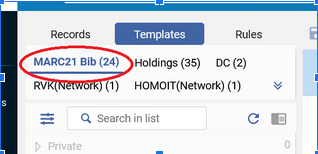
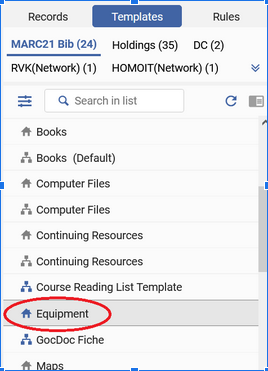
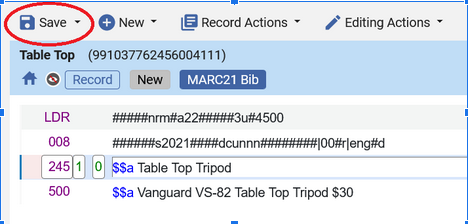
#### Equipment Bib record template

The LDR and 008 values were from the existing Books template, so it's not properly correct from a cataloger point of view. These records are saved to our IZ only and not shared with the NZ.

245 10 $$a \[name of the equipment\]  
500 \_\_ $$a \[any notes/descriptive information about brand/model/etc. that you want in the record to help patrons find it and know they have the right thing\]  
956 42 $$u \[URL of a thumbnail image; if you don't have one, delete this field\]  
996 \_\_ $$a equipment

### Fulfillment

#### New Overdue and Lost Loan Profiles

##### Specifically for the Stacks Equipment location and Equipment item policy

- Overdue notices at 1 day &amp; 6 days overdue 
    - 1 Day overdue also applies "Overdue Item" block to the patron's account
- Lost at 7 days overdue 
    - When the item becomes lost the Overdue block is removed but the patron is now blocked due to owing the replacement cost

##### For Studios: Lost Loan Profile

Name : Lost Lau Studio Key  
Description : Lost if not returned before close  
Active : Yes  
Profile Type : Change to lost  
Create Overdue Notification Fee : No  
Days After Due Date : 0 Days  
Days After Status Date : 0 Days  
Loan Status : \[blank\]  
User Group : \[blank\]  
Library : Lauinger Library  
Locations : Lauinger Library - Digital Media Studios (studios)  
Item policy : \[blank\]  
Material Type : \[blank\]  
Letter send format : Mail

#### Request Pickup Configuration  


Name: Booking requests for Digital Media Studios  
Input Parameters:   
Request Type = Booking  
Location = Lauinger Library - Digital Media Studios

Output Parameters:

- Consider as missing when expired = Never
- Show in 'Pick From Shelf' list = False
- Expiry time for 'Pick From Shelf' (in days) = -
- Calculate expiry time in open days = No

\--

Name: Booking requests for Lau Equipment  
Input Parameters: Request Type = Booking

Output Parameters:

- Consider as missing when expired = Never
- Show in 'Pick From Shelf' list = True
- Expiry time for 'Pick From Shelf' (in days) = 3
- Calculate expiry time in open days = Yes


#### Process Type Exception rules

Added at the top of the list of Booking rules to prevent requests on lost/missing items

Name: missing exception for studios  
Description: prevent bookings on missing keys

Input Parameters:

- Location = Lauinger Library - Digital Media Studios
- Process Type InList Lost, Lost and paid, Missing

Output Parameters: Default terms of use (not bookable)

\--

Name: process type exception \[equipment\]  
Description: prevent bookings on lost/missing items

Input Parameters:

- Process Type InList Lost, Lost and paid, Missing
- Location = Lauinger Library - Stacks Equipment

Output Parameters: Default terms of use (not bookable)

#### Request Reminder Notice

We've adapted the Ful Requests Report Letter to send a daily reminder to patrons of their upcoming reservations for equipment and our digital media studios.

Configuration &gt; Fulfillment &gt; General &gt; Fulfillment Jobs Configuration &gt; Requests - Send report job, select all request types:

- Non active requests
- Requests in process
- Requests on hold shelf

<p class="callout info">The requests letter XSL includes a terminate clause for non-booking requests, so the job always reports "Completed with Errors"</p>

Letter XSL was heavily customized to remove the distinctions between types of requests and list the requests by start date/time.

<details id="bkmrk-ful-requests-report-"><summary>Ful Requests Report Letter full XSL</summary>

&lt;?xml version="1.0" encoding="utf-8"?&gt;

&lt;xsl:stylesheet version="1.0"  
xmlns:xsl="http://www.w3.org/1999/XSL/Transform"&gt;

&lt;xsl:include href="header.xsl" /&gt;  
&lt;xsl:include href="senderReceiver.xsl" /&gt;  
&lt;xsl:include href="mailReason.xsl" /&gt;  
&lt;xsl:include href="footer.xsl" /&gt;  
&lt;xsl:include href="style.xsl" /&gt;

&lt;xsl:template match="/"&gt;  
 &lt;html&gt;  
 &lt;xsl:if test="notification\_data/languages/string"&gt;  
 &lt;xsl:attribute name="lang"&gt;  
 &lt;xsl:value-of select="notification\_data/languages/string"/&gt;  
 &lt;/xsl:attribute&gt;  
 &lt;/xsl:if&gt;  
   
 &lt;head&gt;  
 &lt;title&gt;  
 &lt;xsl:value-of select="notification\_data/general\_data/subject"/&gt;  
 &lt;/title&gt;

 &lt;xsl:call-template name="generalStyle" /&gt;  
 &lt;/head&gt;  
   
 &lt;body&gt;  
 &lt;xsl:attribute name="style"&gt;  
 &lt;xsl:call-template name="bodyStyleCss" /&gt; &lt;!-- style.xsl --&gt;  
 &lt;/xsl:attribute&gt;

 &lt;xsl:call-template name="head" /&gt; &lt;!-- header.xsl --&gt;  
 &lt;xsl:call-template name="senderReceiver" /&gt; &lt;!-- SenderReceiver.xsl --&gt;  
   
 &lt;xsl:call-template name="toWhomIsConcerned" /&gt;  
 &lt;div class="messageArea"&gt;  
 &lt;div class="messageBody"&gt;  
&lt;!-- Don't send notice for non-booking requests --&gt;  
&lt;xsl:choose&gt;  
&lt;xsl:when test="(notification\_data/non\_active\_requests/ful\_request\_interpated/request\_type = 'BOOKING') or (notification\_data/process\_requests/ful\_request\_interpated/request\_type ='BOOKING') or (notification\_data/hold\_shelf\_requests/ful\_request\_interpated/request\_type ='BOOKING')"&gt;  
 &lt;h&gt;@@please\_find\_below@@&lt;/h&gt;  
&lt;/xsl:when&gt;  
&lt;xsl:otherwise&gt;  
&lt;xsl:message terminate="yes"&gt;this is not a booking request!&lt;/xsl:message&gt;  
&lt;/xsl:otherwise&gt;  
&lt;/xsl:choose&gt;   
 &lt;br /&gt;  
 &lt;br /&gt;  
 &lt;table role='presentation' cellspacing="0" cellpadding="5" border="0" class="listing"&gt;  
 &lt;xsl:attribute name="style"&gt;  
 &lt;xsl:call-template name="mainTableStyleCss" /&gt;  
 &lt;/xsl:attribute&gt;  
 &lt;tr&gt;  
 &lt;xsl:attribute name="style"&gt;  
 &lt;xsl:call-template name="headerTableStyleCss" /&gt; &lt;!-- style.xsl --&gt;  
 &lt;/xsl:attribute&gt;  
 &lt;th&gt;@@title@@&lt;/th&gt;  
 &lt;th&gt;Reservation Start&lt;/th&gt;  
 &lt;th&gt;Start Time&lt;/th&gt;  
 &lt;th&gt;Reservation End&lt;/th&gt;  
 &lt;th&gt;End Time&lt;/th&gt;   
 &lt;/tr&gt;  
 &lt;xsl:for-each select="notification\_data/hold\_shelf\_requests/ful\_request\_interpated|notification\_data/process\_requests/ful\_request\_interpated|notification\_data/non\_active\_requests/ful\_request\_interpated"&gt;  
 &lt;xsl:sort select="start\_time" /&gt;  
 &lt;xsl:if test="request\_type='BOOKING'"&gt;  
 &lt;tr&gt;  
 &lt;td&gt;&lt;xsl:value-of select="title\_display"/&gt;&lt;/td&gt;  
 &lt;td&gt;&lt;xsl:value-of select="start\_time"/&gt;&lt;/td&gt;  
 &lt;td&gt;&lt;xsl:value-of select="booking\_start\_time"/&gt;&lt;/td&gt;  
 &lt;td&gt;&lt;xsl:value-of select="end\_time"/&gt;&lt;/td&gt;  
 &lt;td&gt;&lt;xsl:value-of select="booking\_end\_time"/&gt;&lt;/td&gt;  
 &lt;/tr&gt;  
 &lt;/xsl:if&gt;  
 &lt;/xsl:for-each&gt;  
 &lt;/table&gt;&lt;br /&gt;  
 &lt;table&gt;  
 &lt;tr&gt;&lt;td&gt;&lt;xsl:call-template name="signature" /&gt;&lt;/td&gt;&lt;/tr&gt;  
 &lt;/table&gt;  
 &lt;/div&gt;  
 &lt;/div&gt;  
 &lt;xsl:call-template name="lastFooter" /&gt; &lt;!-- footer.xsl --&gt;  
 &lt;/body&gt;  
 &lt;/html&gt;  
&lt;/xsl:template&gt;

&lt;/xsl:stylesheet&gt;

</details>[![Screenshot of customized "Scheduled Library Reservations" email](https://alma-documentation-bookstack.azurewebsites.net/uploads/images/gallery/2026-05/scaled-1680-/2025-06-12-fulrequestsreportletter-modified.png)](https://alma-documentation-bookstack.azurewebsites.net/uploads/images/gallery/2026-05/2025-06-12-fulrequestsreportletter-modified.png)

#### On Hold Shelf notice booking-specific text for equipment

required WRLC ticket, as the On Hold Shelf Letter is controlled centrally

```XSL
<xsl:when test="contains(notification_data/request/delivery_address, 'Lauinger')">

<xsl:choose>

<xsl:when test="contains(notification_data/request/request_type, 'BOOKING')">

Your booked item will be held until the circulation desk closes on your requested pick up day.

</xsl:when>

<xsl:otherwise>

     @@note_item_held_until@@ <xsl:value-of select="notification_data/request/work_flow_entity/expiration_date"/>.

</xsl:otherwise>

</xsl:choose>
```

#### Loan and Booking Terms of Use

(see [Terms of Use page](https://alma-documentation-bookstack.azurewebsites.net/books/georgetown-university/page/terms-of-use-and-rules) for details)

#### Loan Receipt studio-specific text  


(excerpt from the full Loan Receipt Letter)

 &lt;xsl:if test="(/notification\_data/loans\_by\_library/library\_loans\_for\_display/item\_loans/overdue\_and\_lost\_loan\_notification\_display/item\_loan/physical\_item/item\_policy='studio')"&gt;  
 &lt;tr&gt;&lt;td bgcolor="yellow"&gt;  
NOTE: You will be charged for any damage to the room and/or any items removed from the space. If there is any damage to the space, or missing equipment, at the start of reservation, please report it to digitalscholarship@georgetown.edu immediately to avoid being charged.&lt;br/&gt;  
 &lt;/td&gt;&lt;/tr&gt;  
 &lt;/xsl:if&gt;

(then comes the list of loaned items)

---

## Primo Configurations

### Equipment local resource type (996)

Configuration &gt; Discovery &gt; Display Configuration &gt; Resource Types Configuration &gt; Add/Edit Resource Type Configuration &gt; Custom Local Resource Types tab

Code : equipment  
Display Singular Label : Equipment  
Display Plural Label : Equipment  
MARC mapping : 996 $a equipment (Use Regular Expression : false)

### Thumbnail template configuration (956)

Configuration &gt; Discovery &gt; Display Configuration &gt; Thumbnail configuration &gt; Add New Template

Template Name : local thumbnail  
Template : $$LinkingParameter1  
LinkingParameter Configuration  
Field : 956 | Ind1 : 4 | Ind2 : 2 | Subfield : u  
Use Field : Always  
Normalization : No normalization

<p class="callout info">This setup is the most basic possible configuration and also allows us to selectively override book cover images that are incorrect.</p>

### Labels

Configuration &gt; Discovery &gt; Display Configuration &gt; Labels &gt; Request labels

- almaRequest.startDate : Reservation Start
- almaRequest.endDate : Reservation End
- almaRequest.checkAvailiability : Check Availability Calendar&lt;p&gt;&lt;/p&gt; \[adds space between the link and the rest of the request form\]
- 400307 : Same day requests cannot be accepted. Please choose a date in the future.

Considering adding a form description specifically to the booking form (almaBookingRequest.formDescription), but haven't so far.

## Additional Considerations

### Library Hours

The time our service desk opens varies depending on the day of the week, which caused some unexpected issues with the booking duration initially selected (3 days). This is why the booking duration currently in use for equipment is 76 hours instead of 72.

We also set our service desk hours in Alma to begin 30 minutes after staff are scheduled to arrive so that patrons aren't expecting to pick up their equipment (or check out the Digital Media Studio keys) the instant the library opens.

### Title-level vs. Item-level requests

One of the goals of setting up our equipment in Alma was to allow patrons to place requests without needing to select a particular item. This also allows requests to be filled by whichever item is currently on the shelf automatically. Having it work this way REQUIRES that nothing be put into the Item Description field. As soon as you put anything in the Description, even if multiple items have the same Description, that changes the request process to be item-specific.

# Terms of Use and Rules

Terms of Use and Rules used for equipment for each of the three libraries: Lauinger, GU-Q (Qatar), and SCS. Lauinger is the only library that uses Booking.

## Lauinger

Summary: Most items are bookable (requestable for specific dates, up to 3 days at a time), all are loanable (i.e. do not require a booking to borrow the item, though bookings are recommended).

### Booking (Requesting)

#### Lau Equipment Hour-based Loan Items (2-Hour, 4-Hour)

Chargers, power banks, etc. = Not Bookable

<div class="pm-table-container with-shadow-observer" data-layout="custom" data-testid="table-container" id="bkmrk-name-operator-value-" style="width: min(1776px, 100cqw);"><div class="pm-table-wrapper" data-autosize="false" data-layout="center" data-number-column="false" data-table-local-id="a0570608-3c44-41a1-a998-de1a3e88c8a2" data-table-width="1776" data-vc="table-node-wrapper"><table data-layout="center" data-number-column="false" data-table-width="1776" data-testid="renderer-table"><colgroup></colgroup><tbody><tr><td colspan="1" rowspan="1">**Name**

</td><td colspan="1" rowspan="1">**Operator**

</td><td colspan="1" rowspan="1">**Value**

</td></tr><tr><td colspan="1" rowspan="1">Item Policy

</td><td colspan="1" rowspan="1">InList

</td><td colspan="1" rowspan="1">4-Hour Reserve, Overnight ; 2-Hour Reserve, No overnight

</td></tr><tr><td colspan="1" rowspan="1">Location

</td><td colspan="1" rowspan="1">=

</td><td colspan="1" rowspan="1">Lauinger Library - Stacks Equipment

</td></tr><tr><td colspan="1" rowspan="1">Output

</td><td colspan="1" rowspan="1"></td><td colspan="1" rowspan="1">Default terms of use (not bookable)

</td></tr></tbody></table>

</div><div class="pm-table-sticky-scrollbar-container-view-page" data-vc="table-sticky-scrollbar-container" style="height: var(--ds-space-250, 20px); display: block; width: 100%; visibility: hidden; overflow-x: auto; position: sticky; bottom: var(--ds-space-0, 0px); z-index: 1;"><div style="width: 100%; height: 100%;">  
</div></div></div>#### Lau Equipment 3-Day Items

<div class="pm-table-container with-shadow-observer" data-layout="custom" data-testid="table-container" id="bkmrk-" style="width: min(1776px, 100cqw);"></div><div class="pm-table-container with-shadow-observer" data-layout="custom" data-testid="table-container" id="bkmrk-name-operator-value--1" style="width: min(1800px, 100cqw);"><div class="pm-table-wrapper" data-autosize="false" data-layout="default" data-number-column="false" data-table-local-id="a0500909-f95b-424a-ac56-72cb931c1a5d" data-table-width="1800" data-vc="table-node-wrapper"><table data-layout="default" data-number-column="false" data-table-width="1800" data-testid="renderer-table" style="width: 69.0266%;"><colgroup></colgroup><tbody><tr><td colspan="1" rowspan="1" style="width: 8.5405%;">**Name**

</td><td colspan="1" rowspan="1" style="width: 10.2237%;">**Operator**

</td><td colspan="1" rowspan="1" style="width: 81.1957%;">**Value**

</td></tr><tr><td colspan="1" rowspan="1" style="width: 8.5405%;">Location

</td><td colspan="1" rowspan="1" style="width: 10.2237%;">=

</td><td colspan="1" rowspan="1" style="width: 81.1957%;">Lauinger Library - Stacks Equipment

</td></tr><tr><td colspan="1" rowspan="1" style="width: 8.5405%;">User Group

</td><td colspan="1" rowspan="1" style="width: 10.2237%;">InList

</td><td colspan="1" rowspan="1" style="width: 81.1957%;">Continuing Ed &amp; Prof Development, Graduate Student, Library Staff, Non-Tenure Line Faculty, Senior, Staff, Staff/AAP Retiree, Tenure Line Faculty/Emeritus Faculty, Undergraduate

</td></tr><tr><td colspan="1" rowspan="1" style="width: 8.5405%;">Item Policy

</td><td colspan="1" rowspan="1" style="width: 10.2237%;">=

</td><td colspan="1" rowspan="1" style="width: 81.1957%;">Equipment

</td></tr><tr><td colspan="1" rowspan="1" style="width: 8.5405%;">Output

</td><td colspan="1" rowspan="1" style="width: 10.2237%;"></td><td colspan="1" rowspan="1" style="width: 81.1957%;">Lau Equipment 3 day Booking ToU

</td></tr></tbody></table>

</div><div class="pm-table-sticky-scrollbar-container-view-page" data-vc="table-sticky-scrollbar-container" style="height: var(--ds-space-250, 20px); display: block; width: 100%; visibility: hidden; overflow-x: auto; position: sticky; bottom: var(--ds-space-0, 0px); z-index: 1;"><div style="width: 100%; height: 100%;">  
</div></div></div>Lau Equipment 3 day Booking ToU Output terms

- Booking release time : 25 Hours
- Is item bookable : Item is bookable
- Maximum allowed booking length : 3 Days(ish) Allowed (3 days + 4 hours for circ desk opening time variations)
- Preview period : 24 Hours
- Pickup locations : Pickup only in owning library
- Future limit : 30 Day Future Limit
- Back to back booking : No limit
- Purged request fee : No purged request fee
- Booking resolution : Days plus overnight
- Closed library booking management : Attempt expanding if within maximum allowed booking length

#### Lauinger Digital Media Studios

<div class="pm-table-container with-shadow-observer" data-layout="custom" data-testid="table-container" id="bkmrk-name-operator-value--2" style="width: min(1800px, 100cqw);"><div class="pm-table-wrapper" data-autosize="false" data-layout="default" data-number-column="false" data-table-local-id="a0500909-f95b-424a-ac56-72cb931c1a5d" data-table-width="1800" data-vc="table-node-wrapper"><table data-layout="default" data-number-column="false" data-table-width="1800" data-testid="renderer-table" style="width: 68.5288%;"><colgroup></colgroup><tbody><tr><td colspan="1" rowspan="1" style="width: 9.2084%;">**Name**

</td><td colspan="1" rowspan="1" style="width: 9.93391%;">**Operator**

</td><td colspan="1" rowspan="1" style="width: 80.8173%;">**Value**

</td></tr><tr><td colspan="1" rowspan="1" style="width: 9.2084%;">Location

</td><td colspan="1" rowspan="1" style="width: 9.93391%;">=

</td><td colspan="1" rowspan="1" style="width: 80.8173%;">Lauinger Library - Digital Media Studios

</td></tr><tr><td colspan="1" rowspan="1" style="width: 9.2084%;">User Group

</td><td colspan="1" rowspan="1" style="width: 9.93391%;">In List

</td><td colspan="1" rowspan="1" style="width: 80.8173%;">Continuing Ed &amp; Prof Development, Graduate Student, Library Staff, Non-Tenure Line Faculty, Senior, Staff, Staff/AAP Retiree, Tenure Line Faculty/Emeritus Faculty, Undergraduate, Visiting Researcher

</td></tr><tr><td colspan="1" rowspan="1" style="width: 9.2084%;">Output

</td><td colspan="1" rowspan="1" style="width: 9.93391%;"></td><td colspan="1" rowspan="1" style="width: 80.8173%;">Lau Room 3 hour booking

</td></tr></tbody></table>

</div><div class="pm-table-sticky-scrollbar-container-view-page" data-vc="table-sticky-scrollbar-container" style="height: var(--ds-space-250, 20px); display: block; width: 100%; visibility: hidden; overflow-x: auto; position: sticky; bottom: var(--ds-space-0, 0px); z-index: 1;"></div></div>Lau Room 3 hour booking Output terms

- Booking release time : No booking release time
- Is item bookable : Item is bookable
- Maximum allowed booking length : 3 Hours booking
- Preview period : 30 minutes
- Pickup locations : Pickup only in owning library
- Future limit : 30 Day Future Limit
- Back to back booking : No limit
- Purged request fee : No purged request fee
- Booking resolution : Default booking resolution - Minutes
- Closed library booking management : Adjust booking time to be during open times only. When the Library is closed during the entire requested booking period, the request will be blocked.

### Loan

#### Lau Equipment 2-Hour Items

Currently only used for power banks

<div class="pm-table-container with-shadow-observer" data-layout="custom" data-testid="table-container" id="bkmrk-name-operator-value--3" style="width: min(1800px, 100cqw);"><div class="pm-table-wrapper" data-autosize="false" data-layout="default" data-number-column="false" data-table-local-id="3b3059a9-d7f6-4753-8a61-4029b10a9af0" data-table-width="1800" data-vc="table-node-wrapper"><table data-layout="default" data-number-column="false" data-table-width="1800" data-testid="renderer-table" style="width: 69.4414%;"><colgroup></colgroup><tbody><tr><td colspan="1" rowspan="1" style="width: 9.12943%;">**Name**

</td><td colspan="1" rowspan="1" style="width: 9.93837%;">**Operator**

</td><td colspan="1" rowspan="1" style="width: 80.8937%;">**Value**

</td></tr><tr><td colspan="1" rowspan="1" style="width: 9.12943%;">Item Policy

</td><td colspan="1" rowspan="1" style="width: 9.93837%;">In List

</td><td colspan="1" rowspan="1" style="width: 80.8937%;">2-Hour Reserve, No Overnight

</td></tr><tr><td colspan="1" rowspan="1" style="width: 9.12943%;">Location

</td><td colspan="1" rowspan="1" style="width: 9.93837%;">=

</td><td colspan="1" rowspan="1" style="width: 80.8937%;">Lauinger Library - Stacks Equipment

</td></tr><tr><td colspan="1" rowspan="1" style="width: 9.12943%;">User Group

</td><td colspan="1" rowspan="1" style="width: 9.93837%;">In List

</td><td colspan="1" rowspan="1" style="width: 80.8937%;">Continuing Ed &amp; Prof Development, Graduate Student, Library Staff, Non-Tenure Line Faculty, Senior, Staff, Staff/AAP Retiree, Tenure Line Faculty/Emeritus Faculty, Undergraduate

</td></tr><tr><td colspan="1" rowspan="1" style="width: 9.12943%;">Output

</td><td colspan="1" rowspan="1" style="width: 9.93837%;"></td><td colspan="1" rowspan="1" style="width: 80.8937%;">2-Hour Lau Equipment Loan

</td></tr></tbody></table>

</div><div class="pm-table-sticky-scrollbar-container-view-page" data-vc="table-sticky-scrollbar-container" style="height: var(--ds-space-250, 20px); display: block; width: 100%; visibility: hidden; overflow-x: auto; position: sticky; bottom: var(--ds-space-0, 0px); z-index: 1;">  
</div></div>2-Hour Lau Equipment Loan Output terms

- Is Loanable : Loanable
- Is Recallable : No Recall
- Due Date : 2 Hours loan
- Lost Item Fine : No Lost Item Fine
- Lost Item Replacement Fee : 200.00 Lost Item Replacement Fee
- Lost Item Replacement Fee Refund Ratio : 100 Percent Lost item refund
- Maximum Fine : 70.00 Maximum Fine
- Overdue Fine : 1.00 Open Hours overdue fine
- Grace Period : No Grace
- Is Renewable : Not Renewable
- Closed Library Due Date Management : Move Due Time to Upcoming Closing Time

#### Lau Equipment 4-Hour Items  


e.g. charging cords

<div class="pm-table-container with-shadow-observer" data-layout="custom" data-testid="table-container" id="bkmrk-name-operator-value--4" style="width: min(1800px, 100cqw);"><div class="pm-table-wrapper" data-autosize="false" data-layout="default" data-number-column="false" data-table-local-id="3a6cfafd-ffab-4f57-85a3-f8a01039c0ee" data-table-width="1800" data-vc="table-node-wrapper"><table data-layout="default" data-number-column="false" data-table-width="1800" data-testid="renderer-table" style="width: 69.6073%;"><colgroup></colgroup><tbody><tr><td colspan="1" rowspan="1" style="width: 8.70775%;">**Name**

</td><td colspan="1" rowspan="1" style="width: 10.0187%;">**Operator**

</td><td colspan="1" rowspan="1" style="width: 81.2338%;">**Value**

</td></tr><tr><td colspan="1" rowspan="1" style="width: 8.70775%;">Item Policy

</td><td colspan="1" rowspan="1" style="width: 10.0187%;">In List

</td><td colspan="1" rowspan="1" style="width: 81.2338%;">4-Hour Reserve, Overnight

</td></tr><tr><td colspan="1" rowspan="1" style="width: 8.70775%;">Location

</td><td colspan="1" rowspan="1" style="width: 10.0187%;">=

</td><td colspan="1" rowspan="1" style="width: 81.2338%;">Lauinger Library - Stacks Equipment

</td></tr><tr><td colspan="1" rowspan="1" style="width: 8.70775%;">User Group

</td><td colspan="1" rowspan="1" style="width: 10.0187%;">In List

</td><td colspan="1" rowspan="1" style="width: 81.2338%;">Continuing Ed &amp; Prof Development, Graduate Student, Library Staff, Non-Tenure Line Faculty, Senior, Staff, Staff/AAP Retiree, Tenure Line Faculty/Emeritus Faculty, Undergraduate

</td></tr><tr><td colspan="1" rowspan="1" style="width: 8.70775%;">Output

</td><td colspan="1" rowspan="1" style="width: 10.0187%;"></td><td colspan="1" rowspan="1" style="width: 81.2338%;">4-Hour Lau Equipment Loan

</td></tr></tbody></table>

</div><div class="pm-table-sticky-scrollbar-container-view-page" data-vc="table-sticky-scrollbar-container" style="height: var(--ds-space-250, 20px); display: block; width: 100%; visibility: hidden; overflow-x: auto; position: sticky; bottom: var(--ds-space-0, 0px); z-index: 1;">  
</div></div>4-Hour Lau Equipment Loan Output terms

- Is Loanable : Loanable
- Is Recallable : No Recall
- Due Date : 4 Hours loan
- Lost Item Fine : No Lost Item Fine
- Lost Item Replacement Fee : 200.00 Lost Item Replacement Fee
- Lost Item Replacement Fee Refund Ratio : 100 Percent Lost item refund
- Maximum Fine : 70.00 Maximum Fine
- Overdue Fine : 1.00 Open Hours overdue fine
- Grace Period : No Grace
- Is Renewable : Not Renewable
- Closed Library Due Date Management : Move Due Time to Next Open Time

#### Lau Equipment 3-Day Loan

<div class="pm-table-container with-shadow-observer" data-layout="custom" data-testid="table-container" id="bkmrk-cameras%2C-microphones" style="width: min(1800px, 100cqw);"><div class="pm-table-sticky-scrollbar-sentinel-top" data-testid="sticky-scrollbar-sentinel-top">Cameras, microphones, cables, etc.</div><div class="pm-table-wrapper" data-autosize="false" data-layout="default" data-number-column="false" data-table-local-id="756ad283-6c8d-48ac-bea8-d78dd56ff02c" data-table-width="1800" data-vc="table-node-wrapper"><div class="sentinel-left">  
</div><table data-layout="default" data-number-column="false" data-table-width="1800" data-testid="renderer-table" style="width: 69.6073%; height: 191.734px;"><colgroup></colgroup><tbody><tr style="height: 29.4667px;"><td colspan="1" rowspan="1" style="width: 9.66203%; height: 29.4667px;">**Name**

</td><td colspan="1" rowspan="1" style="width: 9.53857%; height: 29.4667px;">**Operator**

</td><td colspan="1" rowspan="1" style="width: 80.7596%; height: 29.4667px;">**Value**

</td></tr><tr style="height: 46.2667px;"><td colspan="1" rowspan="1" style="width: 9.66203%; height: 46.2667px;">Item Policy

</td><td colspan="1" rowspan="1" style="width: 9.53857%; height: 46.2667px;">In List

</td><td colspan="1" rowspan="1" style="width: 80.7596%; height: 46.2667px;">Equipment

</td></tr><tr style="height: 29.4667px;"><td colspan="1" rowspan="1" style="width: 9.66203%; height: 29.4667px;">Location

</td><td colspan="1" rowspan="1" style="width: 9.53857%; height: 29.4667px;">=

</td><td colspan="1" rowspan="1" style="width: 80.7596%; height: 29.4667px;">Lauinger Library - Stacks Equipment

</td></tr><tr style="height: 46.2667px;"><td colspan="1" rowspan="1" style="width: 9.66203%; height: 46.2667px;">User Group

</td><td colspan="1" rowspan="1" style="width: 9.53857%; height: 46.2667px;">In List

</td><td colspan="1" rowspan="1" style="width: 80.7596%; height: 46.2667px;">Continuing Ed &amp; Prof Development, Graduate Student, Library Staff, Non-Tenure Line Faculty, Senior, Staff, Staff/AAP Retiree, Tenure Line Faculty/Emeritus Faculty, Undergraduate

</td></tr><tr style="height: 40.2667px;"><td colspan="1" rowspan="1" style="width: 9.66203%; height: 40.2667px;">Output

</td><td colspan="1" rowspan="1" style="width: 9.53857%; height: 40.2667px;"></td><td colspan="1" rowspan="1" style="width: 80.7596%; height: 40.2667px;">3-Day Lau Equipment Loan

</td></tr></tbody></table>

</div><div class="pm-table-sticky-scrollbar-container-view-page" data-vc="table-sticky-scrollbar-container" style="height: var(--ds-space-250, 20px); display: block; width: 100%; visibility: hidden; overflow-x: auto; position: sticky; bottom: var(--ds-space-0, 0px); z-index: 1;">  
</div></div>3-Day Lau Equipment Loan Output terms

- Is Loanable : Loanable
- Is Recallable : No Recall
- Due Date : 3 Days (Exact Days)
- Lost Item Fine : No Lost Item Fine
- Lost Item Replacement Fee : 200.00 Lost Item Replacement Fee
- Lost Item Replacement Fee Refund Ratio : 100 Percent Lost item refund
- Maximum Fine : 70.00 Maximum Fine
- Overdue Fine : 1.00 Open Hours overdue fine
- Grace Period : 1 Hour grace period
- Is Renewable : Not Renewable
- Maximum Renewal Period : 9 Day Renewal (3-day loan + 2 renewals) (Note: this allows staff discretion to renew items by overriding the ‘not renewable’ block)
- Closed Library Due Date Management : Move due time to next open time

#### Lauinger Digital Media Studios Loan

<div class="pm-table-container with-shadow-observer" data-layout="custom" data-testid="table-container" id="bkmrk-name-operator-value--5" style="width: min(1800px, 100cqw);"><div class="pm-table-wrapper" data-autosize="false" data-layout="default" data-number-column="false" data-table-local-id="3a6cfafd-ffab-4f57-85a3-f8a01039c0ee" data-table-width="1800" data-vc="table-node-wrapper"><table data-layout="default" data-number-column="false" data-table-width="1800" data-testid="renderer-table" style="width: 67.7821%;"><tbody><tr><td colspan="1" rowspan="1" style="width: 9.18822%;">**Name**

</td><td colspan="1" rowspan="1" style="width: 9.92162%;">**Operator**

</td><td colspan="1" rowspan="1" style="width: 80.8493%;">**Value**

</td></tr><tr><td colspan="1" rowspan="1" style="width: 9.18822%;">Location

</td><td colspan="1" rowspan="1" style="width: 9.92162%;">=

</td><td colspan="1" rowspan="1" style="width: 80.8493%;">Lauinger Library - Digital Media Studios

</td></tr><tr><td colspan="1" rowspan="1" style="width: 9.18822%;">User Group

</td><td colspan="1" rowspan="1" style="width: 9.92162%;">In List

</td><td colspan="1" rowspan="1" style="width: 80.8493%;">Continuing Ed &amp; Prof Development, Graduate Student, Library Staff, Non-Tenure Line Faculty, Senior, Staff, Staff/AAP Retiree, Tenure Line Faculty/Emeritus Faculty, Undergraduate, Visiting Researcher

</td></tr><tr><td colspan="1" rowspan="1" style="width: 9.18822%;">Output

</td><td colspan="1" rowspan="1" style="width: 9.92162%;"></td><td colspan="1" rowspan="1" style="width: 80.8493%;">3-Hour Loan, No Overnight

</td></tr></tbody></table>

</div><div class="pm-table-sticky-scrollbar-container-view-page" data-vc="table-sticky-scrollbar-container" style="height: var(--ds-space-250, 20px); display: block; width: 100%; visibility: hidden; overflow-x: auto; position: sticky; bottom: var(--ds-space-0, 0px); z-index: 1;"></div></div>3-Hour Loan, No Overnight Output terms

- Is Loanable : Loanable
- Is Recallable : No Recall
- Due Date : 3 Hours loan
- Lost Item Fine : No Lost Item Fine
- Lost Item Replacement Fee : 200.00 Lost Item Replacement Fee
- Lost Item Replacement Fee Refund Ratio : 100 Percent Lost item refund
- Maximum Fine : No maximum fine
- Overdue Fine : No overdue fine
- Grace Period : 30 minutes
- Is Renewable : Not Renewable
- Closed Library Due Date Management : Move Due Time to Upcoming Closing Time

---

## GU-Q (Qatar)

Summary: Innovation Lab items do not circulate. Everything else does. No requesting/booking.

### Request

Items are not requestable.

### Loan

#### Innovation Lab non-circulating

<div class="pm-table-container with-shadow-observer" data-layout="custom" data-testid="table-container" id="bkmrk-name-operator-value--6" style="width: min(1800px, 100cqw);"><div class="pm-table-wrapper" data-autosize="false" data-layout="default" data-number-column="false" data-table-local-id="aab4192d-d950-4dd0-8505-cea6c15b92cd" data-table-width="1800" data-vc="table-node-wrapper"><div class="sentinel-left">  
</div><table data-layout="default" data-number-column="false" data-table-width="1800" data-testid="renderer-table"><colgroup></colgroup><tbody><tr><td colspan="1" rowspan="1">**Name**

</td><td colspan="1" rowspan="1">**Operator**

</td><td colspan="1" rowspan="1">**Value**

</td></tr><tr><td colspan="1" rowspan="1">Location

</td><td colspan="1" rowspan="1">=

</td><td colspan="1" rowspan="1">Qatar Library - Innovation Lab

</td></tr><tr><td colspan="1" rowspan="1">Output

</td><td colspan="1" rowspan="1"></td><td colspan="1" rowspan="1">Non-circulating

</td></tr></tbody></table>

</div><div class="pm-table-sticky-scrollbar-container-view-page" data-vc="table-sticky-scrollbar-container" style="height: var(--ds-space-250, 20px); display: block; width: 100%; visibility: hidden; overflow-x: auto; position: sticky; bottom: var(--ds-space-0, 0px); z-index: 1;">  
</div></div>#### Qatar Equipment 3-Day Loan

<div class="pm-table-container with-shadow-observer" data-layout="custom" data-testid="table-container" id="bkmrk-name-operator-value--7" style="width: min(1800px, 100cqw);"><div class="pm-table-wrapper" data-autosize="false" data-layout="default" data-number-column="false" data-table-local-id="3340dbef-e48e-414c-9589-ea0df554244a" data-table-width="1800" data-vc="table-node-wrapper"><div class="sentinel-left">  
</div><table data-layout="default" data-number-column="false" data-table-width="1800" data-testid="renderer-table" style="width: 33.6007%; height: 200.534px;"><colgroup></colgroup><tbody><tr style="height: 29.4667px;"><td colspan="1" rowspan="1" style="width: 25.8844%; height: 29.4667px;">**Name**

</td><td colspan="1" rowspan="1" style="width: 19.6721%; height: 29.4667px;">**Operator**

</td><td colspan="1" rowspan="1" style="width: 54.3572%; height: 29.4667px;">**Value**

</td></tr><tr style="height: 46.2667px;"><td colspan="1" rowspan="1" style="width: 25.8844%; height: 46.2667px;">Item Policy

</td><td colspan="1" rowspan="1" style="width: 19.6721%; height: 46.2667px;">=

</td><td colspan="1" rowspan="1" style="width: 54.3572%; height: 46.2667px;">Equipment

</td></tr><tr style="height: 46.2667px;"><td colspan="1" rowspan="1" style="width: 25.8844%; height: 46.2667px;">Material Type

</td><td colspan="1" rowspan="1" style="width: 19.6721%; height: 46.2667px;">=

</td><td colspan="1" rowspan="1" style="width: 54.3572%; height: 46.2667px;">Equipment

</td></tr><tr style="height: 46.2667px;"><td colspan="1" rowspan="1" style="width: 25.8844%; height: 46.2667px;">Location

</td><td colspan="1" rowspan="1" style="width: 19.6721%; height: 46.2667px;">=

</td><td colspan="1" rowspan="1" style="width: 54.3572%; height: 46.2667px;">Qatar Library - Circulation Desk

</td></tr><tr style="height: 32.2667px;"><td colspan="1" rowspan="1" style="width: 25.8844%; height: 32.2667px;">Output

</td><td colspan="1" rowspan="1" style="width: 19.6721%; height: 32.2667px;"></td><td colspan="1" rowspan="1" style="width: 54.3572%; height: 32.2667px;">3-Day Loan (Qatar)

</td></tr></tbody></table>

</div><div class="pm-table-sticky-scrollbar-container-view-page" data-vc="table-sticky-scrollbar-container" style="height: var(--ds-space-250, 20px); display: block; width: 100%; visibility: hidden; overflow-x: auto; position: sticky; bottom: var(--ds-space-0, 0px); z-index: 1;">  
</div></div>3-Day Loan (Qatar) Output terms:

- Is Loanable : Loanable
- Is Recallable : No Recall
- Due Date : 3 Days
- Lost Item Fine : No Lost Item Fine
- Lost Item Replacement Fee : 110.00 Lost Item Replacement Fee
- Lost Item Replacement Fee Refund Ratio : 100 Percent Lost item refund
- Overdue Fine : No Overdue Fine
- Grace Period : 1 Hour grace period
- Is Renewable : Not Renewable
- Closed Library Due Date Management : Move due time to next open time

#### Qatar Equipment 28-Day Loan

<div class="pm-table-container with-shadow-observer" data-layout="custom" data-testid="table-container" id="bkmrk-e.g.-kindles-name-op" style="width: min(1800px, 100cqw);"><div class="pm-table-wrapper" data-autosize="false" data-layout="default" data-number-column="false" data-table-local-id="5ef8a5db-f9be-47ec-a26a-f71ee27c1af4" data-table-width="1800" data-vc="table-node-wrapper"><div class="sentinel-left">e.g. Kindles</div><div class="sentinel-left">  
</div><table data-layout="default" data-number-column="false" data-table-width="1800" data-testid="renderer-table"><colgroup></colgroup><tbody><tr><td colspan="1" rowspan="1">**Name**

</td><td colspan="1" rowspan="1">**Operator**

</td><td colspan="1" rowspan="1">**Value**

</td></tr><tr><td colspan="1" rowspan="1">Item Policy

</td><td colspan="1" rowspan="1">=

</td><td colspan="1" rowspan="1">Equipment

</td></tr><tr><td colspan="1" rowspan="1">Material Type

</td><td colspan="1" rowspan="1">=

</td><td colspan="1" rowspan="1">E-reader

</td></tr><tr><td colspan="1" rowspan="1">Location

</td><td colspan="1" rowspan="1">=

</td><td colspan="1" rowspan="1">Qatar Library - Circulation Desk

</td></tr><tr><td colspan="1" rowspan="1">Output

</td><td colspan="1" rowspan="1"></td><td colspan="1" rowspan="1">4-Week Loan (Qatar equip)

</td></tr></tbody></table>

</div><div class="pm-table-sticky-scrollbar-container-view-page" data-vc="table-sticky-scrollbar-container" style="height: var(--ds-space-250, 20px); display: block; width: 100%; visibility: hidden; overflow-x: auto; position: sticky; bottom: var(--ds-space-0, 0px); z-index: 1;">  
</div></div>4-Week Loan (Qatar equip) Output terms:

- Is Loanable : Loanable
- Is Recallable : No Recall
- Due Date : 28 Days (4 weeks; uses Days unit of measurement)
- Lost Item Fine : No Lost Item Fine
- Lost Item Replacement Fee : 110.00 Lost Item Replacement Fee
- Lost Item Replacement Fee Refund Ratio : 100 Percent Lost item refund
- Overdue Fine : No Overdue Fine
- Grace Period : 3 exact days grace period
- Is Renewable : Not Renewable
- Closed Library Due Date Management : Move due time to next open time

---

## SCS

Summary: All items are loanable for 7 days. No requesting/booking.

### Request

Items are not requestable.

### Loan

<div class="pm-table-container with-shadow-observer" data-layout="custom" data-testid="table-container" id="bkmrk-name-operator-value--8" style="width: min(1800px, 100cqw);"><div class="pm-table-wrapper" data-autosize="false" data-layout="default" data-number-column="false" data-table-local-id="9be830fd-eb95-4c52-9d29-0316a00a9c02" data-table-width="1800" data-vc="table-node-wrapper"><div class="sentinel-left">  
</div><table data-layout="default" data-number-column="false" data-table-width="1800" data-testid="renderer-table" style="width: 69.6903%;"><colgroup></colgroup><tbody><tr><td colspan="1" rowspan="1" style="width: 8.93566%;">**Name**

</td><td colspan="1" rowspan="1" style="width: 10.6023%;">**Operator**

</td><td colspan="1" rowspan="1" style="width: 80.4223%;">**Value**

</td></tr><tr><td colspan="1" rowspan="1" style="width: 8.93566%;">User Group

</td><td colspan="1" rowspan="1" style="width: 10.6023%;">In List

</td><td colspan="1" rowspan="1" style="width: 80.4223%;">Continuing Ed &amp; Prof Development, Graduate Student, Library Staff, Non-Tenure Line Faculty, Senior, Staff, Staff/AAP Retiree, Tenure Line Faculty/Emeritus Faculty, Undergraduate

</td></tr><tr><td colspan="1" rowspan="1" style="width: 8.93566%;">Location

</td><td colspan="1" rowspan="1" style="width: 10.6023%;">=

</td><td colspan="1" rowspan="1" style="width: 80.4223%;">SCS Equipment

</td></tr><tr><td colspan="1" rowspan="1" style="width: 8.93566%;">Output

</td><td colspan="1" rowspan="1" style="width: 10.6023%;"></td><td colspan="1" rowspan="1" style="width: 80.4223%;">7-Day SCS Equipment

</td></tr></tbody></table>

</div><div class="pm-table-sticky-scrollbar-container-view-page" data-vc="table-sticky-scrollbar-container" style="height: var(--ds-space-250, 20px); display: block; width: 100%; visibility: hidden; overflow-x: auto; position: sticky; bottom: var(--ds-space-0, 0px); z-index: 1;">  
</div></div>7-Day SCS Equipment Output terms

- Is Loanable : Loanable
- Is Recallable : No Recall
- Due Date : 7 Days (Days unit of measurement)
- Lost Item Fine : No Lost Item Fine
- Lost Item Replacement Fee : 200.00 Lost Item Replacement Fee
- Lost Item Replacement Fee Refund Ratio : 100 Percent Lost item refund
- Maximum Fine : 70.00 Maximum Fine
- Overdue Fine : $25 / Calendar Day
- Grace Period : 5 Exact Days Grace Period (excluded from fine)
- Is Renewable : Not Renewable
- Closed Library Due Date Management : Move to next open day (same hour)

# Booking request creation

Basic process and common errors for patron-created requests in Primo and staff-created requests in Alma.

*as of 18 September 2025; Primo portions assume use of VE original UI, not NDE UI*

## Patron-created requests

### Basic process in Primo

Navigate to an equipment record in HoyaSearch (Primo)

Patron needs to log in, if they haven't already

Click on the Georgetown Request link

Select the dates/times desired

- for equipment items, select the date range desired, up to three days
- for studios, select the date and times for the reservation, up to 3 hours

Click the Send Request button

If it worked, they'll receive the message, "Your request was successfully placed."

<p class="callout info">If a patron wants to use multiple pieces of equipment, yes, they have to place a separate request on each piece of equipment.</p>

### Common problems/errors

#### No items can fulfill the submitted request.

This usually means the date range selected is too long. The system is very pedantic about date selection, so "three days" means the 14th to the 16th, for example.

This could also mean that all items are already booked for some portion of the date range selected. The patron can use the "Check Availability" link to see if part of the desired date range is blocked off as unavailable.

#### Request conflicts were found.

Some portion of the request conflicts with other requests already in the system. The patron can use the "Check Availability" link to see if part of the desired date range is blocked off as unavailable and adjust their request accordingly.

Note for Digital Media Studios: There needs to be a 30-minute buffer between reservations. This allows patrons time to get back up to the circulation desk and return the key without penalizing someone who will be using the room immediately afterward. So if there’s a reservation ending at noon, the next reservation can’t start until 12:30 p.m. Unfortunately this isn’t reflected on the availability calendar, so it can be confusing.

#### Please fill in the following mandatory fields to proceed: You must select time slot

\[Digital Media Studios only\] Either the Date, Hour, or Minutes fields were left empty. All three elements, date, hour, and minute, must be selected for both the Reservation Start and the Reservation End to define the desired reservation time. Depending on the size of the browser/screen, the Minute drop-down box may not be visible until after the Hour is selected because the submission form doesn't adjust well to some screen sizes.

#### The resource cannot be booked while the library is closed.

\[Digital Media Studios only\] The times selected are outside of the Service Desk hours; the studios can only be reserved when the Service Desk is open. Patrons can use the "Check Availability Calendar" link to see available times on the desired date.

## Staff-created requests

### Basic process in Alma

1. Perform a title search (All Titles or Physical Titles) in Alma
2. Click the three dots button and select Request
3. In the Request Type dropdown list, choose "Booking Request"
4. Fill in the "Requester", "Date Range", and "Pickup At" fields
5. NOTE: You can override the future limit and maximum allowed booking length by clicking the "Override Booking Policies" checkbox.
6. Click Submit
7. You should be taken back to your search results and see a green popup message "The request was successfully submitted : request id = \[long string of numbers\]".

<p class="callout info">If a patron wants to use multiple pieces of equipment, yes, you have to place a separate request on each piece of equipment.</p>

### Common problems/errors

#### No items available for the request due to policy.

Some portion of the request contradicts what's allowed in the Alma terms of use (e.g. how long the booking will last).

If that's the desired outcome, check the "Override Booking Policies" checkbox to proceed with placing the request.

#### Request conflicts were found.

Some portion of the request conflicts with other requests already in the system. You need to adjust the request dates to avoid the conflict.

Note: Cindy has encountered at least one example where this message appeared even though there were no apparent conflicts, so there may be something in the settings that needs additional refinement? *In that case, use the "Override Booking Policies" checkbox to proceed with the new request, if able, then alert AlmaHelp of the issue and provide the new request ID so the "conflict" can be investigated.*

# Booking workflows for staff

Staff workflows for handling booking requests in Alma: viewing upcoming requests, processing the request for the hold shelf, removing item from hold shelf if not checked out by patron.

## Handling scheduled bookings

### Viewing requests in advance

#### All scheduled bookings

Go to Fulfillment &gt; Monitor Requests &amp; Item Processes

In the Facets, find the Request/Process Type header and click Booking Request

Export the list using the icon if sorting/printing is desired

*NOTE:* Please make sure to delete/destroy the files and any paper copies after use for patron privacy! Future reporting needs can be handled via Alma and Analytics.

#### Bookings for a particular type of item

Physical Titles search &gt; name of item (e.g. Canon DSLR Camera)

*or*

Physical Items search &gt; barcode or name of item

When there are requests in the system, the result will have an entry "Requests: {#}" and the number of requests is clickable. (Results are sorted by Request Date, unfortunately, rather than anything useful. Removing the Request Date field display does not alter the sort.)

*Note:* Equipment bookings scheduled through HoyaSearch are not assigned to a specific barcode in advance. If a booking is manually scheduled by a staff member in Alma, it might be (erroneously) attached to a specific item.

#### Bookings for a specific patron

Manage Patron Services &gt; lookup patron &gt; Requests tab &gt; filter to Request Type: Booking request (if the list is long) *--this will include both A/V equipment and studio reservations*

### Handling on the day of a booking: Equipment

Booked items will (usually) appear in the Pick From Shelf list, and slips can be printed from there

Pull the item needed for the booking

Scan In the item to associate the barcode with the booking →this triggers an email to the requester that their item is on hold for them

When the requester arrives at the circ desk, check out the item as usual for a hold shelf item

*Note:* When there is one booking on a piece of equipment with multiple items, it's possible to loan all but one of the items to other patrons–the last available item is reserved by Alma for the booking even if the booking request is still on the Pick From Shelf list (i.e. no specific item has been put on the hold shelf for that request).

It is not possible to override the "Item cannot be loaned due to a booking request" block.

### Handling on the day of a booking: Studios

**Unlike the equipment, there is no special handling required before circulation to the patron with a reservation.** These requests do NOT appear on the Pick From Shelf list.

Expected process:

- Patron arrives at the Service Desk and asks for the key
- Look up the patron in Manage Patron Services and verify which room they have scheduled for that date and time
- Retrieve the key from the lock box and check it out to the patron
- The Due date and time will correspond to what the patron selected when making their reservation → if they scheduled two hours, they will only get two hours, even though the maximum is three hours.

*Note:* There is a 30-minute buffer between scheduled reservations. If the key has already been returned by the prior room occupant, the next scheduled patron can check out the key up to 30 minutes early for their scheduled time.

It is not possible to override the "Item cannot be loaned due to a booking request" block, so the patron picking up the key MUST be the one who scheduled the room.

### Handling items not picked up

#### Studios

If a patron schedules a studio and does not check out the key within 30 minutes of the scheduled start time, that room becomes available for use by other patrons automatically. Nothing needs to be done by library staff in this scenario.

#### Equipment

The Booking Release Time allows a booked item to be automatically available for circulation after a period of time (25 hours is the current setting for a/v equipment)–but it doesn't remove the item from the hold shelf.

A booked item not picked up from the hold shelf within the initial 25 hours of the booking can be handled as a non-expired but unwanted hold item.

One possible workflow:

- Do a Physical Items search for the barcode of the item being removed from the hold shelf.
- Click on the number following the label **Requests**.
- On the Resource Request Monitoring page, click the three dots button for the request that's on the hold shelf, choose "Update Expiry", then change the Expiration Date to yesterday.
- Fulfillment &gt; Scan In Items &gt; enter item barcode.
- If there was a waiting request, you'll see "Destination: On Hold Shelf" with the requester's name; click the three dots button and choose Print Slip to get a slip for the new request.

***When there are back-to-back requests and no items are available on the (regular) shelf, the request will not appear on the Pick From Shelf list*****.** Using Scan In Items on items being removed from the hold shelf is the ONLY WAY found that provides the ability to print a slip for the next requester in this scenario.

If items remain on the hold shelf beyond the originally booked date(s), they will appear on the Expired Hold Shelf list. Equipment with pending requests will show up under the Activate Next tab; clicking the Activate Next button will print the slip for the next requester and produce a little popup message about what needs to happen with that item.

Possible messages:

- The next step for item: \[item\] is: On Hold Shelf
- To continue processing the item "\[item\]" it must be moved. The destination is: Reshelve Without Transit.

# Equipment cataloging

Covers creating new records and adding items, including required fields and selections for each library. Target audience is equipment managers who are unfamiliar with Alma and library functions like cataloging.

<p class="callout info">These directions refer to an Equipment template that was created in the GT IZ for use by non-catalogers in creating new records, and also mention use of 956 (thumbnail URL) and 996 (resource type) local fields; configuration of the local fields for Primo is covered elsewhere.</p>

*as of 18 September 2025*

## Creating a new record

The easiest way to get into the Metadata Editor (MDE) is to click the shortcut near the bottom left corner of the Alma screen (keyboard shortcut: Alt + M):

[![showMDE.png](https://alma-documentation-bookstack.azurewebsites.net/uploads/images/gallery/2026-05/scaled-1680-/showmde.png)](https://alma-documentation-bookstack.azurewebsites.net/uploads/images/gallery/2026-05/showmde.png)
<div class="rich-media-item mediaSingleView-content-wrap image-align-start css-o7bixz" data-layout="align-start" data-media-vc-wrapper="true" data-node-type="mediaSingle" data-renderer-start-pos="732" data-vc="media-single" data-width="136" data-width-type="pixel" id="bkmrk--1"><div class="css-qr0pl0">  
</div></div><div class="rich-media-item mediaSingleView-content-wrap image-align-start css-o7bixz" data-layout="align-start" data-media-vc-wrapper="true" data-node-type="mediaSingle" data-renderer-start-pos="732" data-vc="media-single" data-width="136" data-width-type="pixel" id="bkmrk--2"><div class="css-qr0pl0"><div data-alt="" data-collection="contentId-37785343" data-context-id="37785343" data-file-mime-type="image/png" data-file-name="showMDE.png" data-file-size="17413" data-height="307" data-id="bda244c0-9d91-4cd5-a02e-64e08bd8c3df" data-node-type="media" data-renderer-start-pos="733" data-type="file" data-width="191"><div class="_2rko18qm _vchhusvi _kqswh2mm _ect4ttxp _p12f1osq _c71l1osq _1bsb1qmm _4t3ine4n _1hlmd0i9 _1rquusvi _eg541i5c _mts3kb7n _1ntskb7n _yfmhtlke _5sb1v00u new-file-experience-wrapper" data-media-vc-wrapper="true" data-testid="media-card-view" id="bkmrk--3" style="--media-wrapper-width: 136px; --media-wrapper-height: 100%; font-size: 11px; line-height: 14px;"><div class="_1reo15vq _18m915vq _2rko18qm _1e0c1txw _kqswh2mm _p12f1osq _1bsb1osq _4t3i1osq _c71l1osq media-file-card-view" data-cursor="pointer" data-test-media-name="showMDE.png" data-test-progress="1" data-test-source="remote" data-test-status="complete" data-testid="media-file-card-view">  
</div></div></div></div></div>When the MDE is open, click on Templates:

[![mde_templates.png](https://alma-documentation-bookstack.azurewebsites.net/uploads/images/gallery/2026-05/scaled-1680-/mde-templates.png)](https://alma-documentation-bookstack.azurewebsites.net/uploads/images/gallery/2026-05/mde-templates.png)
<div class="rich-media-item mediaSingleView-content-wrap image-align-start css-i5keov" data-layout="align-start" data-media-vc-wrapper="true" data-node-type="mediaSingle" data-renderer-start-pos="781" data-vc="media-single" data-width="442" data-width-type="pixel" id="bkmrk--5"><div class="css-1hnboue">  
</div></div><div class="rich-media-item mediaSingleView-content-wrap image-align-start css-i5keov" data-layout="align-start" data-media-vc-wrapper="true" data-node-type="mediaSingle" data-renderer-start-pos="781" data-vc="media-single" data-width="442" data-width-type="pixel" id="bkmrk--6"><div class="css-1hnboue"><div data-alt="" data-collection="contentId-37785343" data-context-id="37785343" data-file-mime-type="image/png" data-file-name="mde_templates.png" data-file-size="49666" data-height="209" data-id="252a7e7c-9dbf-49bc-88db-dd3bda6700d4" data-node-type="media" data-renderer-start-pos="782" data-type="file" data-width="458"><div class="_2rko18qm _vchhusvi _kqswh2mm _ect4ttxp _p12f1osq _c71l1osq _1bsb1qmm _4t3ine4n _1hlmd0i9 _1rquusvi _eg541i5c _mts3kb7n _1ntskb7n _yfmhtlke _5sb1v00u new-file-experience-wrapper" data-media-vc-wrapper="true" data-testid="media-card-view" id="bkmrk--7" style="--media-wrapper-width: 442px; --media-wrapper-height: 100%; font-size: 11px; line-height: 14px;"><div class="_1reo15vq _18m915vq _2rko18qm _1e0c1txw _kqswh2mm _p12f1osq _1bsb1osq _4t3i1osq _c71l1osq media-file-card-view" data-cursor="pointer" data-test-media-name="mde_templates.png" data-test-progress="1" data-test-source="remote" data-test-status="complete" data-testid="media-file-card-view"><div class="_kqswstnw _1bsb1osq _4t3i1osq _1e0c1txw _2lx21bp4 _1bah1h6o _4cvr1h6o" data-testid="ImageRendererWrapper">  
</div></div></div></div></div></div>Then click on "MARC21 Bib" if it isn't selected already:

<div class="rich-media-item mediaSingleView-content-wrap image-align-start css-1n6mpfp" data-layout="align-start" data-media-vc-wrapper="true" data-node-type="mediaSingle" data-renderer-start-pos="845" data-vc="media-single" data-width="306" data-width-type="pixel" id="bkmrk--8"></div><div class="rich-media-item mediaSingleView-content-wrap image-align-start css-1n6mpfp" data-layout="align-start" data-media-vc-wrapper="true" data-node-type="mediaSingle" data-renderer-start-pos="845" data-vc="media-single" data-width="306" data-width-type="pixel" id="bkmrk--9"><div class="css-1g9avvh"><div data-alt="" data-collection="contentId-37785343" data-context-id="37785343" data-file-mime-type="image/png" data-file-name="mde_templates_marc21bib.png" data-file-size="28103" data-height="154" data-id="fb7ba099-417c-4ef4-8aab-5647aa436496" data-node-type="media" data-renderer-start-pos="846" data-type="file" data-width="318"><div class="_2rko18qm _vchhusvi _kqswh2mm _ect4ttxp _p12f1osq _c71l1osq _1bsb1qmm _4t3ine4n _1hlmd0i9 _1rquusvi _eg541i5c _mts3kb7n _1ntskb7n _yfmhtlke _5sb1v00u new-file-experience-wrapper" data-media-vc-wrapper="true" data-testid="media-card-view" id="bkmrk--10" style="--media-wrapper-width: 306px; --media-wrapper-height: 100%; font-size: 11px; line-height: 14px;"><div class="_1reo15vq _18m915vq _2rko18qm _1e0c1txw _kqswh2mm _p12f1osq _1bsb1osq _4t3i1osq _c71l1osq media-file-card-view" data-cursor="pointer" data-test-media-name="mde_templates_marc21bib.png" data-test-progress="1" data-test-source="remote" data-test-status="complete" data-testid="media-file-card-view">  
</div></div></div></div></div>[![mde_templates_marc21bib.png](https://alma-documentation-bookstack.azurewebsites.net/uploads/images/gallery/2026-05/scaled-1680-/mde-templates-marc21bib.png)](https://alma-documentation-bookstack.azurewebsites.net/uploads/images/gallery/2026-05/mde-templates-marc21bib.png)

Click to open the Shared section:

[![mde_templates_shared.png](https://alma-documentation-bookstack.azurewebsites.net/uploads/images/gallery/2026-05/scaled-1680-/mde-templates-shared.png)](https://alma-documentation-bookstack.azurewebsites.net/uploads/images/gallery/2026-05/mde-templates-shared.png)
Find the "Equipment" template and click on it:

<div class="rich-media-item mediaSingleView-content-wrap image-align-start css-2xibw9" data-layout="align-start" data-media-vc-wrapper="true" data-node-type="mediaSingle" data-renderer-start-pos="940" data-vc="media-single" data-width="170" data-width-type="pixel" id="bkmrk--13"></div>[![mde_templates_equipment.png](https://alma-documentation-bookstack.azurewebsites.net/uploads/images/gallery/2026-05/scaled-1680-/mde-templates-equipment.png)](https://alma-documentation-bookstack.azurewebsites.net/uploads/images/gallery/2026-05/mde-templates-equipment.png)

<div class="rich-media-item mediaSingleView-content-wrap image-align-start css-2xibw9" data-layout="align-start" data-media-vc-wrapper="true" data-node-type="mediaSingle" data-renderer-start-pos="940" data-vc="media-single" data-width="170" data-width-type="pixel" id="bkmrk--15"><div class="css-1xbpq92">  
</div></div><div class="rich-media-item mediaSingleView-content-wrap image-align-start css-2xibw9" data-layout="align-start" data-media-vc-wrapper="true" data-node-type="mediaSingle" data-renderer-start-pos="940" data-vc="media-single" data-width="170" data-width-type="pixel" id="bkmrk--16"><div class="css-1xbpq92"><div data-alt="" data-collection="contentId-37785343" data-context-id="37785343" data-file-mime-type="image/png" data-file-name="mde_templates_equipment.png" data-file-size="48260" data-height="371" data-id="f42b95f2-f23a-40d1-af59-f717fefabbb7" data-node-type="media" data-renderer-start-pos="941" data-type="file" data-width="268"><div class="_2rko18qm _vchhusvi _kqswh2mm _ect4ttxp _p12f1osq _c71l1osq _1bsb1qmm _4t3ine4n _1hlmd0i9 _1rquusvi _eg541i5c _mts3kb7n _1ntskb7n _yfmhtlke _5sb1v00u new-file-experience-wrapper" data-media-vc-wrapper="true" data-testid="media-card-view" id="bkmrk--17" style="--media-wrapper-width: 170px; --media-wrapper-height: 100%; font-size: 11px; line-height: 14px;"><div class="_1reo15vq _18m915vq _2rko18qm _1e0c1txw _kqswh2mm _p12f1osq _1bsb1osq _4t3i1osq _c71l1osq media-file-card-view" data-cursor="pointer" data-test-media-name="mde_templates_equipment.png" data-test-progress="1" data-test-source="remote" data-test-status="complete" data-testid="media-file-card-view"><div class="_kqswstnw _1bsb1osq _4t3i1osq _1e0c1txw _2lx21bp4 _1bah1h6o _4cvr1h6o" data-testid="ImageRendererWrapper">![](blob:https://gulibrary.atlassian.net/484f01ac-519a-4766-a664-55fea0caeecf#media-blob-url=true&id=f42b95f2-f23a-40d1-af59-f717fefabbb7&collection=contentId-37785343&contextId=37785343&mimeType=image%2Fpng&name=mde_templates_equipment.png&size=48260&width=268&height=371&alt=&clientId=bbbb82b9-1121-49ef-9467-3164741a75c0)</div></div></div></div></div></div>This will open a new record for you to edit. Add:

- Name of the piece of equipment (e.g. Table Top Tripod) in the 245 field
- Any notes you want to record in the 500 field (staff have used this to record the brand/model/etc. of the equipment and the cost) --&gt;NOTE: This is visible in HoyaSearch/Primo
- If you have a thumbnail image for display, enter the URL of the image in the 956
- The 996 says "equipment" →leave this alone, it tells HoyaSearch this is equipment rather than a book

**SCS ONLY:** You will also need to click Record Actions and select "Suppress from Discovery" (keyboard shortcut Alt+Shift+S):

[![mde_RecordActions_Suppress.png](https://alma-documentation-bookstack.azurewebsites.net/uploads/images/gallery/2026-05/scaled-1680-/rsUmde-recordactions-suppress.png)](https://alma-documentation-bookstack.azurewebsites.net/uploads/images/gallery/2026-05/rsUmde-recordactions-suppress.png)
This keeps your equipment from appearing in HoyaSearch.

When you're finished, or if you need to step away from the computer without losing your work, click Save.

<div class="rich-media-item mediaSingleView-content-wrap image-align-start css-i5keov" data-layout="align-start" data-media-vc-wrapper="true" data-node-type="mediaSingle" data-renderer-start-pos="1723" data-vc="media-single" data-width="442" data-width-type="pixel" id="bkmrk--19"></div>[![mde_saverecord.png](https://alma-documentation-bookstack.azurewebsites.net/uploads/images/gallery/2026-05/scaled-1680-/mde-saverecord.png)](https://alma-documentation-bookstack.azurewebsites.net/uploads/images/gallery/2026-05/mde-saverecord.png)

<div class="rich-media-item mediaSingleView-content-wrap image-align-start css-i5keov" data-layout="align-start" data-media-vc-wrapper="true" data-node-type="mediaSingle" data-renderer-start-pos="1723" data-vc="media-single" data-width="442" data-width-type="pixel" id="bkmrk--21"><div class="css-1jmoz7y">  
</div></div>If a warning about matching records pops up, click No to proceed with saving your record.

[![mde_confirmation_no.png](https://alma-documentation-bookstack.azurewebsites.net/uploads/images/gallery/2026-05/scaled-1680-/mde-confirmation-no.png)](https://alma-documentation-bookstack.azurewebsites.net/uploads/images/gallery/2026-05/mde-confirmation-no.png)
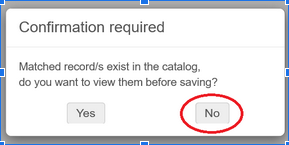
<div class="rich-media-item mediaSingleView-content-wrap image-align-start css-oria4y" data-layout="align-start" data-media-vc-wrapper="true" data-node-type="mediaSingle" data-renderer-start-pos="1817" data-vc="media-single" data-width="272" data-width-type="pixel" id="bkmrk--23"><div class="css-huilmf"><div data-alt="" data-collection="contentId-37785343" data-context-id="37785343" data-file-mime-type="image/png" data-file-name="mde_confirmation_no.png" data-file-size="18602" data-height="145" data-id="93bd39dd-8439-4d83-85dd-537280734a30" data-node-type="media" data-renderer-start-pos="1818" data-type="file" data-width="289"><div class="_2rko18qm _vchhusvi _kqswh2mm _ect4ttxp _p12f1osq _c71l1osq _1bsb1qmm _4t3ine4n _1hlmd0i9 _1rquusvi _eg541i5c _mts3kb7n _1ntskb7n _yfmhtlke _5sb1v00u new-file-experience-wrapper" data-media-vc-wrapper="true" data-testid="media-card-view" id="bkmrk--24" style="--media-wrapper-width: 272px; --media-wrapper-height: 100%; font-size: 11px; line-height: 14px;"><div class="_1reo15vq _18m915vq _2rko18qm _1e0c1txw _kqswh2mm _p12f1osq _1bsb1osq _4t3i1osq _c71l1osq media-file-card-view" data-cursor="pointer" data-test-media-name="mde_confirmation_no.png" data-test-progress="1" data-test-source="remote" data-test-status="complete" data-testid="media-file-card-view"><div class="_kqswstnw _1bsb1osq _4t3i1osq _1e0c1txw _2lx21bp4 _1bah1h6o _4cvr1h6o" data-testid="ImageRendererWrapper">![](blob:https://gulibrary.atlassian.net/3cb8f079-3352-42e9-89fa-31f8936bd36e#media-blob-url=true&id=93bd39dd-8439-4d83-85dd-537280734a30&collection=contentId-37785343&contextId=37785343&mimeType=image%2Fpng&name=mde_confirmation_no.png&size=18602&width=289&height=145&alt=&clientId=bbbb82b9-1121-49ef-9467-3164741a75c0)  
</div></div></div></div></div></div>---

## Add holdings and item(s)

Use the Alma search bar to find the equipment record you want (make sure the left drop-down box is set to "All Titles"):

<div class="rich-media-item mediaSingleView-content-wrap image-align-start css-18jgsy7" data-layout="align-start" data-media-vc-wrapper="true" data-node-type="mediaSingle" data-renderer-start-pos="1972" data-vc="media-single" data-width="612" data-width-type="pixel" id="bkmrk--26"></div>[![alma_alltitles_search.png](https://alma-documentation-bookstack.azurewebsites.net/uploads/images/gallery/2026-05/scaled-1680-/alma-alltitles-search.png)](https://alma-documentation-bookstack.azurewebsites.net/uploads/images/gallery/2026-05/alma-alltitles-search.png)

<div class="rich-media-item mediaSingleView-content-wrap image-align-start css-18jgsy7" data-layout="align-start" data-media-vc-wrapper="true" data-node-type="mediaSingle" data-renderer-start-pos="1972" data-vc="media-single" data-width="612" data-width-type="pixel" id="bkmrk-when-you%27ve-found-th"><div class="css-hxqv21"><div data-alt="" data-collection="contentId-37785343" data-context-id="37785343" data-file-mime-type="image/png" data-file-name="alma_alltitles_search.png" data-file-size="7841" data-height="51" data-id="0ea299ab-7d97-4234-8fdf-0b5782f78763" data-node-type="media" data-renderer-start-pos="1973" data-type="file" data-width="624"><div class="_2rko18qm _vchhusvi _kqswh2mm _ect4ttxp _p12f1osq _c71l1osq _1bsb1qmm _4t3ine4n _1hlmd0i9 _1rquusvi _eg541i5c _mts3kb7n _1ntskb7n _yfmhtlke _5sb1v00u new-file-experience-wrapper" data-media-vc-wrapper="true" data-testid="media-card-view" id="bkmrk-when-you%27ve-found-th-1" style="--media-wrapper-width: 612px; --media-wrapper-height: 100%; font-size: 14px; line-height: 22px;"><div class="_1reo15vq _18m915vq _2rko18qm _1e0c1txw _kqswh2mm _p12f1osq _1bsb1osq _4t3i1osq _c71l1osq media-file-card-view" data-cursor="pointer" data-test-media-name="alma_alltitles_search.png" data-test-progress="1" data-test-source="remote" data-test-status="complete" data-testid="media-file-card-view"><div class="_kqswstnw _1bsb1osq _4t3i1osq _1e0c1txw _2lx21bp4 _1bah1h6o _4cvr1h6o" data-testid="ImageRendererWrapper">![](blob:https://gulibrary.atlassian.net/fb346a8d-fafc-4174-a329-fbf6f231cdb3#media-blob-url=true&id=0ea299ab-7d97-4234-8fdf-0b5782f78763&collection=contentId-37785343&contextId=37785343&mimeType=image%2Fpng&name=alma_alltitles_search.png&size=7841&width=624&height=51&alt=&clientId=bbbb82b9-1121-49ef-9467-3164741a75c0)When you've found the one you need, click the three dots along the right-hand side of the display for that record:</div></div></div></div></div></div><div class="rich-media-item mediaSingleView-content-wrap image-align-start css-18jgsy7" data-layout="align-start" data-media-vc-wrapper="true" data-node-type="mediaSingle" data-renderer-start-pos="2094" data-vc="media-single" data-width="612" data-width-type="pixel" id="bkmrk--28"><div class="css-13bd60n">  
</div></div>[![alma_record_threedots.png](https://alma-documentation-bookstack.azurewebsites.net/uploads/images/gallery/2026-05/scaled-1680-/alma-record-threedots.png)](https://alma-documentation-bookstack.azurewebsites.net/uploads/images/gallery/2026-05/alma-record-threedots.png)

<div class="rich-media-item mediaSingleView-content-wrap image-align-start css-18jgsy7" data-layout="align-start" data-media-vc-wrapper="true" data-node-type="mediaSingle" data-renderer-start-pos="2094" data-vc="media-single" data-width="612" data-width-type="pixel" id="bkmrk--30"><div class="css-13bd60n"><div data-alt="" data-collection="contentId-37785343" data-context-id="37785343" data-file-mime-type="image/png" data-file-name="alma_record_threedots.png" data-file-size="52350" data-height="215" data-id="014179d0-abdd-4408-9a70-059f65043ee9" data-node-type="media" data-renderer-start-pos="2095" data-type="file" data-width="624"><div class="_2rko18qm _vchhusvi _kqswh2mm _ect4ttxp _p12f1osq _c71l1osq _1bsb1qmm _4t3ine4n _1hlmd0i9 _1rquusvi _eg541i5c _mts3kb7n _1ntskb7n _yfmhtlke _5sb1v00u new-file-experience-wrapper" data-media-vc-wrapper="true" data-testid="media-card-view" id="bkmrk--31" style="--media-wrapper-width: 612px; --media-wrapper-height: 100%; font-size: 14px; line-height: 22px;"><div class="_1reo15vq _18m915vq _2rko18qm _1e0c1txw _kqswh2mm _p12f1osq _1bsb1osq _4t3i1osq _c71l1osq media-file-card-view" data-cursor="pointer" data-test-media-name="alma_record_threedots.png" data-test-progress="1" data-test-source="remote" data-test-status="complete" data-testid="media-file-card-view">  
</div></div></div></div></div>Then click "Add Holdings":

[![alma_threedots_addholdings.png](https://alma-documentation-bookstack.azurewebsites.net/uploads/images/gallery/2026-05/scaled-1680-/alma-threedots-addholdings.png)](https://alma-documentation-bookstack.azurewebsites.net/uploads/images/gallery/2026-05/alma-threedots-addholdings.png)

<div class="rich-media-item mediaSingleView-content-wrap image-align-start css-18jgsy7" data-layout="align-start" data-media-vc-wrapper="true" data-node-type="mediaSingle" data-renderer-start-pos="2128" data-vc="media-single" data-width="612" data-width-type="pixel" id="bkmrk--33"><div class="css-1bg8qt4"><div data-alt="" data-collection="contentId-37785343" data-context-id="37785343" data-file-mime-type="image/png" data-file-name="alma_threedots_addholdings.png" data-file-size="35271" data-height="120" data-id="dcb40495-2d87-456f-a854-7a11356b0cc7" data-node-type="media" data-renderer-start-pos="2129" data-type="file" data-width="624"><div class="_2rko18qm _vchhusvi _kqswh2mm _ect4ttxp _p12f1osq _c71l1osq _1bsb1qmm _4t3ine4n _1hlmd0i9 _1rquusvi _eg541i5c _mts3kb7n _1ntskb7n _yfmhtlke _5sb1v00u new-file-experience-wrapper" data-media-vc-wrapper="true" data-testid="media-card-view" id="bkmrk--34" style="--media-wrapper-width: 612px; --media-wrapper-height: 100%; font-size: 14px; line-height: 22px;"><div class="_1reo15vq _18m915vq _2rko18qm _1e0c1txw _kqswh2mm _p12f1osq _1bsb1osq _4t3i1osq _c71l1osq media-file-card-view" data-cursor="pointer" data-test-media-name="alma_threedots_addholdings.png" data-test-progress="1" data-test-source="remote" data-test-status="complete" data-testid="media-file-card-view">  
</div></div></div></div></div>This will open the MDE with a new Holdings record. Enter the appropriate Library and location in $$b and $$c:

- Lauinger : $$b lau $$c steq
- SCS : $$b SCS Equipment $$c scsequip
- Qatar : $$b qatar $$c qequip \[Innovation Lab\] OR $$c qcirc \[Circulation Desk\]

Then click Save:

[![alma_mde_saveholdings.png](https://alma-documentation-bookstack.azurewebsites.net/uploads/images/gallery/2026-05/scaled-1680-/alma-mde-saveholdings.png)](https://alma-documentation-bookstack.azurewebsites.net/uploads/images/gallery/2026-05/alma-mde-saveholdings.png)
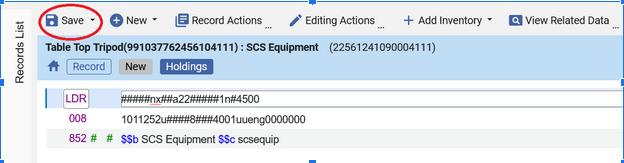
<div class="rich-media-item mediaSingleView-content-wrap image-align-start css-18jgsy7" data-layout="align-start" data-media-vc-wrapper="true" data-node-type="mediaSingle" data-renderer-start-pos="2420" data-vc="media-single" data-width="612" data-width-type="pixel" id="bkmrk--36"><div class="css-1r7ahf5"><div data-alt="" data-collection="contentId-37785343" data-context-id="37785343" data-file-mime-type="image/png" data-file-name="alma_mde_saveholdings.png" data-file-size="57328" data-height="163" data-id="02411e53-cd8d-4b1c-b761-27d61b58b5c8" data-node-type="media" data-renderer-start-pos="2421" data-type="file" data-width="624"><div class="_2rko18qm _vchhusvi _kqswh2mm _ect4ttxp _p12f1osq _c71l1osq _1bsb1qmm _4t3ine4n _1hlmd0i9 _1rquusvi _eg541i5c _mts3kb7n _1ntskb7n _yfmhtlke _5sb1v00u new-file-experience-wrapper" data-media-vc-wrapper="true" data-testid="media-card-view" id="bkmrk--37" style="--media-wrapper-width: 612px; --media-wrapper-height: 100%; font-size: 14px; line-height: 22px;"><div class="_1reo15vq _18m915vq _2rko18qm _1e0c1txw _kqswh2mm _p12f1osq _1bsb1osq _4t3i1osq _c71l1osq media-file-card-view" data-cursor="pointer" data-test-media-name="alma_mde_saveholdings.png" data-test-progress="1" data-test-source="remote" data-test-status="complete" data-testid="media-file-card-view"><div class="_kqswstnw _1bsb1osq _4t3i1osq _1e0c1txw _2lx21bp4 _1bah1h6o _4cvr1h6o" data-testid="ImageRendererWrapper">  
</div></div></div></div></div></div>Now click on "Add Inventory":

[![alma_mde_addinventory.png](https://alma-documentation-bookstack.azurewebsites.net/uploads/images/gallery/2026-05/scaled-1680-/alma-mde-addinventory.png)](https://alma-documentation-bookstack.azurewebsites.net/uploads/images/gallery/2026-05/alma-mde-addinventory.png)

<div class="rich-media-item mediaSingleView-content-wrap image-align-start css-18jgsy7" data-layout="align-start" data-media-vc-wrapper="true" data-node-type="mediaSingle" data-renderer-start-pos="2454" data-vc="media-single" data-width="612" data-width-type="pixel" id="bkmrk--39"><div class="css-1dt5udf"><div data-alt="" data-collection="contentId-37785343" data-context-id="37785343" data-file-mime-type="image/png" data-file-name="alma_mde_addinventory.png" data-file-size="34350" data-height="64" data-id="c2c348b9-8afd-4cd5-bcda-9076b38f1b7a" data-node-type="media" data-renderer-start-pos="2455" data-type="file" data-width="624"><div class="_2rko18qm _vchhusvi _kqswh2mm _ect4ttxp _p12f1osq _c71l1osq _1bsb1qmm _4t3ine4n _1hlmd0i9 _1rquusvi _eg541i5c _mts3kb7n _1ntskb7n _yfmhtlke _5sb1v00u new-file-experience-wrapper" data-media-vc-wrapper="true" data-testid="media-card-view" id="bkmrk--40" style="--media-wrapper-width: 612px; --media-wrapper-height: 100%; font-size: 14px; line-height: 22px;"><div class="_1reo15vq _18m915vq _2rko18qm _1e0c1txw _kqswh2mm _p12f1osq _1bsb1osq _4t3i1osq _c71l1osq media-file-card-view" data-cursor="pointer" data-test-media-name="alma_mde_addinventory.png" data-test-progress="1" data-test-source="remote" data-test-status="complete" data-testid="media-file-card-view"><div class="_kqswstnw _1bsb1osq _4t3i1osq _1e0c1txw _2lx21bp4 _1bah1h6o _4cvr1h6o" data-testid="ImageRendererWrapper">![](blob:https://gulibrary.atlassian.net/509a6485-4802-40ba-a1c0-02f3e3737818#media-blob-url=true&id=c2c348b9-8afd-4cd5-bcda-9076b38f1b7a&collection=contentId-37785343&contextId=37785343&mimeType=image%2Fpng&name=alma_mde_addinventory.png&size=34350&width=624&height=64&alt=&clientId=bbbb82b9-1121-49ef-9467-3164741a75c0)</div></div></div></div></div></div>Select "Add Item":

<div class="rich-media-item mediaSingleView-content-wrap image-align-start css-18jgsy7" data-layout="align-start" data-media-vc-wrapper="true" data-node-type="mediaSingle" data-renderer-start-pos="2477" data-vc="media-single" data-width="612" data-width-type="pixel" id="bkmrk--41"></div><div class="rich-media-item mediaSingleView-content-wrap image-align-start css-18jgsy7" data-layout="align-start" data-media-vc-wrapper="true" data-node-type="mediaSingle" data-renderer-start-pos="2477" data-vc="media-single" data-width="612" data-width-type="pixel" id="bkmrk--42"><div class="css-1r7ahf5"><div data-alt="" data-collection="contentId-37785343" data-context-id="37785343" data-file-mime-type="image/png" data-file-name="alma_mde_additem.png" data-file-size="68552" data-height="163" data-id="8b1016eb-c676-49dd-ba87-4bd1917827ff" data-node-type="media" data-renderer-start-pos="2478" data-type="file" data-width="624"><div class="_2rko18qm _vchhusvi _kqswh2mm _ect4ttxp _p12f1osq _c71l1osq _1bsb1qmm _4t3ine4n _1hlmd0i9 _1rquusvi _eg541i5c _mts3kb7n _1ntskb7n _yfmhtlke _5sb1v00u new-file-experience-wrapper" data-media-vc-wrapper="true" data-testid="media-card-view" id="bkmrk--43" style="--media-wrapper-width: 612px; --media-wrapper-height: 100%; font-size: 14px; line-height: 22px;"><div class="_1reo15vq _18m915vq _2rko18qm _1e0c1txw _kqswh2mm _p12f1osq _1bsb1osq _4t3i1osq _c71l1osq media-file-card-view" data-cursor="pointer" data-test-media-name="alma_mde_additem.png" data-test-progress="1" data-test-source="remote" data-test-status="complete" data-testid="media-file-card-view">  
</div></div></div></div></div>[![alma_mde_additem.png](https://alma-documentation-bookstack.azurewebsites.net/uploads/images/gallery/2026-05/scaled-1680-/alma-mde-additem.png)](https://alma-documentation-bookstack.azurewebsites.net/uploads/images/gallery/2026-05/alma-mde-additem.png)

This opens the Physical Item Editor, where you enter the barcode and other needed information.

### Required item information

1. Barcode
2. Item Policy and Material Type combinations in use for checkout policy purposes:
    
    
    1. Lauinger
        
        
        1. Material Type = Equipment
        2. Item Policy
            
            
            1. Equipment (for bookable items), OR
            2. 3-Day Reserve (for non-bookable items that loan for 3 days), OR 2-Hour Reserve, No Overnight (for power banks) OR 4-Hour Reserve, Overnight (for other non-bookable items like chargers)
    2. SCS *(optional)*
        
        
        1. Material Type = Equipment
        2. Item Policy = Equipment
    3. Qatar
        
        
        1. Material Type
            
            
            1. Equipment (for non-ereader materials), OR
            2. E-reader (for Kindles and their accessories)
        2. Item Policy = Equipment
3. Description
    
    
    1. Lauinger : THIS FIELD MUST REMAIN BLANK
    2. This field can be used or left blank, as desired, for SCS and Qatar
4. Replacement Cost
    
    
    1. Required if you want patrons to be charged the full cost of an item if they lose/fail to return it
    2. Otherwise, they're charged the flat amount (often $110 or $200) for lost items.

### Optional item information

1. Copy ID : this may be useful if you have multiple items of one type (e.g. tripods).
2. Pieces : For equipment kits involving multiple parts, you can use the Pieces field to record the number of pieces included in the kit. This does not affect anything related to circulation, but can be helpful for recordkeeping.
3. Item Call Number : this can be used in place of, or in addition to, the Copy ID field to distinguish between similar items.

Click Save.

<div class="rich-media-item mediaSingleView-content-wrap image-align-start css-18jgsy7" data-layout="align-start" data-media-vc-wrapper="true" data-node-type="mediaSingle" data-renderer-start-pos="4043" data-vc="media-single" data-width="612" data-width-type="pixel" id="bkmrk--45"></div>[![alma_save_phyiscalitemeditor.png](https://alma-documentation-bookstack.azurewebsites.net/uploads/images/gallery/2026-05/scaled-1680-/alma-save-phyiscalitemeditor.png)](https://alma-documentation-bookstack.azurewebsites.net/uploads/images/gallery/2026-05/alma-save-phyiscalitemeditor.png)

<div class="rich-media-item mediaSingleView-content-wrap image-align-start css-18jgsy7" data-layout="align-start" data-media-vc-wrapper="true" data-node-type="mediaSingle" data-renderer-start-pos="4043" data-vc="media-single" data-width="612" data-width-type="pixel" id="bkmrk--47"><div class="css-1rzw3sw"><div data-alt="" data-collection="contentId-37785343" data-context-id="37785343" data-file-mime-type="image/png" data-file-name="alma_save_phyiscalitemeditor.png" data-file-size="34994" data-height="195" data-id="ee18dd55-ee0d-4008-8c54-2120e526258e" data-node-type="media" data-renderer-start-pos="4044" data-type="file" data-width="624"><div class="_2rko18qm _vchhusvi _kqswh2mm _ect4ttxp _p12f1osq _c71l1osq _1bsb1qmm _4t3ine4n _1hlmd0i9 _1rquusvi _eg541i5c _mts3kb7n _1ntskb7n _yfmhtlke _5sb1v00u new-file-experience-wrapper" data-media-vc-wrapper="true" data-testid="media-card-view" id="bkmrk--48" style="--media-wrapper-width: 612px; --media-wrapper-height: 100%; font-size: 14px; line-height: 22px;"><div class="_1reo15vq _18m915vq _2rko18qm _1e0c1txw _kqswh2mm _p12f1osq _1bsb1osq _4t3i1osq _c71l1osq media-file-card-view" data-cursor="pointer" data-test-media-name="alma_save_phyiscalitemeditor.png" data-test-progress="1" data-test-source="remote" data-test-status="complete" data-testid="media-file-card-view">  
</div></div></div></div></div>You'll be taken back to an MDE inventory screen.

If you need to add more items (i.e., you have more than one tripod to circulate), click on the three dots and select View Items:

[![alma_mde_inventory_viewitems.png](https://alma-documentation-bookstack.azurewebsites.net/uploads/images/gallery/2026-05/scaled-1680-/alma-mde-inventory-viewitems.png)](https://alma-documentation-bookstack.azurewebsites.net/uploads/images/gallery/2026-05/alma-mde-inventory-viewitems.png)
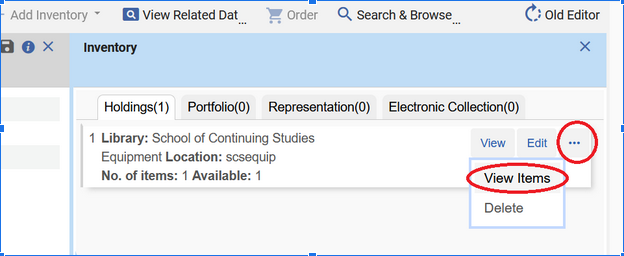
<div class="rich-media-item mediaSingleView-content-wrap image-align-start css-unmd3w" data-layout="align-start" data-media-vc-wrapper="true" data-node-type="mediaSingle" data-renderer-start-pos="4229" data-vc="media-single" data-width="578" data-width-type="pixel" id="bkmrk--50"><div class="css-1yd9qio"><div data-alt="" data-collection="contentId-37785343" data-context-id="37785343" data-file-mime-type="image/png" data-file-name="alma_mde_inventory_viewitems.png" data-file-size="84570" data-height="256" data-id="6f67840a-ca4c-4aa5-8870-d8fadf447bf7" data-node-type="media" data-renderer-start-pos="4230" data-type="file" data-width="624"><div class="_2rko18qm _vchhusvi _kqswh2mm _ect4ttxp _p12f1osq _c71l1osq _1bsb1qmm _4t3ine4n _1hlmd0i9 _1rquusvi _eg541i5c _mts3kb7n _1ntskb7n _yfmhtlke _5sb1v00u new-file-experience-wrapper" data-media-vc-wrapper="true" data-testid="media-card-view" id="bkmrk--51" style="--media-wrapper-width: 578px; --media-wrapper-height: 100%; font-size: 11px; line-height: 14px;"><div class="_1reo15vq _18m915vq _2rko18qm _1e0c1txw _kqswh2mm _p12f1osq _1bsb1osq _4t3i1osq _c71l1osq media-file-card-view" data-cursor="pointer" data-test-media-name="alma_mde_inventory_viewitems.png" data-test-progress="1" data-test-source="remote" data-test-status="complete" data-testid="media-file-card-view"><div class="_kqswstnw _1bsb1osq _4t3i1osq _1e0c1txw _2lx21bp4 _1bah1h6o _4cvr1h6o" data-testid="ImageRendererWrapper">![](blob:https://gulibrary.atlassian.net/47a48f11-cfcd-4398-a7d2-ee8d62d6cc5e#media-blob-url=true&id=6f67840a-ca4c-4aa5-8870-d8fadf447bf7&collection=contentId-37785343&contextId=37785343&mimeType=image%2Fpng&name=alma_mde_inventory_viewitems.png&size=84570&width=624&height=256&alt=&clientId=bbbb82b9-1121-49ef-9467-3164741a75c0)</div></div></div></div></div></div>You'll be taken to the List of Items screen where you can click "Add Item" to add another item:

[![alma_listofitems_additem.png](https://alma-documentation-bookstack.azurewebsites.net/uploads/images/gallery/2026-05/scaled-1680-/alma-listofitems-additem.png)](https://alma-documentation-bookstack.azurewebsites.net/uploads/images/gallery/2026-05/alma-listofitems-additem.png)
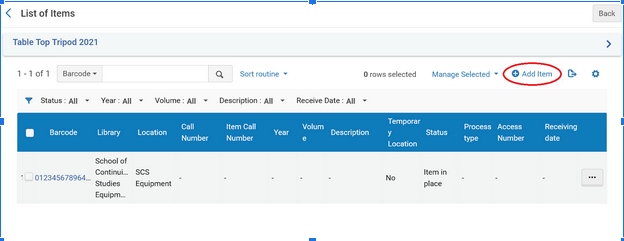
<div class="rich-media-item mediaSingleView-content-wrap image-align-start css-18jgsy7" data-layout="align-start" data-media-vc-wrapper="true" data-node-type="mediaSingle" data-renderer-start-pos="4332" data-vc="media-single" data-width="612" data-width-type="pixel" id="bkmrk--53"><div class="css-13x5g62"><div data-alt="" data-collection="contentId-37785343" data-context-id="37785343" data-file-mime-type="image/png" data-file-name="alma_listofitems_additem.png" data-file-size="55612" data-height="241" data-id="d768bad8-05b9-48b5-80b4-350b64e3a3d5" data-node-type="media" data-renderer-start-pos="4333" data-type="file" data-width="624"><div class="_2rko18qm _vchhusvi _kqswh2mm _ect4ttxp _p12f1osq _c71l1osq _1bsb1qmm _4t3ine4n _1hlmd0i9 _1rquusvi _eg541i5c _mts3kb7n _1ntskb7n _yfmhtlke _5sb1v00u new-file-experience-wrapper" data-media-vc-wrapper="true" data-testid="media-card-view" id="bkmrk--54" style="--media-wrapper-width: 612px; --media-wrapper-height: 100%; font-size: 14px; line-height: 22px;"><div class="_1reo15vq _18m915vq _2rko18qm _1e0c1txw _kqswh2mm _p12f1osq _1bsb1osq _4t3i1osq _c71l1osq media-file-card-view" data-cursor="pointer" data-test-media-name="alma_listofitems_additem.png" data-test-progress="1" data-test-source="remote" data-test-status="complete" data-testid="media-file-card-view"><div class="_kqswstnw _1bsb1osq _4t3i1osq _1e0c1txw _2lx21bp4 _1bah1h6o _4cvr1h6o" data-testid="ImageRendererWrapper">![](blob:https://gulibrary.atlassian.net/ce34d626-ae43-46b0-b723-e1d7060b8abc#media-blob-url=true&id=d768bad8-05b9-48b5-80b4-350b64e3a3d5&collection=contentId-37785343&contextId=37785343&mimeType=image%2Fpng&name=alma_listofitems_additem.png&size=55612&width=624&height=241&alt=&clientId=bbbb82b9-1121-49ef-9467-3164741a75c0)  
</div></div></div></div></div></div>This will take you to the Physical Item Editor where you can enter the second item's information:

<div class="rich-media-item mediaSingleView-content-wrap image-align-start css-18jgsy7" data-layout="align-start" data-media-vc-wrapper="true" data-node-type="mediaSingle" data-renderer-start-pos="4437" data-vc="media-single" data-width="612" data-width-type="pixel" id="bkmrk--55"></div><div class="rich-media-item mediaSingleView-content-wrap image-align-start css-18jgsy7" data-layout="align-start" data-media-vc-wrapper="true" data-node-type="mediaSingle" data-renderer-start-pos="4437" data-vc="media-single" data-width="612" data-width-type="pixel" id="bkmrk--56"><div class="css-n3gu6w"><div data-alt="" data-collection="contentId-37785343" data-context-id="37785343" data-file-mime-type="image/png" data-file-name="alma_physicalitemeditor.png" data-file-size="30289" data-height="181" data-id="47c1f596-267d-4f3a-a494-3437efbe07e7" data-node-type="media" data-renderer-start-pos="4438" data-type="file" data-width="624"><div class="_2rko18qm _vchhusvi _kqswh2mm _ect4ttxp _p12f1osq _c71l1osq _1bsb1qmm _4t3ine4n _1hlmd0i9 _1rquusvi _eg541i5c _mts3kb7n _1ntskb7n _yfmhtlke _5sb1v00u new-file-experience-wrapper" data-media-vc-wrapper="true" data-testid="media-card-view" id="bkmrk--57" style="--media-wrapper-width: 612px; --media-wrapper-height: 100%; font-size: 14px; line-height: 22px;"><div class="_1reo15vq _18m915vq _2rko18qm _1e0c1txw _kqswh2mm _p12f1osq _1bsb1osq _4t3i1osq _c71l1osq media-file-card-view" data-cursor="pointer" data-test-media-name="alma_physicalitemeditor.png" data-test-progress="1" data-test-source="remote" data-test-status="complete" data-testid="media-file-card-view">  
</div></div></div></div></div>[![alma_physicalitemeditor.png](https://alma-documentation-bookstack.azurewebsites.net/uploads/images/gallery/2026-05/scaled-1680-/alma-physicalitemeditor.png)](https://alma-documentation-bookstack.azurewebsites.net/uploads/images/gallery/2026-05/alma-physicalitemeditor.png)

Clicking Save will take you back to the List of Items.

<p class="callout success">Repeat for each additional item until all are entered into Alma.</p>

### Item Notes

If there is information specific to one particular item, you can use the item notes to record that information. The [maximum length for most item notes](https://knowledge.exlibrisgroup.com/Alma/Product_Documentation/010Alma_Online_Help_(English)/040Resource_Management/050Inventory/040Managing_Physical_Resources#Notes_Tab "https://knowledge.exlibrisgroup.com/Alma/Product_Documentation/010Alma_Online_Help_(English)/040Resource_Management/050Inventory/040Managing_Physical_Resources#Notes_Tab") is 4000 characters.

If you're adding notes while creating an item, the item must be saved before the Notes tab is available and a note can be added. You can click the **Save and Edit** button to save the barcode, etc., and have the Notes tab appear.

[![alma_physicalitemeditor_saveandedit.png](https://alma-documentation-bookstack.azurewebsites.net/uploads/images/gallery/2026-05/scaled-1680-/alma-physicalitemeditor-saveandedit.png)](https://alma-documentation-bookstack.azurewebsites.net/uploads/images/gallery/2026-05/alma-physicalitemeditor-saveandedit.png)

<div class="rich-media-item mediaSingleView-content-wrap image-align-start css-18jgsy7" data-layout="align-start" data-media-vc-wrapper="true" data-node-type="mediaSingle" data-renderer-start-pos="4976" data-vc="media-single" data-width="612" data-width-type="pixel" id="bkmrk--60"><div class="css-7hx82b"><div data-alt="" data-collection="contentId-37785343" data-context-id="37785343" data-file-mime-type="image/png" data-file-name="alma_physicalitemeditor_saveandedit.png" data-file-size="14603" data-height="31" data-id="3da4d64c-1315-460a-8018-1a0155485cb2" data-node-type="media" data-renderer-start-pos="4977" data-type="file" data-width="624"><div class="_2rko18qm _vchhusvi _kqswh2mm _ect4ttxp _p12f1osq _c71l1osq _1bsb1qmm _4t3ine4n _1hlmd0i9 _1rquusvi _eg541i5c _mts3kb7n _1ntskb7n _yfmhtlke _5sb1v00u new-file-experience-wrapper" data-media-vc-wrapper="true" data-testid="media-card-view" id="bkmrk--61" style="--media-wrapper-width: 612px; --media-wrapper-height: 100%; font-size: 14px; line-height: 22px;"><div class="_1reo15vq _18m915vq _2rko18qm _1e0c1txw _kqswh2mm _p12f1osq _1bsb1osq _4t3i1osq _c71l1osq media-file-card-view" data-cursor="pointer" data-test-media-name="alma_physicalitemeditor_saveandedit.png" data-test-progress="1" data-test-source="remote" data-test-status="complete" data-testid="media-file-card-view">  
</div></div></div></div></div>Or, if adding a note later, open an item in the Physical Items Editor and you'll see the Notes tab.

[![alma_physicalitemeditor_notestab.png](https://alma-documentation-bookstack.azurewebsites.net/uploads/images/gallery/2026-05/scaled-1680-/alma-physicalitemeditor-notestab.png)](https://alma-documentation-bookstack.azurewebsites.net/uploads/images/gallery/2026-05/alma-physicalitemeditor-notestab.png)
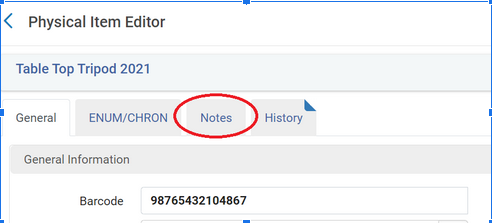
<div class="rich-media-item mediaSingleView-content-wrap image-align-start css-1xw8ifg" data-layout="align-start" data-media-vc-wrapper="true" data-node-type="mediaSingle" data-renderer-start-pos="5083" data-vc="media-single" data-width="476" data-width-type="pixel" id="bkmrk--63"><div class="css-1mcmfc5"><div data-alt="" data-collection="contentId-37785343" data-context-id="37785343" data-file-mime-type="image/png" data-file-name="alma_physicalitemeditor_notestab.png" data-file-size="40375" data-height="223" data-id="f190ac19-af4a-48cc-a79f-2e9da47342de" data-node-type="media" data-renderer-start-pos="5084" data-type="file" data-width="492"><div class="_2rko18qm _vchhusvi _kqswh2mm _ect4ttxp _p12f1osq _c71l1osq _1bsb1qmm _4t3ine4n _1hlmd0i9 _1rquusvi _eg541i5c _mts3kb7n _1ntskb7n _yfmhtlke _5sb1v00u new-file-experience-wrapper" data-media-vc-wrapper="true" data-testid="media-card-view" id="bkmrk--64" style="--media-wrapper-width: 476px; --media-wrapper-height: 100%; font-size: 11px; line-height: 14px;"><div class="_1reo15vq _18m915vq _2rko18qm _1e0c1txw _kqswh2mm _p12f1osq _1bsb1osq _4t3i1osq _c71l1osq media-file-card-view" data-cursor="pointer" data-test-media-name="alma_physicalitemeditor_notestab.png" data-test-progress="1" data-test-source="remote" data-test-status="complete" data-testid="media-file-card-view">  
</div></div></div></div></div>There are several types of notes available: Functional, Internal, and Statistics.

<p class="callout warning">Do not use the Statistics Notes fields; there are specific ways those are used by Lauinger and WRLC.</p>

<div class="rich-media-item mediaSingleView-content-wrap image-align-start css-unmd3w" data-layout="align-start" data-media-vc-wrapper="true" data-node-type="mediaSingle" data-renderer-start-pos="5274" data-vc="media-single" data-width="578" data-width-type="pixel" id="bkmrk--65"></div><div class="rich-media-item mediaSingleView-content-wrap image-align-start css-unmd3w" data-layout="align-start" data-media-vc-wrapper="true" data-node-type="mediaSingle" data-renderer-start-pos="5274" data-vc="media-single" data-width="578" data-width-type="pixel" id="bkmrk--66"><div class="css-1rgvh7k"><div data-alt="" data-collection="contentId-37785343" data-context-id="37785343" data-file-mime-type="image/png" data-file-name="alma_physicalitemeditor_notesfields.png" data-file-size="23903" data-height="260" data-id="ef5e2d99-5fdc-496b-a6f5-05978b7c998d" data-node-type="media" data-renderer-start-pos="5275" data-type="file" data-width="624"><div class="_2rko18qm _vchhusvi _kqswh2mm _ect4ttxp _p12f1osq _c71l1osq _1bsb1qmm _4t3ine4n _1hlmd0i9 _1rquusvi _eg541i5c _mts3kb7n _1ntskb7n _yfmhtlke _5sb1v00u new-file-experience-wrapper" data-media-vc-wrapper="true" data-testid="media-card-view" id="bkmrk--67" style="--media-wrapper-width: 578px; --media-wrapper-height: 100%; font-size: 11px; line-height: 14px;"><div class="_1reo15vq _18m915vq _2rko18qm _1e0c1txw _kqswh2mm _p12f1osq _1bsb1osq _4t3i1osq _c71l1osq media-file-card-view" data-cursor="pointer" data-test-media-name="alma_physicalitemeditor_notesfields.png" data-test-progress="1" data-test-source="remote" data-test-status="complete" data-testid="media-file-card-view"><div class="_kqswstnw _1bsb1osq _4t3i1osq _1e0c1txw _2lx21bp4 _1bah1h6o _4cvr1h6o" data-testid="ImageRendererWrapper">![](blob:https://gulibrary.atlassian.net/ad068ae2-977e-4b30-86a8-6ffe99704f29#media-blob-url=true&id=ef5e2d99-5fdc-496b-a6f5-05978b7c998d&collection=contentId-37785343&contextId=37785343&mimeType=image%2Fpng&name=alma_physicalitemeditor_notesfields.png&size=23903&width=624&height=260&alt=&clientId=bbbb82b9-1121-49ef-9467-3164741a75c0)</div></div></div></div></div></div>[![alma_physicalitemeditor_notesfields.png](https://alma-documentation-bookstack.azurewebsites.net/uploads/images/gallery/2026-05/scaled-1680-/alma-physicalitemeditor-notesfields.png)](https://alma-documentation-bookstack.azurewebsites.net/uploads/images/gallery/2026-05/alma-physicalitemeditor-notesfields.png)

The most relevant for equipment circulation purposes is the Fulfillment note. Anything in this field will pop up when the barcode is checked in or out, so it can be a helpful place to indicate what parts should be present and/or missing pieces.

*For example:* This is a Fulfillment note to check for a particular piece.

[![alma_physicalitemeditor_fulfillmentnote.png](https://alma-documentation-bookstack.azurewebsites.net/uploads/images/gallery/2026-05/scaled-1680-/alma-physicalitemeditor-fulfillmentnote.png)](https://alma-documentation-bookstack.azurewebsites.net/uploads/images/gallery/2026-05/alma-physicalitemeditor-fulfillmentnote.png)

<div class="rich-media-item mediaSingleView-content-wrap image-align-start css-1gz39v8" data-layout="align-start" data-media-vc-wrapper="true" data-node-type="mediaSingle" data-renderer-start-pos="5601" data-vc="media-single" data-width="544" data-width-type="pixel" id="bkmrk--70"><div class="css-1jwlg4q"><div data-alt="" data-collection="contentId-37785343" data-context-id="37785343" data-file-mime-type="image/png" data-file-name="alma_physicalitemeditor_fulfillmentnote.png" data-file-size="16214" data-height="91" data-id="b2b0e807-f908-4a27-b032-f93076dea2bd" data-node-type="media" data-renderer-start-pos="5602" data-type="file" data-width="571"><div class="_2rko18qm _vchhusvi _kqswh2mm _ect4ttxp _p12f1osq _c71l1osq _1bsb1qmm _4t3ine4n _1hlmd0i9 _1rquusvi _eg541i5c _mts3kb7n _1ntskb7n _yfmhtlke _5sb1v00u new-file-experience-wrapper" data-media-vc-wrapper="true" data-testid="media-card-view" id="bkmrk--71" style="--media-wrapper-width: 544px; --media-wrapper-height: 100%; font-size: 11px; line-height: 14px;"><div class="_1reo15vq _18m915vq _2rko18qm _1e0c1txw _kqswh2mm _p12f1osq _1bsb1osq _4t3i1osq _c71l1osq media-file-card-view" data-cursor="pointer" data-test-media-name="alma_physicalitemeditor_fulfillmentnote.png" data-test-progress="1" data-test-source="remote" data-test-status="complete" data-testid="media-file-card-view"><div class="_kqswstnw _1bsb1osq _4t3i1osq _1e0c1txw _2lx21bp4 _1bah1h6o _4cvr1h6o" data-testid="ImageRendererWrapper">![](blob:https://gulibrary.atlassian.net/89ac6448-29f7-4a08-9c60-774e6138fe47#media-blob-url=true&id=b2b0e807-f908-4a27-b032-f93076dea2bd&collection=contentId-37785343&contextId=37785343&mimeType=image%2Fpng&name=alma_physicalitemeditor_fulfillmentnote.png&size=16214&width=571&height=91&alt=&clientId=bbbb82b9-1121-49ef-9467-3164741a75c0)</div></div></div></div></div></div>That note will look like this when you're checking out the tripod to a patron:

<div class="rich-media-item mediaSingleView-content-wrap image-align-start css-18jgsy7" data-layout="align-start" data-media-vc-wrapper="true" data-node-type="mediaSingle" data-renderer-start-pos="5684" data-vc="media-single" data-width="612" data-width-type="pixel" id="bkmrk--72"></div>[![alma_fulfillmentnote_circpopup.png](https://alma-documentation-bookstack.azurewebsites.net/uploads/images/gallery/2026-05/scaled-1680-/alma-fulfillmentnote-circpopup.png)](https://alma-documentation-bookstack.azurewebsites.net/uploads/images/gallery/2026-05/alma-fulfillmentnote-circpopup.png)

<div class="rich-media-item mediaSingleView-content-wrap image-align-start css-18jgsy7" data-layout="align-start" data-media-vc-wrapper="true" data-node-type="mediaSingle" data-renderer-start-pos="5684" data-vc="media-single" data-width="612" data-width-type="pixel" id="bkmrk--74"><div class="css-1e4krr7">  
</div></div><div class="rich-media-item mediaSingleView-content-wrap image-align-start css-18jgsy7" data-layout="align-start" data-media-vc-wrapper="true" data-node-type="mediaSingle" data-renderer-start-pos="5684" data-vc="media-single" data-width="612" data-width-type="pixel" id="bkmrk--75"><div class="css-1e4krr7"><div data-alt="" data-collection="contentId-37785343" data-context-id="37785343" data-file-mime-type="image/png" data-file-name="alma_fulfillmentnote_circpopup.png" data-file-size="26090" data-height="193" data-id="1900e307-ec13-45e1-8bd9-0c822c566fcf" data-node-type="media" data-renderer-start-pos="5685" data-type="file" data-width="615"><div class="_2rko18qm _vchhusvi _kqswh2mm _ect4ttxp _p12f1osq _c71l1osq _1bsb1qmm _4t3ine4n _1hlmd0i9 _1rquusvi _eg541i5c _mts3kb7n _1ntskb7n _yfmhtlke _5sb1v00u new-file-experience-wrapper" data-media-vc-wrapper="true" data-testid="media-card-view" id="bkmrk--76" style="--media-wrapper-width: 612px; --media-wrapper-height: 100%; font-size: 14px; line-height: 22px;"><div class="_1reo15vq _18m915vq _2rko18qm _1e0c1txw _kqswh2mm _p12f1osq _1bsb1osq _4t3i1osq _c71l1osq media-file-card-view" data-cursor="pointer" data-test-media-name="alma_fulfillmentnote_circpopup.png" data-test-progress="1" data-test-source="remote" data-test-status="complete" data-testid="media-file-card-view">  
</div></div></div></div></div>The choice to use fulfillment notes and what to put in them is 100% up to you.

You can use the Internal note fields for information you want to record but that you don't want/need to pop up during circulation.

# Resources

## Ex Libris documentation

[Booking Workflow](https://knowledge.exlibrisgroup.com/Alma/Product_Documentation/010Alma_Online_Help_(English)/030Fulfillment/030Booking/010Booking_Workflow)

[Creating Booking Requests](https://knowledge.exlibrisgroup.com/Alma/Product_Documentation/010Alma_Online_Help_(English)/030Fulfillment/030Booking/020Creating_Booking_Requests)

[Booking Configuration](https://knowledge.exlibrisgroup.com/Alma/Product_Documentation/010Alma_Online_Help_(English)/030Fulfillment/030Booking/Booking_Configuration)

[Configuring Physical Fulfillment - Adding Fulfillment Policies](https://knowledge.exlibrisgroup.com/Alma/Product_Documentation/010Alma_Online_Help_(English)/030Fulfillment/080Configuring_Fulfillment/020Fulfillment_Infrastructure/Configuring_Physical_Fulfillment#Adding_Fulfillment_Policies)

[Requests in Alma - Booking Requests](https://knowledge.exlibrisgroup.com/Alma/Product_Documentation/010Alma_Online_Help_(English)/030Fulfillment/020Resource_Requests/005Requests_in_Alma#Booking_Requests)

Alma Essentials videos: [Booking Requests](https://knowledge.exlibrisgroup.com/Alma/Training/AlmaEssentials/Alma_Essentials_-_English/F_Booking_Requests/A_Booking_Requests) / [Booking Requests Management](https://knowledge.exlibrisgroup.com/Alma/Training/AlmaEssentials/Alma_Essentials_-_English/F_Booking_Requests/B_Booking_Requests_Management)

[Configuring Fulfillment Jobs - Configuring Other Settings](https://knowledge.exlibrisgroup.com/Alma/Product_Documentation/010Alma_Online_Help_(English)/030Fulfillment/080Configuring_Fulfillment/080General/Configuring_Fulfillment_Jobs#Configuring_Other_Settings_(Fulfillment)) (enable\_booking\_workflow)

[Scheduled Jobs - Handle Expired Booking Requests](https://knowledge.exlibrisgroup.com/Alma/Product_Documentation/010Alma_Online_Help_(English)/050Administration/070Managing_Jobs/030Scheduled_Jobs#Handle_Expired_Booking_Requests)

## Cindy's Presentations

2024 ELUNA Annual Meeting : [Equipment Booking: What We've Learned (and What We Still Don't Know)](https://docs.google.com/presentation/d/1AhEPIBOy4gARp_8Pl8_GYMAZzOqsL2NfwWCxW6vlQ9Q/edit?usp=sharing)

2024 WRLC Annual Meeting (shortened from ELUNA 2024 presentation) : [Alma/Primo VE Equipment Booking: What We've Learned So Far](https://docs.google.com/presentation/d/1LyYrXt09nfBLA1k6Luw5uBmsKqSbFVlJbalzsQWMoYw/edit?usp=sharing)

2025 ELUNA Annual Meeting : [Booking Revisited: Implementing Room Reservations](https://docs.google.com/presentation/d/1FZ15Y8gEoqxZgVSHOYswGBsIPuiBnMLtfEuL_LuZXW8/edit?usp=sharing)

All presentations include copious screenshots and links