# Fulfillment Units and the AFN

In a consortial (shared) environment using an Alma Network Zone (NZ), a **Network Fulfillment Unit** is used to manage circulation policies that apply across multiple institutions, such as consortial loan (CLS/AFN) transactions.

- **Function:** It is possible for an **Institution-only Fulfillment Unit** to incorporate rules from a **Network Fulfillment Unit** (like the 'WRLC Fulfillment Network'). This allows for centralized management of shared policies.
- **Example:** In your consortium, the 'WRLC Fulfillment Network' is the single NZ fulfillment unit containing all rules specific to CLS/AFN transactions.

For more information on the rules and TOUs used in the WRLC Fulfillment Network fulfillment unit, please see the [Fulfillment Unit](https://alma-documentation-bookstack.azurewebsites.net/books/fulfillment/page/afn-network-zone-configurations#bkmrk-fulfillment-unit) section of the [AFN Network Zone Configurations](https://alma-documentation-bookstack.azurewebsites.net/books/fulfillment/page/afn-network-zone-configurations) page of the WRLC Alma Wiki.


---

### How to <span style="text-decoration: underline;">*Allow*</span> AFN Requests for an IZ Fulfillment Unit

[![Screenshot 2025-10-10 145712.png](https://alma-documentation-bookstack.azurewebsites.net/uploads/images/gallery/2025-10/scaled-1680-/screenshot-2025-10-10-145712.png)](https://alma-documentation-bookstack.azurewebsites.net/uploads/images/gallery/2025-10/screenshot-2025-10-10-145712.png)

To configure the use of Network Zone rules in a specific Fulfillment Unit,

1. Go to **Configuration &gt; Fulfillment &gt; Physical Fulfillment &gt; Fulfillment Units**
2. Edit the specific Fulfillment Unit you wish to make available for AFN requests
3. On the Fulfillment Unit Details tab, choose the **WRLC Fulfillment Network** from the drop-down menu in the Fulfillment Unit configuration page, under the option **Use Rules From Network Fulfillment Unit**. 
    1. Do **not** checkmark 'Use Network Rules First.'

<p class="callout info">Rules configured for your IZ Fulfillment Unit will be applied first, THEN rules configured in the 'WRLC Fulfillment Network' Fulfillment Unit will be applied</p>


---

### How to <span style="text-decoration: underline;">*Prevent*</span> AFN Requests for an IZ Fulfillment Unit

To configure the prevention of AFN requests to a specific Fulfillment Unit,

1. Go to **Configuration &gt; Fulfillment &gt; Physical Fulfillment &gt; Fulfillment Units**
2. Edit the specific Fulfillment Unit you wish to NOT make available for AFN requests
3. On the Fulfillment Unit Details tab, make sure the **Use Rules From Network Fulfillment Unit option** is left blank.
4. Go to the **Fulfillment Unit Rules** tab, then choose **Request** from the Type drop-down menu.

[![Screenshot 2026-01-12 154323.png](https://alma-documentation-bookstack.azurewebsites.net/uploads/images/gallery/2026-01/scaled-1680-/screenshot-2026-01-12-154323.png)](https://alma-documentation-bookstack.azurewebsites.net/uploads/images/gallery/2026-01/screenshot-2026-01-12-154323.png)
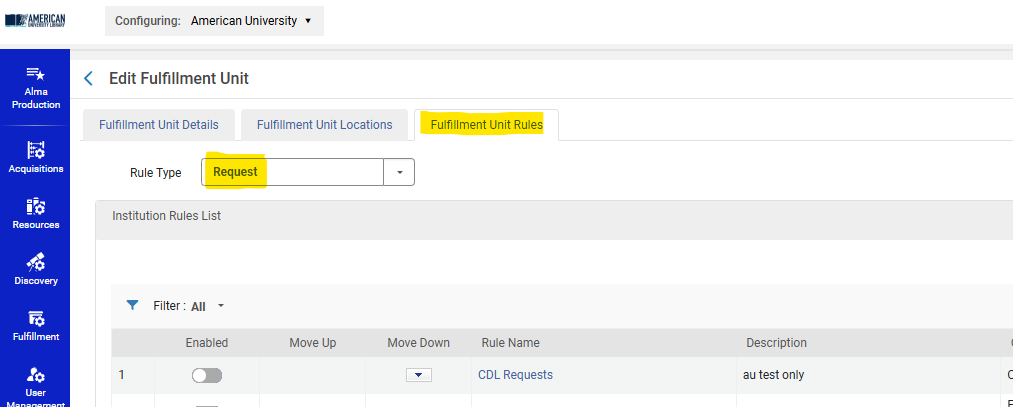
5\. Add a Rule like the following:

Input Parameters :

- - - User Group = **wrlc user**

Output Parameters :

- - - TOU = **No FN Requesting**

[![Screenshot 2026-01-12 154543.png](https://alma-documentation-bookstack.azurewebsites.net/uploads/images/gallery/2026-01/scaled-1680-/screenshot-2026-01-12-154543.png)](https://alma-documentation-bookstack.azurewebsites.net/uploads/images/gallery/2026-01/screenshot-2026-01-12-154543.png)
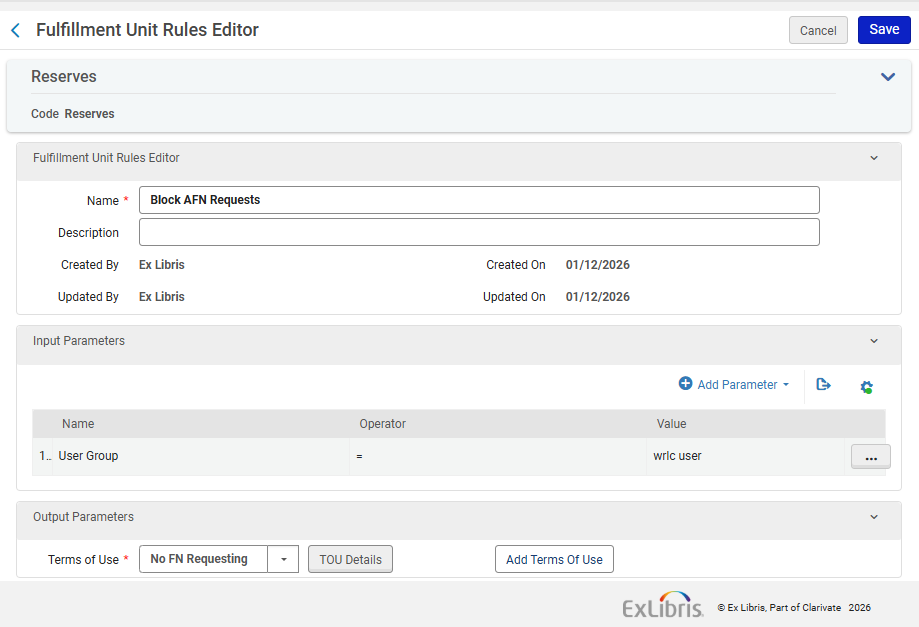
<p class="callout info">Note that the TOU 'No FN Requesting' is managed in the Network Zone.</p>

<p class="callout success">Similarly, if you wish to create Fulfillment Rules that target WRLC patrons only, you can add rules to a Fulfillment unit with an Input Parameter of User Group = 'wrlc user' </p>

---


### For 'Borrowing Only' Institution Zones 

If your entire Institution Zone is a Borrowing Only institution (you do not lend your items via CLS/AFN loans), you do not need additional configurations in your IZ. The Network-managed configurations found in the WRLC's [Rota Templates](https://alma-documentation-bookstack.azurewebsites.net/books/fulfillment/page/afn-network-zone-configurations#bkmrk-rota-templates) and [Partner Profiles](https://alma-documentation-bookstack.azurewebsites.net/books/fulfillment/page/afn-network-zone-configurations#bkmrk-fulfillment-%3E-partne) already prevent other WRLC patrons from requesting your institution's items.

For a full list for all WRLC partners that only borrow in the AFN, see the [Consortial Partners in CLS/AFN](https://alma.wrlc.org/books/fulfillment/page/consortial-partners-in-clsafn) page.