AFN Network Zone Configurations
The following Automated Fulfillment Network (AFN) configurations are set in the WRLC Network Zone. Most of the settings are visible (and not editable) in the Institution Zones; the only one that is not visible in the Institution Zone is the Institutions Relations configuration.
Locate Profiles
Configuration > Fulfillment > Resource Sharing > Locate Profiles
This configuration pertains to
- Borrower + Lender Institutions
- Borrower Only Institutions (see blue note below)
For the WRLC AFN, a locate profile defines how the AFN searches a particular institution's catalog. Locate Profiles are associated with a specific resource sharing partner profile.
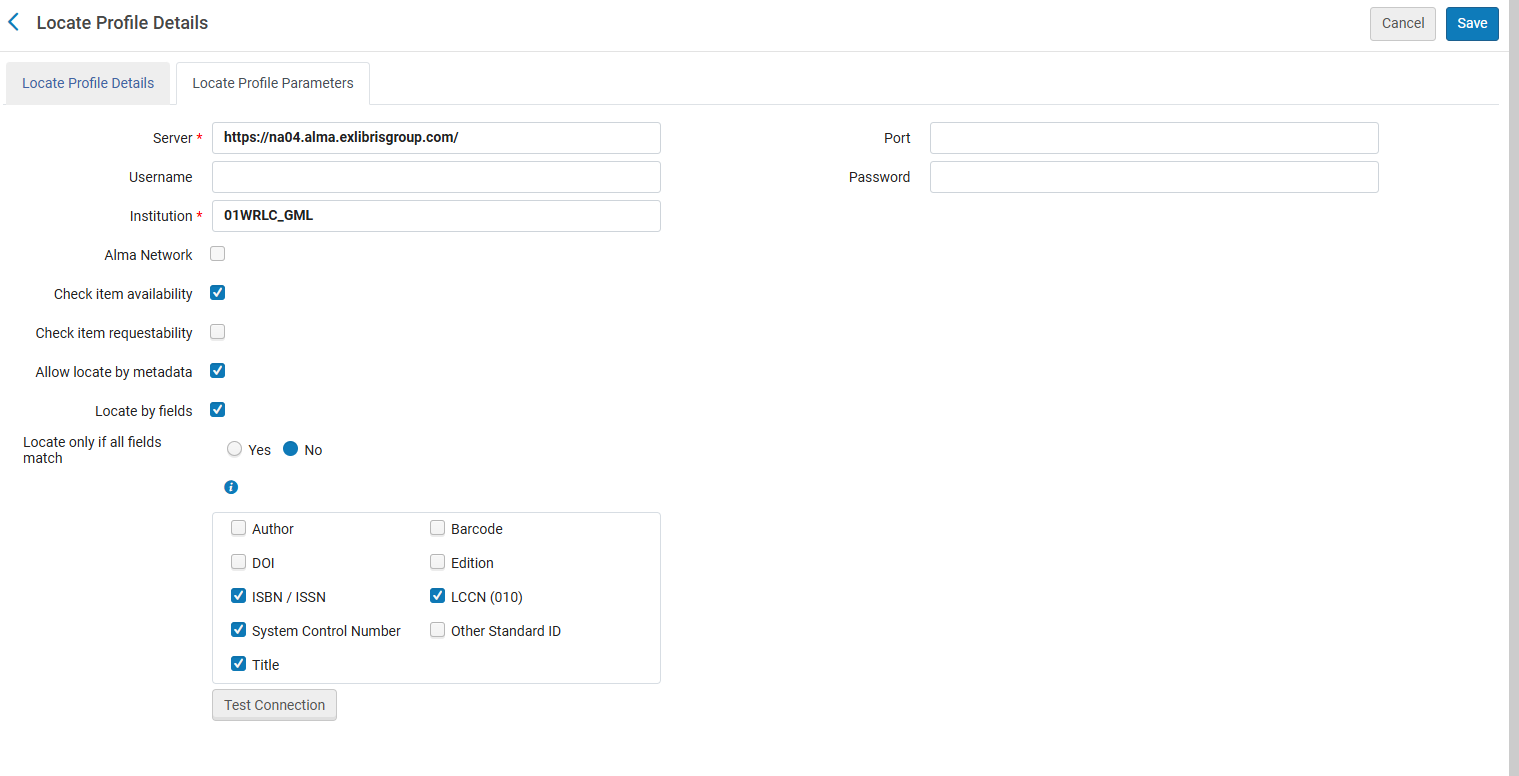
- Alma Network is NOT checked. This is to allow the search against each institution's local catalog, instead of only searching records linked to the NZ.
- Check item availability is checked. This sees whether an item is available in the institution. If it is not, the institution will not be added to the rota for the request
- Check item requestability is not checked. Not checking this option ensures that the Is Requestable for Physical Resource Sharing policy and the Is Requestable for Digital Resource Sharing policy of the TOUs is consulted instead of the Is Requestable policy of the TOUs. For more information, see the Automated Fulfillment Network Requests page on the Alma Knowledge Center.
- For Borrowing-Only institutions, the Check item requestability is checked in order to facilitate the self-ownership borrowing process. Please see the Information box below for more details.
- Allow locate by metadata locates an item based on the metadata listed below; a match is successful if any field listed below matches the bib record. This option allows borrowers that share an NZ to create requests for records not linked to the NZ. It also allows hold requests to be converted to AFN requests
- ISBN / ISSN
- System Control Number
- Title
- LCCN
Borrowing-Only Institutions also have Locate Profiles configured in the NZ. Even though they are not one of the potential lending partners, a Locate Profile is used to first locate a borrowing request in the borrower's catalog prior to sending the request to potential partners. This type of search determine whether a patron's resource request may be filled by local inventory, or whether the request must be directed to an external resource sharing partner as part of the locate process. This is specifically stated in the Locating Items for Resource Sharing page on the Alma Knowledgebase.
For more information, see the Alma Knowledgebase page Configuring Locate Profiles.
Workflow Profiles
Configuration > Fulfillment > Resource Sharing > Workflow Profiles
Workflows control the actions that can be performed on the borrowing and lending request task lists for the defined partner; Workflow Profiles are associated with a specific resource sharing partner profile.
There is one workflow each for borrowing and lending. Below are the borrowing and lending configurations for the WRLC AFN
CLS Borrowing RS
This configuration pertains to
- Borrower + Lender Institutions
- Borrower Only Institutions

CLS Lending RS
This configuration pertains to
- Borrower + Lender Institutions

For more information, see the Alma Knowledgebase page Configuring Workflow Profiles
Institutions Relations
Configuration > General > Network Groups > Institutions Relations
Please note that this configuration is NOT viewable in the Institution Zone.
This configuration pertains to
- Borrower + Lender Institutions
- Borrower Only Institutions
These relation configurations determine if items belonging to an institution can be checked out/in or delivered to other institutions.

- From: the institution whose fulfillment network behavior is configured
- To: the institution(s) who participate in the fulfillment process; in the case of the WRLC, the value All signifies all Institution Zones in the WRLC NZ
- Circulate For is checked; this specific institution can check out and check in items belonging to all of the other institutions
- Deliver To is checked; this specific institution can send its own items to all of the other institutions for pick up.
For more information, see the Alma Knowledgebase page Configuring Pick Up Anywhere/Return Anywhere
Sending Borrowing Request Rules
Configuration > Fulfillment > Resource Sharing > Sending Borrowing Request Rules
This configuration pertains to
- Borrower + Lender Institutions
- Borrower Only Institutions
Sending Borrowing Request Rules dictate when a borrowing request is sent automatically to an active partner institution without staff intervention.
The WRLC Network Zone has two Rules that are enforced before the IZ-only rules. The first is the No Photocopy rule, and the second is the CLS Sending Request rule. The NZ rules are applied to requests in this order.
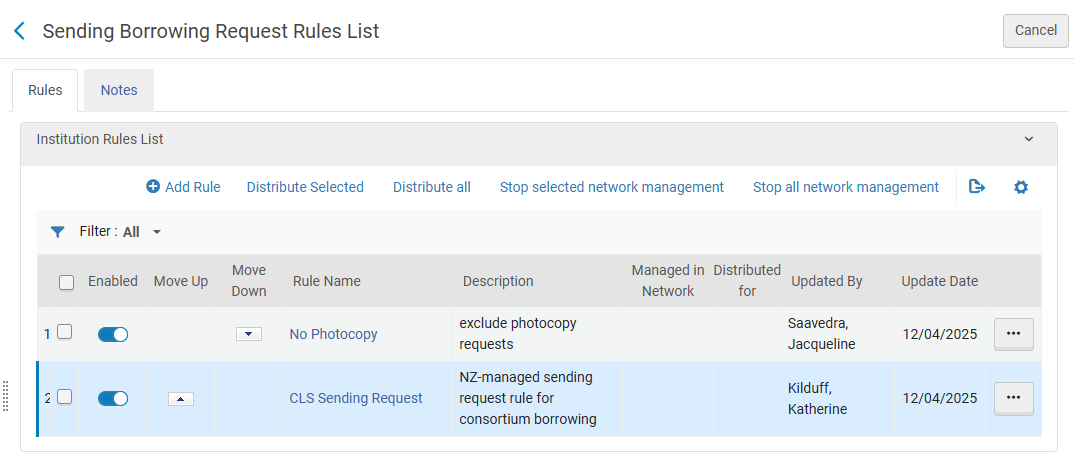
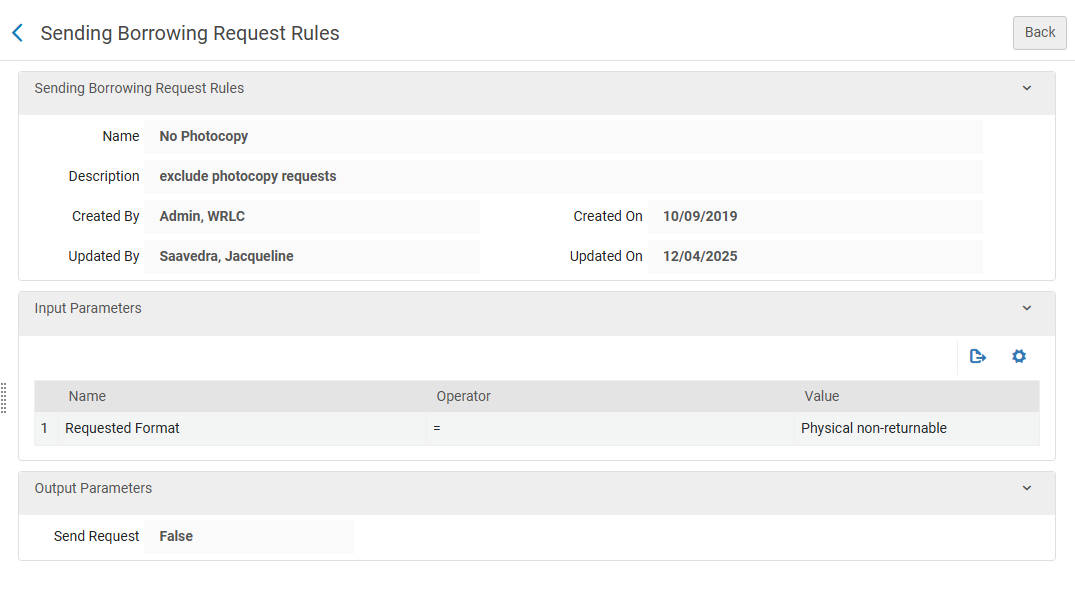
- No Photocopy
- Input Parameters
- Name = Requested Format
- Operator = '='
- Value = Physical non-returnable
- Output Parameters
- Send Request = False
- Input Parameters
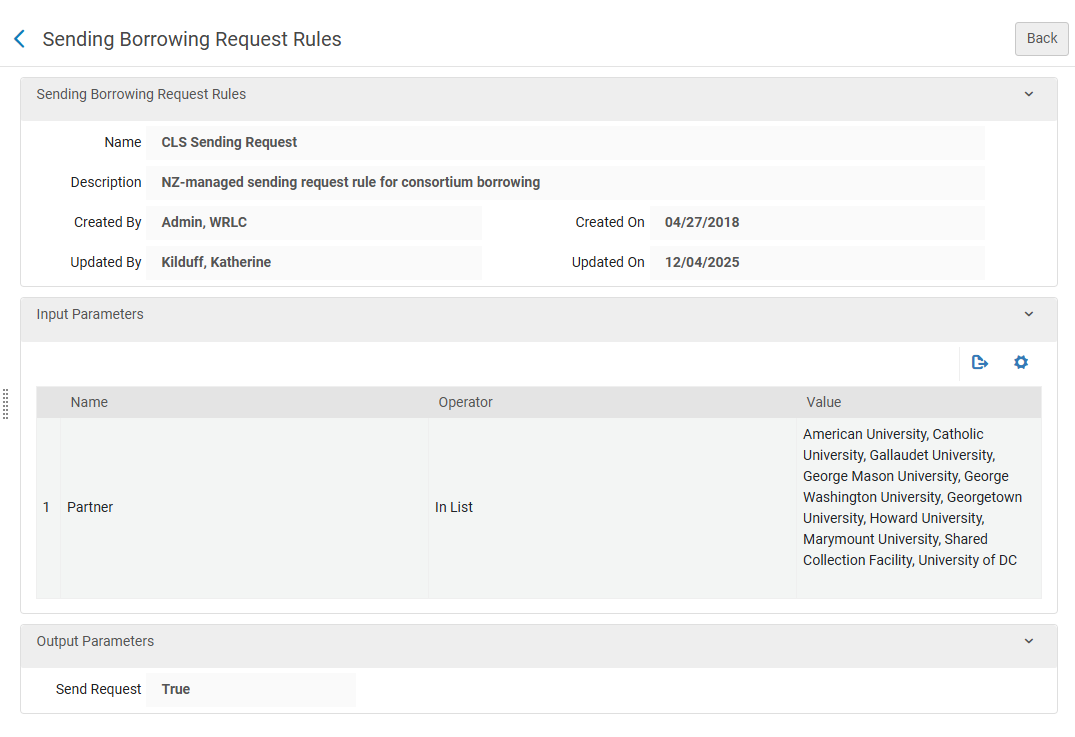
- CLS Sending Request
- Input Parameters
- Name = Partner
- Operator = In List
- Value = American University, Catholic University, Gallaudet University, George Mason University, George Washington University, Georgetown University, Howard University, Marymount University, Shared Collection Facility, University of DC
- Output Parameters
- Send Request = True
- Input Parameters
For more information, see the Alma Knowledgebase page Configuring Sending Borrowing Request Rules
Resource Sharing Partners
Fulfillment > Resource Sharing > Partners
This configuration pertains to
- Borrower + Lender Institutions
- Borrower Only Institutions
Partner profiles define the types of request and communication sent to a specific institution. The profile also defines the Locate Profile and the Workflow Profiles for an institution.
For a list of all partner profiles in the WRLC AFN, as well as their borrowing and lending preferences, see the Consortial Partners in CLS/AFN page.
Typical Partner Profile for a Borrowing AND Lending WRLC Institution

- Profile Type equals Fulfillment Network to signify the AFN
- Locate Profile specifies the Locate Profile (how Alma searches their catalog for a matching item) that should be used for this institution.
- Supports Borrowing / Lending is checkmarked for the WRLC Institutions that lend and borrow in the AFN
- Borrowing / Lending Workflow specifies the Workflow Profile (actions that can be performed on the borrowing and lending request task lists for the defined partner) that is used for borrowing and/or lending in the AFN
For a full list for all WRLC partners that both borrow and lend in the AFN, see the Consortial Partners in CLS/AFN page.
Typical Partner Profile for a Borrowing ONLY WRLC Institution
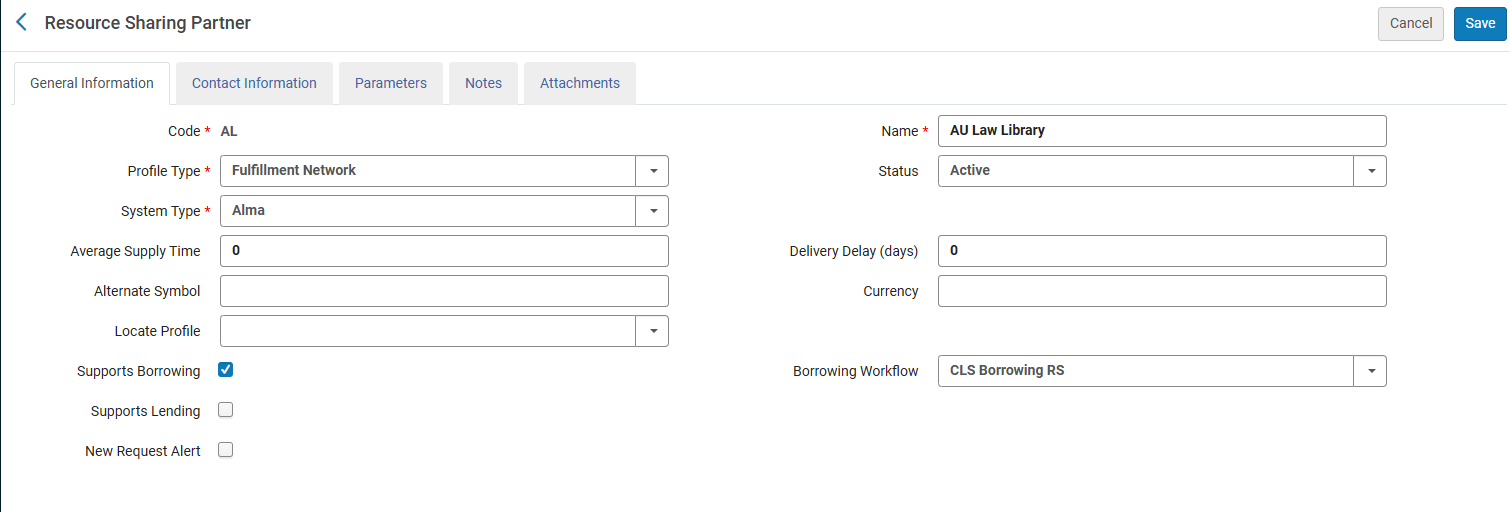
- Profile Type equals Fulfillment Network to signify the AFN
- Locate Profile is left BLANK (because the library does not lend items, there is no need for Alma to search their catalog via a Locate Profile).
- Supports Borrowing is checkmarked for the WRLC Institutions that ONLY borrow from other AFN partners (they do not lend their own materials to other partners)
- Borrowing Workflow specifies the Workflow Profile (actions that can be performed on the borrowing and lending request task lists for the defined partner) that is used for borrowing in the AFN
For a full list for all WRLC partners that only borrow in the AFN, see the Consortial Partners in CLS/AFN page.
Borrowing only partners do not lend via CLS although they may lend via ILL requests and other methods.
For more information, see the Alma Knowledgebase page Configuring a Resource Sharing Partner
Rota Templates
Fulfillment > Resource Sharing > Rota Templates
This configuration pertains to
- Borrower + Lender Institutions
- Borrower Only Institutions
A rota template specifies the list of partners that are queried to see if a particular borrowing request can be fulfilled. The rota template for the WRLC AFN (named CLS-Physical) only lists the institutions in the WRLC that lend items in the AFN (for a full list of lending institutions in the WRLC, see the Consortial Partners in CLS/AFN page); this rota is a non-ordered template, meaning requests are sent to partners in a random order.


For more information, see the Alma Knowledgebase page Configuring Rota Templates page.
Fulfillment Unit
Configuration > Fulfillment > Physical Fulfillment > Fulfillment Units
This configuration pertains to
- Borrower + Lender Institutions
The Fulfillment Unit named WRLC Fulfillment Network (code WRLC_FN) sets the rules by which items circulate in the fulfillment network. This NZ-managed Fulfilment unit is applied to the each Institution's Fulfillment Unit for items requestable and loanable via the WRLC AFN. For more information on how to configure the use of Network Zone rules in a specific Fulfillment Unit, please see the Network Fulfillment Units (Consortial Environments) section of the Fulfillment units and Fulfillment Rules page of the WRLC Alma Wiki.
WRLC-FN Fulfillment Unit Details
- On shelf Request Policy = Request for pickup anywhere regardless of availability
The above settings means all pickup locations that are allowed according to the Pickup Locations policy of the requesting TOU are available, regardless of whether the item is on the shelf.
WRLC-FN Fulfillment Unit Rules
Loan rule type
WRLC Faculty Lending
-
-
- IF the patron's profile has 1) a user group of wrlc user, and 2) a job category of WRLC Faculty, AND the item is a material type of Issue, Book, or Music Score, THEN the Terms of Use applied to the loan is WRLC Faculty Lending TOU
-

WRLC FN Lending
-
-
- IF the patron's profile has a user group of wrlc user AND the item has a material type of Issue, Book, or Music Score, THEN the Terms of Use applied to the loan is WRLC FN Lending TOU
-

WRLC Media Lending
-
-
- IF the patron's profile has a user group of wrlc user AND the item has a material type of Other, Audio cassette, Audiobook, Blu-Ray, Blu-Ray And DVD, CD-ROM, Compact Disc, DAT (Digital Audio Tape), DVD, DVD-ROM, Video Disk, Video Recording, Video Recording (Other), or Video Cassette, THEN the Terms of Use applied to the loan is WRLC Media Lending TOU
-

Request rule type
WRLC FN Requesting
-
-
- IF the patron's profile has a user group of wrlc user AND the item has a material type of Issue, Book, or Music Score, THEN the Terms of Use applied to the request is WRLC FN Requesting TOU
-

WRLC Media Requesting
-
-
- IF the patron's profile has a user group of wrlc user AND the item has a material type of Other, Audio cassette, Audiobook, Blu-Ray, Blu-Ray And DVD, CD-ROM, Compact Disc, DAT (Digital Audio Tape), DVD, DVD-ROM, Video Disk, Video Recording, Video Recording (Other), or Video Cassette, THEN the Terms of Use applied to the request is WRLC Media Requesting TOU
-

WRLC Limited Requesting
-
-
- IF the patron's profile has a user group of wrlc user AND the item has a material type of Book, Bound Issue, Issue, or Microfilm, THEN the Terms of Use applied to the request is WRLC Limited Requesting TOU
-

For more information, see the Alma Knowledgebase page Configuring Fulfillment Units
Terms of Use
Configuration > Fulfillment > Physical Fulfillment > Terms of Use and Policies
Terms of Use refers to a list of policies that define the institutional services that will be provided or terminated. Terms of Use are assigned to specific Fulfillment Unit Rules.
WRLC-FN Terms of Use
Below are the Terms of Use owned by the Network Zone and affiliated with the WRLC-FN Fulfillment Unit
Loan TOUs
WRLC Faculty Lending
Terms for lending to Faculty in the CLS fulfillment network. This TOU is applied to the WRLC Faculty Lending Loan rule.
| Policy Type | Policy Name | Policy Description |
| Is Loanable | Loanable | Loanable |
| Is Recallable | Recall Allowed | Recall is possible |
| Due Date | CLS - Faculty | End-of-term loan for faculty |
| Requested Item Due Date | 14 day limit if request exists | Limit new loans to 14 days if another request on the same item |
| Recall Period | 14 Days Recall Period | 14 Days Recall Period |
| Renew Fee | No Renewal Fee | Default No Renewal Fee |
| Lost Item Fine | No Lost Item Fine | Default Lost Item fine - per RSAC 10/5/2022 |
| Lost Item Replacement Fee | CLS $110 replacement fee | Default replacement fee for WRLC-FN Lending TOU 8/20/2018 |
| Lost Item Replacement Fee Refund Ratio | 100 Percent Lost Item Refund | Default lost item replacement refund |
| Maximum Fine | CLS $25 maximum fine | Max fine for WRLC FN Lending TOU 8/20/2018 |
| Overdue Fine | CLS no overdue fine | Daily overdue fine removed 4/15/2019 |
| Recalled Overdue Fine | CLS $5/day recalled item fine | Overdue for recalled items for WRLC FN Lending TOU 8/20/2018 |
| Grace Period | CLS 39 day grace period. | Extension of grace period before Lost Item Fine |
| Is Renewable | Renewable | Is item renewable |
| Maximum Renewal Period | CLS 16 mo max renewal | Faculty maximum renewal period for WRLC FN Lending TOU, approved by RSC 4/17/2026 |
| Closed Library Due Date Management | Move Due Time to Next Open Time | When the Library will close before the Due Time of a short loan, lengthen the due time to the Library's next opening time |
| Cancelled Recall Due Date | Restore to original due date | This option will take the due date of the loan before the recall was done on the loan |
| Overdue Notification Fine Type 1 | No Overdue Fine | Default value - No Overdue Fine |
| Overdue Notification Fine Type 2 | No Overdue Fine | Default value - No Overdue Fine |
| Overdue Notification Fine Type 3 | No Overdue Fine | Default value - No Overdue Fine |
| Overdue Notification Fine Type 4 | No Overdue Fine | Default value - No Overdue Fine |
| Overdue Notification Fine Type 5 | No Overdue Fine | Default value - No Overdue Fine |
| Block When Overdue | No block when overdue | Do not create a block when overdue |
| Maximum Period for Overdue Block | No Maximum Block Period | No Maximum Block Period for Block When Overdue |
| Reloan Limit | No Reloan Limit | No Reloan Limit |
| Time frame when loan renewal is allowed | No limit | Do not limit the time in which renewal is allowed |
WRLC FN Lending
Terms for lending in the CLS fulfillment network. This TOU is applied to the WRLC FN Lending Loan rule.
| Policy Type | Policy Name | Policy Description |
| Is Loanable | Loanable | Loanable |
| Is Recallable | Recall Allowed | Recall is possible |
| Due Date | 6 wk general loan | 6 week general loan |
| Requested Item Due Date | 14 day limit if request exists | Limit new loans to 14 days if another request on the same item |
| Recall Period | 14 Days Recall Period | 14 Days Recall Period |
| Renew Fee | No Renewal Fee | Default No Renewal Fee |
| Lost Item Fine | No Lost Item Fine | Default Lost Item fine - per RSAC 10/5/2022 |
| Lost Item Replacement Fee | CLS $110 replacement fee | Default replacement fee for WRLC-FN Lending TOU 8/20/2018 |
| Lost Item Replacement Fee Refund Ratio | 100 Percent Lost Item Refund | Default lost item replacement refund |
| Maximum Fine | CLS $25 maximum fine | Max fine for WRLC FN Lending TOU 8/20/2018 |
| Overdue Fine | CLS no overdue fine | Daily overdue fine removed 4/15/2019 |
| Recalled Overdue Fine | CLS $5/day recalled item fine | Overdue for recalled items for WRLC FN Lending TOU 8/20/2018 |
| Grace Period | CLS 39 day grace period. | Extension of grace period before Lost Item Fine, approved by LDC 05/2025 |
| Is Renewable | Renewable | Is item renewable |
| Maximum Renewal Period | CLS 24 wk max renewal | Maximum student renewal period for WRLC FN Lending TOU, approved by RSC 4/17/2026 |
| Closed Library Due Date Management | Move Due Time to Next Open Time | When the Library will close before the Due Time of a short loan, lengthen the due time to the Library's next opening time |
| Cancelled Recall Due Date | Restore to original due date | This option will take the due date of the loan before the recall was done on the loan |
| Overdue Notification Fine Type 1 | No Overdue Fine | Default value - No Overdue Fine |
| Overdue Notification Fine Type 2 | No Overdue Fine | Default value - No Overdue Fine |
| Overdue Notification Fine Type 3 | No Overdue Fine | Default value - No Overdue Fine |
| Overdue Notification Fine Type 4 | No Overdue Fine | Default value - No Overdue Fine |
| Overdue Notification Fine Type 5 | No Overdue Fine | Default value - No Overdue Fine |
| Block When Overdue | No block when overdue | Do not create a block when overdue |
| Maximum Period for Overdue Block | No Maximum Block Period | No Maximum Block Period for Block When Overdue |
| Reloan Limit | No Reloan Limit | No Reloan Limit |
| Time frame when loan renewal is allowed | No limit | Do not limit the time in which renewal is allowed |
WRLC Media Lending
Terms for media loans in the CLS fulfillment network. This TOU is applied to the WRLC Media Lending Loan rule.
| Policy Type | Policy Name | Policy Description |
| Is Loanable | Loanable | Loanable |
| Is Recallable | No Recall | Default Recall is not possible |
| Due Date | 1 week media loan | 7 day loan period for WRLC media lending TOU |
| Requested Item Due Date | No Requested Due Date | Default value - No Requested Item Due Date |
| Recall Period | No Recall Due Date | Default Recall Due date - none |
| Renew Fee | No Renewal Fee | Default No Renewal Fee |
| Lost Item Fine | No Lost Item Fine | Default Lost Item fine - per RSAC 10/5/2022 |
| Lost Item Replacement Fee | CLS $110 replacement fee | Default replacement fee for WRLC-FN Lending TOU 8/20/2018 |
| Lost Item Replacement Fee Refund Ratio | 100 Percent Lost Item Refund | Default lost item replacement refund |
| Maximum Fine | CLS $25 maximum fine | Max fine for WRLC FN Lending TOU 8/20/2018 |
| Overdue Fine | CLS $5/day overdue media fine | Overdue fine for WRLC FN Media 8/20/2018 |
| Recalled Overdue Fine | No Recall Overdue Fine | Default Value for recalled overdue fine |
| Grace Period | No Grace | Default value for Grace |
| Is Renewable | Not Renewable | Item not renewable |
| Maximum Renewal Period | No Maximum Renew Period | Default Maximum Renewal Period |
| Closed Library Due Date Management | Move Due Time to Next Open Time | When the Library will close before the Due Time of a short loan, lengthen the due time to the Library's next opening time |
| Cancelled Recall Due Date | Keep due date | No change to the due date |
| Overdue Notification Fine Type 1 | No Overdue Fine | Default value - No Overdue Fine |
| Overdue Notification Fine Type 2 | No Overdue Fine | Default value - No Overdue Fine |
| Overdue Notification Fine Type 3 | No Overdue Fine | Default value - No Overdue Fine |
| Overdue Notification Fine Type 4 | No Overdue Fine | Default value - No Overdue Fine |
| Overdue Notification Fine Type 5 | No Overdue Fine | Default value - No Overdue Fine |
| Block When Overdue | No block when overdue | Do not create a block when overdue |
| Maximum Period for Overdue Block | No Maximum Block Period | No Maximum Block Period for Block When Overdue |
| Reloan Limit | No Reloan Limit | No Reloan Limit |
| Time frame when loan renewal is allowed | No limit | Do not limit the time in which renewal is allowed |
In Library Use Only - Periodicals (Loan TOU)
Terms that can be used for loan fulfillment rules associated with locations that are 'in library use only' for CLS/AFN patrons.
| Policy Type | Policy Name | Policy Description |
| Is Loanable | Loanable | Loanable |
| Is Recallable | No Recall Allowed | Default Recall is not possible |
| Due Date | 2 week loan | 14 day loan period for WRLC "In Library Use Only" Lending TOU |
| Requested Item Due Date | No Requested Due Date | Default value - No Requested Item Due Date |
| Recall Period | No Recall Due Date | Default Recall Due date - none |
| Renew Fee | No Renewal Fee | Default No Renewal Fee |
| Lost Item Fine | CLS $10.00 Lost Item Fine | Lost item fine put in place after removal of Overdue Fines (4/15/2019) |
| Lost Item Replacement Fee | CLS $110 replacement fee | Default replacement fee for WRLC-FN Lending TOU 8/20/2018 |
| Lost Item Replacement Fee Refund Ratio | 100 Percent Lost Item Refund | Default lost item replacement refund |
| Maximum Fine | CLS $25 maximum fine | Max fine for WRLC FN Lending TOU 8/20/2018 |
| Overdue Fine | CLS $5/day overdue media fine | Overdue fine for WRLC FN Media 8/20/2018 |
| Recalled Overdue Fine | No Recall Overdue Fine | Default Value for recalled overdue fine |
| Grace Period | No Grace | Default value for Grace |
| Is Renewable | Renewable | Is item renewable |
| Maximum Renewal Period | No Maximum Renew Period | Default Maximum Renewal Period |
| Closed Library Due Date Management | Move Due Time to Next Open Time | When the Library will close before the Due Time of a short loan, lengthen the due time to the Library's next opening time |
| Cancelled Recall Due Date | Keep due date | No change to the due date |
| Overdue Notification Fine Type 1 | No Overdue Fine | Default value - No Overdue Fine |
| Overdue Notification Fine Type 2 | No Overdue Fine | Default value - No Overdue Fine |
| Overdue Notification Fine Type 3 | No Overdue Fine | Default value - No Overdue Fine |
| Overdue Notification Fine Type 4 | No Overdue Fine | Default value - No Overdue Fine |
| Overdue Notification Fine Type 5 | No Overdue Fine | Default value - No Overdue Fine |
| Block When Overdue | No block when overdue | Do not create a block when overdue |
| Maximum Period for Overdue Block | No Maximum Block Period | No Maximum Block Period for Block When Overdue |
| Reloan Limit | No Reloan Limit | No Reloan Limit |
| Time frame when loan renewal is allowed | No limit | Do not limit the time in which renewal is allowed |
Request TOUs
WRLC FN Requesting
Terms for requests in the CLS fulfillment network. This TOU is applied to the WRLC FN Requesting Request rule.
| Policy Type | Policy Name | Policy Description |
| Is Requestable | Requestable | Requestable |
| Pickup Locations |
Pickup At Any Institution* Please see A note about Rapido institutions for more details |
Pickup At Any Institution |
| Hold Shelf Period | 14 day Hold Shelf (Covid default) | Longer hold shelf time due to library restrictions. |
| Is Digitizable | Is Digitizable | Default value for Digitizable |
| Is Requestable for Physical Resource Sharing | Requestable for Physical Resource Sharing | Requestable for Physical Resource Sharing |
| Is Requestable for Digital Resource Sharing | Requestable for Digital Resource Sharing | Requestable for Digital Resource Sharing |
| Request Priority | Medium | Medium |
| On Shelf Request Policy | Use fulfillment unit definition | Use fulfillment unit definition |
| Personal Delivery | Personal Delivery - None | Do not deliver items at all |
| Personal Delivery Fee | Personal Delivery Fee - No Fee | Personal Delivery is not charged with a fee |
| Automatically convert to resource sharing | Do not convert to resource sharing | Do not convert to resource sharing |
| Digitization Fee per Digitization | No Fee | Digitization request is not charged with a fee |
| Digitization Fee per page | No Fee | Digitization request is not charged with a fee per page |
WRLC Media Requesting
Terms for media requests (requestable but not digitizable) in the CLS fulfillment network. This TOU is applied to the WRLC Media Requesting Request rule.
| Policy Type | Policy Name | Policy Description |
| Is Requestable | Requestable | Requestable |
| Pickup Locations |
Pickup At Any Institution* Please see A note about Rapido institutions for more details |
Pickup At Any Institution |
| Hold Shelf Period | 7 day Hold Shelf | Default value for HoldShelfPeriod |
| Is Digitizable | Not Digitizable | Not Digitizable |
| Is Requestable for Physical Resource Sharing | Not requestable for Physical Resource Sharing | Not requestable for Physical Resource Sharing |
| Is Requestable for Digital Resource Sharing | Not requestable for Digital Resource Sharing | Not requestable for Digital Resource Sharing |
| Request Priority | Medium | Medium |
| On Shelf Request Policy | Use fulfillment unit definition | Use fulfillment unit definition |
| Personal Delivery | Personal Delivery - None | Do not deliver items at all |
| Personal Delivery Fee | Personal Delivery Fee - No Fee | Personal Delivery is not charged with a fee |
| Automatically convert to resource sharing | Do not convert to resource sharing | Do not convert to resource sharing |
| Digitization Fee per Digitization | No Fee | Digitization request is not charged with a fee |
| Digitization Fee per page | No Fee | Digitization request is not charged with a fee per page |
WRLC Limited Requesting
Terms for limited requests (digitizable but not requestable) in the CLS fulfillment network. This TOU is applied to the WRLC Limited Requesting Request rule.
| Policy Type | Policy Name | Policy Description |
| Is Requestable | Not Requestable | Default value is not requestable |
| Pickup Locations |
Pickup At Any Institution* Please see A note about Rapido institutions for more details |
Pickup At Any Institution |
| Hold Shelf Period | 10 day Hold Shelf | Default value for HoldShelfPeriod (per RSAC) |
| Is Digitizable | Is Digitizable | Default value for Digitizable |
| Is Requestable for Physical Resource Sharing | Not requestable for Physical Resource Sharing | Not requestable for Physical Resource Sharing |
| Is Requestable for Digital Resource Sharing | Requestable for Digital Resource Sharing | Requestable for Digital Resource Sharing |
| Request Priority | Medium | Medium |
| On Shelf Request Policy | Use fulfillment unit definition | Use fulfillment unit definition |
| Personal Delivery | Personal Delivery - None | Do not deliver items at all |
| Personal Delivery Fee | Personal Delivery Fee - No Fee | Personal Delivery is not charged with a fee |
| Automatically convert to resource sharing | Do not convert to resource sharing | Do not convert to resource sharing |
| Digitization Fee per Digitization | No Fee | Digitization request is not charged with a fee |
| Digitization Fee per page | No Fee | Digitization request is not charged with a fee per page |
No FN Requesting
Terms that can be used for fulfillment rules associated with locations that are not requestable via CLS/AFN.
| Policy Type | Policy Name | Policy Description |
| Is Requestable | Not Requestable | Default value is not requestable |
| Pickup Locations |
Anywhere |
Default value for Pickup - Anywhere |
| Hold Shelf Period | 10 day Hold Shelf | Default value for HoldShelfPeriod (per RSAC) |
| Is Digitizable | Not Digitizable | Not Digitizable |
| Is Requestable for Physical Resource Sharing | Not requestable for Physical Resource Sharing | Not requestable for Physical Resource Sharing |
| Is Requestable for Digital Resource Sharing | Requestable for Digital Resource Sharing | Requestable for Digital Resource Sharing |
| Request Priority | Medium | Medium |
| On Shelf Request Policy | Use fulfillment unit definition | Use fulfillment unit definition |
| Personal Delivery | Personal Delivery - None | Do not deliver items at all |
| Personal Delivery Fee | Personal Delivery Fee - No Fee | Personal Delivery is not charged with a fee |
| Automatically convert to resource sharing | Do not convert to resource sharing | Do not convert to resource sharing |
| Digitization Fee per Digitization | No Fee | Digitization request is not charged with a fee |
| Digitization Fee per page | No Fee | Digitization request is not charged with a fee per page |
In Library Use Only - Periodicals (Request TOU)
Terms that can be used for request fulfillment rules associated with locations that are 'in library use only' for CLS/AFN patrons.
| Policy Type | Policy Name | Policy Description |
| Is Requestable | Requestable | Requestable |
| Pickup Locations |
In own Institution |
|
| Hold Shelf Period | 14 day Hold Shelf | Covid default (Longer than hold shelf due to library restrictions) |
| Is Digitizable | Is Digitizable | Default value for Digitizable |
| Is Requestable for Physical Resource Sharing | Requestable for Physical Resource Sharing | Requestable for Physical Resource Sharing |
| Is Requestable for Digital Resource Sharing | Requestable for Digital Resource Sharing | Requestable for Digital Resource Sharing |
| Request Priority | Medium | Medium |
| On Shelf Request Policy | Use fulfillment unit definition | Use fulfillment unit definition |
| Personal Delivery | Personal Delivery - None | Do not deliver items at all |
| Personal Delivery Fee | Personal Delivery Fee - No Fee | Personal Delivery is not charged with a fee |
| Automatically convert to resource sharing | Do not convert to resource sharing | Do not convert to resource sharing |
| Digitization Fee per Digitization | No Fee | Digitization request is not charged with a fee |
| Digitization Fee per page | No Fee | Digitization request is not charged with a fee per page |
A note about Rapido Institutions
For Rapido institutions, the Request TOU setting (specifically the "Pickup at Institution" value) controls the pickup options that appear in both Alma AND Primo. When you set the TOU to "Pickup at Institution" Rapido will only show the patron's own institution as a valid pickup option, and other institutions in your network won't appear on the list.
For non-Rapido institutions, however, Primo does NOT use the TOU settings when displaying pickup locations in the Primo request form; it uses the Resource Sharing Form configuration (described in the Resource Sharing Form page of the WRLC Alma Wiki)) instead. Unlike Rapido institutions, TOU settings for non-Rapido institutions pertains to staff-side requests in Alma, not to patron-side requests in Primo. In this case, the list of AFN partner institutions will still appear in Primo regardless of the request TOUs unless you explicitly restrict them using the Resource Sharing Request Form configuration.
Please see Salesforce case #08203423 for more details.