# AFN Institution Zone Configurations

The following Automated Fulfillment Network (AFN) configurations are set in each WRLC Institution Zone. Settings will look slightly different depending on whether the Institution Zone is both a lender and borrower in the WRLC AFN, or if they are only a borrower. The below configurations are clearly marked as to whether they apply to all CLS libraries, r to only the borrower + lender libraries (and not to borrower-only librariess).

For a list of all partner profiles in the WRLC AFN, as well as their borrowing and lending preferences, see the [Consortial Partners in CLS/AFN](https://alma.wrlc.org/books/fulfillment/page/consortial-partners-in-clsafn) page.

For information on how to edit the CLS Request link in Primo, see the [Display Logic Rules for the AFN/CLS Request Form in Primo](https://alma.wrlc.org/books/fulfillment/page/display-logic-rules-for-the-afncls-request-form-in-primo) page.


---

### Resource Sharing Library

**Configuration &gt; Configuring drop-down menu = \[*choose your institution's Main Library*\] &gt; Fulfillment &gt; Library Management &gt; Library Details**

<span style="background-color: rgb(255, 255, 255);">This configuration pertains to </span>

- [x] <span style="background-color: rgb(255, 255, 255);">Borrower + Lender Institutions</span>
- [x] <span style="background-color: rgb(255, 255, 255);">Borrower Only Institutions</span>

Your resource sharing library is the library where your temporary borrowing and lending locations are housed. <span style="font-family: -apple-system, BlinkMacSystemFont, 'Segoe UI', Oxygen, Ubuntu, Roboto, Cantarell, 'Fira Sans', 'Droid Sans', 'Helvetica Neue', sans-serif; font-size: 14px; font-style: normal; font-variant-ligatures: normal; font-variant-caps: normal; color: rgb(68, 68, 68);">For the WRLC AFN, your institution's Main Library is the designated Resource Sharing Library.</span>


#### Resource Sharing Information section

- Is Resource Sharing Library = Yes
- Itemless = No
- Symbol = \[ISO symbol\]

##### Borrowing Setup section

- Cancel request on locate failure = Yes
- Automatically activate locate profile = Yes
- Temporarily inactive for borrowing = No 
    - This can be switched to Yes for a specific period of time, for example if the Library is closed
- Default location = CLS Borrowing Library
- Default pickup location = \[Institution's Library\]
- Extend due date when renew requested = No

[![afn-iz-1.PNG](https://alma-documentation-bookstack.azurewebsites.net/uploads/images/gallery/2025-05/scaled-1680-/OwVafn-iz-1.PNG)](https://alma-documentation-bookstack.azurewebsites.net/uploads/images/gallery/2025-05/OwVafn-iz-1.PNG)

##### Lending Setup section

Please note that the Lending Setup portion of the Resource Sharing section is <span style="text-decoration: underline;">*NOT*</span> used by the WRLC AFN. This is because our AFN handles all lending requests as regular hold requests within the owning Institution's IZ; they are NOT considered true lending requests by Alma. For more information, see the Alma Knowledgebase page [Automated Fulfillment Network Requests (AFN)](https://knowledge.exlibrisgroup.com/Alma/Product_Documentation/010Alma_Online_Help_(English)/030Fulfillment/050Resource_Sharing/Automated_Fulfillment_Network_Requests_(AFN))

[![afn-iz-2.PNG](https://alma-documentation-bookstack.azurewebsites.net/uploads/images/gallery/2025-05/scaled-1680-/ah1afn-iz-2.PNG)](https://alma-documentation-bookstack.azurewebsites.net/uploads/images/gallery/2025-05/ah1afn-iz-2.PNG)

Similarly, the AFN follows the settings in each Institution's Locate Profile to find a matching item, NOT the settings in the Lending Setup section of the Library Details page. This is because our AFN handles all lending requests as regular hold requests within the owning Institution's IZ; they are NOT considered true lending requests by Alma.

[![afn-iz-3.PNG](https://alma-documentation-bookstack.azurewebsites.net/uploads/images/gallery/2025-05/scaled-1680-/afn-iz-3.PNG)](https://alma-documentation-bookstack.azurewebsites.net/uploads/images/gallery/2025-05/afn-iz-3.PNG)

For more information, see the Alma Knowledgebase page [Configuring Parameters of a Resource Sharing Library](https://knowledge.exlibrisgroup.com/Alma/Product_Documentation/010Alma_Online_Help_(English)/030Fulfillment/080Configuring_Fulfillment/060Resource_Sharing/030Configuring_Parameters_of_a_Resource_Sharing_Library)


---

<span style="color: rgb(34, 34, 34); font-family: -apple-system, BlinkMacSystemFont, 'Segoe UI', Oxygen, Ubuntu, Roboto, Cantarell, 'Fira Sans', 'Droid Sans', 'Helvetica Neue', sans-serif; font-size: 2.333em;">Temporary Resource Sharing Locations</span>

**<span style="font-family: -apple-system, BlinkMacSystemFont, 'Segoe UI', Oxygen, Ubuntu, Roboto, Cantarell, 'Fira Sans', 'Droid Sans', 'Helvetica Neue', sans-serif; font-size: 14px; font-style: normal; font-variant-ligatures: normal; font-variant-caps: normal; outline-color: rgb(32, 110, 167);">Configuration &gt; Configuring drop-down menu = \[*choose your institution's Main Library*\] &gt; Fulfillment &gt; Locations &gt; Physical Locations</span>**

<span style="background-color: rgb(255, 255, 255);">This configuration pertains to </span>

- [x] <span style="background-color: rgb(255, 255, 255);">Borrower + Lender Institutions</span>
- [x] <span style="background-color: rgb(255, 255, 255);">Borrower Only Institutions</span>

- <span style="color: rgb(0, 0, 0);">CLSBORR (CLS Borrowing Library location)</span>
    - <span style="color: rgb(0, 0, 0);"><span style="font-family: -apple-system, BlinkMacSystemFont, 'Segoe UI', Oxygen, Ubuntu, Roboto, Cantarell, 'Fira Sans', 'Droid Sans', 'Helvetica Neue', sans-serif; font-size: 14px; font-variant-ligatures: normal; font-variant-caps: normal;">Item records for AFN items borrowed from other libraries will be given the temporary borrowing location </span><span style="outline-color: rgb(32, 110, 167); font-variant-ligatures: normal; font-variant-caps: normal; font-size: 14px; font-family: -apple-system, BlinkMacSystemFont, 'Segoe UI', Oxygen, Ubuntu, Roboto, Cantarell, 'Fira Sans', 'Droid Sans', 'Helvetica Neue', sans-serif;"><span style="outline-color: rgb(32, 110, 167);">CLSBORR.</span></span></span>
    - <span style="outline-color: rgb(32, 110, 167); font-variant-ligatures: normal; font-variant-caps: normal; font-size: 14px; font-family: -apple-system, BlinkMacSystemFont, 'Segoe UI', Oxygen, Ubuntu, Roboto, Cantarell, 'Fira Sans', 'Droid Sans', 'Helvetica Neue', sans-serif; color: rgb(0, 0, 0);"><span style="outline-color: rgb(32, 110, 167);">IZs that only borrow in the WRLC AFN will only have the CLSBORR location configured in their IZ. For a list of all partner profiles in the WRLC AFN, as well as their borrowing and lending preferences, see the [Consortial Partners in CLS/AFN](https://alma.wrlc.org/books/fulfillment/page/consortial-partners-in-clsafn) page.</span></span>

- <span style="background-color: rgb(255, 255, 255); color: rgb(0, 0, 0);"><span style="font-family: -apple-system, BlinkMacSystemFont, 'Segoe UI', Oxygen, Ubuntu, Roboto, Cantarell, 'Fira Sans', 'Droid Sans', 'Helvetica Neue', sans-serif; font-size: 14px; font-style: normal; font-variant-ligatures: normal; font-variant-caps: normal; background-color: rgb(255, 255, 255);">CLSLEND (CLS Lending Library location)</span></span>
    - <span style="background-color: rgb(255, 255, 255); color: rgb(0, 0, 0);"><span style="font-family: -apple-system, BlinkMacSystemFont, 'Segoe UI', Oxygen, Ubuntu, Roboto, Cantarell, 'Fira Sans', 'Droid Sans', 'Helvetica Neue', sans-serif; font-size: 14px; font-style: normal; font-variant-ligatures: normal; font-variant-caps: normal; background-color: rgb(255, 255, 255);">Although there is a location named </span>*<span style="outline-color: rgb(32, 110, 167);">CLSLEND</span>*<span style="font-family: -apple-system, BlinkMacSystemFont, 'Segoe UI', Oxygen, Ubuntu, Roboto, Cantarell, 'Fira Sans', 'Droid Sans', 'Helvetica Neue', sans-serif; font-size: 14px; font-style: normal; font-variant-ligatures: normal; font-variant-caps: normal; background-color: rgb(255, 255, 255);">, it is NOT used in the AFN workflow. Items lent out via AFN will have a status of </span>*<span style="outline-color: rgb(32, 110, 167);">Loan</span>*<span style="font-family: -apple-system, BlinkMacSystemFont, 'Segoe UI', Oxygen, Ubuntu, Roboto, Cantarell, 'Fira Sans', 'Droid Sans', 'Helvetica Neue', sans-serif; font-size: 14px; font-style: normal; font-variant-ligatures: normal; font-variant-caps: normal; background-color: rgb(255, 255, 255);">, but will not be given a temporary location. Meanwhile, items lent out in either Peer 2 Peer or Rapido requests are given the </span>*<span style="outline-color: rgb(32, 110, 167);">CLSLEND</span>*<span style="font-family: -apple-system, BlinkMacSystemFont, 'Segoe UI', Oxygen, Ubuntu, Roboto, Cantarell, 'Fira Sans', 'Droid Sans', 'Helvetica Neue', sans-serif; font-size: 14px; font-style: normal; font-variant-ligatures: normal; font-variant-caps: normal; background-color: rgb(255, 255, 255);"> temporary location. </span></span>

[![afn-iz-2.PNG](https://alma-documentation-bookstack.azurewebsites.net/uploads/images/gallery/2025-05/scaled-1680-/afn-iz-2.PNG)](https://alma-documentation-bookstack.azurewebsites.net/uploads/images/gallery/2025-05/afn-iz-2.PNG)

For more information, see the Alma Knowledgebase page [Configuring Physical Locations](https://knowledge.exlibrisgroup.com/Alma/Product_Documentation/010Alma_Online_Help_(English)/030Fulfillment/080Configuring_Fulfillment/020Fulfillment_Infrastructure/Configuring_Physical_Locations)

---

### Temp Item Creation Rule

**<span style="font-family: -apple-system, BlinkMacSystemFont, 'Segoe UI', Oxygen, Ubuntu, Roboto, Cantarell, 'Fira Sans', 'Droid Sans', 'Helvetica Neue', sans-serif; font-size: 14px; font-style: normal; font-variant-ligatures: normal; font-variant-caps: normal; outline-color: rgb(32, 110, 167);">Configuration &gt; Configuring drop-down menu = \[*choose your institution's Main Library*\] &gt; Fulfillment &gt;Library Management &gt; Temporary Item Creation Rules</span>**

- [x] <span style="background-color: rgb(255, 255, 255);">This configuration pertains to </span>
    
    
    - [x] <span style="background-color: rgb(255, 255, 255);">Borrower + Lender Institutions</span>

These are rules that dictate what location and item policy are given to temporary item records created by AFN requests.

- Rule Name = Temporary item rule
- Location = CLSBORR
- Item Policy = 4 week loan

[![Capture.PNG](https://alma-documentation-bookstack.azurewebsites.net/uploads/images/gallery/2025-05/scaled-1680-/capture.PNG)](https://alma-documentation-bookstack.azurewebsites.net/uploads/images/gallery/2025-05/capture.PNG)

<p class="callout warning">Please note that the length of loans are dictated by TOUs and fulfillment units, NOT the item policy assigned to CLS items</p>


For more information, see the Alma Knowledgebase page [Configuring Temporary Item Creation Rules](https://knowledge.exlibrisgroup.com/Alma/Product_Documentation/010Alma_Online_Help_(English)/030Fulfillment/080Configuring_Fulfillment/060Resource_Sharing/020Advanced_Resource_Sharing_Configurations#Configuring_Temporary_Item_Creation_Rules)

---

### Fulfillment Units

**<span style="font-family: -apple-system, BlinkMacSystemFont, 'Segoe UI', Oxygen, Ubuntu, Roboto, Cantarell, 'Fira Sans', 'Droid Sans', 'Helvetica Neue', sans-serif; font-size: 14px; font-style: normal; font-variant-ligatures: normal; font-variant-caps: normal; outline-color: rgb(32, 110, 167);">Configuration &gt; Fulfillment &gt; Physical Fulfillment &gt; Fulfillment Units &gt; Edit Fulfillment Unit &gt; Fulfillment Unit Details tab</span>**

<span style="background-color: rgb(255, 255, 255);">This configuration pertains to </span>

- [x] <span style="background-color: rgb(255, 255, 255);">Borrower + Lender Institutions</span>
- [x] <span style="background-color: rgb(255, 255, 255);">Borrower Only Institutions</span>

Fulfillment Units are one or more physical locations in an institution that follow the same fulfillment policies. Similarly, the Network Zone has a [fulfillment unit for WRLC's AFN](https://alma.wrlc.org/books/fulfillment/page/afn-network-zone-configurations#bkmrk-fulfillment-unit), that dictates the rules by which items circulate in the fulfillment network.

For information on how to apply the NZ Fulfillment rules for AFN requests to IZ-only Fulfilment Units, please see the [Network Fulfillment Units (Consortial Environments) section](https://alma-documentation-bookstack.azurewebsites.net/books/fulfillment/page/fulfillment-units-and-fulfillment-rules#bkmrk-network-fulfillment-) of the [Fulfillment units and Fulfillment Rules page](https://alma-documentation-bookstack.azurewebsites.net/books/fulfillment/page/fulfillment-units-and-fulfillment-rules) of the WRLC Alma Wiki.

 For more information, see the Alma Knowledgebase page [Configuring Fulfillment Units](https://knowledge.exlibrisgroup.com/Alma/Product_Documentation/010Alma_Online_Help_(English)/030Fulfillment/080Configuring_Fulfillment/020Fulfillment_Infrastructure/Configuring_Physical_Fulfillment#Configuring_Fulfillment_Units)

---

### Request Pickup Configuration

**Configuration &gt; Fulfillment &gt; Physical Fulfillment &gt; Request Pickup Configuration**

<span style="background-color: rgb(255, 255, 255);">This configuration pertains to </span>

- [x] <span style="background-color: rgb(255, 255, 255);">Borrower + Lender Institutions</span>

The following 2-3 request pickup rules are configured for each Institution Zone that *lends* their library's items in the CLS/AFN. These rules control how and when both AFN and SCF requests expire.

The first request rule should always be *WRLC SCF Requests*, followed by *WRLC AFN/CLS Requests*. The third request rule, *General Request Pickup Rule*, is configured if there are no other request pickup rules used by the Institution Zone.

When the item's expiration time arrives, the *Requests - Handle Expiration Step job* cancels the requests. For more information, please see the [Fulfillment Jobs Configuration](https://alma-documentation-bookstack.azurewebsites.net/books/fulfillment/page/afn-institution-zone-configurations#bkmrk-fulfillment-jobs-con) section of the [AFN Institution Zone Configurations](https://alma-documentation-bookstack.azurewebsites.net/books/fulfillment/page/afn-institution-zone-configurations "AFN Institution Zone Configurations") page on the WRLC Alma Wiki.

[![Screenshot 2025-11-04 114036.png](https://alma-documentation-bookstack.azurewebsites.net/uploads/images/gallery/2025-11/scaled-1680-/screenshot-2025-11-04-114036.png)](https://alma-documentation-bookstack.azurewebsites.net/uploads/images/gallery/2025-11/screenshot-2025-11-04-114036.png)
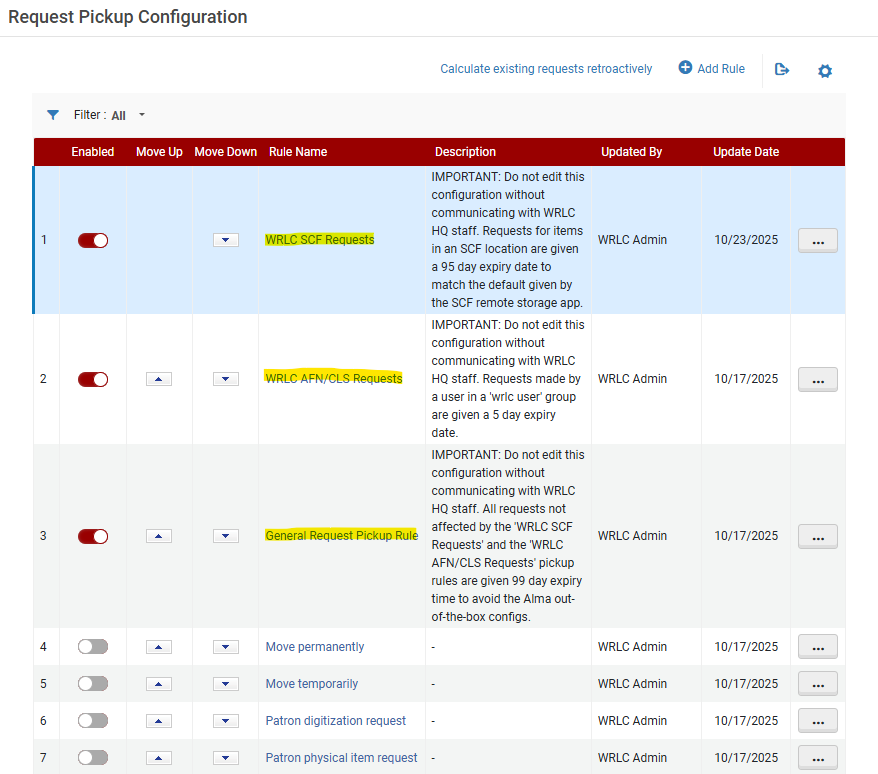
##### WRLC SCF Requests pickup rule

When a request is made for an item in the Shared Collections Facility, two copies of that request are created in WRLC's network; the original request in the owning Institution's IZ, and a second copy of the request in the SCF IZ. This rule ensures that both copies have the same expiration date.

[![Screenshot 2025-11-04 114427.png](https://alma-documentation-bookstack.azurewebsites.net/uploads/images/gallery/2025-11/scaled-1680-/screenshot-2025-11-04-114427.png)](https://alma-documentation-bookstack.azurewebsites.net/uploads/images/gallery/2025-11/screenshot-2025-11-04-114427.png)
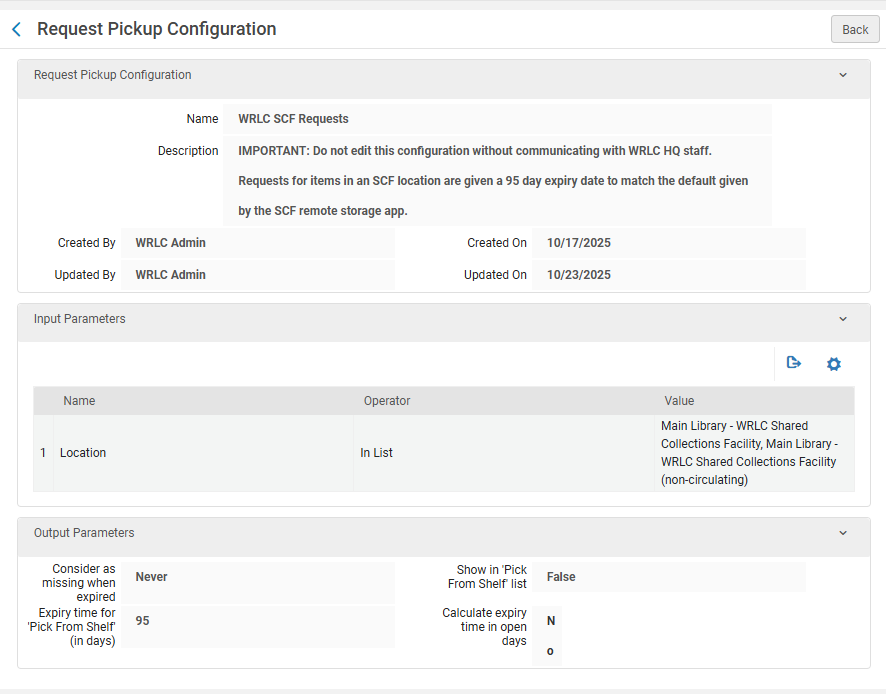
- Input Parameters 
    - Name - Location
    - Operator - In List
    - Value - ALL Remote Storage locations configured in the IZ
- Output Parameters 
    - Consider as missing when expired - Never
    - Expiry time for 'Pick From Shelf' (in days) - 95\*
    - Show in 'Pick From Shelf' list - False
    - Calculate expiry time in open days - No

\*This number is to match the expiry time automatically given by the SCF Remote Storage app when requests are copied from the owning Institution Zone to the Shared Collections Facility Institution Zone. For more information about the Remote Storage Applications, please see the [Remote Storage App chapter](https://alma-documentation-bookstack.azurewebsites.net/books/shared-collections-facility-scf-institution-zone/chapter/remote-storage-app) in the WRLC Alma Wiki.

##### WRLC AFN/CLS Requests pickup rule

This rule ensures that each CLS/AFN request is given 5 days to be filled before the request is marked as expired by Alma.

[![Screenshot 2025-11-04 114958.png](https://alma-documentation-bookstack.azurewebsites.net/uploads/images/gallery/2025-11/scaled-1680-/screenshot-2025-11-04-114958.png)](https://alma-documentation-bookstack.azurewebsites.net/uploads/images/gallery/2025-11/screenshot-2025-11-04-114958.png)

- Input Parameters 
    - Name - User Group
    - Operator - '='
    - Value - wrlc user
- Output Parameters 
    - Consider as missing when expired - Never
    - Expiry time for 'Pick From Shelf' (in days) - 5
    - Show in 'Pick From Shelf' list - True
    - Calculate expiry time in open days - Yes

##### General Request Pickup Rule

This third request rule is *only* configured IF there are no other request pickup rules active in the Institution Zone. This rule is primarily used to prevent Alma's out-of-the-box configurations (7 day expiry, mark as missing when expired) being applied to all requests.

[![Screenshot 2025-11-04 115141.png](https://alma-documentation-bookstack.azurewebsites.net/uploads/images/gallery/2025-11/scaled-1680-/screenshot-2025-11-04-115141.png)](https://alma-documentation-bookstack.azurewebsites.net/uploads/images/gallery/2025-11/screenshot-2025-11-04-115141.png)
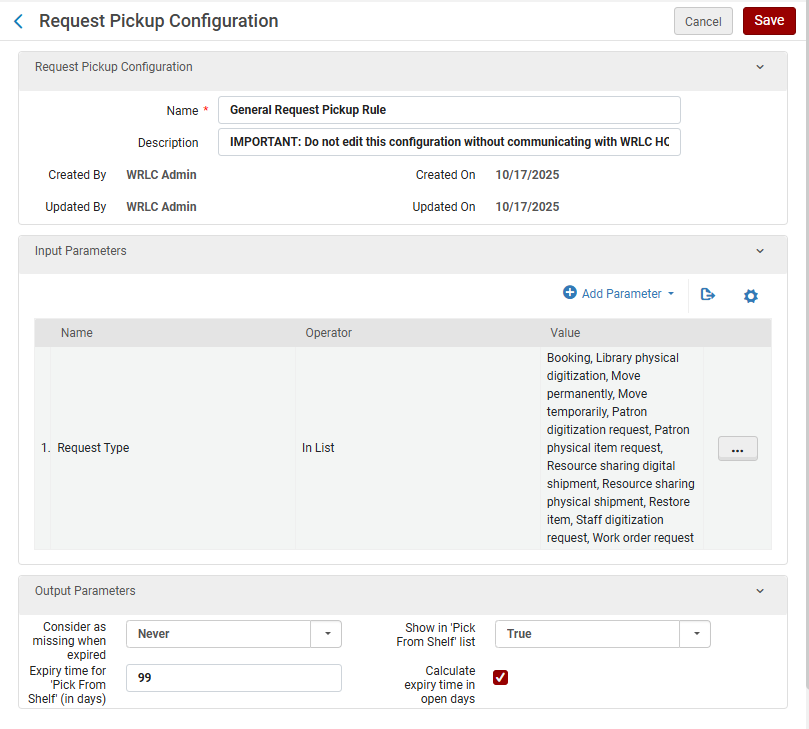
- Input Parameters 
    - Name - Request Type
    - Operator - In List
    - Value - Boking, Library physical digitization, Move permanently, Move temporarily, Patron digitization request, Patron physical item request, Resource sharing digital shipment, Resource sharing physical shipment, Restore item, Staff digitization request, Work order request
- Output Parameters 
    - Consider as missing when expired - Never
    - Expiry time for 'Pick From Shelf' (in days) - 99
    - Show in 'Pick From Shelf' list - True
    - Calculate expiry time in open days - Yes

---

### Rota Assignment Rules

**<span style="font-family: -apple-system, BlinkMacSystemFont, 'Segoe UI', Oxygen, Ubuntu, Roboto, Cantarell, 'Fira Sans', 'Droid Sans', 'Helvetica Neue', sans-serif; font-size: 14px; font-style: normal; font-variant-ligatures: normal; font-variant-caps: normal; outline-color: rgb(32, 110, 167);">Configuration &gt; Fulfillment &gt; Resource Sharing &gt; Rota Assignment Rules</span>**

<span style="background-color: rgb(255, 255, 255);">This configuration pertains to </span>

- [x] <span style="background-color: rgb(255, 255, 255);">Borrower + Lender Institutions</span>
- [x] <span style="background-color: rgb(255, 255, 255);">Borrower Only Institutions</span>

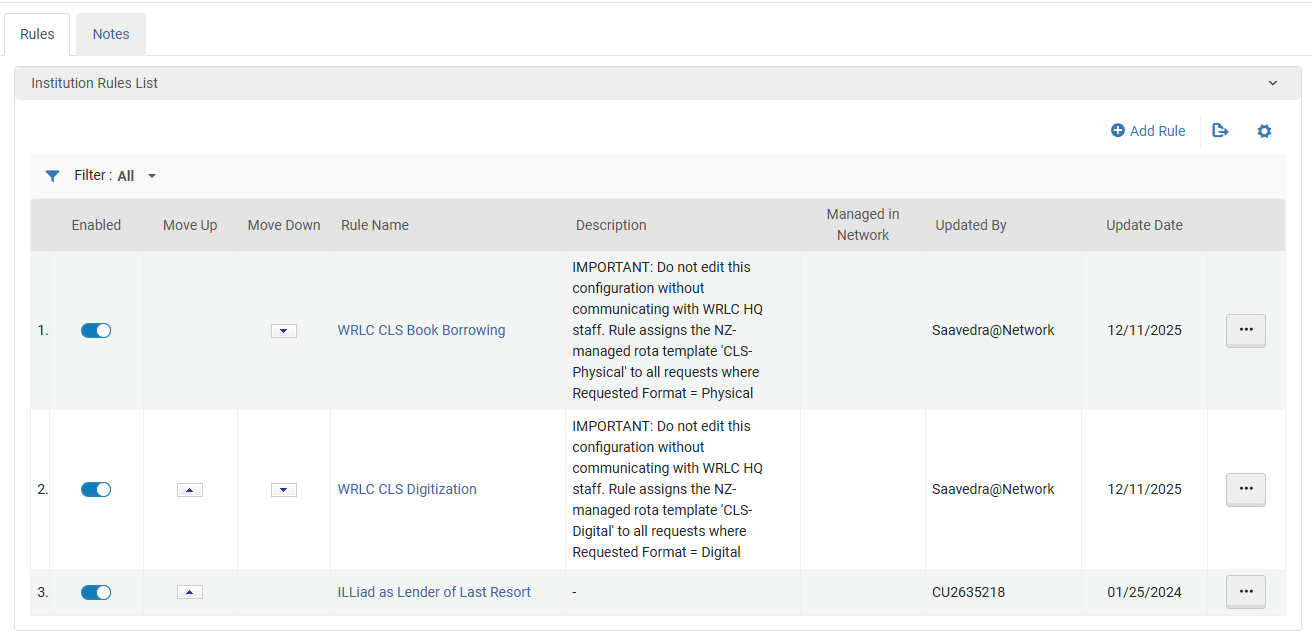
<span style="font-family: -apple-system, BlinkMacSystemFont, 'Segoe UI', Oxygen, Ubuntu, Roboto, Cantarell, 'Fira Sans', 'Droid Sans', 'Helvetica Neue', sans-serif; font-size: 14px; font-style: normal; font-variant-ligatures: normal; font-variant-caps: normal; outline-color: rgb(32, 110, 167);">Rota Assignment Rules assign Rota Templates to specific requests, based on specified criteria. </span>

<span style="font-family: -apple-system, BlinkMacSystemFont, 'Segoe UI', Oxygen, Ubuntu, Roboto, Cantarell, 'Fira Sans', 'Droid Sans', 'Helvetica Neue', sans-serif; font-size: 14px; font-style: normal; font-variant-ligatures: normal; font-variant-caps: normal; outline-color: rgb(32, 110, 167);">There are two WRLC Rota Assignment Rules configured in each Institution Zone in our consortium. These rules use the [Rota Templates configured in the WRLC Network Zone](https://alma-documentation-bookstack.azurewebsites.net/books/fulfillment/page/afn-network-zone-configurations#bkmrk-rota-templates). </span>

<span style="font-family: -apple-system, BlinkMacSystemFont, 'Segoe UI', Oxygen, Ubuntu, Roboto, Cantarell, 'Fira Sans', 'Droid Sans', 'Helvetica Neue', sans-serif; font-size: 14px; font-style: normal; font-variant-ligatures: normal; font-variant-caps: normal; outline-color: rgb(32, 110, 167);">These rules can be in any order, though both should always be above Lender of Last Resort rules configured in your IZ. </span>

1. [<span style="font-family: -apple-system, BlinkMacSystemFont, 'Segoe UI', Oxygen, Ubuntu, Roboto, Cantarell, 'Fira Sans', 'Droid Sans', 'Helvetica Neue', sans-serif; font-size: 14px; font-style: normal; font-variant-ligatures: normal; font-variant-caps: normal; outline-color: rgb(32, 110, 167);">WRLC CLS Book Borrowing</span>](https://alma-documentation-bookstack.azurewebsites.net/books/fulfillment/page/afn-institution-zone-configurations#bkmrk-wrlc-cls-book-borrow-1)
2. <span style="font-family: -apple-system, BlinkMacSystemFont, 'Segoe UI', Oxygen, Ubuntu, Roboto, Cantarell, 'Fira Sans', 'Droid Sans', 'Helvetica Neue', sans-serif; font-size: 14px; font-style: normal; font-variant-ligatures: normal; font-variant-caps: normal; outline-color: rgb(32, 110, 167);">[WRLC CLS Digitization](https://alma-documentation-bookstack.azurewebsites.net/books/fulfillment/page/afn-institution-zone-configurations#bkmrk-wrlc-cls-digitizatio) \* *(please note that, although this Rota Assignment Rule is active, the NZ Rota Template it uses is currently <span style="text-decoration: underline;">inactive</span>)*</span>

<p class="callout info"><span style="font-family: -apple-system, BlinkMacSystemFont, 'Segoe UI', Oxygen, Ubuntu, Roboto, Cantarell, 'Fira Sans', 'Droid Sans', 'Helvetica Neue', sans-serif; font-size: 14px; font-style: normal; font-variant-ligatures: normal; font-variant-caps: normal; outline-color: rgb(32, 110, 167);">The priority of Institution rules versus Network rules is determined by the *network\_rota\_assignment\_rules\_precedence* setting found in Configuration &gt; Fulfillment &gt; General &gt; Other Settings. The default setting for WRLC is *<span style="text-decoration: underline;">FALSE</span>* (IZ rules take precedent over NZ rules). For a full list of all recommended *Other Settings* configurations for a WRLC Institution Zone, please see the I[nstitution Zone Configuration page](https://alma-documentation-bookstack.azurewebsites.net/books/configuration/page/institution-zone-configuration) on the WRLC Alma Wiki.</span></p>

[![Screenshot 2025-12-16 150712.png](https://alma-documentation-bookstack.azurewebsites.net/uploads/images/gallery/2025-12/scaled-1680-/screenshot-2025-12-16-150712.png)](https://alma-documentation-bookstack.azurewebsites.net/uploads/images/gallery/2025-12/screenshot-2025-12-16-150712.png)

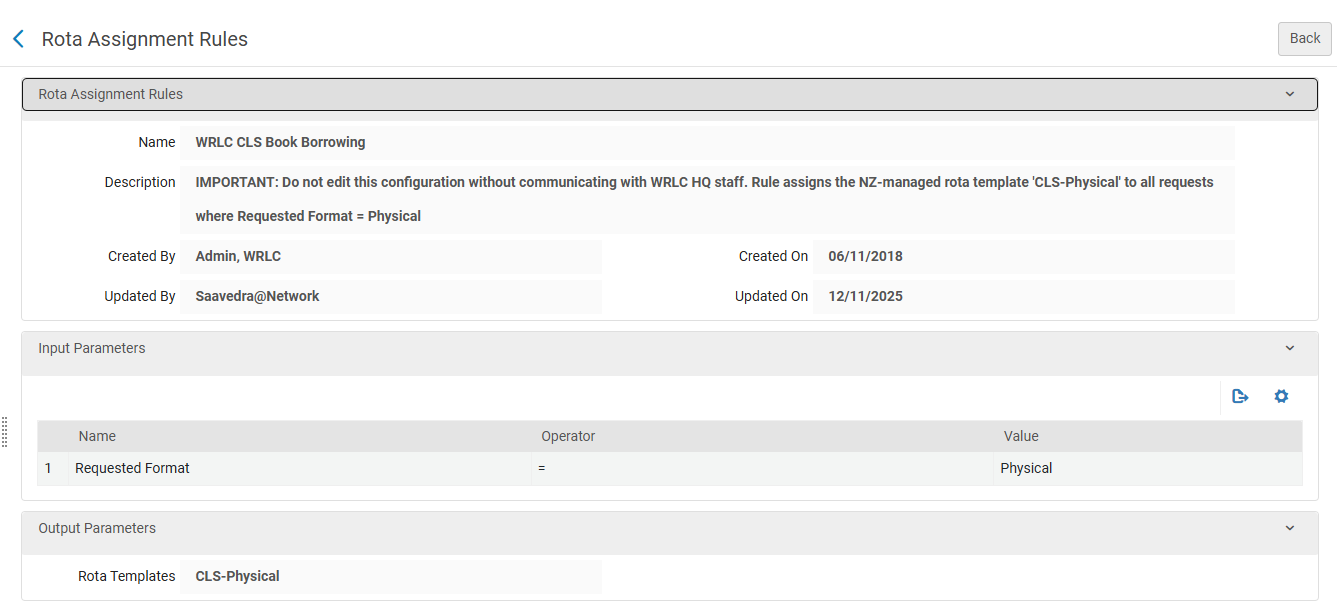
##### WRLC CLS Book Borrowing

- - <span style="font-family: -apple-system, BlinkMacSystemFont, 'Segoe UI', Oxygen, Ubuntu, Roboto, Cantarell, 'Fira Sans', 'Droid Sans', 'Helvetica Neue', sans-serif; font-size: 14px; font-style: normal; font-variant-ligatures: normal; font-variant-caps: normal; outline-color: rgb(32, 110, 167);">Input Parameters</span>
        - <span style="font-family: -apple-system, BlinkMacSystemFont, 'Segoe UI', Oxygen, Ubuntu, Roboto, Cantarell, 'Fira Sans', 'Droid Sans', 'Helvetica Neue', sans-serif; font-size: 14px; font-style: normal; font-variant-ligatures: normal; font-variant-caps: normal; outline-color: rgb(32, 110, 167);">Name - Requested Format </span>
        - <span style="font-family: -apple-system, BlinkMacSystemFont, 'Segoe UI', Oxygen, Ubuntu, Roboto, Cantarell, 'Fira Sans', 'Droid Sans', 'Helvetica Neue', sans-serif; font-size: 14px; font-style: normal; font-variant-ligatures: normal; font-variant-caps: normal; outline-color: rgb(32, 110, 167);">Operator - =</span>
        - <span style="font-family: -apple-system, BlinkMacSystemFont, 'Segoe UI', Oxygen, Ubuntu, Roboto, Cantarell, 'Fira Sans', 'Droid Sans', 'Helvetica Neue', sans-serif; font-size: 14px; font-style: normal; font-variant-ligatures: normal; font-variant-caps: normal; outline-color: rgb(32, 110, 167);">Value - Physical</span>
    - <span style="font-family: -apple-system, BlinkMacSystemFont, 'Segoe UI', Oxygen, Ubuntu, Roboto, Cantarell, 'Fira Sans', 'Droid Sans', 'Helvetica Neue', sans-serif; font-size: 14px; font-style: normal; font-variant-ligatures: normal; font-variant-caps: normal; outline-color: rgb(32, 110, 167);">Output Parameters</span>
        - <span style="font-family: -apple-system, BlinkMacSystemFont, 'Segoe UI', Oxygen, Ubuntu, Roboto, Cantarell, 'Fira Sans', 'Droid Sans', 'Helvetica Neue', sans-serif; font-size: 14px; font-style: normal; font-variant-ligatures: normal; font-variant-caps: normal; outline-color: rgb(32, 110, 167);">Rota Templates - CLS-Physical</span>

[![Screenshot 2025-12-16 150733.png](https://alma-documentation-bookstack.azurewebsites.net/uploads/images/gallery/2025-12/scaled-1680-/screenshot-2025-12-16-150733.png)](https://alma-documentation-bookstack.azurewebsites.net/uploads/images/gallery/2025-12/screenshot-2025-12-16-150733.png)

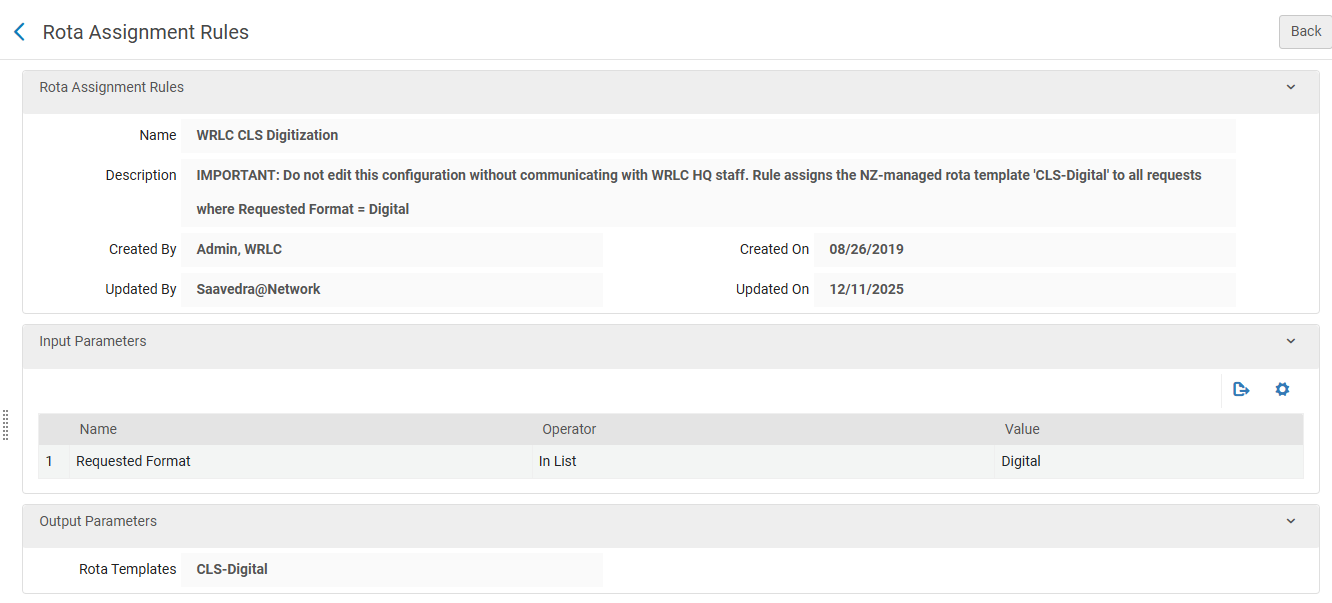
##### WRLC CLS Digitization

- <span style="font-family: -apple-system, BlinkMacSystemFont, 'Segoe UI', Oxygen, Ubuntu, Roboto, Cantarell, 'Fira Sans', 'Droid Sans', 'Helvetica Neue', sans-serif; font-size: 14px; font-style: normal; font-variant-ligatures: normal; font-variant-caps: normal; outline-color: rgb(32, 110, 167);">Input Parameters</span>
    - <span style="font-family: -apple-system, BlinkMacSystemFont, 'Segoe UI', Oxygen, Ubuntu, Roboto, Cantarell, 'Fira Sans', 'Droid Sans', 'Helvetica Neue', sans-serif; font-size: 14px; font-style: normal; font-variant-ligatures: normal; font-variant-caps: normal; outline-color: rgb(32, 110, 167);">Name - Requested Format </span>
    - <span style="font-family: -apple-system, BlinkMacSystemFont, 'Segoe UI', Oxygen, Ubuntu, Roboto, Cantarell, 'Fira Sans', 'Droid Sans', 'Helvetica Neue', sans-serif; font-size: 14px; font-style: normal; font-variant-ligatures: normal; font-variant-caps: normal; outline-color: rgb(32, 110, 167);">Operator - In List</span>
    - <span style="font-family: -apple-system, BlinkMacSystemFont, 'Segoe UI', Oxygen, Ubuntu, Roboto, Cantarell, 'Fira Sans', 'Droid Sans', 'Helvetica Neue', sans-serif; font-size: 14px; font-style: normal; font-variant-ligatures: normal; font-variant-caps: normal; outline-color: rgb(32, 110, 167);">Value - Digital</span>
- <span style="font-family: -apple-system, BlinkMacSystemFont, 'Segoe UI', Oxygen, Ubuntu, Roboto, Cantarell, 'Fira Sans', 'Droid Sans', 'Helvetica Neue', sans-serif; font-size: 14px; font-style: normal; font-variant-ligatures: normal; font-variant-caps: normal; outline-color: rgb(32, 110, 167);">Output Parameters</span>
    - <span style="font-family: -apple-system, BlinkMacSystemFont, 'Segoe UI', Oxygen, Ubuntu, Roboto, Cantarell, 'Fira Sans', 'Droid Sans', 'Helvetica Neue', sans-serif; font-size: 14px; font-style: normal; font-variant-ligatures: normal; font-variant-caps: normal; outline-color: rgb(32, 110, 167);">Rota Templates - CLS-Digital \* (this NZ-managed Rota Template is currently inactive)</span>

[![Screenshot 2025-12-16 150752.png](https://alma-documentation-bookstack.azurewebsites.net/uploads/images/gallery/2025-12/scaled-1680-/screenshot-2025-12-16-150752.png)](https://alma-documentation-bookstack.azurewebsites.net/uploads/images/gallery/2025-12/screenshot-2025-12-16-150752.png)

For more information, see the Alma Knowledgebase page [Configuring Rota Assignment Rules](https://knowledge.exlibrisgroup.com/Alma/Product_Documentation/010Alma_Online_Help_(English)/030Fulfillment/080Configuring_Fulfillment/060Resource_Sharing/010Basic_Resource_Sharing_Configurations#Configuring_Rota_Assignment_Rules)

---

### Fulfillment Jobs Configuration

**<span style="font-family: -apple-system, BlinkMacSystemFont, 'Segoe UI', Oxygen, Ubuntu, Roboto, Cantarell, 'Fira Sans', 'Droid Sans', 'Helvetica Neue', sans-serif; font-size: 14px; font-style: normal; font-variant-ligatures: normal; font-variant-caps: normal; outline-color: rgb(32, 110, 167);">Configuration &gt; Fulfillment &gt; General &gt; Fulfillment Jobs Configuration</span>**

- [x] <span style="background-color: rgb(255, 255, 255);">This configuration pertains to </span>
    
    
    - [x] <span style="background-color: rgb(255, 255, 255);">Borrower + Lender Institutions</span>

Below are the Fulfillment jobs that <span style="text-decoration: underline;">**must**</span> be active for libraries that lend their library's items in the CLS/AFN.


##### Requests - Handle Expiration Job

This job should be active only for libraries that *lend* their library's items in the CLS/AFN.

The job cancels requests when the expiration date for a request has passed AND the status of the request is one of the following :

- Pick from shelf
- Communicated to Remote Storage

Expiration dates are configured according to an Institution's Request Pickup Rules. For more information on how these should be configured for the AFN, please see the [Request Pickup Configuration](https://alma-documentation-bookstack.azurewebsites.net/books/fulfillment/page/afn-institution-zone-configurations#bkmrk-request-pickup-confi) section of the [AFN Institution Zone Configurations](https://alma-documentation-bookstack.azurewebsites.net/books/fulfillment/page/afn-institution-zone-configurations "AFN Institution Zone Configurations") page on the WRLC Alma Wiki.

##### <span class="ScreenElement">Loans - Overdue and Lost Item</span>

<span class="ScreenElement">This job should be active for libraries that *lend* their library's items in the CLS/AFN.</span>

<span class="ScreenElement">The job both notifies patrons about overdue loans, and changes a loan's status to Lost; the parameters for each of these actions is dictated by the configuration of your Institution Zones Overdue and Lost Loan profiles. For more information about these in relation to CLS, please see the Overdue and Lost Loan Profiles section of the WRLC Alma Wiki.</span>

<span class="ScreenElement">For more information, see the Alma Knowledgebase page [Configuring Fulfillment Jobs](https://knowledge.exlibrisgroup.com/Alma/Product_Documentation/010Alma_Online_Help_(English)/030Fulfillment/080Configuring_Fulfillment/080General/Configuring_Fulfillment_Jobs).</span>

---

### Overdue and Lost Loan Profiles

**Configuration &gt; Fulfillment &gt; General &gt; Overdue and Lost Loan Profiles**

- [x] <span style="background-color: rgb(255, 255, 255);">This configuration pertains to </span>
    
    
    - [x] <span style="background-color: rgb(255, 255, 255);">Borrower + Lender Institutions</span>

The overdue and lost loan profiles monitor long overdue loans and turn them into lost loans when applicable. The profiles send reminders to the patron as well as create fees and user blocks. Lost fees charged to a patron account are determined by the items Terms of Use.

For libraries that<span class="ScreenElement"> *lend* their library's items in the CLS/AFN</span> both lend and borrow, there should be at least one **Change to Lost** profile that includes the User Group '*wrlc user*'. This profile ensures that any WRLC patrons with overdue items from your institution will be sent an email notifying them that their item is overdue by 40 days and has now been changed to a Lost status. This change in status marks the item as Lost, and adds a $110 replacement fee to their account (as configured in the AFN's Terms of Use).

Below is an example configuration, along with recommended configurations :

[![Screenshot 2026-02-26 110448.png](https://alma-documentation-bookstack.azurewebsites.net/uploads/images/gallery/2026-02/scaled-1680-/screenshot-2026-02-26-110448.png)](https://alma-documentation-bookstack.azurewebsites.net/uploads/images/gallery/2026-02/screenshot-2026-02-26-110448.png)

**Active** : Checked

**Profile Type** : Change to Lost

**Days after due date** : 39

Notices will be send the following day (on the 40th day)

**Days** : Checked (do not check 'Open Days')

**User Group** : *wrlc user*

<p class="callout info">Please note that if any of the settings above are left blank, the field will apply to all in the category. For example, if the User Group field is left blank, this profile will be applied to all user groups in your Institution Zone. </p>

<div class="BodyText" id="bkmrk-alma-runs-a-daily-jo">Alma runs a daily job (**<span class="ScreenElement">Loans - Overdue and Lost Item</span>**) to process overdue and lost loans, which, according to the list of profiles, determines the loans for which warnings are sent and those that are defined as lost.</div><div class="BodyText" id="bkmrk--36">  
</div><div class="BodyText" id="bkmrk-the-letter-sent-depe">The type of letter sent depends on the setting of the **<span class="ScreenElement">switch\_to\_overdue\_and\_lost\_loan\_new\_job</span>** customer parameter. When this parameter is set to <span class="ScreenElement">true</span>, the notification sent is the *Ful Overdue and Lost Loan Notification Letter*. In this case, a single notification is sent to each patron for all overdue items whose criteria match a particular profile, listing all of the overdue items in that profile. </div>For more information, see the Alma Knowledgebase page [Configuring Overdue and Lost Loan Profiles](https://knowledge.exlibrisgroup.com/Alma/Product_Documentation/010Alma_Online_Help_(English)/030Fulfillment/080Configuring_Fulfillment/Configuring_Loans#Configuring_Overdue_and_Lost_Loan_Profiles) page.