# Consortium Loan Services (CLS)/ Automated Fulfillment Network (AFN)

The Washington Research Library Consortium (WRLC) supports resource sharing among its nine member institutions. One essential component of this work is Consortium Loan Services (CLS), which allows libraries to request, lend, and borrow materials from one another.

All WRLC libraries use the Ex Libris Alma Library Management System to manage their collections and fulfillment workflows. Within Alma, all CLS activity is handled through the Alma Fulfillment Network (AFN). The AFN is the technical structure that routes requests, tracks items in transit, and manages the lending and borrowing process.

As you work through this chapter, keep in mind that the terms CLS and AFN refer to the same overall service. CLS describes the consortium-wide loan program, while AFN describes the system functionality that makes it possible. For clarity and consistency, this chapter will use these acronyms interchangeably.

# Fulfillment Units and the AFN

In a consortial (shared) environment using an Alma Network Zone (NZ), a **Network Fulfillment Unit** is used to manage circulation policies that apply across multiple institutions, such as consortial loan (CLS/AFN) transactions.

- **Function:** It is possible for an **Institution-only Fulfillment Unit** to incorporate rules from a **Network Fulfillment Unit** (like the 'WRLC Fulfillment Network'). This allows for centralized management of shared policies.
- **Example:** In your consortium, the 'WRLC Fulfillment Network' is the single NZ fulfillment unit containing all rules specific to CLS/AFN transactions.

For more information on the rules and TOUs used in the WRLC Fulfillment Network fulfillment unit, please see the [Fulfillment Unit](https://alma-documentation-bookstack.azurewebsites.net/books/fulfillment/page/afn-network-zone-configurations#bkmrk-fulfillment-unit) section of the [AFN Network Zone Configurations](https://alma-documentation-bookstack.azurewebsites.net/books/fulfillment/page/afn-network-zone-configurations) page of the WRLC Alma Wiki.


---

### How to <span style="text-decoration: underline;">*Allow*</span> AFN Requests for an IZ Fulfillment Unit

[![Screenshot 2025-10-10 145712.png](https://alma-documentation-bookstack.azurewebsites.net/uploads/images/gallery/2025-10/scaled-1680-/screenshot-2025-10-10-145712.png)](https://alma-documentation-bookstack.azurewebsites.net/uploads/images/gallery/2025-10/screenshot-2025-10-10-145712.png)

To configure the use of Network Zone rules in a specific Fulfillment Unit,

1. Go to **Configuration &gt; Fulfillment &gt; Physical Fulfillment &gt; Fulfillment Units**
2. Edit the specific Fulfillment Unit you wish to make available for AFN requests
3. On the Fulfillment Unit Details tab, choose the **WRLC Fulfillment Network** from the drop-down menu in the Fulfillment Unit configuration page, under the option **Use Rules From Network Fulfillment Unit**. 
    1. Do **not** checkmark 'Use Network Rules First.'

<p class="callout info">Rules configured for your IZ Fulfillment Unit will be applied first, THEN rules configured in the 'WRLC Fulfillment Network' Fulfillment Unit will be applied</p>


---

### How to <span style="text-decoration: underline;">*Prevent*</span> AFN Requests for an IZ Fulfillment Unit

To configure the prevention of AFN requests to a specific Fulfillment Unit,

1. Go to **Configuration &gt; Fulfillment &gt; Physical Fulfillment &gt; Fulfillment Units**
2. Edit the specific Fulfillment Unit you wish to NOT make available for AFN requests
3. On the Fulfillment Unit Details tab, make sure the **Use Rules From Network Fulfillment Unit option** is left blank.
4. Go to the **Fulfillment Unit Rules** tab, then choose **Request** from the Type drop-down menu.

[![Screenshot 2026-01-12 154323.png](https://alma-documentation-bookstack.azurewebsites.net/uploads/images/gallery/2026-01/scaled-1680-/screenshot-2026-01-12-154323.png)](https://alma-documentation-bookstack.azurewebsites.net/uploads/images/gallery/2026-01/screenshot-2026-01-12-154323.png)
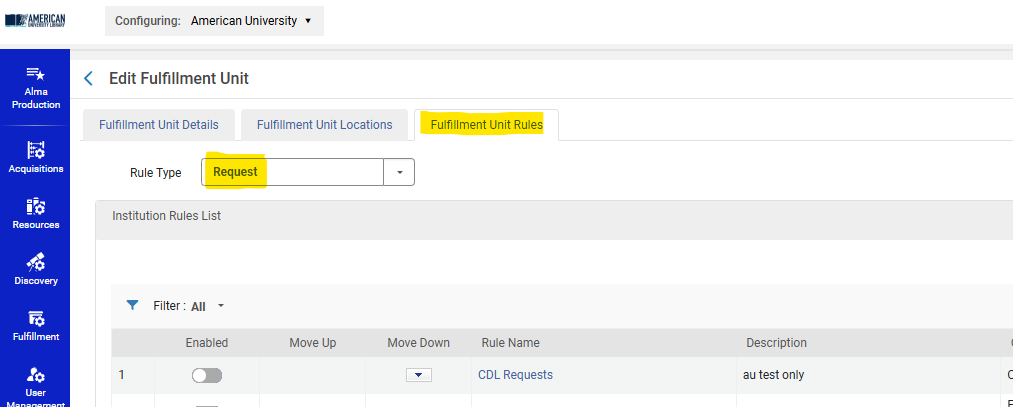
5\. Add a Rule like the following:

Input Parameters :

- - - User Group = **wrlc user**

Output Parameters :

- - - TOU = **No FN Requesting**

[![Screenshot 2026-01-12 154543.png](https://alma-documentation-bookstack.azurewebsites.net/uploads/images/gallery/2026-01/scaled-1680-/screenshot-2026-01-12-154543.png)](https://alma-documentation-bookstack.azurewebsites.net/uploads/images/gallery/2026-01/screenshot-2026-01-12-154543.png)
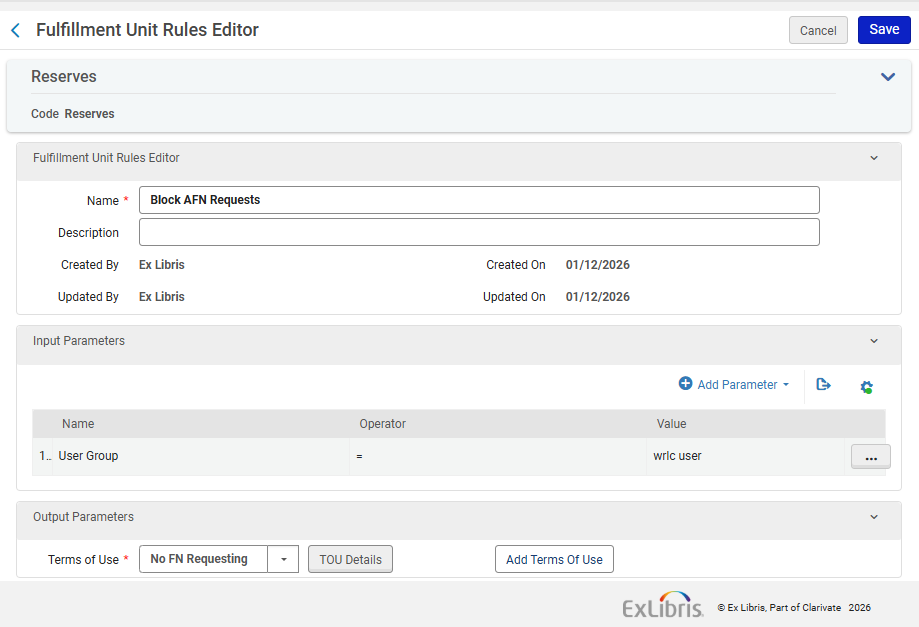
<p class="callout info">Note that the TOU 'No FN Requesting' is managed in the Network Zone.</p>

<p class="callout success">Similarly, if you wish to create Fulfillment Rules that target WRLC patrons only, you can add rules to a Fulfillment unit with an Input Parameter of User Group = 'wrlc user' </p>

---


### For 'Borrowing Only' Institution Zones 

If your entire Institution Zone is a Borrowing Only institution (you do not lend your items via CLS/AFN loans), you do not need additional configurations in your IZ. The Network-managed configurations found in the WRLC's [Rota Templates](https://alma-documentation-bookstack.azurewebsites.net/books/fulfillment/page/afn-network-zone-configurations#bkmrk-rota-templates) and [Partner Profiles](https://alma-documentation-bookstack.azurewebsites.net/books/fulfillment/page/afn-network-zone-configurations#bkmrk-fulfillment-%3E-partne) already prevent other WRLC patrons from requesting your institution's items.

For a full list for all WRLC partners that only borrow in the AFN, see the [Consortial Partners in CLS/AFN](https://alma.wrlc.org/books/fulfillment/page/consortial-partners-in-clsafn) page.

# Consortial Partners in CLS/AFN

#### **Lending and Borrowing Partners**

These partners are configured in the ROTA for the "Consortium Book Borrowing"

- American University - 01WRLC\_AMU
- Catholic University of America - 01WRLC\_CAA
- Gallaudet University - 01WRLC\_GAL
- George Mason University - 01WRLC\_GML
- Georgetown University - 01WRLC\_GUNIV
- George Washington University - 01WRLC\_GWA
- Howard University - 01WRLC\_HOW
- Marymount University - 01WRLC\_MAR
- University of the District of Columbia - 01 WRLC\_DOC
- Washington Research Library Consortium (SCF) - 01WRLC\_SCF

#### **Borrowing Partners\***

- American University, Washington College of Law - 01WRLC\_AMULAW
- Catholic University of America, Columbus School of Law - 01WRLC\_CUALAW
- Georgetown University Law Center - 01WRLC\_GUNIVLAW
- George Washington University School of Medicine and Health (Himmelfarb Health Sciences Library) - 01WRLC\_GWAHLTH
- George Washington University Law School (Jacob Burns Law Library) - 01WRLC\_GWALAW
- University of the District of Columbia, David A. Clarke School of Law - 01WRLC\_DOCLAW
- Trinity Washington University - 01WRLC\_TRN

\*Borrowing partners do not lend via CLS although they may lend via ILL requests and other methods.

# AFN Network Zone Configurations

The following Automated Fulfillment Network (AFN) configurations are set in the WRLC Network Zone. Most of the settings are visible (and not editable) in the Institution Zones; the only one that is not visible in the Institution Zone is the [Institutions Relations](https://alma.wrlc.org/books/fulfillment/page/afn-network-zone-configurations#bkmrk-institutions-relatio) configuration.

---


### Locate Profiles

**Configuration &gt; Fulfillment &gt; Resource Sharing &gt; Locate Profiles**

<span style="background-color: rgb(255, 255, 255);">This configuration pertains to </span>

- [x] <span style="background-color: rgb(255, 255, 255);">Borrower + Lender Institutions</span>
- [x] <span style="background-color: rgb(255, 255, 255);">Borrower Only Institutions (see blue note below)</span>

For the WRLC AFN, a locate profile defines how the AFN searches a particular institution's catalog. Locate Profiles are associated with a specific resource sharing partner profile.

[![afn-nz-1.PNG](https://alma-documentation-bookstack.azurewebsites.net/uploads/images/gallery/2025-04/scaled-1680-/afn-nz-1.PNG)](https://alma-documentation-bookstack.azurewebsites.net/uploads/images/gallery/2025-04/afn-nz-1.PNG)
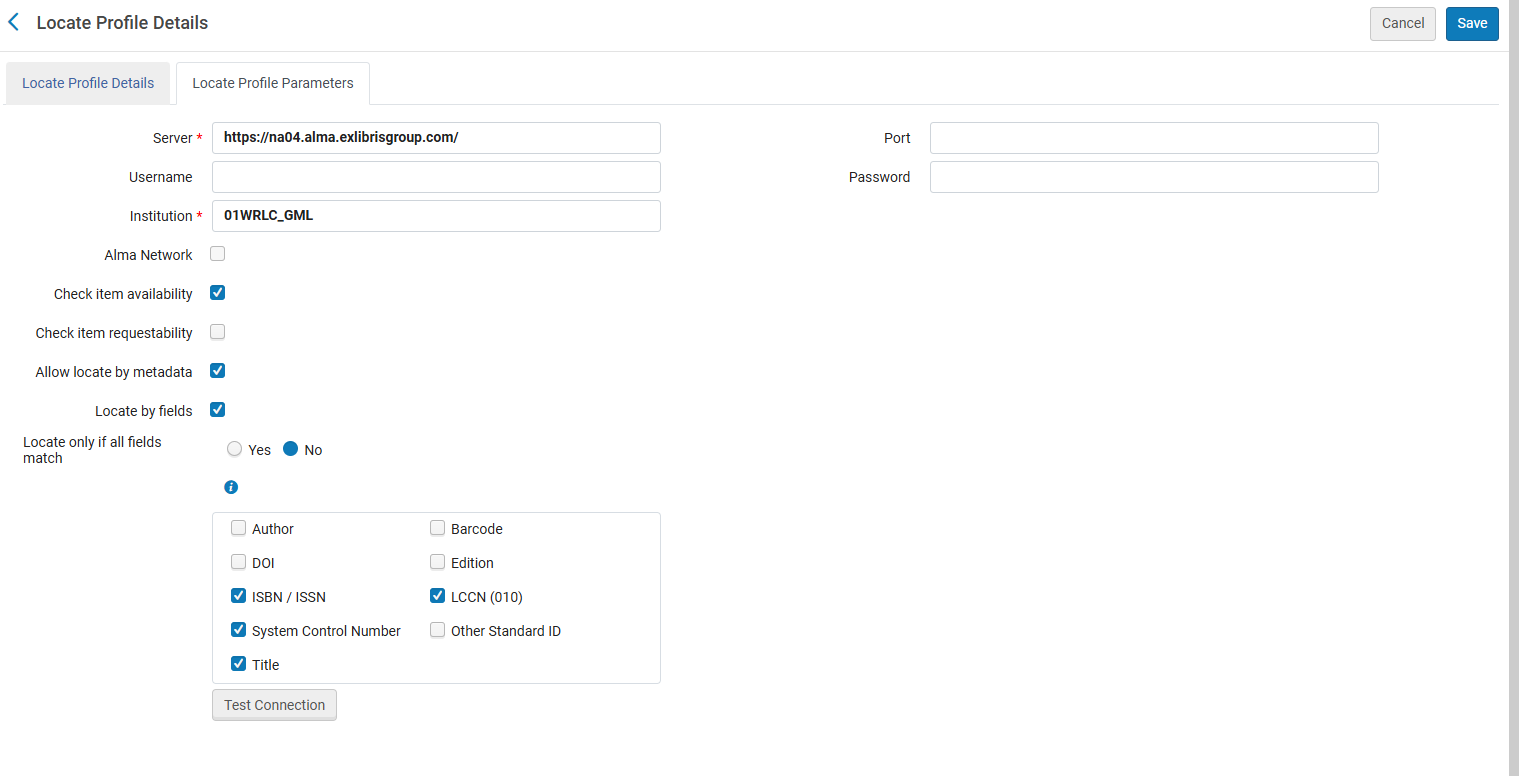
- **Alma Network** is NOT checked. This is to allow the search against each institution's local catalog, instead of only searching records linked to the NZ.
- **Check item availability** is checked. This sees whether an item is available in the institution. If it is not, the institution will not be added to the rota for the request
- **Check item requestability** is not checked. Not checking this option ensures that the ***Is Requestable for Physical Resource Sharing*** policy and the ***Is Requestable for Digital Resource Sharing*** policy of the TOUs is consulted <span style="text-decoration: underline;">*instead of*</span> the ***Is Requestable*** policy of the TOUs. For more information, see the [Automated Fulfillment Network Requests](https://knowledge.exlibrisgroup.com/Alma/Product_Documentation/010Alma_Online_Help_(English)/030Fulfillment/050Resource_Sharing/Automated_Fulfillment_Network_Requests_(AFN)) page on the Alma Knowledge Center. 
    - For [Borrowing-Only institutions,](https://alma.wrlc.org/books/fulfillment/page/consortial-partners-in-clsafn) the **Check item requestability** is checked in order to facilitate the self-ownership borrowing process. Please see the Information box below for more details.
- **Allow locate by metadata** locates an item based on the metadata listed below; a match is successful if ***any*** field listed below matches the bib record. This option allows borrowers that share an NZ to create requests for records not linked to the NZ. It also allows hold requests to be converted to AFN requests 
    - ISBN / ISSN
    - System Control Number
    - Title
    - LCCN

<p class="callout info">[Borrowing-Only Institutions](https://alma.wrlc.org/books/fulfillment/page/consortial-partners-in-clsafn) also have Locate Profiles configured in the NZ. Even though they are not one of the potential lending partners, **a Locate Profile is used to first locate a borrowing request in the borrower's catalog prior to sending the request to potential partners**. This type of search determine whether a patron's resource request may be filled by local inventory, or whether the request must be directed to an external resource sharing partner as part of the locate process. This is specifically stated in the [Locating Items for Resource Sharing page](https://knowledge.exlibrisgroup.com/Alma/Product_Documentation/010Alma_Online_Help_(English)/030Fulfillment/050Resource_Sharing/Resource_Sharing_Configuration/Locating_Items_for_Resource_Sharing) on the Alma Knowledgebase.</p>

For more information, see the Alma Knowledgebase page [Configuring Locate Profiles](https://knowledge.exlibrisgroup.com/Alma/Product_Documentation/010Alma_Online_Help_(English)/030Fulfillment/080Configuring_Fulfillment/060Resource_Sharing/010Basic_Resource_Sharing_Configurations#Configuring_Locate_Profiles).

---


### Workflow Profiles

**Configuration &gt; Fulfillment &gt; Resource Sharing &gt; Workflow Profiles**

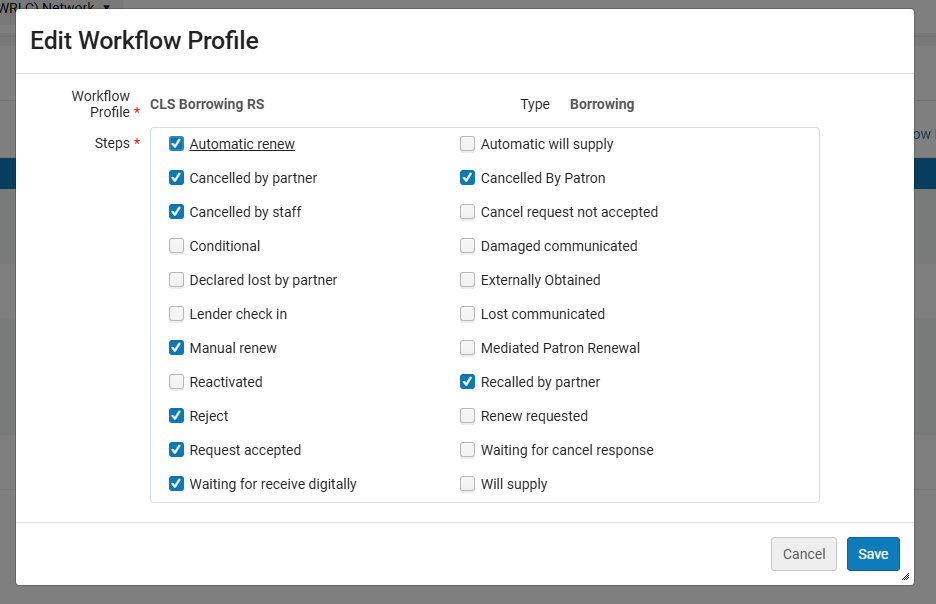
Workflows control the actions that can be performed on the borrowing and lending request task lists for the defined partner; Workflow Profiles are associated with a specific resource sharing partner profile.

There is one workflow each for borrowing and lending. Below are the borrowing and lending configurations for the WRLC AFN

**CLS Borrowing RS**

<span style="background-color: rgb(255, 255, 255);">This configuration pertains to </span>

- [x] <span style="background-color: rgb(255, 255, 255);">Borrower + Lender Institutions</span>
- [x] <span style="background-color: rgb(255, 255, 255);">Borrower Only Institutions</span>

[![afn-nz-4.PNG](https://alma-documentation-bookstack.azurewebsites.net/uploads/images/gallery/2025-04/scaled-1680-/afn-nz-4.PNG)](https://alma-documentation-bookstack.azurewebsites.net/uploads/images/gallery/2025-04/afn-nz-4.PNG)

**CLS Lending RS**

<span style="background-color: rgb(255, 255, 255);">This configuration pertains to </span>

- [x] <span style="background-color: rgb(255, 255, 255);">Borrower + Lender Institutions</span>

[![afn-nz-5.PNG](https://alma-documentation-bookstack.azurewebsites.net/uploads/images/gallery/2025-04/scaled-1680-/afn-nz-5.PNG)](https://alma-documentation-bookstack.azurewebsites.net/uploads/images/gallery/2025-04/afn-nz-5.PNG)

For more information, see the Alma Knowledgebase page [Configuring Workflow Profiles](https://knowledge.exlibrisgroup.com/Alma/Product_Documentation/010Alma_Online_Help_(English)/030Fulfillment/080Configuring_Fulfillment/060Resource_Sharing/010Basic_Resource_Sharing_Configurations#Configuring_Workflow_Profiles)


---

### Institutions Relations


**Configuration &gt; General &gt; Network Groups &gt; Institutions Relations**

<p class="callout info">Please note that this configuration is NOT viewable in the Institution Zone.</p>

<span style="background-color: rgb(255, 255, 255);">This configuration pertains to </span>

- [x] <span style="background-color: rgb(255, 255, 255);">Borrower + Lender Institutions</span>
- [x] <span style="background-color: rgb(255, 255, 255);">Borrower Only Institutions</span>

These relation configurations determine if items belonging to an institution can be checked out/in or delivered to other institutions.

[![afn-nz-6.PNG](https://alma-documentation-bookstack.azurewebsites.net/uploads/images/gallery/2025-04/scaled-1680-/afn-nz-6.PNG)](https://alma-documentation-bookstack.azurewebsites.net/uploads/images/gallery/2025-04/afn-nz-6.PNG)

- **From:** the institution whose fulfillment network behavior is configured
- **To:** the institution(s) who participate in the fulfillment process; in the case of the WRLC, the value ***All*** signifies all Institution Zones in the WRLC NZ
- **Circulate For** is checked; this specific institution can check out and check in items belonging to all of the other institutions
- **Deliver To** is checked; this specific institution can send its own items to all of the other institutions for pick up.

For more information, see the Alma Knowledgebase page [Configuring Pick Up Anywhere/Return Anywhere](https://knowledge.exlibrisgroup.com/Alma/Product_Documentation/010Alma_Online_Help_(English)/050Administration/050Configuring_General_Alma_Functions/160Configuring_Fulfillment_Networks#Configuring_Institutions_Relations)

---

### Sending Borrowing Request Rules

**Configuration &gt; Fulfillment &gt; Resource Sharing &gt; Sending Borrowing Request Rules**

<span style="background-color: rgb(255, 255, 255);">This configuration pertains to </span>

- [x] <span style="background-color: rgb(255, 255, 255);">Borrower + Lender Institutions</span>
- [x] <span style="background-color: rgb(255, 255, 255);">Borrower Only Institutions</span>

Sending Borrowing Request Rules dictate when a borrowing request is sent automatically to an active partner institution without staff intervention.

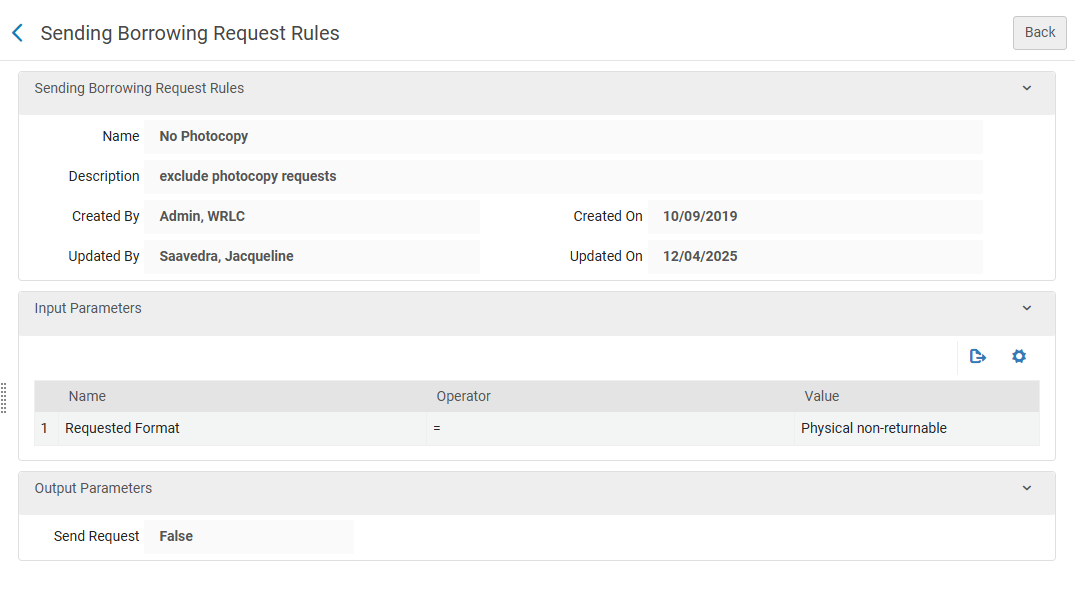
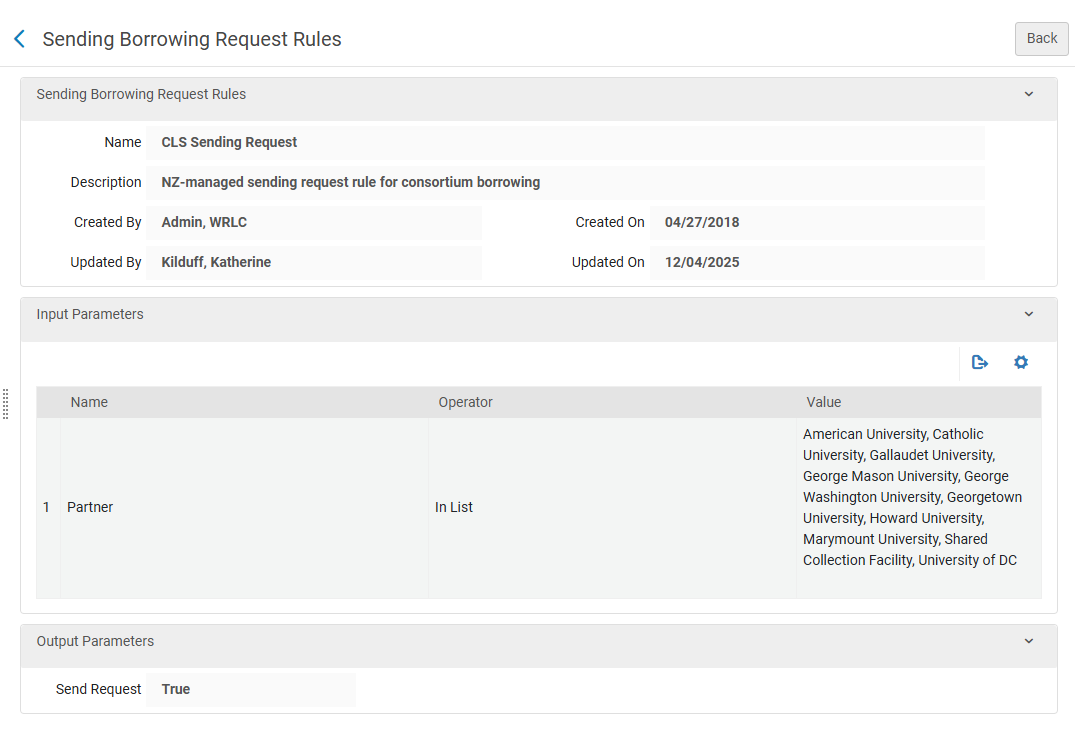
The WRLC Network Zone has two Rules [that are enforced before the IZ-only rules](https://alma-documentation-bookstack.azurewebsites.net/books/configuration/page/network-zone-configuration). The first is the **No Photocopy** rule, and the second is the **CLS Sending Request** rule. The NZ rules are applied to requests in this order.

[![Screenshot 2025-12-10 092127.png](https://alma-documentation-bookstack.azurewebsites.net/uploads/images/gallery/2025-12/scaled-1680-/screenshot-2025-12-10-092127.png)](https://alma-documentation-bookstack.azurewebsites.net/uploads/images/gallery/2025-12/screenshot-2025-12-10-092127.png)
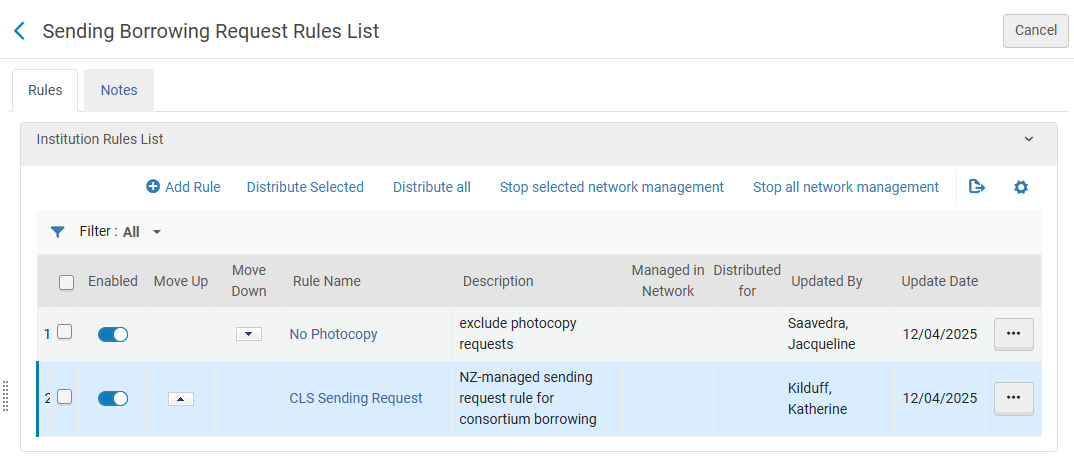
- **No Photocopy**
    - Input Parameters 
        - Name = Requested Format
        - Operator = '='
        - Value = Physical non-returnable
    - Output Parameters 
        - Send Request = False

[![Screenshot 2025-12-10 092033.png](https://alma-documentation-bookstack.azurewebsites.net/uploads/images/gallery/2025-12/scaled-1680-/screenshot-2025-12-10-092033.png)](https://alma-documentation-bookstack.azurewebsites.net/uploads/images/gallery/2025-12/screenshot-2025-12-10-092033.png)
- **CLS Sending Request**
    - Input Parameters 
        - Name = Partner
        - Operator = In List
        - Value = American University, Catholic University, Gallaudet University, George Mason University, George Washington University, Georgetown University, Howard University, Marymount University, Shared Collection Facility, University of DC
    - Output Parameters 
        - Send Request = True

[![Screenshot 2025-12-10 092103.png](https://alma-documentation-bookstack.azurewebsites.net/uploads/images/gallery/2025-12/scaled-1680-/screenshot-2025-12-10-092103.png)](https://alma-documentation-bookstack.azurewebsites.net/uploads/images/gallery/2025-12/screenshot-2025-12-10-092103.png)
For more information, see the Alma Knowledgebase page [Configuring Sending Borrowing Request Rules](https://knowledge.exlibrisgroup.com/Alma/Product_Documentation/010Alma_Online_Help_(English)/030Fulfillment/080Configuring_Fulfillment/060Resource_Sharing/020Advanced_Resource_Sharing_Configurations#Configuring_Sending_Borrowing_Request_Rules)


---

### Resource Sharing Partners

**Fulfillment &gt; Resource Sharing &gt; Partners**

<span style="background-color: rgb(255, 255, 255);">This configuration pertains to </span>

- [x] <span style="background-color: rgb(255, 255, 255);">Borrower + Lender Institutions</span>
- [x] <span style="background-color: rgb(255, 255, 255);">Borrower Only Institutions</span>

Partner profiles define the types of request and communication sent to a specific institution. The profile also defines the Locate Profile and the Workflow Profiles for an institution.

For a list of all partner profiles in the WRLC AFN, as well as their borrowing and lending preferences, see the [Consortial Partners in CLS/AFN](https://alma.wrlc.org/books/fulfillment/page/consortial-partners-in-clsafn) page.

**Typical Partner Profile for a Borrowing AND Lending WRLC Institution**

[![afn-nz-7.PNG](https://alma-documentation-bookstack.azurewebsites.net/uploads/images/gallery/2025-04/scaled-1680-/afn-nz-7.PNG)](https://alma-documentation-bookstack.azurewebsites.net/uploads/images/gallery/2025-04/afn-nz-7.PNG)

- **Profile Type** equals Fulfillment Network to signify the AFN
- **Locate Profile** specifies the Locate Profile (how Alma searches their catalog for a matching item) that should be used for this institution.
- **Supports Borrowing / Lending** is checkmarked for the WRLC Institutions that lend and borrow in the AFN
- **Borrowing / Lending Workflow** specifies the Workflow Profile (actions that can be performed on the borrowing and lending request task lists for the defined partner) that is used for borrowing and/or lending in the AFN

For a full list for all WRLC partners that both borrow and lend in the AFN, see the [Consortial Partners in CLS/AFN](https://alma.wrlc.org/books/fulfillment/page/consortial-partners-in-clsafn) page.

**Typical Partner Profile for a Borrowing ONLY WRLC Institution**

[![Screenshot 2026-01-12 143104.png](https://alma-documentation-bookstack.azurewebsites.net/uploads/images/gallery/2026-01/scaled-1680-/screenshot-2026-01-12-143104.png)](https://alma-documentation-bookstack.azurewebsites.net/uploads/images/gallery/2026-01/screenshot-2026-01-12-143104.png)
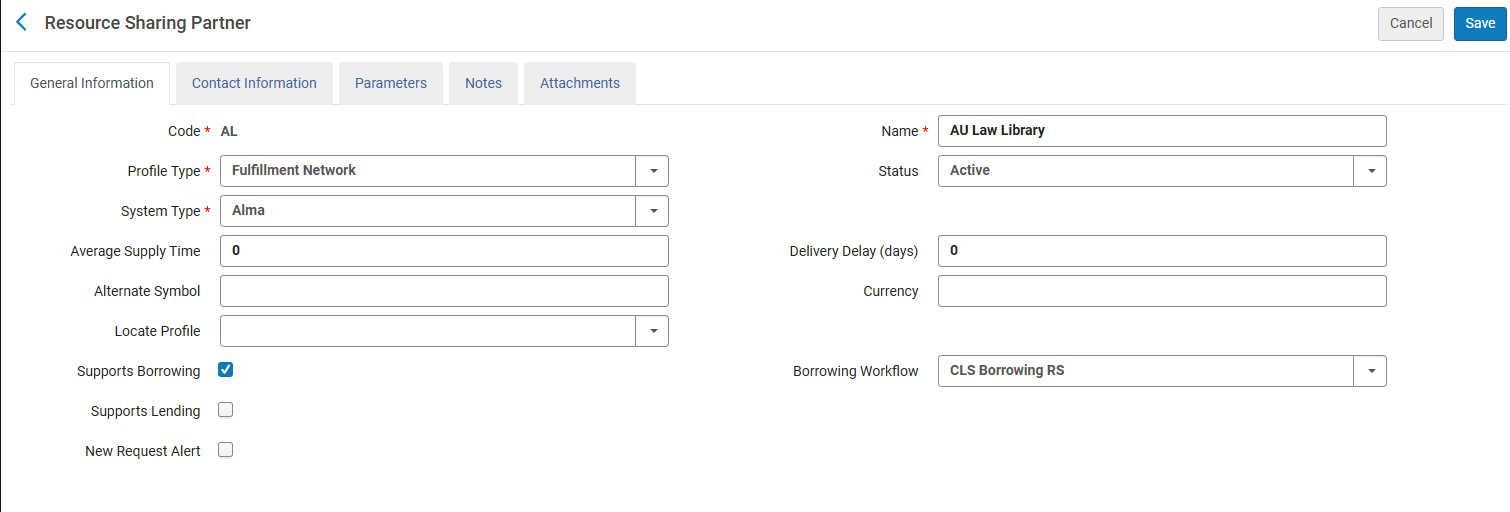
- **Profile Type** equals Fulfillment Network to signify the AFN
- **Locate Profile** is left BLANK (because the library does not lend items, there is no need for Alma to search their catalog via a Locate Profile).
- **Supports Borrowing** is checkmarked for the WRLC Institutions that ONLY borrow from other AFN partners (they do not lend their own materials to other partners)
- **Borrowing Workflow** specifies the Workflow Profile (actions that can be performed on the borrowing and lending request task lists for the defined partner) that is used for borrowing in the AFN

For a full list for all WRLC partners that only borrow in the AFN, see the [Consortial Partners in CLS/AFN](https://alma.wrlc.org/books/fulfillment/page/consortial-partners-in-clsafn) page.

<p class="callout info">Borrowing only partners do not lend via CLS although they may lend via ILL requests and other methods.</p>

For more information, see the Alma Knowledgebase page [Configuring a Resource Sharing Partner](https://knowledge.exlibrisgroup.com/Alma/Product_Documentation/010Alma_Online_Help_(English)/030Fulfillment/050Resource_Sharing/005Managing_Resource_Sharing_Partners/Resource_Sharing_Partners#Configuring_a_Resource_Sharing_Partner)


---

### Rota Templates

**Fulfillment &gt; Resource Sharing &gt; Rota Templates**

<span style="background-color: rgb(255, 255, 255);">This configuration pertains to </span>

- [x] <span style="background-color: rgb(255, 255, 255);">Borrower + Lender Institutions</span>
- [x] <span style="background-color: rgb(255, 255, 255);">Borrower Only Institutions</span>

A rota template specifies the list of partners that are queried to see if a particular borrowing request can be fulfilled. The rota template for the WRLC AFN (named **CLS-Physical**) only lists the institutions in the WRLC that lend items in the AFN (for a full list of lending institutions in the WRLC, see the [Consortial Partners in CLS/AFN](https://alma.wrlc.org/books/fulfillment/page/consortial-partners-in-clsafn) page); this rota is a ***non-ordered*** template, meaning requests are sent to partners in a random order.

[![afn-nz-15.PNG](https://alma-documentation-bookstack.azurewebsites.net/uploads/images/gallery/2025-04/scaled-1680-/afn-nz-15.PNG)](https://alma-documentation-bookstack.azurewebsites.net/uploads/images/gallery/2025-04/afn-nz-15.PNG)

[![afn-nz-16.PNG](https://alma-documentation-bookstack.azurewebsites.net/uploads/images/gallery/2025-04/scaled-1680-/afn-nz-16.PNG)](https://alma-documentation-bookstack.azurewebsites.net/uploads/images/gallery/2025-04/afn-nz-16.PNG)

For more information, see the Alma Knowledgebase page [Configuring Rota Templates](https://knowledge.exlibrisgroup.com/Alma/Product_Documentation/010Alma_Online_Help_(English)/030Fulfillment/050Resource_Sharing/005Managing_Resource_Sharing_Partners/Configuring_Rota_Templates) page.


---

### Fulfillment Unit


**Configuration &gt; Fulfillment &gt; Physical Fulfillment &gt; Fulfillment Units**

<span style="background-color: rgb(255, 255, 255);">This configuration pertains to </span>

- [x] <span style="background-color: rgb(255, 255, 255);">Borrower + Lender Institutions</span>

The Fulfillment Unit named **WRLC Fulfillment Network** (code <span style="text-decoration: underline;">***WRLC\_FN***</span>) sets the rules by which items circulate in the fulfillment network. This NZ-managed Fulfilment unit is applied to the each Institution's Fulfillment Unit for items requestable and loanable via the WRLC AFN. For more information on how to configure the use of Network Zone rules in a specific Fulfillment Unit, please see the [Network Fulfillment Units (Consortial Environments) section](https://alma-documentation-bookstack.azurewebsites.net/books/fulfillment/page/fulfillment-units-and-fulfillment-rules#bkmrk-network-fulfillment-) of the [Fulfillment units and Fulfillment Rules page](https://alma-documentation-bookstack.azurewebsites.net/books/fulfillment/page/fulfillment-units-and-fulfillment-rules) of the WRLC Alma Wiki.

**WRLC-FN Fulfillment Unit Details**

- **On shelf Request Policy = Request for pickup anywhere regardless of availability**

The above settings means all pickup locations that are allowed <span style="text-decoration: underline;">according to the Pickup Locations policy of the requesting TOU</span> are available, regardless of whether the item is on the shelf.

**WRLC-FN Fulfillment Unit Rules**

**Loan** rule type

##### WRLC Faculty Lending

- - - IF the patron's profile has 1) a user group of *wrlc user*, and 2) a job category of *WRLC Faculty*, AND the item is a material type of Issue, Book, or Music Score, THEN the Terms of Use applied to the <span style="text-decoration: underline;">loan</span> is [***WRLC Faculty Lending TOU***](https://alma.wrlc.org/books/fulfillment/page/afn-network-zone-configurations#bkmrk-wrlc-faculty-lending-1)

[![afn-nz-9.PNG](https://alma-documentation-bookstack.azurewebsites.net/uploads/images/gallery/2025-04/scaled-1680-/afn-nz-9.PNG)](https://alma-documentation-bookstack.azurewebsites.net/uploads/images/gallery/2025-04/afn-nz-9.PNG)


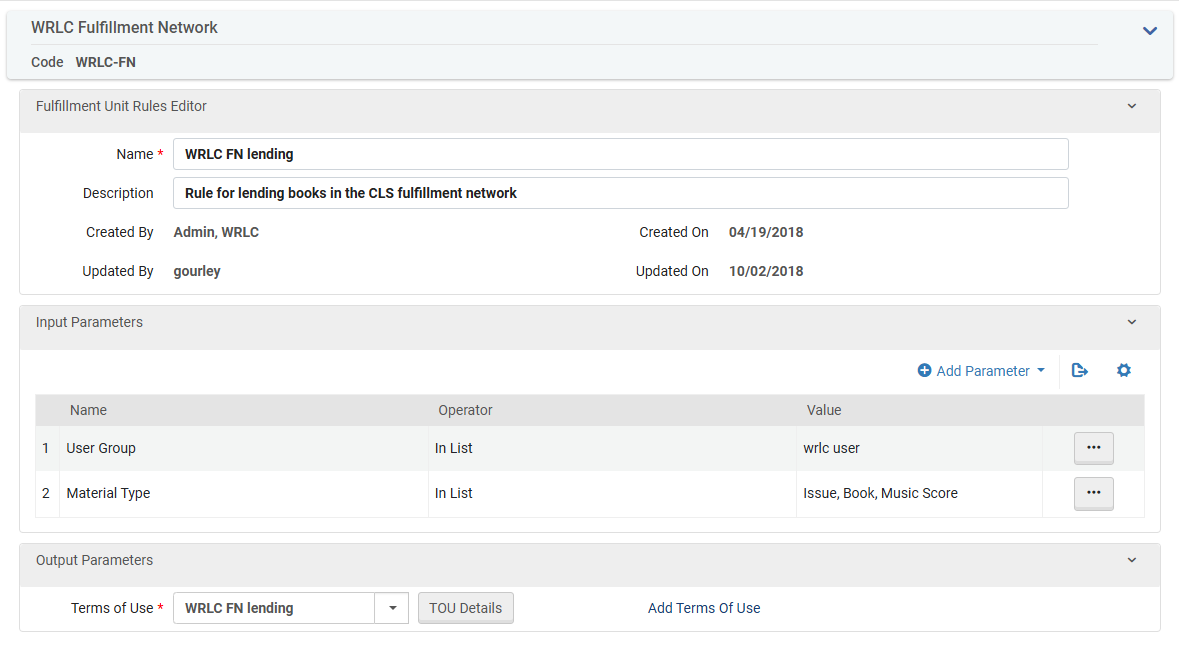
##### WRLC FN Lending

- - - IF the patron's profile has a user group of *wrlc user* AND the item has a material type of Issue, Book, or Music Score, THEN the Terms of Use applied to the <span style="text-decoration: underline;">loan</span> is [***WRLC FN Lending TOU***](https://alma.wrlc.org/books/fulfillment/page/afn-network-zone-configurations#bkmrk-wrlc-fn-lending-1)

[![afn-nz-10.PNG](https://alma-documentation-bookstack.azurewebsites.net/uploads/images/gallery/2025-04/scaled-1680-/afn-nz-10.PNG)](https://alma-documentation-bookstack.azurewebsites.net/uploads/images/gallery/2025-04/afn-nz-10.PNG)


##### WRLC Media Lending

- - - IF the patron's profile has a user group of *wrlc user* AND the item has a material type of Other, Audio cassette, Audiobook, Blu-Ray, Blu-Ray And DVD, CD-ROM, Compact Disc, DAT (Digital Audio Tape), DVD, DVD-ROM, Video Disk, Video Recording, Video Recording (Other), or Video Cassette, THEN the Terms of Use applied to the <span style="text-decoration: underline;">loan</span> is [***WRLC Media Lending TOU***](https://alma.wrlc.org/books/fulfillment/page/afn-network-zone-configurations#bkmrk-wrlc-media-lending-1)

[![afn-nz-11.PNG](https://alma-documentation-bookstack.azurewebsites.net/uploads/images/gallery/2025-04/scaled-1680-/afn-nz-11.PNG)](https://alma-documentation-bookstack.azurewebsites.net/uploads/images/gallery/2025-04/afn-nz-11.PNG)

**Request** rule type

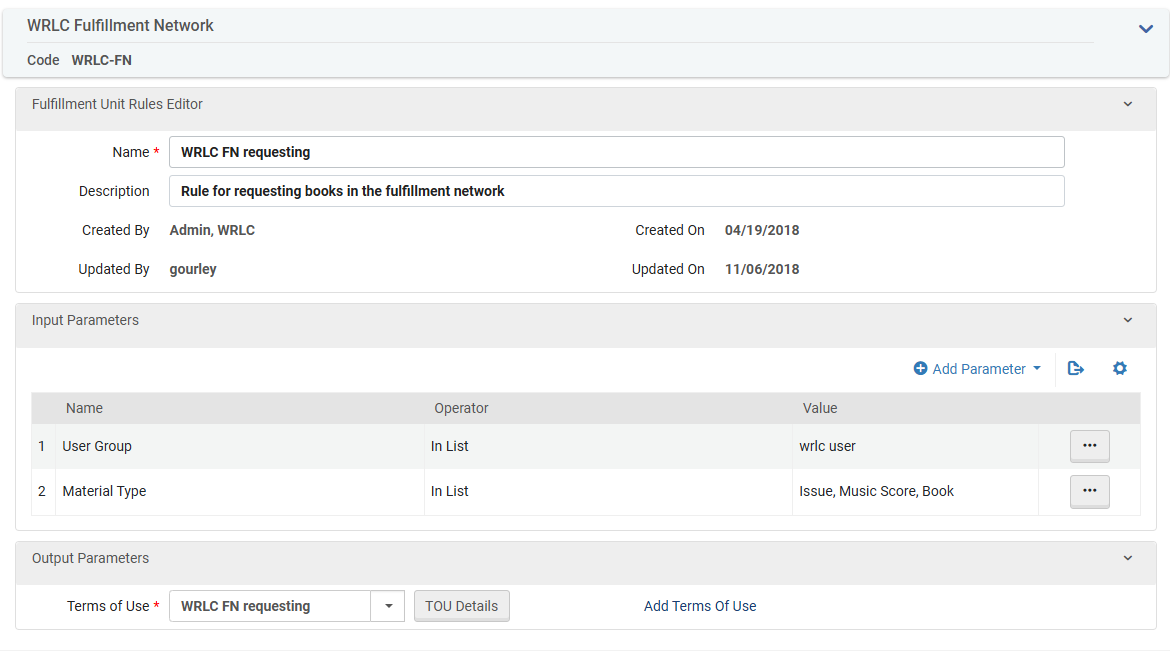
##### WRLC FN Requesting

- - - IF the patron's profile has a user group of *wrlc user* AND the item has a material type of Issue, Book, or Music Score, THEN the Terms of Use applied to the <span style="text-decoration: underline;">request</span> is [***WRLC FN Requesting TOU***](https://alma.wrlc.org/books/fulfillment/page/afn-network-zone-configurations#bkmrk-wrlc-fn-requesting-1)

[![afn-nz-12.PNG](https://alma-documentation-bookstack.azurewebsites.net/uploads/images/gallery/2025-04/scaled-1680-/afn-nz-12.PNG)](https://alma-documentation-bookstack.azurewebsites.net/uploads/images/gallery/2025-04/afn-nz-12.PNG)


##### WRLC Media Requesting

- - - IF the patron's profile has a user group of *wrlc user* AND the item has a material type of Other, Audio cassette, Audiobook, Blu-Ray, Blu-Ray And DVD, CD-ROM, Compact Disc, DAT (Digital Audio Tape), DVD, DVD-ROM, Video Disk, Video Recording, Video Recording (Other), or Video Cassette, THEN the Terms of Use applied to the <span style="text-decoration: underline;">request</span> is [***WRLC Media Requesting TOU*** ](https://alma.wrlc.org/books/fulfillment/page/afn-network-zone-configurations#bkmrk-wrlc-media-requestin-1)

[![afn-nz-13.PNG](https://alma-documentation-bookstack.azurewebsites.net/uploads/images/gallery/2025-04/scaled-1680-/afn-nz-13.PNG)](https://alma-documentation-bookstack.azurewebsites.net/uploads/images/gallery/2025-04/afn-nz-13.PNG)


##### WRLC Limited Requesting

- - - IF the patron's profile has a user group of *wrlc user* AND the item has a material type of Book, Bound Issue, Issue, or Microfilm, THEN the Terms of Use applied to the <span style="text-decoration: underline;">request</span> is [***WRLC Limited Requesting TOU***](https://alma.wrlc.org/books/fulfillment/page/afn-network-zone-configurations#bkmrk-wrlc-limited-request-1)

[![afn-nz-14.PNG](https://alma-documentation-bookstack.azurewebsites.net/uploads/images/gallery/2025-04/scaled-1680-/afn-nz-14.PNG)](https://alma-documentation-bookstack.azurewebsites.net/uploads/images/gallery/2025-04/afn-nz-14.PNG)

For more information, see the Alma Knowledgebase page [Configuring Fulfillment Units](https://knowledge.exlibrisgroup.com/Alma/Product_Documentation/010Alma_Online_Help_(English)/030Fulfillment/080Configuring_Fulfillment/020Fulfillment_Infrastructure/Configuring_Physical_Fulfillment#Configuring_Fulfillment_Units)


---

### Terms of Use

**Configuration &gt; Fulfillment &gt; Physical Fulfillment &gt; Terms of Use and Policies**

Terms of Use refers to a list of policies that define the institutional services that will be provided or terminated. Terms of Use are assigned to specific Fulfillment Unit Rules.

**WRLC-FN Terms of Use**

Below are the Terms of Use owned by the Network Zone and affiliated with the WRLC-FN Fulfillment Unit

**Loan TOUs**


##### WRLC Faculty Lending

Terms for lending to Faculty in the CLS fulfillment network. This TOU is applied to the [***WRLC Faculty Lending Loan rule***](https://alma.wrlc.org/books/fulfillment/page/afn-network-zone-configurations#bkmrk-wrlc-faculty-lending).

<table border="1" id="bkmrk-policy-type-policy-n" style="border-collapse: collapse; width: 100%; height: 704.313px;"><colgroup><col style="width: 28.6774%;"></col><col style="width: 27.4515%;"></col><col style="width: 43.9947%;"></col></colgroup><tbody><tr style="height: 29.7969px;"><td style="height: 29.7969px;">***Policy Type***</td><td style="height: 29.7969px;">***Policy Name***</td><td>***Policy Description***</td></tr><tr style="height: 29.7969px;"><td style="height: 29.7969px;">Is Loanable</td><td style="height: 29.7969px;">Loanable </td><td>Loanable</td></tr><tr style="height: 29.7969px;"><td style="height: 29.7969px;">Is Recallable</td><td style="height: 29.7969px;">Recall Allowed </td><td>Recall is possible</td></tr><tr style="height: 29.7969px;"><td style="height: 29.7969px;">Due Date</td><td style="height: 29.7969px;">CLS - Faculty</td><td>End-of-term loan for faculty</td></tr><tr style="height: 46.5938px;"><td style="height: 46.5938px;">Requested Item Due Date</td><td style="height: 46.5938px;">14 day limit if request exists</td><td>Limit new loans to 14 days if another request on the same item</td></tr><tr style="height: 29.7969px;"><td style="height: 29.7969px;">Recall Period</td><td style="height: 29.7969px;">14 Days Recall Period</td><td>14 Days Recall Period</td></tr><tr style="height: 29.7969px;"><td style="height: 29.7969px;">Renew Fee</td><td style="height: 29.7969px;">No Renewal Fee </td><td>Default No Renewal Fee</td></tr><tr style="height: 46.5938px;"><td style="height: 46.5938px;">Lost Item Fine</td><td style="height: 46.5938px;">No Lost Item Fine </td><td>Default Lost Item fine - per RSAC 10/5/2022</td></tr><tr style="height: 46.5938px;"><td style="height: 46.5938px;">Lost Item Replacement Fee</td><td style="height: 46.5938px;">CLS $110 replacement fee</td><td>Default replacement fee for WRLC-FN Lending TOU 8/20/2018</td></tr><tr style="height: 46.5938px;"><td style="height: 46.5938px;">Lost Item Replacement Fee Refund Ratio</td><td style="height: 46.5938px;">100 Percent Lost Item Refund</td><td>Default lost item replacement refund</td></tr><tr style="height: 46.5938px;"><td style="height: 46.5938px;">Maximum Fine</td><td style="height: 46.5938px;">CLS $25 maximum fine</td><td>Max fine for WRLC FN Lending TOU 8/20/2018</td></tr><tr style="height: 29.7969px;"><td style="height: 29.7969px;">Overdue Fine</td><td style="height: 29.7969px;">CLS no overdue fine</td><td>Daily overdue fine removed 4/15/2019</td></tr><tr style="height: 46.5938px;"><td style="height: 46.5938px;">Recalled Overdue Fine</td><td style="height: 46.5938px;">CLS $5/day recalled item fine</td><td>Overdue for recalled items for WRLC FN Lending TOU 8/20/2018</td></tr><tr style="height: 46.5938px;"><td style="height: 46.5938px;">Grace Period</td><td style="height: 46.5938px;">CLS 39 day grace period.</td><td>Extension of grace period before Lost Item Fine</td></tr><tr style="height: 29.7969px;"><td style="height: 29.7969px;">Is Renewable</td><td style="height: 29.7969px;">Renewable</td><td>Is item renewable</td></tr><tr style="height: 46.5938px;"><td style="height: 46.5938px;">Maximum Renewal Period</td><td style="height: 46.5938px;">No Maximum Renew Period</td><td>Default Maximum Renewal Period</td></tr><tr style="height: 63.3906px;"><td style="height: 63.3906px;">Closed Library Due Date Management</td><td style="height: 63.3906px;">Move Due Time to Next Open Time</td><td>When the Library will close before the Due Time of a short loan, lengthen the due time to the Library's next opening time</td></tr><tr style="height: 29.7969px;"><td style="height: 29.7969px;">Cancelled Recall Due Date</td><td style="height: 29.7969px;">Restore to original due date</td><td>This option will take the due date of the loan before the recall was done on the loan</td></tr><tr><td>Overdue Notification Fine Type 1</td><td>No Overdue Fine</td><td>Default value - No Overdue Fine</td></tr><tr><td>Overdue Notification Fine Type 2</td><td>No Overdue Fine</td><td>Default value - No Overdue Fine</td></tr><tr><td>Overdue Notification Fine Type 3</td><td>No Overdue Fine</td><td>Default value - No Overdue Fine</td></tr><tr><td>Overdue Notification Fine Type 4</td><td>No Overdue Fine</td><td>Default value - No Overdue Fine</td></tr><tr><td>Overdue Notification Fine Type 5</td><td>No Overdue Fine</td><td>Default value - No Overdue Fine</td></tr><tr><td>Block When Overdue</td><td>No block when overdue</td><td>Do not create a block when overdue</td></tr><tr><td>Maximum Period for Overdue Block</td><td>No Maximum Block Period</td><td>No Maximum Block Period for Block When Overdue</td></tr><tr><td>Reloan Limit</td><td>No Reloan Limit</td><td>No Reloan Limit</td></tr><tr><td>Time frame when loan renewal is allowed</td><td>No limit</td><td>Do not limit the time in which renewal is allowed</td></tr></tbody></table>


##### WRLC FN Lending

Terms for lending in the CLS fulfillment network. This TOU is applied to the [***WRLC FN Lending Loan rule***](https://alma.wrlc.org/books/fulfillment/page/afn-network-zone-configurations#bkmrk-wrlc-fn-lending).

<table border="1" id="bkmrk-policy-type-policy-n-1" style="border-collapse: collapse; width: 100%; height: 704.313px;"><colgroup><col style="width: 28.6774%;"></col><col style="width: 27.4515%;"></col><col style="width: 43.9947%;"></col></colgroup><tbody><tr style="height: 29.7969px;"><td style="height: 29.7969px;">***Policy Type***</td><td style="height: 29.7969px;">***Policy Name***</td><td>***Policy Description***</td></tr><tr style="height: 29.7969px;"><td style="height: 29.7969px;">Is Loanable</td><td style="height: 29.7969px;">Loanable </td><td>Loanable</td></tr><tr style="height: 29.7969px;"><td style="height: 29.7969px;">Is Recallable</td><td style="height: 29.7969px;">Recall Allowed </td><td>Recall is possible</td></tr><tr style="height: 29.7969px;"><td style="height: 29.7969px;">Due Date</td><td style="height: 29.7969px;">6 wk general loan</td><td>6 week general loan</td></tr><tr style="height: 46.5938px;"><td style="height: 46.5938px;">Requested Item Due Date</td><td style="height: 46.5938px;">14 day limit if request exists</td><td>Limit new loans to 14 days if another request on the same item</td></tr><tr style="height: 29.7969px;"><td style="height: 29.7969px;">Recall Period</td><td style="height: 29.7969px;">14 Days Recall Period</td><td>14 Days Recall Period</td></tr><tr style="height: 29.7969px;"><td style="height: 29.7969px;">Renew Fee</td><td style="height: 29.7969px;">No Renewal Fee </td><td>Default No Renewal Fee</td></tr><tr style="height: 46.5938px;"><td style="height: 46.5938px;">Lost Item Fine</td><td style="height: 46.5938px;">No Lost Item Fine </td><td>Default Lost Item fine - per RSAC 10/5/2022</td></tr><tr style="height: 46.5938px;"><td style="height: 46.5938px;">Lost Item Replacement Fee</td><td style="height: 46.5938px;">CLS $110 replacement fee</td><td>Default replacement fee for WRLC-FN Lending TOU 8/20/2018</td></tr><tr style="height: 46.5938px;"><td style="height: 46.5938px;">Lost Item Replacement Fee Refund Ratio</td><td style="height: 46.5938px;">100 Percent Lost Item Refund</td><td>Default lost item replacement refund</td></tr><tr style="height: 46.5938px;"><td style="height: 46.5938px;">Maximum Fine</td><td style="height: 46.5938px;">CLS $25 maximum fine</td><td>Max fine for WRLC FN Lending TOU 8/20/2018</td></tr><tr style="height: 29.7969px;"><td style="height: 29.7969px;">Overdue Fine</td><td style="height: 29.7969px;">CLS no overdue fine</td><td>Daily overdue fine removed 4/15/2019</td></tr><tr style="height: 46.5938px;"><td style="height: 46.5938px;">Recalled Overdue Fine</td><td style="height: 46.5938px;">CLS $5/day recalled item fine</td><td>Overdue for recalled items for WRLC FN Lending TOU 8/20/2018</td></tr><tr style="height: 46.5938px;"><td style="height: 46.5938px;">Grace Period</td><td style="height: 46.5938px;">CLS 39 day grace period.</td><td>Extension of grace period before Lost Item Fine</td></tr><tr style="height: 29.7969px;"><td style="height: 29.7969px;">Is Renewable</td><td style="height: 29.7969px;">Renewable</td><td>Is item renewable</td></tr><tr style="height: 46.5938px;"><td style="height: 46.5938px;">Maximum Renewal Period</td><td style="height: 46.5938px;">No Maximum Renew Period</td><td>Default Maximum Renewal Period</td></tr><tr style="height: 63.3906px;"><td style="height: 63.3906px;">Closed Library Due Date Management</td><td style="height: 63.3906px;">Move Due Time to Next Open Time</td><td>When the Library will close before the Due Time of a short loan, lengthen the due time to the Library's next opening time</td></tr><tr style="height: 29.7969px;"><td style="height: 29.7969px;">Cancelled Recall Due Date</td><td style="height: 29.7969px;">Restore to original due date</td><td>This option will take the due date of the loan before the recall was done on the loan</td></tr><tr><td>Overdue Notification Fine Type 1</td><td>No Overdue Fine</td><td>Default value - No Overdue Fine</td></tr><tr><td>Overdue Notification Fine Type 2</td><td>No Overdue Fine</td><td>Default value - No Overdue Fine</td></tr><tr><td>Overdue Notification Fine Type 3</td><td>No Overdue Fine</td><td>Default value - No Overdue Fine</td></tr><tr><td>Overdue Notification Fine Type 4</td><td>No Overdue Fine</td><td>Default value - No Overdue Fine</td></tr><tr><td>Overdue Notification Fine Type 5</td><td>No Overdue Fine</td><td>Default value - No Overdue Fine</td></tr><tr><td>Block When Overdue</td><td>No block when overdue</td><td>Do not create a block when overdue</td></tr><tr><td>Maximum Period for Overdue Block</td><td>No Maximum Block Period</td><td>No Maximum Block Period for Block When Overdue</td></tr><tr><td>Reloan Limit</td><td>No Reloan Limit</td><td>No Reloan Limit</td></tr><tr><td>Time frame when loan renewal is allowed</td><td>No limit</td><td>Do not limit the time in which renewal is allowed</td></tr></tbody></table>


##### WRLC Media Lending

Terms for media loans in the CLS fulfillment network. This TOU is applied to the [***WRLC Media Lending Loan rule***](https://alma.wrlc.org/books/fulfillment/page/afn-network-zone-configurations#bkmrk-wrlc-media-lending).

<table border="1" id="bkmrk-policy-type-policy-n-2" style="border-collapse: collapse; width: 100%; height: 704.313px;"><colgroup><col style="width: 28.6774%;"></col><col style="width: 27.4515%;"></col><col style="width: 43.9947%;"></col></colgroup><tbody><tr style="height: 29.7969px;"><td style="height: 29.7969px;">***Policy Type***</td><td style="height: 29.7969px;">***Policy Name***</td><td>***Policy Description***</td></tr><tr style="height: 29.7969px;"><td style="height: 29.7969px;">Is Loanable</td><td style="height: 29.7969px;">Loanable </td><td>Loanable</td></tr><tr style="height: 29.7969px;"><td style="height: 29.7969px;">Is Recallable</td><td style="height: 29.7969px;">No Recall</td><td>Default Recall is not possible</td></tr><tr style="height: 29.7969px;"><td style="height: 29.7969px;">Due Date</td><td style="height: 29.7969px;">1 week media loan</td><td>7 day loan period for WRLC media lending TOU</td></tr><tr style="height: 46.5938px;"><td style="height: 46.5938px;">Requested Item Due Date</td><td style="height: 46.5938px;">No Requested Due Date</td><td>Default value - No Requested Item Due Date</td></tr><tr style="height: 29.7969px;"><td style="height: 29.7969px;">Recall Period</td><td style="height: 29.7969px;">No Recall Due Date</td><td>Default Recall Due date - none</td></tr><tr style="height: 29.7969px;"><td style="height: 29.7969px;">Renew Fee</td><td style="height: 29.7969px;">No Renewal Fee </td><td>Default No Renewal Fee</td></tr><tr style="height: 46.5938px;"><td style="height: 46.5938px;">Lost Item Fine</td><td style="height: 46.5938px;">No Lost Item Fine </td><td>Default Lost Item fine - per RSAC 10/5/2022</td></tr><tr style="height: 46.5938px;"><td style="height: 46.5938px;">Lost Item Replacement Fee</td><td style="height: 46.5938px;">CLS $110 replacement fee</td><td>Default replacement fee for WRLC-FN Lending TOU 8/20/2018</td></tr><tr style="height: 46.5938px;"><td style="height: 46.5938px;">Lost Item Replacement Fee Refund Ratio</td><td style="height: 46.5938px;">100 Percent Lost Item Refund</td><td>Default lost item replacement refund</td></tr><tr style="height: 46.5938px;"><td style="height: 46.5938px;">Maximum Fine</td><td style="height: 46.5938px;">CLS $25 maximum fine</td><td>Max fine for WRLC FN Lending TOU 8/20/2018</td></tr><tr style="height: 29.7969px;"><td style="height: 29.7969px;">Overdue Fine</td><td style="height: 29.7969px;">CLS $5/day overdue media fine</td><td>Overdue fine for WRLC FN Media 8/20/2018</td></tr><tr style="height: 46.5938px;"><td style="height: 46.5938px;">Recalled Overdue Fine</td><td style="height: 46.5938px;">No Recall Overdue Fine</td><td>Default Value for recalled overdue fine</td></tr><tr style="height: 46.5938px;"><td style="height: 46.5938px;">Grace Period</td><td style="height: 46.5938px;">No Grace</td><td>Default value for Grace</td></tr><tr style="height: 29.7969px;"><td style="height: 29.7969px;">Is Renewable</td><td style="height: 29.7969px;">Not Renewable</td><td>Item not renewable</td></tr><tr style="height: 46.5938px;"><td style="height: 46.5938px;">Maximum Renewal Period</td><td style="height: 46.5938px;">No Maximum Renew Period</td><td>Default Maximum Renewal Period</td></tr><tr style="height: 63.3906px;"><td style="height: 63.3906px;">Closed Library Due Date Management</td><td style="height: 63.3906px;">Move Due Time to Next Open Time</td><td>When the Library will close before the Due Time of a short loan, lengthen the due time to the Library's next opening time</td></tr><tr style="height: 29.7969px;"><td style="height: 29.7969px;">Cancelled Recall Due Date</td><td style="height: 29.7969px;">Keep due date</td><td>No change to the due date</td></tr><tr><td>Overdue Notification Fine Type 1</td><td>No Overdue Fine</td><td>Default value - No Overdue Fine</td></tr><tr><td>Overdue Notification Fine Type 2</td><td>No Overdue Fine</td><td>Default value - No Overdue Fine</td></tr><tr><td>Overdue Notification Fine Type 3</td><td>No Overdue Fine</td><td>Default value - No Overdue Fine</td></tr><tr><td>Overdue Notification Fine Type 4</td><td>No Overdue Fine</td><td>Default value - No Overdue Fine</td></tr><tr><td>Overdue Notification Fine Type 5</td><td>No Overdue Fine</td><td>Default value - No Overdue Fine</td></tr><tr><td>Block When Overdue</td><td>No block when overdue</td><td>Do not create a block when overdue</td></tr><tr><td>Maximum Period for Overdue Block</td><td>No Maximum Block Period</td><td>No Maximum Block Period for Block When Overdue</td></tr><tr><td>Reloan Limit</td><td>No Reloan Limit</td><td>No Reloan Limit</td></tr><tr><td>Time frame when loan renewal is allowed</td><td>No limit</td><td>Do not limit the time in which renewal is allowed</td></tr></tbody></table>

##### In Library Use Only - Periodicals (Loan TOU)

Terms that ***can*** be used for loan fulfillment rules associated with locations that are 'in library use only' for CLS/AFN patrons.

<table border="1" id="bkmrk-policy-type-policy-n-3" style="border-collapse: collapse; width: 100%; height: 704.313px;"><colgroup><col style="width: 28.6774%;"></col><col style="width: 27.4515%;"></col><col style="width: 43.9947%;"></col></colgroup><tbody><tr style="height: 29.7969px;"><td style="height: 29.7969px;">***Policy Type***</td><td style="height: 29.7969px;">***Policy Name***</td><td>***Policy Description***</td></tr><tr style="height: 29.7969px;"><td style="height: 29.7969px;">Is Loanable</td><td style="height: 29.7969px;">Loanable </td><td>Loanable</td></tr><tr style="height: 29.7969px;"><td style="height: 29.7969px;">Is Recallable</td><td style="height: 29.7969px;">No Recall Allowed </td><td>Default Recall is not possible</td></tr><tr style="height: 29.7969px;"><td style="height: 29.7969px;">Due Date</td><td style="height: 29.7969px;">2 week loan</td><td>14 day loan period for WRLC "In Library Use Only" Lending TOU</td></tr><tr style="height: 46.5938px;"><td style="height: 46.5938px;">Requested Item Due Date</td><td style="height: 46.5938px;">No Requested Due Date</td><td>Default value - No Requested Item Due Date</td></tr><tr style="height: 29.7969px;"><td style="height: 29.7969px;">Recall Period</td><td style="height: 29.7969px;">No Recall Due Date</td><td>Default Recall Due date - none</td></tr><tr style="height: 29.7969px;"><td style="height: 29.7969px;">Renew Fee</td><td style="height: 29.7969px;">No Renewal Fee </td><td>Default No Renewal Fee</td></tr><tr style="height: 46.5938px;"><td style="height: 46.5938px;">Lost Item Fine</td><td style="height: 46.5938px;">CLS $10.00 Lost Item Fine </td><td>Lost item fine put in place after removal of Overdue Fines (4/15/2019)</td></tr><tr style="height: 46.5938px;"><td style="height: 46.5938px;">Lost Item Replacement Fee</td><td style="height: 46.5938px;">CLS $110 replacement fee</td><td>Default replacement fee for WRLC-FN Lending TOU 8/20/2018</td></tr><tr style="height: 46.5938px;"><td style="height: 46.5938px;">Lost Item Replacement Fee Refund Ratio</td><td style="height: 46.5938px;">100 Percent Lost Item Refund</td><td>Default lost item replacement refund</td></tr><tr style="height: 46.5938px;"><td style="height: 46.5938px;">Maximum Fine</td><td style="height: 46.5938px;">CLS $25 maximum fine</td><td>Max fine for WRLC FN Lending TOU 8/20/2018</td></tr><tr style="height: 29.7969px;"><td style="height: 29.7969px;">Overdue Fine</td><td style="height: 29.7969px;">CLS $5/day overdue media fine</td><td>Overdue fine for WRLC FN Media 8/20/2018</td></tr><tr style="height: 46.5938px;"><td style="height: 46.5938px;">Recalled Overdue Fine</td><td style="height: 46.5938px;">No Recall Overdue Fine</td><td>Default Value for recalled overdue fine</td></tr><tr style="height: 46.5938px;"><td style="height: 46.5938px;">Grace Period</td><td style="height: 46.5938px;">No Grace</td><td>Default value for Grace</td></tr><tr style="height: 29.7969px;"><td style="height: 29.7969px;">Is Renewable</td><td style="height: 29.7969px;">Renewable</td><td>Is item renewable</td></tr><tr style="height: 46.5938px;"><td style="height: 46.5938px;">Maximum Renewal Period</td><td style="height: 46.5938px;">No Maximum Renew Period</td><td>Default Maximum Renewal Period</td></tr><tr style="height: 63.3906px;"><td style="height: 63.3906px;">Closed Library Due Date Management</td><td style="height: 63.3906px;">Move Due Time to Next Open Time</td><td>When the Library will close before the Due Time of a short loan, lengthen the due time to the Library's next opening time</td></tr><tr style="height: 29.7969px;"><td style="height: 29.7969px;">Cancelled Recall Due Date</td><td style="height: 29.7969px;">Keep due date</td><td>No change to the due date</td></tr><tr><td>Overdue Notification Fine Type 1</td><td>No Overdue Fine</td><td>Default value - No Overdue Fine</td></tr><tr><td>Overdue Notification Fine Type 2</td><td>No Overdue Fine</td><td>Default value - No Overdue Fine</td></tr><tr><td>Overdue Notification Fine Type 3</td><td>No Overdue Fine</td><td>Default value - No Overdue Fine</td></tr><tr><td>Overdue Notification Fine Type 4</td><td>No Overdue Fine</td><td>Default value - No Overdue Fine</td></tr><tr><td>Overdue Notification Fine Type 5</td><td>No Overdue Fine</td><td>Default value - No Overdue Fine</td></tr><tr><td>Block When Overdue</td><td>No block when overdue</td><td>Do not create a block when overdue</td></tr><tr><td>Maximum Period for Overdue Block</td><td>No Maximum Block Period</td><td>No Maximum Block Period for Block When Overdue</td></tr><tr><td>Reloan Limit</td><td>No Reloan Limit</td><td>No Reloan Limit</td></tr><tr><td>Time frame when loan renewal is allowed</td><td>No limit</td><td>Do not limit the time in which renewal is allowed</td></tr></tbody></table>

**Request TOUs**


##### WRLC FN Requesting

Terms for requests in the CLS fulfillment network. This TOU is applied to the [***WRLC FN Requesting Request rule***](https://alma.wrlc.org/books/fulfillment/page/afn-network-zone-configurations#bkmrk-wrlc-fn-requesting).

<table border="1" id="bkmrk-policy-type-policy-n-4" style="border-collapse: collapse; width: 100%; height: 629.907px;"><colgroup><col style="width: 28.6774%;"></col><col style="width: 27.4515%;"></col><col style="width: 43.9947%;"></col></colgroup><tbody><tr style="height: 29.7969px;"><td style="height: 29.7969px;">***Policy Type***</td><td style="height: 29.7969px;">***Policy Name***</td><td style="height: 29.7969px;">***Policy Description***</td></tr><tr style="height: 29.7969px;"><td style="height: 29.7969px;">Is Requestable</td><td style="height: 29.7969px;">Requestable </td><td style="height: 29.7969px;">Requestable </td></tr><tr style="height: 74.5781px;"><td style="height: 74.5781px;">Pickup Locations</td><td style="height: 74.5781px;">Pickup At Any Institution\*

*Please see [A note about Rapido institutions](https://alma-documentation-bookstack.azurewebsites.net/books/fulfillment/page/afn-network-zone-configurations#bkmrk-a-note-about-rapido-) for more details*

</td><td style="height: 74.5781px;">Pickup At Any Institution </td></tr><tr style="height: 29.7969px;"><td style="height: 29.7969px;">Hold Shelf Period</td><td style="height: 29.7969px;">14 day Hold Shelf (Covid default)</td><td style="height: 29.7969px;">Longer hold shelf time due to library restrictions.</td></tr><tr style="height: 46.5938px;"><td style="height: 46.5938px;">Is Digitizable</td><td style="height: 46.5938px;">Is Digitizable</td><td style="height: 46.5938px;">Default value for Digitizable</td></tr><tr style="height: 46.5938px;"><td style="height: 46.5938px;">Is Requestable for Physical Resource Sharing</td><td style="height: 46.5938px;">Requestable for Physical Resource Sharing</td><td style="height: 46.5938px;">Requestable for Physical Resource Sharing</td></tr><tr style="height: 46.5938px;"><td style="height: 46.5938px;">Is Requestable for Digital Resource Sharing</td><td style="height: 46.5938px;">Requestable for Digital Resource Sharing</td><td style="height: 46.5938px;">Requestable for Digital Resource Sharing</td></tr><tr style="height: 46.5938px;"><td style="height: 46.5938px;">Request Priority</td><td style="height: 46.5938px;">Medium </td><td style="height: 46.5938px;">Medium </td></tr><tr style="height: 46.5938px;"><td style="height: 46.5938px;">On Shelf Request Policy</td><td style="height: 46.5938px;">Use fulfillment unit definition</td><td style="height: 46.5938px;">Use fulfillment unit definition</td></tr><tr style="height: 46.5938px;"><td style="height: 46.5938px;">Personal Delivery</td><td style="height: 46.5938px;">Personal Delivery - None</td><td style="height: 46.5938px;">Do not deliver items at all</td></tr><tr style="height: 46.5938px;"><td style="height: 46.5938px;">Personal Delivery Fee</td><td style="height: 46.5938px;">Personal Delivery Fee - No Fee</td><td style="height: 46.5938px;">Personal Delivery is not charged with a fee</td></tr><tr style="height: 46.5938px;"><td style="height: 46.5938px;">Automatically convert to resource sharing</td><td style="height: 46.5938px;">Do not convert to resource sharing</td><td style="height: 46.5938px;">Do not convert to resource sharing</td></tr><tr style="height: 46.5938px;"><td style="height: 46.5938px;">Digitization Fee per Digitization</td><td style="height: 46.5938px;">No Fee</td><td style="height: 46.5938px;">Digitization request is not charged with a fee</td></tr><tr style="height: 46.5938px;"><td style="height: 46.5938px;">Digitization Fee per page</td><td style="height: 46.5938px;">No Fee</td><td style="height: 46.5938px;">Digitization request is not charged with a fee per page</td></tr></tbody></table>

##### WRLC Media Requesting

Terms for media requests (requestable but not digitizable) in the CLS fulfillment network. This TOU is applied to the [***WRLC Media Requesting Request rule***](https://alma.wrlc.org/books/fulfillment/page/afn-network-zone-configurations#bkmrk-wrlc-media-requestin).

<table border="1" id="bkmrk-policy-type-policy-n-5" style="border-collapse: collapse; width: 100%; height: 531.735px;"><colgroup><col style="width: 28.6774%;"></col><col style="width: 27.4515%;"></col><col style="width: 43.9947%;"></col></colgroup><tbody><tr style="height: 29.7969px;"><td style="height: 29.7969px;">***Policy Type***</td><td style="height: 29.7969px;">***Policy Name***</td><td style="height: 29.7969px;">***Policy Description***</td></tr><tr style="height: 29.7969px;"><td style="height: 29.7969px;">Is Requestable</td><td style="height: 29.7969px;">Requestable </td><td style="height: 29.7969px;">Requestable </td></tr><tr style="height: 29.7969px;"><td style="height: 29.7969px;">Pickup Locations</td><td style="height: 29.7969px;">Pickup At Any Institution\*

*Please see [A note about Rapido institutions](https://alma-documentation-bookstack.azurewebsites.net/books/fulfillment/page/afn-network-zone-configurations#bkmrk-a-note-about-rapido-) for more details*

</td><td style="height: 29.7969px;">Pickup At Any Institution </td></tr><tr style="height: 29.7969px;"><td style="height: 29.7969px;">Hold Shelf Period</td><td style="height: 29.7969px;">7 day Hold Shelf</td><td style="height: 29.7969px;">Default value for HoldShelfPeriod</td></tr><tr style="height: 46.5938px;"><td style="height: 46.5938px;">Is Digitizable</td><td style="height: 46.5938px;">Not Digitizable</td><td style="height: 46.5938px;">Not Digitizable</td></tr><tr style="height: 46.5938px;"><td style="height: 46.5938px;">Is Requestable for Physical Resource Sharing</td><td style="height: 46.5938px;">Not requestable for Physical Resource Sharing</td><td style="height: 46.5938px;">Not requestable for Physical Resource Sharing</td></tr><tr style="height: 10px;"><td style="height: 10px;">Is Requestable for Digital Resource Sharing</td><td style="height: 10px;">Not requestable for Digital Resource Sharing</td><td style="height: 10px;">Not requestable for Digital Resource Sharing</td></tr><tr style="height: 46.5938px;"><td style="height: 46.5938px;">Request Priority</td><td style="height: 46.5938px;">Medium </td><td style="height: 46.5938px;">Medium </td></tr><tr style="height: 46.5938px;"><td style="height: 46.5938px;">On Shelf Request Policy</td><td style="height: 46.5938px;">Use fulfillment unit definition</td><td style="height: 46.5938px;">Use fulfillment unit definition</td></tr><tr style="height: 46.5938px;"><td style="height: 46.5938px;">Personal Delivery</td><td style="height: 46.5938px;">Personal Delivery - None</td><td style="height: 46.5938px;">Do not deliver items at all</td></tr><tr style="height: 46.5938px;"><td style="height: 46.5938px;">Personal Delivery Fee</td><td style="height: 46.5938px;">Personal Delivery Fee - No Fee</td><td style="height: 46.5938px;">Personal Delivery is not charged with a fee</td></tr><tr style="height: 29.7969px;"><td style="height: 29.7969px;">Automatically convert to resource sharing</td><td style="height: 29.7969px;">Do not convert to resource sharing</td><td style="height: 29.7969px;">Do not convert to resource sharing</td></tr><tr style="height: 46.5938px;"><td style="height: 46.5938px;">Digitization Fee per Digitization</td><td style="height: 46.5938px;">No Fee</td><td style="height: 46.5938px;">Digitization request is not charged with a fee</td></tr><tr style="height: 46.5938px;"><td style="height: 46.5938px;">Digitization Fee per page</td><td style="height: 46.5938px;">No Fee</td><td style="height: 46.5938px;">Digitization request is not charged with a fee per page</td></tr></tbody></table>

##### WRLC Limited Requesting

Terms for limited requests (digitizable but not requestable) in the CLS fulfillment network. This TOU is applied to the [***WRLC Limited Requesting Request rule***](https://alma.wrlc.org/books/fulfillment/page/afn-network-zone-configurations#bkmrk-wrlc-limited-request).

<table border="1" id="bkmrk-policy-type-policy-n-6" style="border-collapse: collapse; width: 100%; height: 531.735px;"><colgroup><col style="width: 28.6774%;"></col><col style="width: 27.4413%;"></col><col style="width: 44.0049%;"></col></colgroup><tbody><tr style="height: 29.7969px;"><td style="height: 29.7969px;">***Policy Type***</td><td style="height: 29.7969px;">***Policy Name***</td><td style="height: 29.7969px;">***Policy Description***</td></tr><tr style="height: 29.7969px;"><td style="height: 29.7969px;">Is Requestable</td><td style="height: 29.7969px;">Not Requestable </td><td style="height: 29.7969px;">Default value is not requestable </td></tr><tr style="height: 29.7969px;"><td style="height: 29.7969px;">Pickup Locations</td><td style="height: 29.7969px;">Pickup At Any Institution\*

*Please see [A note about Rapido institutions](https://alma-documentation-bookstack.azurewebsites.net/books/fulfillment/page/afn-network-zone-configurations#bkmrk-a-note-about-rapido-) for more details*

</td><td style="height: 29.7969px;">Pickup At Any Institution </td></tr><tr style="height: 29.7969px;"><td style="height: 29.7969px;">Hold Shelf Period</td><td style="height: 29.7969px;">10 day Hold Shelf</td><td style="height: 29.7969px;">Default value for HoldShelfPeriod (per RSAC)</td></tr><tr style="height: 46.5938px;"><td style="height: 46.5938px;">Is Digitizable</td><td style="height: 46.5938px;">Is Digitizable</td><td style="height: 46.5938px;">Default value for Digitizable</td></tr><tr style="height: 46.5938px;"><td style="height: 46.5938px;">Is Requestable for Physical Resource Sharing</td><td style="height: 46.5938px;">Not requestable for Physical Resource Sharing</td><td style="height: 46.5938px;">Not requestable for Physical Resource Sharing</td></tr><tr style="height: 10px;"><td style="height: 10px;">Is Requestable for Digital Resource Sharing</td><td style="height: 10px;">Requestable for Digital Resource Sharing</td><td style="height: 10px;">Requestable for Digital Resource Sharing</td></tr><tr style="height: 46.5938px;"><td style="height: 46.5938px;">Request Priority</td><td style="height: 46.5938px;">Medium </td><td style="height: 46.5938px;">Medium </td></tr><tr style="height: 46.5938px;"><td style="height: 46.5938px;">On Shelf Request Policy</td><td style="height: 46.5938px;">Use fulfillment unit definition</td><td style="height: 46.5938px;">Use fulfillment unit definition</td></tr><tr style="height: 46.5938px;"><td style="height: 46.5938px;">Personal Delivery</td><td style="height: 46.5938px;">Personal Delivery - None</td><td style="height: 46.5938px;">Do not deliver items at all</td></tr><tr style="height: 46.5938px;"><td style="height: 46.5938px;">Personal Delivery Fee</td><td style="height: 46.5938px;">Personal Delivery Fee - No Fee</td><td style="height: 46.5938px;">Personal Delivery is not charged with a fee</td></tr><tr style="height: 29.7969px;"><td style="height: 29.7969px;">Automatically convert to resource sharing</td><td style="height: 29.7969px;">Do not convert to resource sharing</td><td style="height: 29.7969px;">Do not convert to resource sharing</td></tr><tr style="height: 46.5938px;"><td style="height: 46.5938px;">Digitization Fee per Digitization</td><td style="height: 46.5938px;">No Fee</td><td style="height: 46.5938px;">Digitization request is not charged with a fee</td></tr><tr style="height: 46.5938px;"><td style="height: 46.5938px;">Digitization Fee per page</td><td style="height: 46.5938px;">No Fee</td><td style="height: 46.5938px;">Digitization request is not charged with a fee per page</td></tr></tbody></table>

##### No FN Requesting

Terms that ***can*** be used for fulfillment rules associated with locations that are not requestable via CLS/AFN.

<table border="1" id="bkmrk-policy-type-policy-n-7" style="border-collapse: collapse; width: 100%; height: 531.735px;"><colgroup><col style="width: 28.6774%;"></col><col style="width: 27.4413%;"></col><col style="width: 44.0049%;"></col></colgroup><tbody><tr style="height: 29.7969px;"><td style="height: 29.7969px;">***Policy Type***</td><td style="height: 29.7969px;">***Policy Name***</td><td style="height: 29.7969px;">***Policy Description***</td></tr><tr style="height: 29.7969px;"><td style="height: 29.7969px;">Is Requestable</td><td style="height: 29.7969px;">Not Requestable </td><td style="height: 29.7969px;">Default value is not requestable </td></tr><tr style="height: 29.7969px;"><td style="height: 29.7969px;">Pickup Locations</td><td style="height: 29.7969px;">Anywhere

</td><td style="height: 29.7969px;">Default value for Pickup - Anywhere</td></tr><tr style="height: 29.7969px;"><td style="height: 29.7969px;">Hold Shelf Period</td><td style="height: 29.7969px;">10 day Hold Shelf</td><td style="height: 29.7969px;">Default value for HoldShelfPeriod (per RSAC)</td></tr><tr style="height: 46.5938px;"><td style="height: 46.5938px;">Is Digitizable</td><td style="height: 46.5938px;">Not Digitizable</td><td style="height: 46.5938px;">Not Digitizable</td></tr><tr style="height: 46.5938px;"><td style="height: 46.5938px;">Is Requestable for Physical Resource Sharing</td><td style="height: 46.5938px;">Not requestable for Physical Resource Sharing</td><td style="height: 46.5938px;">Not requestable for Physical Resource Sharing</td></tr><tr style="height: 10px;"><td style="height: 10px;">Is Requestable for Digital Resource Sharing</td><td style="height: 10px;">Requestable for Digital Resource Sharing</td><td style="height: 10px;">Requestable for Digital Resource Sharing</td></tr><tr style="height: 46.5938px;"><td style="height: 46.5938px;">Request Priority</td><td style="height: 46.5938px;">Medium </td><td style="height: 46.5938px;">Medium </td></tr><tr style="height: 46.5938px;"><td style="height: 46.5938px;">On Shelf Request Policy</td><td style="height: 46.5938px;">Use fulfillment unit definition</td><td style="height: 46.5938px;">Use fulfillment unit definition</td></tr><tr style="height: 46.5938px;"><td style="height: 46.5938px;">Personal Delivery</td><td style="height: 46.5938px;">Personal Delivery - None</td><td style="height: 46.5938px;">Do not deliver items at all</td></tr><tr style="height: 46.5938px;"><td style="height: 46.5938px;">Personal Delivery Fee</td><td style="height: 46.5938px;">Personal Delivery Fee - No Fee</td><td style="height: 46.5938px;">Personal Delivery is not charged with a fee</td></tr><tr style="height: 29.7969px;"><td style="height: 29.7969px;">Automatically convert to resource sharing</td><td style="height: 29.7969px;">Do not convert to resource sharing</td><td style="height: 29.7969px;">Do not convert to resource sharing</td></tr><tr style="height: 46.5938px;"><td style="height: 46.5938px;">Digitization Fee per Digitization</td><td style="height: 46.5938px;">No Fee</td><td style="height: 46.5938px;">Digitization request is not charged with a fee</td></tr><tr style="height: 46.5938px;"><td style="height: 46.5938px;">Digitization Fee per page</td><td style="height: 46.5938px;">No Fee</td><td style="height: 46.5938px;">Digitization request is not charged with a fee per page</td></tr></tbody></table>

##### In Library Use Only - Periodicals (Request TOU)

Terms that ***can*** be used for request fulfillment rules associated with locations that are 'in library use only' for CLS/AFN patrons.

<table border="1" id="bkmrk-policy-type-policy-n-8" style="border-collapse: collapse; width: 100%; height: 531.735px;"><colgroup><col style="width: 28.6774%;"></col><col style="width: 27.4413%;"></col><col style="width: 44.0049%;"></col></colgroup><tbody><tr style="height: 29.7969px;"><td style="height: 29.7969px;">***Policy Type***</td><td style="height: 29.7969px;">***Policy Name***</td><td style="height: 29.7969px;">***Policy Description***</td></tr><tr style="height: 29.7969px;"><td style="height: 29.7969px;">Is Requestable</td><td style="height: 29.7969px;">Requestable </td><td style="height: 29.7969px;">Requestable </td></tr><tr style="height: 29.7969px;"><td style="height: 29.7969px;">Pickup Locations</td><td style="height: 29.7969px;">In own Institution

</td><td style="height: 29.7969px;"> </td></tr><tr style="height: 29.7969px;"><td style="height: 29.7969px;">Hold Shelf Period</td><td style="height: 29.7969px;">14 day Hold Shelf</td><td style="height: 29.7969px;">Covid default (Longer than hold shelf due to library restrictions)</td></tr><tr style="height: 46.5938px;"><td style="height: 46.5938px;">Is Digitizable</td><td style="height: 46.5938px;">Is Digitizable</td><td style="height: 46.5938px;">Default value for Digitizable</td></tr><tr style="height: 46.5938px;"><td style="height: 46.5938px;">Is Requestable for Physical Resource Sharing</td><td style="height: 46.5938px;">Requestable for Physical Resource Sharing</td><td style="height: 46.5938px;">Requestable for Physical Resource Sharing</td></tr><tr style="height: 10px;"><td style="height: 10px;">Is Requestable for Digital Resource Sharing</td><td style="height: 10px;">Requestable for Digital Resource Sharing</td><td style="height: 10px;">Requestable for Digital Resource Sharing</td></tr><tr style="height: 46.5938px;"><td style="height: 46.5938px;">Request Priority</td><td style="height: 46.5938px;">Medium </td><td style="height: 46.5938px;">Medium </td></tr><tr style="height: 46.5938px;"><td style="height: 46.5938px;">On Shelf Request Policy</td><td style="height: 46.5938px;">Use fulfillment unit definition</td><td style="height: 46.5938px;">Use fulfillment unit definition</td></tr><tr style="height: 46.5938px;"><td style="height: 46.5938px;">Personal Delivery</td><td style="height: 46.5938px;">Personal Delivery - None</td><td style="height: 46.5938px;">Do not deliver items at all</td></tr><tr style="height: 46.5938px;"><td style="height: 46.5938px;">Personal Delivery Fee</td><td style="height: 46.5938px;">Personal Delivery Fee - No Fee</td><td style="height: 46.5938px;">Personal Delivery is not charged with a fee</td></tr><tr style="height: 29.7969px;"><td style="height: 29.7969px;">Automatically convert to resource sharing</td><td style="height: 29.7969px;">Do not convert to resource sharing</td><td style="height: 29.7969px;">Do not convert to resource sharing</td></tr><tr style="height: 46.5938px;"><td style="height: 46.5938px;">Digitization Fee per Digitization</td><td style="height: 46.5938px;">No Fee</td><td style="height: 46.5938px;">Digitization request is not charged with a fee</td></tr><tr style="height: 46.5938px;"><td style="height: 46.5938px;">Digitization Fee per page</td><td style="height: 46.5938px;">No Fee</td><td style="height: 46.5938px;">Digitization request is not charged with a fee per page</td></tr></tbody></table>

---


### A note about Rapido Institutions

For Rapido institutions, the Request TOU setting (specifically the "Pickup at Institution" value) controls the pickup options that appear in both Alma AND Primo. When you set the TOU to "Pickup at Institution" Rapido will only show the patron's own institution as a valid pickup option, and other institutions in your network won't appear on the list.   
  
For non-Rapido institutions, however, Primo does NOT use the TOU settings when displaying pickup locations in the Primo request form; it uses the Resource Sharing Form configuration (described in the [Resource Sharing Form](https://alma-documentation-bookstack.azurewebsites.net/books/discovery-primo-ve/page/resource-sharing-form-delivery-fields#bkmrk-a-note-about-rapido-) page of the WRLC Alma Wiki)) instead. Unlike Rapido institutions, TOU settings for non-Rapido institutions pertains to staff-side requests in Alma, not to patron-side requests in Primo. In this case, the list of AFN partner institutions will still appear in Primo regardless of the request TOUs unless you explicitly restrict them using the Resource Sharing Request Form configuration.

Please see Salesforce case #08203423 for more details.

# AFN Institution Zone Configurations

The following Automated Fulfillment Network (AFN) configurations are set in each WRLC Institution Zone. Settings will look slightly different depending on whether the Institution Zone is both a lender and borrower in the WRLC AFN, or if they are only a borrower. The below configurations are clearly marked as to whether they apply to all CLS libraries, r to only the borrower + lender libraries (and not to borrower-only librariess).

For a list of all partner profiles in the WRLC AFN, as well as their borrowing and lending preferences, see the [Consortial Partners in CLS/AFN](https://alma.wrlc.org/books/fulfillment/page/consortial-partners-in-clsafn) page.

For information on how to edit the CLS Request link in Primo, see the [Display Logic Rules for the AFN/CLS Request Form in Primo](https://alma.wrlc.org/books/fulfillment/page/display-logic-rules-for-the-afncls-request-form-in-primo) page.


---

### Resource Sharing Library

**Configuration &gt; Configuring drop-down menu = \[*choose your institution's Main Library*\] &gt; Fulfillment &gt; Library Management &gt; Library Details**

<span style="background-color: rgb(255, 255, 255);">This configuration pertains to </span>

- [x] <span style="background-color: rgb(255, 255, 255);">Borrower + Lender Institutions</span>
- [x] <span style="background-color: rgb(255, 255, 255);">Borrower Only Institutions</span>

Your resource sharing library is the library where your temporary borrowing and lending locations are housed. <span style="font-family: -apple-system, BlinkMacSystemFont, 'Segoe UI', Oxygen, Ubuntu, Roboto, Cantarell, 'Fira Sans', 'Droid Sans', 'Helvetica Neue', sans-serif; font-size: 14px; font-style: normal; font-variant-ligatures: normal; font-variant-caps: normal; color: rgb(68, 68, 68);">For the WRLC AFN, your institution's Main Library is the designated Resource Sharing Library.</span>


#### Resource Sharing Information section

- Is Resource Sharing Library = Yes
- Itemless = No
- Symbol = \[ISO symbol\]

##### Borrowing Setup section

- Cancel request on locate failure = Yes
- Automatically activate locate profile = Yes
- Temporarily inactive for borrowing = No 
    - This can be switched to Yes for a specific period of time, for example if the Library is closed
- Default location = CLS Borrowing Library
- Default pickup location = \[Institution's Library\]
- Extend due date when renew requested = No

[![afn-iz-1.PNG](https://alma-documentation-bookstack.azurewebsites.net/uploads/images/gallery/2025-05/scaled-1680-/OwVafn-iz-1.PNG)](https://alma-documentation-bookstack.azurewebsites.net/uploads/images/gallery/2025-05/OwVafn-iz-1.PNG)

##### Lending Setup section

Please note that the Lending Setup portion of the Resource Sharing section is <span style="text-decoration: underline;">*NOT*</span> used by the WRLC AFN. This is because our AFN handles all lending requests as regular hold requests within the owning Institution's IZ; they are NOT considered true lending requests by Alma. For more information, see the Alma Knowledgebase page [Automated Fulfillment Network Requests (AFN)](https://knowledge.exlibrisgroup.com/Alma/Product_Documentation/010Alma_Online_Help_(English)/030Fulfillment/050Resource_Sharing/Automated_Fulfillment_Network_Requests_(AFN))

[![afn-iz-2.PNG](https://alma-documentation-bookstack.azurewebsites.net/uploads/images/gallery/2025-05/scaled-1680-/ah1afn-iz-2.PNG)](https://alma-documentation-bookstack.azurewebsites.net/uploads/images/gallery/2025-05/ah1afn-iz-2.PNG)

Similarly, the AFN follows the settings in each Institution's Locate Profile to find a matching item, NOT the settings in the Lending Setup section of the Library Details page. This is because our AFN handles all lending requests as regular hold requests within the owning Institution's IZ; they are NOT considered true lending requests by Alma.

[![afn-iz-3.PNG](https://alma-documentation-bookstack.azurewebsites.net/uploads/images/gallery/2025-05/scaled-1680-/afn-iz-3.PNG)](https://alma-documentation-bookstack.azurewebsites.net/uploads/images/gallery/2025-05/afn-iz-3.PNG)

For more information, see the Alma Knowledgebase page [Configuring Parameters of a Resource Sharing Library](https://knowledge.exlibrisgroup.com/Alma/Product_Documentation/010Alma_Online_Help_(English)/030Fulfillment/080Configuring_Fulfillment/060Resource_Sharing/030Configuring_Parameters_of_a_Resource_Sharing_Library)


---

<span style="color: rgb(34, 34, 34); font-family: -apple-system, BlinkMacSystemFont, 'Segoe UI', Oxygen, Ubuntu, Roboto, Cantarell, 'Fira Sans', 'Droid Sans', 'Helvetica Neue', sans-serif; font-size: 2.333em;">Temporary Resource Sharing Locations</span>

**<span style="font-family: -apple-system, BlinkMacSystemFont, 'Segoe UI', Oxygen, Ubuntu, Roboto, Cantarell, 'Fira Sans', 'Droid Sans', 'Helvetica Neue', sans-serif; font-size: 14px; font-style: normal; font-variant-ligatures: normal; font-variant-caps: normal; outline-color: rgb(32, 110, 167);">Configuration &gt; Configuring drop-down menu = \[*choose your institution's Main Library*\] &gt; Fulfillment &gt; Locations &gt; Physical Locations</span>**

<span style="background-color: rgb(255, 255, 255);">This configuration pertains to </span>

- [x] <span style="background-color: rgb(255, 255, 255);">Borrower + Lender Institutions</span>
- [x] <span style="background-color: rgb(255, 255, 255);">Borrower Only Institutions</span>

- <span style="color: rgb(0, 0, 0);">CLSBORR (CLS Borrowing Library location)</span>
    - <span style="color: rgb(0, 0, 0);"><span style="font-family: -apple-system, BlinkMacSystemFont, 'Segoe UI', Oxygen, Ubuntu, Roboto, Cantarell, 'Fira Sans', 'Droid Sans', 'Helvetica Neue', sans-serif; font-size: 14px; font-variant-ligatures: normal; font-variant-caps: normal;">Item records for AFN items borrowed from other libraries will be given the temporary borrowing location </span><span style="outline-color: rgb(32, 110, 167); font-variant-ligatures: normal; font-variant-caps: normal; font-size: 14px; font-family: -apple-system, BlinkMacSystemFont, 'Segoe UI', Oxygen, Ubuntu, Roboto, Cantarell, 'Fira Sans', 'Droid Sans', 'Helvetica Neue', sans-serif;"><span style="outline-color: rgb(32, 110, 167);">CLSBORR.</span></span></span>
    - <span style="outline-color: rgb(32, 110, 167); font-variant-ligatures: normal; font-variant-caps: normal; font-size: 14px; font-family: -apple-system, BlinkMacSystemFont, 'Segoe UI', Oxygen, Ubuntu, Roboto, Cantarell, 'Fira Sans', 'Droid Sans', 'Helvetica Neue', sans-serif; color: rgb(0, 0, 0);"><span style="outline-color: rgb(32, 110, 167);">IZs that only borrow in the WRLC AFN will only have the CLSBORR location configured in their IZ. For a list of all partner profiles in the WRLC AFN, as well as their borrowing and lending preferences, see the [Consortial Partners in CLS/AFN](https://alma.wrlc.org/books/fulfillment/page/consortial-partners-in-clsafn) page.</span></span>

- <span style="background-color: rgb(255, 255, 255); color: rgb(0, 0, 0);"><span style="font-family: -apple-system, BlinkMacSystemFont, 'Segoe UI', Oxygen, Ubuntu, Roboto, Cantarell, 'Fira Sans', 'Droid Sans', 'Helvetica Neue', sans-serif; font-size: 14px; font-style: normal; font-variant-ligatures: normal; font-variant-caps: normal; background-color: rgb(255, 255, 255);">CLSLEND (CLS Lending Library location)</span></span>
    - <span style="background-color: rgb(255, 255, 255); color: rgb(0, 0, 0);"><span style="font-family: -apple-system, BlinkMacSystemFont, 'Segoe UI', Oxygen, Ubuntu, Roboto, Cantarell, 'Fira Sans', 'Droid Sans', 'Helvetica Neue', sans-serif; font-size: 14px; font-style: normal; font-variant-ligatures: normal; font-variant-caps: normal; background-color: rgb(255, 255, 255);">Although there is a location named </span>*<span style="outline-color: rgb(32, 110, 167);">CLSLEND</span>*<span style="font-family: -apple-system, BlinkMacSystemFont, 'Segoe UI', Oxygen, Ubuntu, Roboto, Cantarell, 'Fira Sans', 'Droid Sans', 'Helvetica Neue', sans-serif; font-size: 14px; font-style: normal; font-variant-ligatures: normal; font-variant-caps: normal; background-color: rgb(255, 255, 255);">, it is NOT used in the AFN workflow. Items lent out via AFN will have a status of </span>*<span style="outline-color: rgb(32, 110, 167);">Loan</span>*<span style="font-family: -apple-system, BlinkMacSystemFont, 'Segoe UI', Oxygen, Ubuntu, Roboto, Cantarell, 'Fira Sans', 'Droid Sans', 'Helvetica Neue', sans-serif; font-size: 14px; font-style: normal; font-variant-ligatures: normal; font-variant-caps: normal; background-color: rgb(255, 255, 255);">, but will not be given a temporary location. Meanwhile, items lent out in either Peer 2 Peer or Rapido requests are given the </span>*<span style="outline-color: rgb(32, 110, 167);">CLSLEND</span>*<span style="font-family: -apple-system, BlinkMacSystemFont, 'Segoe UI', Oxygen, Ubuntu, Roboto, Cantarell, 'Fira Sans', 'Droid Sans', 'Helvetica Neue', sans-serif; font-size: 14px; font-style: normal; font-variant-ligatures: normal; font-variant-caps: normal; background-color: rgb(255, 255, 255);"> temporary location. </span></span>

[![afn-iz-2.PNG](https://alma-documentation-bookstack.azurewebsites.net/uploads/images/gallery/2025-05/scaled-1680-/afn-iz-2.PNG)](https://alma-documentation-bookstack.azurewebsites.net/uploads/images/gallery/2025-05/afn-iz-2.PNG)

For more information, see the Alma Knowledgebase page [Configuring Physical Locations](https://knowledge.exlibrisgroup.com/Alma/Product_Documentation/010Alma_Online_Help_(English)/030Fulfillment/080Configuring_Fulfillment/020Fulfillment_Infrastructure/Configuring_Physical_Locations)

---

### Temp Item Creation Rule

**<span style="font-family: -apple-system, BlinkMacSystemFont, 'Segoe UI', Oxygen, Ubuntu, Roboto, Cantarell, 'Fira Sans', 'Droid Sans', 'Helvetica Neue', sans-serif; font-size: 14px; font-style: normal; font-variant-ligatures: normal; font-variant-caps: normal; outline-color: rgb(32, 110, 167);">Configuration &gt; Configuring drop-down menu = \[*choose your institution's Main Library*\] &gt; Fulfillment &gt;Library Management &gt; Temporary Item Creation Rules</span>**

- [x] <span style="background-color: rgb(255, 255, 255);">This configuration pertains to </span>
    
    
    - [x] <span style="background-color: rgb(255, 255, 255);">Borrower + Lender Institutions</span>

These are rules that dictate what location and item policy are given to temporary item records created by AFN requests.

- Rule Name = Temporary item rule
- Location = CLSBORR
- Item Policy = 4 week loan

[![Capture.PNG](https://alma-documentation-bookstack.azurewebsites.net/uploads/images/gallery/2025-05/scaled-1680-/capture.PNG)](https://alma-documentation-bookstack.azurewebsites.net/uploads/images/gallery/2025-05/capture.PNG)

<p class="callout warning">Please note that the length of loans are dictated by TOUs and fulfillment units, NOT the item policy assigned to CLS items</p>


For more information, see the Alma Knowledgebase page [Configuring Temporary Item Creation Rules](https://knowledge.exlibrisgroup.com/Alma/Product_Documentation/010Alma_Online_Help_(English)/030Fulfillment/080Configuring_Fulfillment/060Resource_Sharing/020Advanced_Resource_Sharing_Configurations#Configuring_Temporary_Item_Creation_Rules)

---

### Fulfillment Units

**<span style="font-family: -apple-system, BlinkMacSystemFont, 'Segoe UI', Oxygen, Ubuntu, Roboto, Cantarell, 'Fira Sans', 'Droid Sans', 'Helvetica Neue', sans-serif; font-size: 14px; font-style: normal; font-variant-ligatures: normal; font-variant-caps: normal; outline-color: rgb(32, 110, 167);">Configuration &gt; Fulfillment &gt; Physical Fulfillment &gt; Fulfillment Units &gt; Edit Fulfillment Unit &gt; Fulfillment Unit Details tab</span>**

<span style="background-color: rgb(255, 255, 255);">This configuration pertains to </span>

- [x] <span style="background-color: rgb(255, 255, 255);">Borrower + Lender Institutions</span>
- [x] <span style="background-color: rgb(255, 255, 255);">Borrower Only Institutions</span>

Fulfillment Units are one or more physical locations in an institution that follow the same fulfillment policies. Similarly, the Network Zone has a [fulfillment unit for WRLC's AFN](https://alma.wrlc.org/books/fulfillment/page/afn-network-zone-configurations#bkmrk-fulfillment-unit), that dictates the rules by which items circulate in the fulfillment network.

For information on how to apply the NZ Fulfillment rules for AFN requests to IZ-only Fulfilment Units, please see the [Network Fulfillment Units (Consortial Environments) section](https://alma-documentation-bookstack.azurewebsites.net/books/fulfillment/page/fulfillment-units-and-fulfillment-rules#bkmrk-network-fulfillment-) of the [Fulfillment units and Fulfillment Rules page](https://alma-documentation-bookstack.azurewebsites.net/books/fulfillment/page/fulfillment-units-and-fulfillment-rules) of the WRLC Alma Wiki.

 For more information, see the Alma Knowledgebase page [Configuring Fulfillment Units](https://knowledge.exlibrisgroup.com/Alma/Product_Documentation/010Alma_Online_Help_(English)/030Fulfillment/080Configuring_Fulfillment/020Fulfillment_Infrastructure/Configuring_Physical_Fulfillment#Configuring_Fulfillment_Units)

---

### Request Pickup Configuration

**Configuration &gt; Fulfillment &gt; Physical Fulfillment &gt; Request Pickup Configuration**

<span style="background-color: rgb(255, 255, 255);">This configuration pertains to </span>

- [x] <span style="background-color: rgb(255, 255, 255);">Borrower + Lender Institutions</span>

The following 2-3 request pickup rules are configured for each Institution Zone that *lends* their library's items in the CLS/AFN. These rules control how and when both AFN and SCF requests expire.

The first request rule should always be *WRLC SCF Requests*, followed by *WRLC AFN/CLS Requests*. The third request rule, *General Request Pickup Rule*, is configured if there are no other request pickup rules used by the Institution Zone.

When the item's expiration time arrives, the *Requests - Handle Expiration Step job* cancels the requests. For more information, please see the [Fulfillment Jobs Configuration](https://alma-documentation-bookstack.azurewebsites.net/books/fulfillment/page/afn-institution-zone-configurations#bkmrk-fulfillment-jobs-con) section of the [AFN Institution Zone Configurations](https://alma-documentation-bookstack.azurewebsites.net/books/fulfillment/page/afn-institution-zone-configurations "AFN Institution Zone Configurations") page on the WRLC Alma Wiki.

[![Screenshot 2025-11-04 114036.png](https://alma-documentation-bookstack.azurewebsites.net/uploads/images/gallery/2025-11/scaled-1680-/screenshot-2025-11-04-114036.png)](https://alma-documentation-bookstack.azurewebsites.net/uploads/images/gallery/2025-11/screenshot-2025-11-04-114036.png)
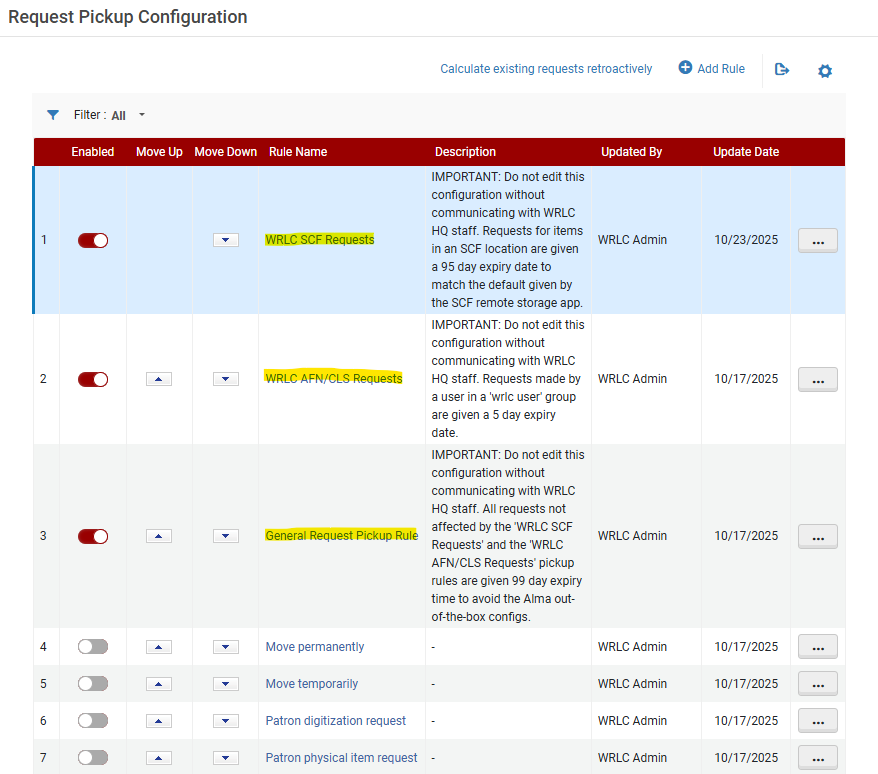
##### WRLC SCF Requests pickup rule

When a request is made for an item in the Shared Collections Facility, two copies of that request are created in WRLC's network; the original request in the owning Institution's IZ, and a second copy of the request in the SCF IZ. This rule ensures that both copies have the same expiration date.

[![Screenshot 2025-11-04 114427.png](https://alma-documentation-bookstack.azurewebsites.net/uploads/images/gallery/2025-11/scaled-1680-/screenshot-2025-11-04-114427.png)](https://alma-documentation-bookstack.azurewebsites.net/uploads/images/gallery/2025-11/screenshot-2025-11-04-114427.png)
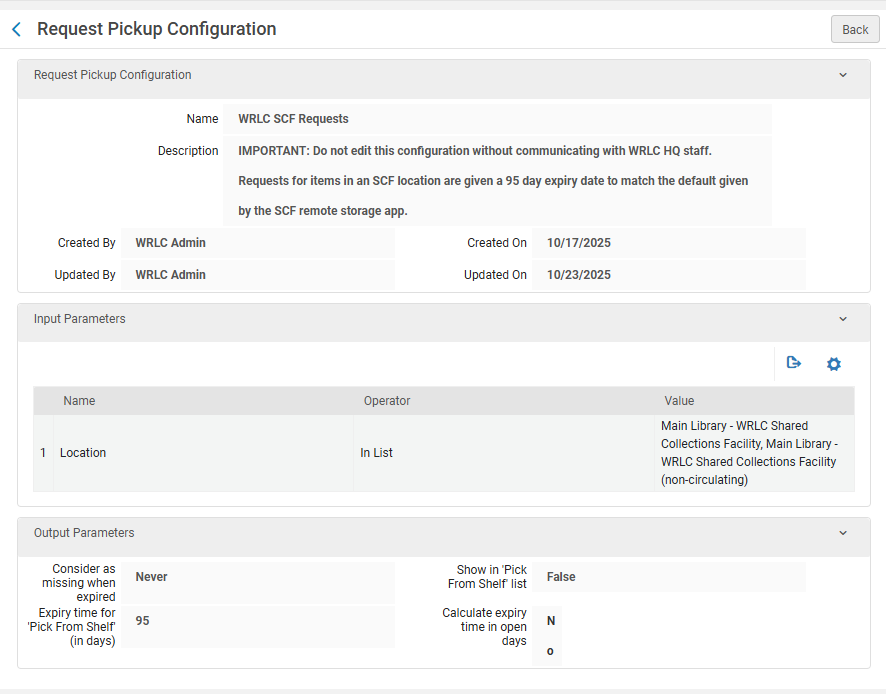
- Input Parameters 
    - Name - Location
    - Operator - In List
    - Value - ALL Remote Storage locations configured in the IZ
- Output Parameters 
    - Consider as missing when expired - Never
    - Expiry time for 'Pick From Shelf' (in days) - 95\*
    - Show in 'Pick From Shelf' list - False
    - Calculate expiry time in open days - No

\*This number is to match the expiry time automatically given by the SCF Remote Storage app when requests are copied from the owning Institution Zone to the Shared Collections Facility Institution Zone. For more information about the Remote Storage Applications, please see the [Remote Storage App chapter](https://alma-documentation-bookstack.azurewebsites.net/books/shared-collections-facility-scf-institution-zone/chapter/remote-storage-app) in the WRLC Alma Wiki.

##### WRLC AFN/CLS Requests pickup rule

This rule ensures that each CLS/AFN request is given 5 days to be filled before the request is marked as expired by Alma.

[![Screenshot 2025-11-04 114958.png](https://alma-documentation-bookstack.azurewebsites.net/uploads/images/gallery/2025-11/scaled-1680-/screenshot-2025-11-04-114958.png)](https://alma-documentation-bookstack.azurewebsites.net/uploads/images/gallery/2025-11/screenshot-2025-11-04-114958.png)

- Input Parameters 
    - Name - User Group
    - Operator - '='
    - Value - wrlc user
- Output Parameters 
    - Consider as missing when expired - Never
    - Expiry time for 'Pick From Shelf' (in days) - 5
    - Show in 'Pick From Shelf' list - True
    - Calculate expiry time in open days - Yes

##### General Request Pickup Rule

This third request rule is *only* configured IF there are no other request pickup rules active in the Institution Zone. This rule is primarily used to prevent Alma's out-of-the-box configurations (7 day expiry, mark as missing when expired) being applied to all requests.

[![Screenshot 2025-11-04 115141.png](https://alma-documentation-bookstack.azurewebsites.net/uploads/images/gallery/2025-11/scaled-1680-/screenshot-2025-11-04-115141.png)](https://alma-documentation-bookstack.azurewebsites.net/uploads/images/gallery/2025-11/screenshot-2025-11-04-115141.png)
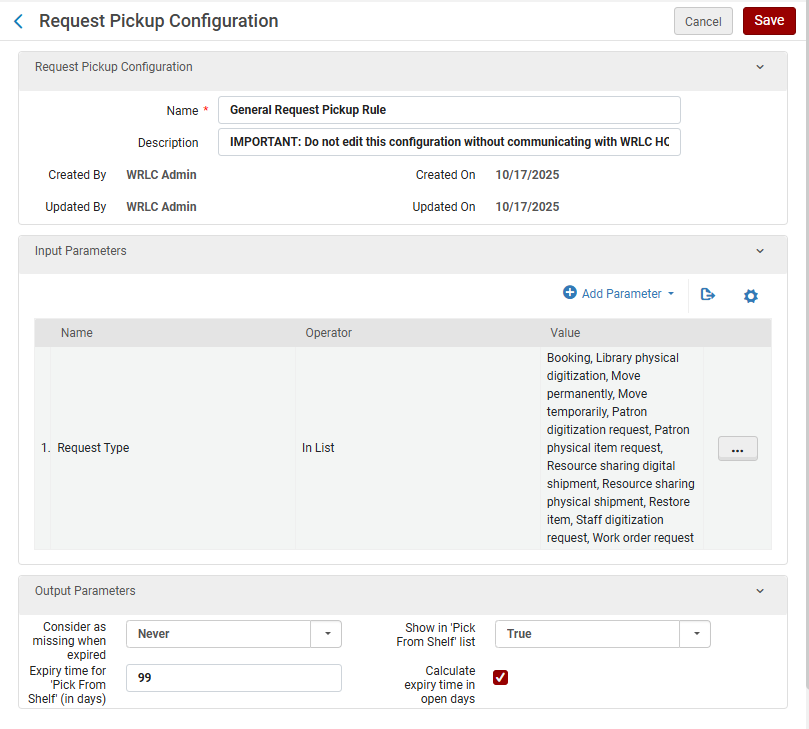
- Input Parameters 
    - Name - Request Type
    - Operator - In List
    - Value - Boking, Library physical digitization, Move permanently, Move temporarily, Patron digitization request, Patron physical item request, Resource sharing digital shipment, Resource sharing physical shipment, Restore item, Staff digitization request, Work order request
- Output Parameters 
    - Consider as missing when expired - Never
    - Expiry time for 'Pick From Shelf' (in days) - 99
    - Show in 'Pick From Shelf' list - True
    - Calculate expiry time in open days - Yes

---

### Rota Assignment Rules

**<span style="font-family: -apple-system, BlinkMacSystemFont, 'Segoe UI', Oxygen, Ubuntu, Roboto, Cantarell, 'Fira Sans', 'Droid Sans', 'Helvetica Neue', sans-serif; font-size: 14px; font-style: normal; font-variant-ligatures: normal; font-variant-caps: normal; outline-color: rgb(32, 110, 167);">Configuration &gt; Fulfillment &gt; Resource Sharing &gt; Rota Assignment Rules</span>**

<span style="background-color: rgb(255, 255, 255);">This configuration pertains to </span>

- [x] <span style="background-color: rgb(255, 255, 255);">Borrower + Lender Institutions</span>
- [x] <span style="background-color: rgb(255, 255, 255);">Borrower Only Institutions</span>

<span style="font-family: -apple-system, BlinkMacSystemFont, 'Segoe UI', Oxygen, Ubuntu, Roboto, Cantarell, 'Fira Sans', 'Droid Sans', 'Helvetica Neue', sans-serif; font-size: 14px; font-style: normal; font-variant-ligatures: normal; font-variant-caps: normal; outline-color: rgb(32, 110, 167);">Rota Assignment Rules assign Rota Templates to specific requests, based on specified criteria. </span>

<span style="font-family: -apple-system, BlinkMacSystemFont, 'Segoe UI', Oxygen, Ubuntu, Roboto, Cantarell, 'Fira Sans', 'Droid Sans', 'Helvetica Neue', sans-serif; font-size: 14px; font-style: normal; font-variant-ligatures: normal; font-variant-caps: normal; outline-color: rgb(32, 110, 167);">There are two WRLC Rota Assignment Rules configured in each Institution Zone in our consortium. These rules use the [Rota Templates configured in the WRLC Network Zone](https://alma-documentation-bookstack.azurewebsites.net/books/fulfillment/page/afn-network-zone-configurations#bkmrk-rota-templates). </span>

<span style="font-family: -apple-system, BlinkMacSystemFont, 'Segoe UI', Oxygen, Ubuntu, Roboto, Cantarell, 'Fira Sans', 'Droid Sans', 'Helvetica Neue', sans-serif; font-size: 14px; font-style: normal; font-variant-ligatures: normal; font-variant-caps: normal; outline-color: rgb(32, 110, 167);">These rules can be in any order, though both should always be above Lender of Last Resort rules configured in your IZ. </span>

1. [<span style="font-family: -apple-system, BlinkMacSystemFont, 'Segoe UI', Oxygen, Ubuntu, Roboto, Cantarell, 'Fira Sans', 'Droid Sans', 'Helvetica Neue', sans-serif; font-size: 14px; font-style: normal; font-variant-ligatures: normal; font-variant-caps: normal; outline-color: rgb(32, 110, 167);">WRLC CLS Book Borrowing</span>](https://alma-documentation-bookstack.azurewebsites.net/books/fulfillment/page/afn-institution-zone-configurations#bkmrk-wrlc-cls-book-borrow-1)
2. <span style="font-family: -apple-system, BlinkMacSystemFont, 'Segoe UI', Oxygen, Ubuntu, Roboto, Cantarell, 'Fira Sans', 'Droid Sans', 'Helvetica Neue', sans-serif; font-size: 14px; font-style: normal; font-variant-ligatures: normal; font-variant-caps: normal; outline-color: rgb(32, 110, 167);">[WRLC CLS Digitization](https://alma-documentation-bookstack.azurewebsites.net/books/fulfillment/page/afn-institution-zone-configurations#bkmrk-wrlc-cls-digitizatio) \* *(please note that, although this Rota Assignment Rule is active, the NZ Rota Template it uses is currently <span style="text-decoration: underline;">inactive</span>)*</span>

<p class="callout info"><span style="font-family: -apple-system, BlinkMacSystemFont, 'Segoe UI', Oxygen, Ubuntu, Roboto, Cantarell, 'Fira Sans', 'Droid Sans', 'Helvetica Neue', sans-serif; font-size: 14px; font-style: normal; font-variant-ligatures: normal; font-variant-caps: normal; outline-color: rgb(32, 110, 167);">The priority of Institution rules versus Network rules is determined by the *network\_rota\_assignment\_rules\_precedence* setting found in Configuration &gt; Fulfillment &gt; General &gt; Other Settings. The default setting for WRLC is *<span style="text-decoration: underline;">FALSE</span>* (IZ rules take precedent over NZ rules). For a full list of all recommended *Other Settings* configurations for a WRLC Institution Zone, please see the I[nstitution Zone Configuration page](https://alma-documentation-bookstack.azurewebsites.net/books/configuration/page/institution-zone-configuration) on the WRLC Alma Wiki.</span></p>

[![Screenshot 2025-12-16 150712.png](https://alma-documentation-bookstack.azurewebsites.net/uploads/images/gallery/2025-12/scaled-1680-/screenshot-2025-12-16-150712.png)](https://alma-documentation-bookstack.azurewebsites.net/uploads/images/gallery/2025-12/screenshot-2025-12-16-150712.png)

##### WRLC CLS Book Borrowing

- - <span style="font-family: -apple-system, BlinkMacSystemFont, 'Segoe UI', Oxygen, Ubuntu, Roboto, Cantarell, 'Fira Sans', 'Droid Sans', 'Helvetica Neue', sans-serif; font-size: 14px; font-style: normal; font-variant-ligatures: normal; font-variant-caps: normal; outline-color: rgb(32, 110, 167);">Input Parameters</span>
        - <span style="font-family: -apple-system, BlinkMacSystemFont, 'Segoe UI', Oxygen, Ubuntu, Roboto, Cantarell, 'Fira Sans', 'Droid Sans', 'Helvetica Neue', sans-serif; font-size: 14px; font-style: normal; font-variant-ligatures: normal; font-variant-caps: normal; outline-color: rgb(32, 110, 167);">Name - Requested Format </span>
        - <span style="font-family: -apple-system, BlinkMacSystemFont, 'Segoe UI', Oxygen, Ubuntu, Roboto, Cantarell, 'Fira Sans', 'Droid Sans', 'Helvetica Neue', sans-serif; font-size: 14px; font-style: normal; font-variant-ligatures: normal; font-variant-caps: normal; outline-color: rgb(32, 110, 167);">Operator - =</span>
        - <span style="font-family: -apple-system, BlinkMacSystemFont, 'Segoe UI', Oxygen, Ubuntu, Roboto, Cantarell, 'Fira Sans', 'Droid Sans', 'Helvetica Neue', sans-serif; font-size: 14px; font-style: normal; font-variant-ligatures: normal; font-variant-caps: normal; outline-color: rgb(32, 110, 167);">Value - Physical</span>
    - <span style="font-family: -apple-system, BlinkMacSystemFont, 'Segoe UI', Oxygen, Ubuntu, Roboto, Cantarell, 'Fira Sans', 'Droid Sans', 'Helvetica Neue', sans-serif; font-size: 14px; font-style: normal; font-variant-ligatures: normal; font-variant-caps: normal; outline-color: rgb(32, 110, 167);">Output Parameters</span>
        - <span style="font-family: -apple-system, BlinkMacSystemFont, 'Segoe UI', Oxygen, Ubuntu, Roboto, Cantarell, 'Fira Sans', 'Droid Sans', 'Helvetica Neue', sans-serif; font-size: 14px; font-style: normal; font-variant-ligatures: normal; font-variant-caps: normal; outline-color: rgb(32, 110, 167);">Rota Templates - CLS-Physical</span>

[![Screenshot 2025-12-16 150733.png](https://alma-documentation-bookstack.azurewebsites.net/uploads/images/gallery/2025-12/scaled-1680-/screenshot-2025-12-16-150733.png)](https://alma-documentation-bookstack.azurewebsites.net/uploads/images/gallery/2025-12/screenshot-2025-12-16-150733.png)

##### WRLC CLS Digitization

- <span style="font-family: -apple-system, BlinkMacSystemFont, 'Segoe UI', Oxygen, Ubuntu, Roboto, Cantarell, 'Fira Sans', 'Droid Sans', 'Helvetica Neue', sans-serif; font-size: 14px; font-style: normal; font-variant-ligatures: normal; font-variant-caps: normal; outline-color: rgb(32, 110, 167);">Input Parameters</span>
    - <span style="font-family: -apple-system, BlinkMacSystemFont, 'Segoe UI', Oxygen, Ubuntu, Roboto, Cantarell, 'Fira Sans', 'Droid Sans', 'Helvetica Neue', sans-serif; font-size: 14px; font-style: normal; font-variant-ligatures: normal; font-variant-caps: normal; outline-color: rgb(32, 110, 167);">Name - Requested Format </span>
    - <span style="font-family: -apple-system, BlinkMacSystemFont, 'Segoe UI', Oxygen, Ubuntu, Roboto, Cantarell, 'Fira Sans', 'Droid Sans', 'Helvetica Neue', sans-serif; font-size: 14px; font-style: normal; font-variant-ligatures: normal; font-variant-caps: normal; outline-color: rgb(32, 110, 167);">Operator - In List</span>
    - <span style="font-family: -apple-system, BlinkMacSystemFont, 'Segoe UI', Oxygen, Ubuntu, Roboto, Cantarell, 'Fira Sans', 'Droid Sans', 'Helvetica Neue', sans-serif; font-size: 14px; font-style: normal; font-variant-ligatures: normal; font-variant-caps: normal; outline-color: rgb(32, 110, 167);">Value - Digital</span>
- <span style="font-family: -apple-system, BlinkMacSystemFont, 'Segoe UI', Oxygen, Ubuntu, Roboto, Cantarell, 'Fira Sans', 'Droid Sans', 'Helvetica Neue', sans-serif; font-size: 14px; font-style: normal; font-variant-ligatures: normal; font-variant-caps: normal; outline-color: rgb(32, 110, 167);">Output Parameters</span>
    - <span style="font-family: -apple-system, BlinkMacSystemFont, 'Segoe UI', Oxygen, Ubuntu, Roboto, Cantarell, 'Fira Sans', 'Droid Sans', 'Helvetica Neue', sans-serif; font-size: 14px; font-style: normal; font-variant-ligatures: normal; font-variant-caps: normal; outline-color: rgb(32, 110, 167);">Rota Templates - CLS-Digital \* (this NZ-managed Rota Template is currently inactive)</span>

[![Screenshot 2025-12-16 150752.png](https://alma-documentation-bookstack.azurewebsites.net/uploads/images/gallery/2025-12/scaled-1680-/screenshot-2025-12-16-150752.png)](https://alma-documentation-bookstack.azurewebsites.net/uploads/images/gallery/2025-12/screenshot-2025-12-16-150752.png)

For more information, see the Alma Knowledgebase page [Configuring Rota Assignment Rules](https://knowledge.exlibrisgroup.com/Alma/Product_Documentation/010Alma_Online_Help_(English)/030Fulfillment/080Configuring_Fulfillment/060Resource_Sharing/010Basic_Resource_Sharing_Configurations#Configuring_Rota_Assignment_Rules)

---

### Fulfillment Jobs Configuration

**<span style="font-family: -apple-system, BlinkMacSystemFont, 'Segoe UI', Oxygen, Ubuntu, Roboto, Cantarell, 'Fira Sans', 'Droid Sans', 'Helvetica Neue', sans-serif; font-size: 14px; font-style: normal; font-variant-ligatures: normal; font-variant-caps: normal; outline-color: rgb(32, 110, 167);">Configuration &gt; Fulfillment &gt; General &gt; Fulfillment Jobs Configuration</span>**

- [x] <span style="background-color: rgb(255, 255, 255);">This configuration pertains to </span>
    
    
    - [x] <span style="background-color: rgb(255, 255, 255);">Borrower + Lender Institutions</span>

Below are the Fulfillment jobs that <span style="text-decoration: underline;">**must**</span> be active for libraries that lend their library's items in the CLS/AFN.


##### Requests - Handle Expiration Job

This job should be active only for libraries that *lend* their library's items in the CLS/AFN.

The job cancels requests when the expiration date for a request has passed AND the status of the request is one of the following :

- Pick from shelf
- Communicated to Remote Storage

Expiration dates are configured according to an Institution's Request Pickup Rules. For more information on how these should be configured for the AFN, please see the [Request Pickup Configuration](https://alma-documentation-bookstack.azurewebsites.net/books/fulfillment/page/afn-institution-zone-configurations#bkmrk-request-pickup-confi) section of the [AFN Institution Zone Configurations](https://alma-documentation-bookstack.azurewebsites.net/books/fulfillment/page/afn-institution-zone-configurations "AFN Institution Zone Configurations") page on the WRLC Alma Wiki.

##### <span class="ScreenElement">Loans - Overdue and Lost Item</span>

<span class="ScreenElement">This job should be active for libraries that *lend* their library's items in the CLS/AFN.</span>

<span class="ScreenElement">The job both notifies patrons about overdue loans, and changes a loan's status to Lost; the parameters for each of these actions is dictated by the configuration of your Institution Zones Overdue and Lost Loan profiles. For more information about these in relation to CLS, please see the Overdue and Lost Loan Profiles section of the WRLC Alma Wiki.</span>

<span class="ScreenElement">For more information, see the Alma Knowledgebase page [Configuring Fulfillment Jobs](https://knowledge.exlibrisgroup.com/Alma/Product_Documentation/010Alma_Online_Help_(English)/030Fulfillment/080Configuring_Fulfillment/080General/Configuring_Fulfillment_Jobs).</span>

---

### Overdue and Lost Loan Profiles

**Configuration &gt; Fulfillment &gt; General &gt; Overdue and Lost Loan Profiles**

- [x] <span style="background-color: rgb(255, 255, 255);">This configuration pertains to </span>
    
    
    - [x] <span style="background-color: rgb(255, 255, 255);">Borrower + Lender Institutions</span>

The overdue and lost loan profiles monitor long overdue loans and turn them into lost loans when applicable. The profiles send reminders to the patron as well as create fees and user blocks. Lost fees charged to a patron account are determined by the items Terms of Use.

For libraries that<span class="ScreenElement"> *lend* their library's items in the CLS/AFN</span> both lend and borrow, there should be at least one **Change to Lost** profile that includes the User Group '*wrlc user*'. This profile ensures that any WRLC patrons with overdue items from your institution will be sent an email notifying them that their item is overdue by 40 days and has now been changed to a Lost status. This change in status marks the item as Lost, and adds a $110 replacement fee to their account (as configured in the AFN's Terms of Use).

Below is an example configuration, along with recommended configurations :

[![Screenshot 2026-02-26 110448.png](https://alma-documentation-bookstack.azurewebsites.net/uploads/images/gallery/2026-02/scaled-1680-/screenshot-2026-02-26-110448.png)](https://alma-documentation-bookstack.azurewebsites.net/uploads/images/gallery/2026-02/screenshot-2026-02-26-110448.png)

**Active** : Checked

**Profile Type** : Change to Lost

**Days after due date** : 39

Notices will be send the following day (on the 40th day)

**Days** : Checked (do not check 'Open Days')

**User Group** : *wrlc user*

<p class="callout info">Please note that if any of the settings above are left blank, the field will apply to all in the category. For example, if the User Group field is left blank, this profile will be applied to all user groups in your Institution Zone. </p>

<div class="BodyText" id="bkmrk-alma-runs-a-daily-jo">Alma runs a daily job (**<span class="ScreenElement">Loans - Overdue and Lost Item</span>**) to process overdue and lost loans, which, according to the list of profiles, determines the loans for which warnings are sent and those that are defined as lost.</div><div class="BodyText" id="bkmrk--36">  
</div><div class="BodyText" id="bkmrk-the-letter-sent-depe">The type of letter sent depends on the setting of the **<span class="ScreenElement">switch\_to\_overdue\_and\_lost\_loan\_new\_job</span>** customer parameter. When this parameter is set to <span class="ScreenElement">true</span>, the notification sent is the *Ful Overdue and Lost Loan Notification Letter*. In this case, a single notification is sent to each patron for all overdue items whose criteria match a particular profile, listing all of the overdue items in that profile. </div>For more information, see the Alma Knowledgebase page [Configuring Overdue and Lost Loan Profiles](https://knowledge.exlibrisgroup.com/Alma/Product_Documentation/010Alma_Online_Help_(English)/030Fulfillment/080Configuring_Fulfillment/Configuring_Loans#Configuring_Overdue_and_Lost_Loan_Profiles) page.

# Faculty Due Date Maintenance

Each IZ that participates in consortial lending needs to maintain the fixed due date on their calendars for patrons in "wrlc user" user group with the "WRLC Faculty" job category. This is done 3 times a year so that Faculty can have loans that last the semester. The dates are changed about 6 weeks prior to the expiration of the current due date.

The designated due dates are January 31st for the Fall semester, May 31st for the Spring semester, and September 30th for the Summer sessions.

The dates are changed on the following schedule:

- January 31 due date is set on about August 15th.
- May 31st due date is set on about December 15th.
- September 30th due date is set on about April 15th.

# Procedure: Update the Faculty Due Date

**The following procedure assumes that the "End of Term WRLC Faculty" date is configured at and inherited from the Institution's Calendar. All Libraries under the IZ that have this date on their calendar will be updated by the procedure below.**

**If you do not have this date configured on the Institution Calendar, you will need to select the individual Libraries that have this date and update them individually following the same basic procedure except at the Library level.**

**Go To: Alma --&gt; Configuration --&gt; General --&gt; Libraries --&gt; Add a Library or Edit Library Information**

Select the Calendar Management tab. Click on the ellipsis to Edit the "End of Term WRLC Faculty" date. Select Edit.

[![Screen Shot 2023-10-12 at 2.28.06 PM.png](https://alma-documentation-bookstack.azurewebsites.net/uploads/images/gallery/2023-10/scaled-1680-/screen-shot-2023-10-12-at-2-28-06-pm.png)](https://alma-documentation-bookstack.azurewebsites.net/uploads/images/gallery/2023-10/screen-shot-2023-10-12-at-2-28-06-pm.png)

Click on the calendar button on the right. Select the new "End of Term WRLC Faculty" date. Then Save.

[![Screen Shot 2023-10-12 at 2.31.22 PM.png](https://alma-documentation-bookstack.azurewebsites.net/uploads/images/gallery/2023-10/scaled-1680-/screen-shot-2023-10-12-at-2-31-22-pm.png)](https://alma-documentation-bookstack.azurewebsites.net/uploads/images/gallery/2023-10/screen-shot-2023-10-12-at-2-31-22-pm.png)

After saving, make sure that you "Apply Changes"!

[![Screen Shot 2023-10-12 at 2.32.35 PM.png](https://alma-documentation-bookstack.azurewebsites.net/uploads/images/gallery/2023-10/scaled-1680-/screen-shot-2023-10-12-at-2-32-35-pm.png)](https://alma-documentation-bookstack.azurewebsites.net/uploads/images/gallery/2023-10/screen-shot-2023-10-12-at-2-32-35-pm.png)

You will be notified once you submitted the job to apply the changes.

[![Screen Shot 2023-10-12 at 2.34.36 PM.png](https://alma-documentation-bookstack.azurewebsites.net/uploads/images/gallery/2023-10/scaled-1680-/screen-shot-2023-10-12-at-2-34-36-pm.png)](https://alma-documentation-bookstack.azurewebsites.net/uploads/images/gallery/2023-10/screen-shot-2023-10-12-at-2-34-36-pm.png)

The "End of Term WRLC Faculty" date is now updated.

# Linked Patron Accounts

### How to update a Linked Patron Account

Patron linked accounts can be updated in several ways.

1. If a patron renews an item on loan from partner institution, the patron's expiry date will automatically be updated to match the expiry date at the home institution.
2. If a patron requests a new item from a partner institution, the patron's expiry date will automatically be updated to match the expiry date at the home institution.
3. A staff member can manually force an update to a linked patron's expiry date by using "Manage Patron Services".

 **Fulfillment --&gt; Checkout/Checkin --&gt; Manage Patron Services --&gt; Patron Services page**

- - - Select "Find user in other institution", select the appropriate institution.
        - Scan patron's ID or search for patron and select appropriate one.
        - "Find User" (This will force an update to the patron's linked account.

---

### How Linked Patron Accounts are configured

#### Linked Account Rules (Institution Zone)

Each institution in the WRLC network has configured a ***WRLC Fulfillment Network Patron*** linked account rule in their Institution Zone (minus Catholic University Law school, which does not borrow nor lend using the WRLC AFN).

Below are the recommended configurations for the ***WRLC Fulfillment Network Patron*** linked account rule, found in

***Configuration &gt; User Management &gt; Collaborative Networks &gt; Linked Account Rules***

[![Screenshot 2026-01-29 100333.png](https://alma-documentation-bookstack.azurewebsites.net/uploads/images/gallery/2026-01/scaled-1680-/screenshot-2026-01-29-100333.png)](https://alma-documentation-bookstack.azurewebsites.net/uploads/images/gallery/2026-01/screenshot-2026-01-29-100333.png)

- Input Parameters 
    - Name = Source Institution
    - Operator = In List
    - Value = all institutions in the WRLC Network except for Catholic Law
- Output Parameters 
    - User Group = *wrlc user*
    - Expiry Date = NULL
    - Expiry from Source = Same as in source

<p class="callout info">Copies Expiry Date from the patron account in the patron's Home Institution</p>

- - Refresh Expiry Date = Yes

<p class="callout info">When set to 'Yes', the corresponding date is recalculated each time the linked record is refreshed from the source institution</p>

- - Purge Date = NULL
    - Purge After Expired = One month after expiration

<p class="callout info">The above sets the Purge <span style="text-decoration: underline;">Date</span>; the account will only be purged if the 'Purge User Records' job is run </p>

- - Refresh Purge Date = Yes

<p class="callout info">When set to 'Yes', the corresponding date is recalculated each time the linked record is refreshed from the source institution</p>

- - Resource Sharing Library = \[your institution's resource sharing library\]
    - Copy Network Blocks = Yes

<p class="callout danger">When set to 'Yes', Alma will delete all the current network blocks that exist on the linked account and re-create them each time the linked record is refreshed. Blocks can only be placed on linked accounts if they are configured in the ***User Block Definitions*** and ***User Block Descriptions*** section.</p>

For more information, please see the [Configuring Linked Account Rules page](https://knowledge.exlibrisgroup.com/Alma/Product_Documentation/010Alma_Online_Help_(English)/050Administration/040Configuring_User_Management/110Linking_Users_in_Collaborative_Networks#rules.linkedAccount.rule_editor) on the Alma Knowledgebase.

---

#### Linked Account Shared Fields (Network Zone)

The configuration that determines which fields in the user account are shared in linked accounts is managed in the WRLC Network Zone. Below is the current configuration.

<table border="1" id="bkmrk-field-name-shared-fi" style="border-collapse: collapse; width: 100%;"><colgroup><col style="width: 50%;"></col><col style="width: 50%;"></col></colgroup><tbody><tr><td>***Field Name***</td><td>***Shared***</td></tr><tr><td>First Name</td><td><span style="background-color: rgb(255, 255, 255); color: rgb(22, 145, 121);">True</span></td></tr><tr><td>Middle Name</td><td><span style="background-color: rgb(255, 255, 255); color: rgb(22, 145, 121);">True</span></td></tr><tr><td>Last Name</td><td><span style="background-color: rgb(255, 255, 255); color: rgb(22, 145, 121);">True</span></td></tr><tr><td>Pin Number</td><td><span style="color: rgb(186, 55, 42);">False</span></td></tr><tr><td>Job Title</td><td><span style="color: rgb(22, 145, 121);">True</span></td></tr><tr><td>Job Description</td><td><span style="color: rgb(22, 145, 121);">True</span></td></tr><tr><td>Preferred Language</td><td><span style="color: rgb(22, 145, 121);">True</span></td></tr><tr><td>Birth Date</td><td><span style="color: rgb(22, 145, 121);">True </span></td></tr><tr><td>Expiry Date</td><td><span style="color: rgb(22, 145, 121);">True</span></td></tr><tr><td>Purge Date</td><td><span style="color: rgb(22, 145, 121);">True</span></td></tr><tr><td>Email List</td><td><span style="color: rgb(22, 145, 121);">True</span></td></tr><tr><td>Address List</td><td><span style="color: rgb(186, 55, 42);">False</span></td></tr><tr><td>Phone List</td><td><span style="color: rgb(186, 55, 42);">False</span></td></tr><tr><td>Preferred First Name</td><td><span style="color: rgb(22, 145, 121);">True</span></td></tr><tr><td>Preferred Middle Name</td><td><span style="color: rgb(22, 145, 121);">True</span></td></tr><tr><td>Preferred Last Name</td><td><span style="color: rgb(22, 145, 121);">True</span></td></tr></tbody></table>

For more information, please see the [Configuring Linked Account Shared Fields](https://knowledge.exlibrisgroup.com/Alma/Product_Documentation/010Alma_Online_Help_(English)/050Administration/040Configuring_User_Management/110Linking_Users_in_Collaborative_Networks#Configuring_Linked_Account_Shared_Fields) page on the Alma Knowledgebase.

# Standard Opening Hours

#### Impact on Due Dates 

A library's Standard Opening Hours along with other events in their calendar can affect item due dates and renewal dates. It is good practice to review the Standard Opening Hours each semester when you may be adding specific events, exceptions or holidays.

A library's Standard Opening Hours are always set at the library level. (They do not "inherit" from the institutional calendar.) The "Valid from" date to the "Valid to" date is set to 3 years. If the "Valid to" date is approaching, this can shorten due dates for items that would otherwise get a much longer loan period.

The procedure to update the "Valid to" dates in your library's calendar is fairly simple. You must have the role of Fulfillment Administrator (or General Administrator).

#### **Updating the Standard Opening Hours**

The following procedure assumes that you have the role of Fulfillment Administrator (or General Administrator) and you have selected a valid Library from the top of the Configuration page.

Go To: **Alma --&gt; Configuration --&gt; Fulfillment --&gt; Library Management --&gt; Opening Hours**

[![Screen Shot 2024-06-04 at 1.46.15 PM.png](https://alma-documentation-bookstack.azurewebsites.net/uploads/images/gallery/2024-06/scaled-1680-/screen-shot-2024-06-04-at-1-46-15-pm.png)](https://alma-documentation-bookstack.azurewebsites.net/uploads/images/gallery/2024-06/screen-shot-2024-06-04-at-1-46-15-pm.png)

Find the calendar entries of type "Standard opening hours". (You can arrange the record types alphabetically by clicking on the Record type column header.) Select the ellipsis at the right of the first entry.

[![Screen Shot 2024-06-04 at 1.34.46 PM.png](https://alma-documentation-bookstack.azurewebsites.net/uploads/images/gallery/2024-06/scaled-1680-/screen-shot-2024-06-04-at-1-34-46-pm.png)](https://alma-documentation-bookstack.azurewebsites.net/uploads/images/gallery/2024-06/screen-shot-2024-06-04-at-1-34-46-pm.png)

Select Edit on the first Standard opening hours entry.

[![Screen Shot 2024-06-04 at 1.29.05 PM.png](https://alma-documentation-bookstack.azurewebsites.net/uploads/images/gallery/2024-06/scaled-1680-/screen-shot-2024-06-04-at-1-29-05-pm.png)](https://alma-documentation-bookstack.azurewebsites.net/uploads/images/gallery/2024-06/screen-shot-2024-06-04-at-1-29-05-pm.png)

Select Save. This will automatically update the "from" and “to” date. (You do not need to make any changes.)

[![Screen Shot 2024-06-04 at 1.29.20 PM.png](https://alma-documentation-bookstack.azurewebsites.net/uploads/images/gallery/2024-06/scaled-1680-/screen-shot-2024-06-04-at-1-29-20-pm.png)](https://alma-documentation-bookstack.azurewebsites.net/uploads/images/gallery/2024-06/screen-shot-2024-06-04-at-1-29-20-pm.png)

Repeat this for the remaining 6 Standard Opening Hours entries.

As with all calendar updates, "Apply Changes"!

[![Screen Shot 2024-06-04 at 1.29.59 PM.png](https://alma-documentation-bookstack.azurewebsites.net/uploads/images/gallery/2024-06/scaled-1680-/screen-shot-2024-06-04-at-1-29-59-pm.png)](https://alma-documentation-bookstack.azurewebsites.net/uploads/images/gallery/2024-06/screen-shot-2024-06-04-at-1-29-59-pm.png)

# Discharging CLS Hold Shelf Items

This workflow explains how to properly discharge CLS (Consortium Library Services) Hold Shelf items in Alma so they are correctly routed back to their owning library and do not remain attached to outdated or unresolved requests. Before starting, determine which situation applies, each case requires a different Alma workflow:

- Item has NOT expired past the Hold Until date
- Item HAS expired past the Hold Until date

**When to Use This Workflow**

- When a CLS item was never picked up by the requesting patron
- When a CLS item has expired on the hold shelf
- When a CLS item must be returned to its owning institution

##### **Why This Matters**  


If CLS hold shelf items are not discharged correctly:

- Requests may remain active incorrectly
- Items may circulate with unresolved requests
- Lending libraries may experience tracking or accountability issues

This workflow ensures clean request closure and correct transit routing.

##### **Required Roles**

- Fulfillment Operator
- Circulation Desk Manager

##### **Part A: Hold Shelf Items That Have NOT Expired Past Hold Until Date**

Force Alma to recognize the item as expired so it can be properly discharged and routed back to the owning library.

**1: Locate the Item on the Active Hold Shelf** Navigate to &lt;Fulfillment &gt; Resource Requests &gt; Active Hold Shelf&gt;

**2: Manually Update the Expiration Date**

- Click &lt;Update Expiry&gt; next to the item

[![image.png](https://alma-documentation-bookstack.azurewebsites.net/uploads/images/gallery/2026-02/scaled-1680-/06bimage.png)](https://alma-documentation-bookstack.azurewebsites.net/uploads/images/gallery/2026-02/06bimage.png)

- In the dialog box, enter yesterday’s date
- Click &lt;Save&gt;

[![image.png](https://alma-documentation-bookstack.azurewebsites.net/uploads/images/gallery/2026-02/scaled-1680-/OETimage.png)](https://alma-documentation-bookstack.azurewebsites.net/uploads/images/gallery/2026-02/OETimage.png)

- *Why This Matters:*  
    Alma only treats items as expired after the Hold Until date has passed.  
    Using yesterday’s date ensures Alma immediately recognizes the item as expired.

**3: Alternative Location (If Updating from Lending Side)** If the item must be managed from the lending/request side:

Navigate to &lt;Fulfillment &gt; Resource Requests &gt; Monitor Requests &amp; Item Processes&gt;

- Use the Facets panel and select &lt;On Hold Shelf&gt; under Process Type

[![image.png](https://alma-documentation-bookstack.azurewebsites.net/uploads/images/gallery/2026-02/scaled-1680-/9uHimage.png)](https://alma-documentation-bookstack.azurewebsites.net/uploads/images/gallery/2026-02/9uHimage.png)

[![image.png](https://alma-documentation-bookstack.azurewebsites.net/uploads/images/gallery/2026-02/scaled-1680-/qA4image.png)](https://alma-documentation-bookstack.azurewebsites.net/uploads/images/gallery/2026-02/qA4image.png)

- Locate the item and repeat the expiration-date update above

**4: Scan the Item In** Navigate to &lt;Fulfillment &gt; Scan In Items&gt;

- Scan the item barcode
- The item’s status should now update to &lt;In Transit for Reshelving&gt; with the owning library as destination.

**5: Prepare Item for Courier**

- Insert the CLS green courier routing slip
- Place the item with outgoing materials for delivery to the owning library

##### **Part B: Hold Shelf Items That HAVE Expired Past Hold Until Date**

Important: This section applies only to items already listed on the Expired Hold Shelf.

**1: Use Scan In Items (Required)**

- Navigate to Fulfillment &gt; Resource Requests &gt; Scan In Items&gt;
- Select &lt;Item from another institution&gt;
- Use the Institution dropdown to select the owning library
- Scan the item barcode

[![image.png](https://alma-documentation-bookstack.azurewebsites.net/uploads/images/gallery/2026-02/scaled-1680-/3jzimage.png)](https://alma-documentation-bookstack.azurewebsites.net/uploads/images/gallery/2026-02/3jzimage.png)

*Why This Matters:* If the item was never checked out, Return Items cannot be used. Scan In Items ensures Alma processes the item correctly.

**2: If an Active Request Still Remains After Scanning** Choose one of the following options:

**Option A:** Update Expiry and Scan Again

- As previously detailed, manually update the expiration date to yesterday
- Scan the item in again

The request should clear, and the item should route to the owning library.

**Option B:** Cancel the Active Request

- Navigate to &lt;Fulfillment &gt; Resource Requests &gt; Active Hold Shelf&gt;
- Locate the item the patron no longer wants
- Click &lt;Cancel Request&gt;
- Select a Cancellation Reason
- Uncheck &lt;Notify User&gt; if appropriate
- Click &lt;Confirm&gt;

The item should now route In Transit for Reshelving to the owning library.

[![image.png](https://alma-documentation-bookstack.azurewebsites.net/uploads/images/gallery/2026-02/scaled-1680-/5Pqimage.png)](https://alma-documentation-bookstack.azurewebsites.net/uploads/images/gallery/2026-02/5Pqimage.png)

**Part C: Place Directly on Hold Shelf (Configuration Awareness)** Some institutions have an additional option on their Scan In Items page to toggle Place Directly on Hold Shelf, while others do not**.**

The option adds a Hold Processing status

- Hold Processing: 
    - Does not notify the patron
    - Does not make the item ready for pickup

Best Practice: When expiring or returning CLS items, set Place Directly on Hold Shelf = No.

- No option to Place Directly on Hold Shelf

[![image.png](https://alma-documentation-bookstack.azurewebsites.net/uploads/images/gallery/2026-02/scaled-1680-/3Usimage.png)](https://alma-documentation-bookstack.azurewebsites.net/uploads/images/gallery/2026-02/3Usimage.png)

- Option to Place Directly on Hold Shelf

[![image.png](https://alma-documentation-bookstack.azurewebsites.net/uploads/images/gallery/2026-02/scaled-1680-/7d9image.png)](https://alma-documentation-bookstack.azurewebsites.net/uploads/images/gallery/2026-02/7d9image.png)

**9: Configuration Path (Administrative Awareness Only)** This step is informational only for most staff

- Configuration &gt; Fulfillment &gt; Library Management&gt;
- Select library → Circulation Desk List
- Select Circulation Desk
- Under Hold Shelf Information, enable Has Hold Shelf

[![image.png](https://alma-documentation-bookstack.azurewebsites.net/uploads/images/gallery/2026-02/scaled-1680-/F7Wimage.png)](https://alma-documentation-bookstack.azurewebsites.net/uploads/images/gallery/2026-02/F7Wimage.png)

##### **Best Practices and Critical Notes (Read Carefully)**

- Always use Scan In Items before returning CLS items to prevent lingering requests
- Only use CLS green routing slips for outbound CLS items. The green routing slips signify that an item is no longer needed.
- If an item comes back to the home institution with a green routing slip, but it still has an active request attached to it, it should be assumed that the item is no longer needed regardless of the request date:  
    
    - Cancel the request
    - Scan the item again
- Destination should list only one institution 
    - If both lending and borrowing institutions appear, a request is still attached

##### **Notes and Frequently Asked Questions**

*Why can’t I just return the item normally?*

- Because Return Items only works if the item was actually checked out.

*Why is yesterday’s date used?*

- Alma only recognizes expiration *after* the Hold Until date passes.

*What if I forget to scan the item?*

- The request may remain open, causing routing and accountability issues.

*Why are CLS green slips required?*

- They signal to courier staff that the item is no longer needed by the borrowing library.

*What if the destination lists multiple libraries?*

- A request is still active; cancel it and scan again.

# Expired Hold Shelf Audit Workflow

This workflow is used when auditing items that appear on the Expired Hold Shelf but cannot be physically located where Alma indicates they should be.

When to Use This Workflow:

- During scheduled Expired Hold Shelf audits
- When a CLS (consortial) item is marked In Transit and in the Expired Hold Shelf queue but cannot be found
- When reconciling discrepancies between Alma status and physical item location

*Why This Matters: Expired hold shelf items represent shared consortial responsibility. Prompt, consistent handling ensures accurate records, fair cost responsibility, and minimal impact on patrons and partner libraries.*

##### **Required Roles**

- Fulfillment Operator
- Circulation Desk Manager

##### **Workflow Overview**

This process answers three key questions, in order:

- Can the item be found at either library?
- If not, is the item likely with the requesting patron?
- If still unresolved, who is responsible for resolution and cost?

**1: Perform a Comprehensive Physical Search** Begin with a physical and Alma-based search that includes all locations where the item could reasonably be found:

- Hold Shelf
- General Collection
- Any additional local locations relevant to your library

Unlike a traditional Patron Claimed Return investigation, only one thorough search per item is required for Reconciliation audit purposes.

**2: Contact the Lending Library** Once your local search is complete:

- Contact the lending library
- Request that they perform a corresponding search on their end

*Why This Matters: Both the requesting and lending libraries must confirm the item’s absence before moving forward.*

Note: If this audit is being completed as a part of the annual Reconciliation audit process, it will not be necessary to contact the lending library. As of December 2025 RSC members agreed that each library will conduct a physical search for every item listed on the Comprehensive Reconciliation CLS (Lost in Transit) and Expired Hold Shelf Report.

**3: Evaluate Search Results** At this point, one of three outcomes will occur:

Outcome A: Item Located at Either Library

- Stop further investigation
- Process the item using the standardized workflow:<span style="color: rgb(0, 0, 0);"> <span style="color: rgb(53, 152, 219);">[Discharging CLS Hold Shelf Items](https://alma-documentation-bookstack.azurewebsites.net/books/fulfillment/page/discharging-cls-hold-shelf-items)</span></span>

Outcome B: Item Not Located at Either Library

- The item is likely in the possession of the requesting patron
- The item was likely not properly discharged or checked out at pickup

Note: Similar to ILLiad lending agreements, the lending library is ultimately responsible for compensating fellow libraries for Lost or Missing requested CLS materials

**4: Patron Resolution (If Item Is Not Located):** Determine Whether to Contact the Patron

The requesting library may choose to:

- Contact the patron before taking action, or
- Proceed directly with checking the item out to the patron’s account

Both approaches are acceptable; local policy may guide this decision.

**5: Optional** Send Initial Patron Notification; Suggested email language:

*Hello,*  
*The item you requested on XX/XX/XXXX titled “Lorem ipsum dolor sit amet” was not correctly checked out to your library account at the time of pickup. This item will be checked out to your account. If you have any concerns, please contact the XX Circulation Desk at <span style="color: rgb(0, 0, 0);"><span style="text-decoration-thickness: initial; text-decoration-style: initial; text-decoration-color: initial;"><u>[XXXXXX@edu](mailto:XXXXXX@edu)</u></span>.</span>*

<span style="color: rgb(0, 0, 0);">A library may choose to either wait a set number of days for a response or proceed with checking the item out to the requesting patron’s account</span>

**<span style="color: rgb(0, 0, 0);">6: </span>Check the Item Out to the Patron's Account in Alma** This establishes a clear chain of responsibility moving forward.

**7: Documenting the Action in Alma** Add a Patron Pop-Up Note:

From the Patron Services screen: Fulfillment&gt; Checkout/Checkin&gt; Manage Patron Services, locate patron's account

Click on patron's name to access their account

[![image.png](https://alma-documentation-bookstack.azurewebsites.net/uploads/images/gallery/2026-02/scaled-1680-/rnEimage.png)](https://alma-documentation-bookstack.azurewebsites.net/uploads/images/gallery/2026-02/rnEimage.png)

From the patron's User Details screen, select the &lt;Notes&gt; tab

[![image.png](https://alma-documentation-bookstack.azurewebsites.net/uploads/images/gallery/2026-02/scaled-1680-/nilimage.png)](https://alma-documentation-bookstack.azurewebsites.net/uploads/images/gallery/2026-02/nilimage.png)

- Select the &lt;Add Note&gt; drop down menu

[![image.png](https://alma-documentation-bookstack.azurewebsites.net/uploads/images/gallery/2026-02/scaled-1680-/Pppimage.png)](https://alma-documentation-bookstack.azurewebsites.net/uploads/images/gallery/2026-02/Pppimage.png)

- In the Note field, enter: 
    - *Requested Item, “Lorem ipsum dolor sit amet,” checked out to patron’s account; Active Hold Shelf since XX/XX/XXXX.*
    - (Use the date from the audit spreadsheet.)
- Set Type to &lt;Circulation&gt; from the drop-down menu
- Select both: 
    - &lt;Pop Up Note&gt;
    - &lt;User Viewable&gt;
- Select &lt;Add and Close&gt;
- Select &lt;Save&gt; from the top right hand side of the screen

[![image.png](https://alma-documentation-bookstack.azurewebsites.net/uploads/images/gallery/2026-02/scaled-1680-/peximage.png)](https://alma-documentation-bookstack.azurewebsites.net/uploads/images/gallery/2026-02/peximage.png)

Note:

- Types are informational only and do not trigger Alma behavior. The list is standardized across institutions.
- Pop\_up notes alert staff and patrons (if User Viewable option is engaged) but do not trigger a block to prevent borrowing
- Selecting &lt;User Viewable&gt; ensure the note is viewable in the patron's Primo My Library account

**8: If the Patron Claims They Never Received the Item** The patron’s home library will:

- Discharge the item from the patron’s account (if already added)
- Assume responsibility for the item
- Proceed using the standardized workflow: <span style="color: rgb(0, 0, 0);"><span style="color: rgb(53, 152, 219);">[Discharging CLS Hold Shelf Items](https://alma-documentation-bookstack.azurewebsites.net/books/fulfillment/page/discharging-cls-hold-shelf-items)</span></span>

##### **Frequently Asked Questions (FAQs)**

*Why is only one search required?*

- This workflow, when used in conjunction with the WRLC's RSC (Resource Sharing Committee) annual Reconciliation project, and completed by all participating WRLC AFN (Alma Fulfillment Network) libraries, replaces multi-week claimed return investigations with a single, documented audit.

*Why does the requesting library assume responsibility?*

- As with lending agreements, the requesting library is responsible for items borrowed on behalf of its patrons.

*Why add a pop-up note?*

- It alerts staff and patron to the context of the checkout and prevents confusion during future transactions.

*What if the patron never responds?*

- Libraries may proceed with checkout after a reasonable waiting period, per local policy.

# Weekly Request Status Exception Report

The Weekly Request Status Exception report reflects requests that have stalled in the rota the previous week. It is an opportunity to see what material is outstanding and reach out to the library staff at the IZ where the request is waiting. This report is run weekly at 6am on Monday and can be configured to be sent directly to a preferred email.

Once you contact the library staff where the request is stalled, they can then investigate why it has not been fulfilled and, if the item is not available, cancel the request so that it can be moved along the rota to the next IZ where the item is available.

# Display Logic Rules for the AFN/CLS Request Form in Primo

The Display Logic Rules configuration page determines when and for whom various Primo links appear for patrons, including the link to the CLS Request Form; this is referred to as the Resource Sharing Request.

The pathfinder to display logic rules: <span style="text-decoration: underline;">***Configuration&gt; Fulfillment&gt; Discovery Interface Display Logic&gt; Display Logic Rules***</span>

In general, WRLC libraries are allowed to make in-house decisions and independently configure their own Display Logic Rules. However, below are some helpful configuration rules for the CLS Request Form

---

##### Hide the CLS Request Link from specific user groups

This rule will hide the CLS Request link (referred to as the Resource Sharing Request on this configuration page) from view for patrons whose accounts have a specific user group. This is a helpful if specific users are not allowed to place CLS requests (for example, alumni).

[![display-logic-rules2.PNG](https://alma-documentation-bookstack.azurewebsites.net/uploads/images/gallery/2025-07/scaled-1680-/display-logic-rules2.PNG)](https://alma-documentation-bookstack.azurewebsites.net/uploads/images/gallery/2025-07/display-logic-rules2.PNG)

- **For user from groups** : list of all user groups
- **hide service** : Resource Sharing Request

---

##### Hide the CLS Request Link when your Institution's copy is available for a Hold Request

This rule will hide the CLS Request link (referred to as the Resource Sharing Request on this configuration page) from view when the following conditions are met:

1. Your institution has a copy of this title
2. Your institution's copy has a status of Available
3. The patron is allowed to place a Hold on your institution's copy

This is helpful when you only want CLS requests to be placed for items your institution does not have already available to a patron.

[![display-logic-rules.PNG](https://alma-documentation-bookstack.azurewebsites.net/uploads/images/gallery/2025-07/scaled-1680-/display-logic-rules.PNG)](https://alma-documentation-bookstack.azurewebsites.net/uploads/images/gallery/2025-07/display-logic-rules.PNG)

- **hide service** : Resource Sharing Request
- **with** : Availability by the institution
- **with value** : True
- **if service exists** : Hold Request

For more information about Display Logic Rules, see the [Configuring Display Logic Rules page](https://knowledge.exlibrisgroup.com/Alma/Product_Documentation/010Alma_Online_Help_(English)/030Fulfillment/080Configuring_Fulfillment/090Discovery_Interface_Display_Logic/035ViewIt#Configuring_Display_Logic_Rules) on the Alma Knowledgebase

# Resource Sharing Form (Delivery Fields) in Primo

Information about configuring the Delivery Fields section of the Resource Sharing Form in Primo can be found on the [Resource Sharing Form (Delivery Fields)](https://alma-documentation-bookstack.azurewebsites.net/books/discovery-primo-ve/page/resource-sharing-form-delivery-fields) page of the WRLC Alma Wiki. These configuration settings determine which (if any) pickup locations are displayed to patrons when they request items in Primo VE.

# CLS Lost In Transit | Expired Hold Shelf Reconciliation Audit 2026

On an annual basis, WRLC AFN (Alma Fulfillment Network) libraries, that participate in CLS (Consortium Loan Services), conduct an annual Reconciliation Audit to identify and resolve materials that have an outstanding In Transit status and Expired Hold Shelf status.

These items may be:

- Temporarily misplaced
- Delayed in transit
- Incorrectly Checked Out/ In or routed
- Permanently lost

This process mirrors long-established interlibrary loan practices whereas the requesting/borrowing institution is ultimately responsible for materials that cannot be located after a documented search.

##### **Why This Process Exists**

- To ensure accurate shared collection records
- To fairly assign financial responsibility for lost materials
- To confirm that every reasonable effort has been made to physically locate items before replacement costs are assessed

##### [<span style="text-decoration: underline;"><span style="color: rgb(35, 111, 161);">Comprehensive Reconciliation Report 2026 </span></span>](https://docs.google.com/spreadsheets/d/1LqkdsTQdLdnA_yU-uFRAMq3WcAl75owuT2kPykj4-DY/edit?usp=sharing)

- Includes CLS items (In Transit status) and Expired Hold Shelf items; January 1, 2025- December 31, 2025
- At the December RSC meeting, RSC agreed that each library will conduct a comprehensive physical search for every item listed on the report

##### **RSC Agreed Audit Timeline**

[![image.png](https://alma-documentation-bookstack.azurewebsites.net/uploads/images/gallery/2026-02/scaled-1680-/Vdnimage.png)](https://alma-documentation-bookstack.azurewebsites.net/uploads/images/gallery/2026-02/Vdnimage.png)

**1: Receive the Reconciliation Report** At the February meeting, the RSC liaison will provide the Comprehensive Reconciliation Report to all participating libraries. The report includes associated bibliographic and item identifiers.

**2: Create a Local Copy of the Spreadsheet** Make a copy of the provided spreadsheet for your home library.

- Use this copy to reformat per your libraries search procedures
- Do not edit the original consortium file

**3: Conduct a Physical Search for Each Item** For every item listed, conduct a thorough physical search, which may include:

- Hold shelves
- General collections
- Reshelving areas
- Known problem locations (e.g., sorting areas, processing shelves)
- This includes items identified as Expired Hold Shelf Items:

**4: Item is Located**

- Enter 1 in the F=1/NF=0 column
- Found items should be Checked In to the appropriate Circulation Desk; follow all in-house CLS processing guidelines
- Once completed, the item's Status should reflect as &lt;Item In Place&gt;
- If it belongs to a fellow CLS lending library, it should processed and routed as per usual: [How to Check In Items: How to Check in AFN Items](https://alma-documentation-bookstack.azurewebsites.net/books/fulfillment/page/how-to-check-in-items)

**5: Item is Not Located** Enter 0 in the F=1/NF=0 column

**6: Managing Expired Hold Shelf Items** Similar to CLS items, Expired Hold Shelf Items are often mis-shelved in the Stacks

- **If Item is located**
    - [Discharging CLS Hold Shelf Items](https://alma-documentation-bookstack.azurewebsites.net/books/fulfillment/page/discharging-cls-hold-shelf-items): Part B: Hold Shelf Items That HAVE Expired Past Hold Until Date
- **If item is NOT located**
    - [Expired Hold Shelf Audit Workflow:](https://alma-documentation-bookstack.azurewebsites.net/books/fulfillment/page/expired-hold-shelf-audit-workflow) Patron Resolution (If Item Is Not Located)

Note: Patron Resolution is entirely at the requesting libraries' discretion. Similar to outstanding CLS material, item's not checked out to the requesting patron's account will be added to the final audit of items owed to the lending library.

**7: Record Search Results (Required Format)** In the first column of the spreadsheet, record the outcome of your search:

- Enter 1 if the item is Found
- Enter 0 if the item is Not Found

**8: Complete Searches by the Deadline** All physical searches must be completed no later than May 15th. This ensures:

- Adequate time for review and auditing
- Completion before the end of the academic year fiscal year

**9: Submit Your Results** Email your completed spreadsheet to: <carson@wrlc.org>

Important Requirements:

- Use only this numeric method
- Do not highlight cells
- Do not add notes, comments, or alternate symbols